1
Personalizing Your IP Phone
Personalizing Your IP Phone
This chapter describes features you can use to personalize your IP phone.
Installing Designation Cards
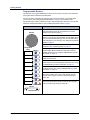
If you program buttons on your 5304 (see page 9), you can install a new paper designation card
with the revised button labels. A plastic cover holds the designation card in place. Designation
cards are provided by your system administrator.
To replace the default designation card:
1.
Remove the plastic cover over the original designation card.
2.
Discard the original designation card.
3.
Place the new designation card next to the buttons on the phone.
4.
Replace the plastic cover on the new designation card.
Changing Volume Levels
You can change the following volume levels:
• Ringer (alerting tone)
• Handset
• Headset
• Background music
• External speaker
NOTE
Turning the external speaker volume down to the lowest levels may prevent you
from hearing the feature “warning tones” that notify you when errors occur (for
example, when you enter an incorrect feature code).
You must be using the feature to change the volume level. For example, if you want to change
handset volume level, you must be using the handset. However, you can adjust the ringer
(alerting tone) volume level when the IP phone is idle.
To change a volume level:
While using the feature, press
(Up) to increase the volume or press
decrease the volume. The volume level is automatically saved.
Mitel® 5304 IP Phone User Guide – Issue 1, September 2009
(Down) to
Page 7