1
IN1508
Scaling Presentation Switcher
68-791-01 Rev. G
03 08
Precautions
Safety Instructions • English
Warning
This symbol is intended to alert the user of important operating and maintenance
(servicing) instructions in the literature provided with the equipment.
Power sources • This equipment should be operated only from the power source indicated on the product. This
equipment is intended to be used with a main power system with a grounded (neutral) conductor. The
third (grounding) pin is a safety feature, do not attempt to bypass or disable it.
This symbol is intended to alert the user of the presence of uninsulated dangerous
voltage within the product’s enclosure that may present a risk of electric shock.
Power disconnection • To remove power from the equipment safely, remove all power cords from the rear of
the equipment, or the desktop power module (if detachable), or from the power source receptacle (wall
plug).
Caution
Read Instructions • Read and understand all safety and operating instructions before using the equipment.
Retain Instructions • The safety instructions should be kept for future reference.
Follow Warnings • Follow all warnings and instructions marked on the equipment or in the user
information.
Avoid Attachments • Do not use tools or attachments that are not recommended by the equipment
manufacturer because they may be hazardous.
Consignes de Sécurité • Français
Power cord protection • Power cords should be routed so that they are not likely to be stepped on or pinched by
items placed upon or against them.
Servicing • Refer all servicing to qualified service personnel. There are no user-serviceable parts inside. To
prevent the risk of shock, do not attempt to service this equipment yourself because opening or removing
covers may expose you to dangerous voltage or other hazards.
Slots and openings • If the equipment has slots or holes in the enclosure, these are provided to prevent
overheating of sensitive components inside. These openings must never be blocked by other objects.
Lithium battery • There is a danger of explosion if battery is incorrectly replaced. Replace it only with the
same or equivalent type recommended by the manufacturer. Dispose of used batteries according to the
manufacturer’s instructions.
Avertissement
Ce symbole sert à avertir l’utilisateur que la documentation fournie avec le matériel
contient des instructions importantes concernant l’exploitation et la maintenance
(réparation).
Alimentations• Ne faire fonctionner ce matériel qu’avec la source d’alimentation indiquée sur l’appareil. Ce
matériel doit être utilisé avec une alimentation principale comportant un fil de terre (neutre). Le troisième
contact (de mise à la terre) constitue un dispositif de sécurité : n’essayez pas de la contourner ni de la
désactiver.
Ce symbole sert à avertir l’utilisateur de la présence dans le boîtier de l’appareil
de tensions dangereuses non isolées posant des risques d’électrocution.
Déconnexion de l’alimentation• Pour mettre le matériel hors tension sans danger, déconnectez tous les cordons
d’alimentation de l’arrière de l’appareil ou du module d’alimentation de bureau (s’il est amovible) ou
encore de la prise secteur.
Attention
Lire les instructions• Prendre connaissance de toutes les consignes de sécurité et d’exploitation avant
d’utiliser le matériel.
Conserver les instructions• Ranger les consignes de sécurité afin de pouvoir les consulter à l’avenir.
Respecter les avertissements • Observer tous les avertissements et consignes marqués sur le matériel ou
présentés dans la documentation utilisateur.
Eviter les pièces de fixation • Ne pas utiliser de pièces de fixation ni d’outils non recommandés par le
fabricant du matériel car cela risquerait de poser certains dangers.
Protection du cordon d’alimentation • Acheminer les cordons d’alimentation de manière à ce que personne ne
risque de marcher dessus et à ce qu’ils ne soient pas écrasés ou pincés par des objets.
Réparation-maintenance • Faire exécuter toutes les interventions de réparation-maintenance par un technicien
qualifié. Aucun des éléments internes ne peut être réparé par l’utilisateur. Afin d’éviter tout danger
d’électrocution, l’utilisateur ne doit pas essayer de procéder lui-même à ces opérations car l’ouverture ou le
retrait des couvercles risquent de l’exposer à de hautes tensions et autres dangers.
Fentes et orifices • Si le boîtier de l’appareil comporte des fentes ou des orifices, ceux-ci servent à empêcher
les composants internes sensibles de surchauffer. Ces ouvertures ne doivent jamais être bloquées par des
objets.
Lithium Batterie • Il a danger d’explosion s’ll y a remplacment incorrect de la batterie. Remplacer uniquement
avec une batterie du meme type ou d’un ype equivalent recommande par le constructeur. Mettre au reut les
batteries usagees conformement aux instructions du fabricant.
Sicherheitsanleitungen • Deutsch
Stromquellen • Dieses Gerät sollte nur über die auf dem Produkt angegebene Stromquelle betrieben werden.
Dieses Gerät wurde für eine Verwendung mit einer Hauptstromleitung mit einem geerdeten (neutralen)
Leiter konzipiert. Der dritte Kontakt ist für einen Erdanschluß, und stellt eine Sicherheitsfunktion dar. Diese
sollte nicht umgangen oder außer Betrieb gesetzt werden.
Dieses Symbol soll den Benutzer darauf aufmerksam machen, daß im Inneren des
Gehäuses dieses Produktes gefährliche Spannungen, die nicht isoliert sind und
die einen elektrischen Schock verursachen können, herrschen.
Stromunterbrechung • Um das Gerät auf sichere Weise vom Netz zu trennen, sollten Sie alle Netzkabel
aus der Rückseite des Gerätes, aus der externen Stomversorgung (falls dies möglich ist) oder aus der
Wandsteckdose ziehen.
Achtung
Lesen der Anleitungen • Bevor Sie das Gerät zum ersten Mal verwenden, sollten Sie alle Sicherheits-und
Bedienungsanleitungen genau durchlesen und verstehen.
Aufbewahren der Anleitungen • Die Hinweise zur elektrischen Sicherheit des Produktes sollten Sie
aufbewahren, damit Sie im Bedarfsfall darauf zurückgreifen können.
Befolgen der Warnhinweise • Befolgen Sie alle Warnhinweise und Anleitungen auf dem Gerät oder in der
Benutzerdokumentation.
Keine Zusatzgeräte • Verwenden Sie keine Werkzeuge oder Zusatzgeräte, die nicht ausdrücklich vom
Hersteller empfohlen wurden, da diese eine Gefahrenquelle darstellen können.
Instrucciones de seguridad • Español
Schutz des Netzkabels • Netzkabel sollten stets so verlegt werden, daß sie nicht im Weg liegen und niemand
darauf treten kann oder Objekte darauf- oder unmittelbar dagegengestellt werden können.
Wartung • Alle Wartungsmaßnahmen sollten nur von qualifiziertem Servicepersonal durchgeführt werden.
Die internen Komponenten des Gerätes sind wartungsfrei. Zur Vermeidung eines elektrischen Schocks
versuchen Sie in keinem Fall, dieses Gerät selbst öffnen, da beim Entfernen der Abdeckungen die Gefahr
eines elektrischen Schlags und/oder andere Gefahren bestehen.
Schlitze und Öffnungen • Wenn das Gerät Schlitze oder Löcher im Gehäuse aufweist, dienen diese zur
Vermeidung einer Überhitzung der empfindlichen Teile im Inneren. Diese Öffnungen dürfen niemals von
anderen Objekten blockiert werden.
Litium-Batterie • Explosionsgefahr, falls die Batterie nicht richtig ersetzt wird. Ersetzen Sie verbrauchte
Batterien nur durch den gleichen oder einen vergleichbaren Batterietyp, der auch vom Hersteller
empfohlen wird. Entsorgen Sie verbrauchte Batterien bitte gemäß den Herstelleranweisungen.
Advertencia
Este símbolo se utiliza para advertir al usuario sobre instrucciones importantes
de operación y mantenimiento (o cambio de partes) que se desean destacar en el
contenido de la documentación suministrada con los equipos.
Alimentación eléctrica • Este equipo debe conectarse únicamente a la fuente/tipo de alimentación eléctrica
indicada en el mismo. La alimentación eléctrica de este equipo debe provenir de un sistema de distribución
general con conductor neutro a tierra. La tercera pata (puesta a tierra) es una medida de seguridad, no
puentearia ni eliminaria.
Este símbolo se utiliza para advertir al usuario sobre la presencia de elementos con
voltaje peligroso sin protección aislante, que puedan encontrarse dentro de la caja
o alojamiento del producto, y que puedan representar riesgo de electrocución.
Desconexión de alimentación eléctrica • Para desconectar con seguridad la acometida de alimentación eléctrica
al equipo, desenchufar todos los cables de alimentación en el panel trasero del equipo, o desenchufar el
módulo de alimentación (si fuera independiente), o desenchufar el cable del receptáculo de la pared.
Precaucion
Leer las instrucciones • Leer y analizar todas las instrucciones de operación y seguridad, antes de usar el
equipo.
Conservar las instrucciones • Conservar las instrucciones de seguridad para futura consulta.
Obedecer las advertencias • Todas las advertencias e instrucciones marcadas en el equipo o en la
documentación del usuario, deben ser obedecidas.
Evitar el uso de accesorios • No usar herramientas o accesorios que no sean especificamente recomendados
por el fabricante, ya que podrian implicar riesgos.
ᅝܼ乏ⶹ•Ё᭛
䖭Ͼヺোᦤ⼎⫼᠋䆹䆒⫼᠋ݠЁ᳝䞡㽕ⱘ᪡㓈ᡸ䇈ᯢDŽ
䖭Ͼヺো䄺ਞ⫼᠋䆹䆒ᴎݙ᳝ᲈ䴆ⱘॅ䰽⬉य़ˈ᳝㾺⬉ॅ䰽DŽ
⊼ᛣ
Vorsicht
Dieses Symbol soll dem Benutzer in der im Lieferumfang enthaltenen
Dokumentation besonders wichtige Hinweise zur Bedienung und Wartung
(Instandhaltung) geben.
䯙䇏䇈ᯢк• 䑩ㅸỀ䑩嬦嫿⡈⼆枼敆嬼䍇夤ㆁ㙊⫊₩⏍Ề䑩嬵㕏ɿ
ֱᄬ䇈ᯢк• 䑩ㅸⷕ⪙⫊₩嬵㕏ᶧḦ⡈⭇㚦Ề䑩ɿ
䙉ᅜ䄺ਞ• 䑩ㅸⷕ徶⫉ᷨ␂⏍䑩ㅸ㉈⊘ᵋ䗅ㆁ㙊⫊₩⏍㐎ẝ嬵㕏ɿ
䙓ܡ䗑ࡴ• ᵎ壂Ề䑩嬦ᷨ␂⋃⒇㯢㙊㋩劑䗅₸ㅗ弾⇡嫿⡈澤Ḧ忀₎⊲斪ɿ
Protección del cables de alimentación • Los cables de alimentación eléctrica se deben instalar en lugares donde
no sean pisados ni apretados por objetos que se puedan apoyar sobre ellos.
Reparaciones/mantenimiento • Solicitar siempre los servicios técnicos de personal calificado. En el interior no
hay partes a las que el usuario deba acceder. Para evitar riesgo de electrocución, no intentar personalmente
la reparación/mantenimiento de este equipo, ya que al abrir o extraer las tapas puede quedar expuesto a
voltajes peligrosos u otros riesgos.
Ranuras y aberturas • Si el equipo posee ranuras o orificios en su caja/alojamiento, es para evitar el
sobrecalientamiento de componentes internos sensibles. Estas aberturas nunca se deben obstruir con otros
objetos.
Batería de litio • Existe riesgo de explosión si esta batería se coloca en la posición incorrecta. Cambiar esta
batería únicamente con el mismo tipo (o su equivalente) recomendado por el fabricante. Desachar las
baterías usadas siguiendo las instrucciones del fabricante.
䄺ਞ
⬉⑤• 嬦嫿⡈⌫倾Ề䑩ᷨ␂ᵋ㝈㕏䗅䑶㷑ɿ嫿⡈⼆枼Ề䑩㙊♱一䗅Ờ䑶䰼丠Ờ䑶ɿ䩭ᵊ㚢一
澠♱一澡㕰⫊₩嫿㓾澤ᵎ倾ᵎ䑩ㅗ崴弈ɿ
ᢨᥝ⬉⑤• ᵻ⫊₩♱ḏ嫿⡈㈕㋊䑶㷑澤嬸㈕㋊ㆁ㙊嫿⡈⍏ㅗ㞍暣䑶㷑䗅䑶㷑一澤ㅗḼẖ㋦ⅱⵃ
䑶䰼丠䗅䑶㷑一ɿ
⬉⑤㒓ֱᡸ• ⣦Ⓟⵄ一澤忀₎埬嵪嵐澤ㅗ愎䆪㉥⋌ɿ
㓈ᡸ•ㆁ㙊丵Ἧ⼆枼䑲嫥嬂䗅丵Ἧ᷻⎙弜垍ɿ嫿⡈怩㯢㙊䑩ㅸ⌰Ḧ㘵㊣䗅昷ḷɿᵻ忀₎℻
䋱大䑶⊲斪ᵎ壂儫ⴲ嬖☿㆔⹁嫿⡈䘗⪑丵Ἧ嬦嫿⡈ɿ
䗮亢ᄨ• 㙊ᷜ嫿⡈㙻⠴ᵋ㙊彛栏㤾ㅗ⪕澤⫄ḭ㕰䑩㚦敳㪣㙻㒐だ₄ḷ弈䀮ɿᵎ壂䑩Ḽẖᵝ
壀㉢Ẑ彛栏⪕ɿ
䫖⬉∴• ᵎ㪤䞯䗅㘵㊣䑶㮡ṛ㙊䅇㿹䗅⊲斪ɿ⼆枼Ề䑩ᵏ⋃⫷㋩劑䗅䘹⍍ㅗ䘹弒⛌⌸䗅䑶㮡ɿ
㉊䂨䑠ᷨ⋃䗅⸻嫯⡅䍇ⷠ⹄䑶㮡ɿ
FCC Class A Notice
This equipment has been tested and found to comply with the limits for a Class A digital device, pursuant to part 15 of the FCC Rules. Operation is subject to
the following two conditions: (1) this device may not cause harmful interference, and (2) this device must accept any interference received, including interference
that may cause undesired operation. The Class A limits are designed to provide reasonable protection against harmful interference when the equipment is
operated in a commercial environment. This equipment generates, uses, and can radiate radio frequency energy and, if not installed and used in accordance with
the instruction manual, may cause harmful interference to radio communications. Operation of this equipment in a residential area is likely to cause harmful
interference, in which case the user will be required to correct the interference at his own expense.
N
This unit was tested with shielded cables on the peripheral devices. Shielded cables must be used with the unit to ensure compliance with FCC emissions limits.
Quick Start — IN1508
Scaling Presentation Switcher
Installation
Step 6
Step 1
Connect audio devices to the switcher’s audio
outputs.
If desired, mount the switcher in a rack. See
“Mounting the switcher” in chapter 2,
“Installation”.
Output A — Connect an audio device,
such as an amplifier or powered
speakers, to these left and right RCA
connectors.
Step 2
Step 3
Connect source video devices to the switcher’s
inputs.
Inputs 3 and 4 — Connect
two S-video sources.
Input 5 — Connect an
interlaced, progressive,
or HDTV component
video source.
Y
1
I
3
VID
CAUTION Connect the
Tip
See caution
Sleeve
Tip
See caution
YC
Unbalanced Output
VID
Tip
Ring
Sleeve (s)
Tip
Ring
YC
U
T
2
B-Y
5
4
Balanced Output
Incorrect audio connector wiring
can damage the switcher. See the
captive screw output audio
connections drawing, above for
balanced or unbalanced audio
output connections.
CAUTION
R-Y
Once power is applied, use the menu
system to set the video type (interlaced,
progressive, or HDTV) for input 5. See
“Configure input 5” on page QS-2.
Step 7
Inputs 6 and 7 — Connect two VGA – UXGA
(RGB) video
6
sources.
Input 8 —
Connect a single
link DVI-D
video source.
sleeve to ground.
Connecting the
sleeve to a
negative (-)
terminal will
damage the audio
output circuits.
N
P
R
Output B — Connect an audio device, such
as powered speakers, to this 3.5 mm, 5-pole
captive screw connector for balanced or
unbalanced audio output as shown below.
Turn off power to the input and output devices,
and remove the power cords from them.
Inputs 1 and 2 — Connect
two composite video
sources.
1
L
If desired, connect a PC or control system to the
IN1508’s RS-232 port as shown below.
RGB
RGB
7
DVI
8
Step 4
Connect source audio devices to the switcher’s
inputs.
Inputs 1 through 5 — Connect
unbalanced stereo or mono audio
sources to the left and right RCA
connectors.
5
6
9
1
L
RS-232
—
TX
RX
—
Gnd
—
—
—
—
Function
Not used
Transmit data
Receive data
Not used
Signal ground
Not used
Not used
Not used
Not used
R
Inputs 6 and 8 — Connect unbalanced
stereo or mono audio sources to the
3.5 mm mini stereo jack, shown at right.
Step 5
Connect an RGB or component video
(Y, B-Y, R-Y) display or other output
device to the switcher’s 15-pin HD
video output connector, shown at
right.
1
Pin
1
2
3
4
5
6
7
8
9
RGB
Y, B-Y, R-Y
6
Step 8
Plug the switcher and input and output devices
into a grounded AC source, and turn on the input
and output devices. Ensure that the connected
video display is turned on and operating
normally so that you can observe the on-screen
displays.
IN1508 Scaling Presentation Switcher • Quick Start
QS-1
Quick Start — IN1508
Scaling Presentation Switcher, cont’d
Front Panel Controls
Input buttons and LEDs select and identify
inputs. The green input LED indicates the input
that is scaled and displayed in the main image
window. If the Picture-in-picture (PIP) feature is
turned on (the PIP On LED is lit), the red input
LED indicates the input that is displayed in the
PIP image window.
Output Rate button and LEDs select and identify
the switcher’s output rate. The Output Rate
button cycles through the available output screen
resolutions. The Output Rate LEDs indicate the
selected resolution.
The Output Rate button selects the
resolution only; the refresh rate defaults
to 60 Hz for each resolution selection.
The available 1400 x 1050, 480p, and
576p rates can be selected only by using
the menu system or SIS commands.
There is a 1-second delay between
selecting an output resolution from the
front panel (the Output Rate LED lights)
and the selected change taking effect.
PIP On button and LED select and identify the
on status of the PIP feature.
PIP Swap button toggles the primary and
secondary pictures between the main image
and the PIP window.
Enter button selects a menu item, exits a status
bar indicator, or activates a selected .
Setup and Operation
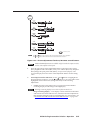
Configure input 5
1. Press Menu > Enter > > Enter to activate
the Input 5 selection box.
2. Press or as necessary to move the
marker next to the appropriate input video
type.
3. Press Enter to activate the selected input
video type.
4. Allow the on-screen timeout to expire.
Configure the output
1. Press Menu > > > Enter > Enter to
activate the output resolution selection box.
2. Press or as necessary to move the
marker next to the desired output resolution.
3. Press Enter to activate the selected resolution.
The screen goes blank while the switcher
changes to the newly selected resolution.
With regard to the PIP function, there are
two groups of inputs: low resolution
(inputs 1 through 4 [and input 5 if it is
configured as interlaced component
video]) and high resolution (inputs 6
through 8 [and input 5 if it configured as
progressive component video/HDTV]).
4. If necessary, press Menu to back up one level
from the resolution selection box.
The PIP function toggles between the
selected input in each group. The PIP
function cannot toggle between two
inputs in the same group.
7. Press Enter to activate the selected rate.
If PIP mode is off, the Swap function
toggles between the most recently selected
low resolution input and the most recently
selected high resolution input.
Picture Control buttons select individual picture
control status bar indicators that you can use
to make adjustments to the centering, size, PIP
centering, PIP size, contrast, brightness, color,
and tint.
Menu button activates the menu system, or a
submenu, or backs up one level within the
menu system.
QS-2
, , , and buttons maneuver through the
menu system, move the slider on status bar
indicators, and move the marker in check
box indicators.
5. Press > Enter to activate the output rate
selection box.
6. Press or as necessary to move the
marker next to the desired output rate.
The screen goes blank while the switcher
changes to the newly selected rate.
8. If necessary, press Menu to back up one level
from the rate selection box.
9. Press > > Enter to activate the signal type
selection box.
10. Press or as necessary to move the
marker next to the desired output signal type.
11. Press Enter to activate the selected rate.
The screen goes blank while the switcher
changes to the newly selected signal type.
12. Allow the on-screen timeout to expire.
IN1508 Scaling Presentation Switcher • Quick Start
Table of Contents
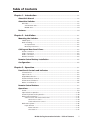
Chapter 1 • Introduction ....................................................................................................... 1-1
About this Manual ............................................................................................................. 1-2
About the Switcher ............................................................................................................ 1-2
DVI video ............................................................................................................................ 1-3
Standard DVI cable ....................................................................................................... 1-4
IN9700 cable ................................................................................................................. 1-4
Features ................................................................................................................................... 1-4
Chapter 2 • Installation .......................................................................................................... 2-1
Mounting the Switcher .................................................................................................... 2-2
Tabletop use ....................................................................................................................... 2-2
Rack mounting ................................................................................................................... 2-2
UL requirements ........................................................................................................... 2-2
Mounting instructions .................................................................................................. 2-2
Cabling and Rear Panel Views ...................................................................................... 2-3
Power connection .............................................................................................................. 2-3
Video connections ............................................................................................................. 2-3
Audio connections ............................................................................................................. 2-4
RS-232 connection ............................................................................................................. 2-5
Remote Control Battery Installation ........................................................................ 2-5
Configuration ....................................................................................................................... 2-5
Chapter 3 • Operation ............................................................................................................. 3-1
Front Panel Controls and Indicators ......................................................................... 3-2
Infrared sensor ................................................................................................................... 3-2
Input controls ..................................................................................................................... 3-3
Output Rate selection ........................................................................................................ 3-4
Picture-in-Picture controls ................................................................................................. 3-5
Picture Controls buttons .................................................................................................... 3-6
Menu control buttons ....................................................................................................... 3-6
Remote Control Buttons ................................................................................................. 3-7
Operations .............................................................................................................................. 3-9
Power ................................................................................................................................. 3-9
Input selection operation ................................................................................................ 3-10
Picture-in-picture mode operation ................................................................................. 3-10
Menu system operation ................................................................................................... 3-12
Selection boxes and status indicator bars ................................................................... 3-13
Selection box control ........................................................................................ 3-14
Status indicator bar control .............................................................................. 3-14
Main menu system ........................................................................................................... 3-16
Input submenu ........................................................................................................... 3-16
Center selection ................................................................................................ 3-17
Size selection ..................................................................................................... 3-17
IN1508 Scaling Presentation Switcher • Table of Contents
i
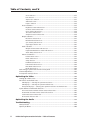
Table of Contents, cont’d
Zoom selection .................................................................................................. 3-17
Pan selection ..................................................................................................... 3-17
Aspect ratio selection ........................................................................................ 3-17
Advanced screen ............................................................................................... 3-18
Input 5 selection ............................................................................................... 3-18
Picture submenu ......................................................................................................... 3-18
Brightness status indicator bar .......................................................................... 3-19
Contrast status indicator bar ............................................................................. 3-19
Color status indicator bar .................................................................................. 3-19
Tint status indicator bar .................................................................................... 3-19
Sharpness status indicator bar .......................................................................... 3-19
Output submenu ........................................................................................................ 3-20
Resolution selection box ................................................................................... 3-21
Refresh Rate selection box ................................................................................ 3-21
Sync Polarity selection box ................................................................................ 3-21
Signal Type selection box .................................................................................. 3-22
Audio submenu .......................................................................................................... 3-22
Output Volume status indicator bar ................................................................. 3-22
Input Gain/Attenuation status indicator bar ..................................................... 3-22
Audio Delay selection box ................................................................................ 3-23
Advanced submenu .................................................................................................... 3-23
Freeze selection box .......................................................................................... 3-23
Blank selection box ........................................................................................... 3-23
Swap selection .................................................................................................. 3-24
PIP Mode selection box ..................................................................................... 3-24
Fade Switch selection box ................................................................................. 3-24
Blue Mode selection box ................................................................................... 3-24
Reset selection box ........................................................................................... 3-24
Performing a system reset from the front panel ........................................................... 3-25
Picture adjustments ......................................................................................................... 3-25
Front panel security lockout ........................................................................................... 3-30
Optimizing the Video ...................................................................................................... 3-30
Setting up a DVD source ................................................................................................. 3-30
Resolution and refresh rates ........................................................................................... 3-30
CRT displays — selecting the optimum resolution ...................................................... 3-31
CRT displays — selecting the optimum refresh rate ................................................... 3-31
Fixed pixel displays — selecting the optimum resolution and refresh rate ................. 3-31
Input submenu’s Advanced selections ............................................................................ 3-33
Horizontal Start and Vertical Start status indicator bars ............................................. 3-35
Active Pixels and Active Lines status indicator bars .................................................... 3-36
Total Pixels status indicator bar .................................................................................. 3-38
Phase status indicator bar ........................................................................................... 3-38
Optimizing the Audio ..................................................................................................... 3-39
Troubleshooting ................................................................................................................ 3-39
General checks ................................................................................................................. 3-39
Specific problems ............................................................................................................. 3-40
ii
IN1508 Scaling Presentation Switcher • Table of Contents
Chapter 4 • Serial Communications ............................................................................... 4-1
Host-to-Switcher Instructions ....................................................................................... 4-2
Switcher-Initiated Messages ......................................................................................... 4-2
Switcher Error Responses ............................................................................................... 4-2
Using the Command/Response Table ........................................................................ 4-3
Symbol definitions ............................................................................................................. 4-3
Command/response table for SIS commands ................................................................... 4-4
Command/response table for special function SIS commands ........................................ 4-8
Appendix A • Specifications and Part Numbers ................................................... A-1
Specifications ....................................................................................................................... A-2
Part Numbers ....................................................................................................................... A-4
Included parts ................................................................................................................... A-4
Suggested adapters .......................................................................................................... A-4
Cables ................................................................................................................................ A-4
Bulk cables ................................................................................................................... A-4
Precut cables ................................................................................................................ A-4
High performance DVI cables ...................................................................................... A-5
IN1508 Scaling Presentation Switcher • Table of Contents
iii
Table of Contents, cont’d
68-791-01 Rev. G
03 08
All trademarks mentioned in this manual are the properties of their respective owners.
iv
IN1508 Scaling Presentation Switcher • Table of Contents
IN1508 Scaling Presentation Switcher
1
Chapter One
Introduction
About this Manual
About the Switcher
Features
Introduction, cont’d
Introduction
About this Manual
This manual contains installation, configuration, and operating information for the
Extron IN1508 Scaling Presentation Switcher (referred to in this manual as the
“IN1508” or the “switcher”).
•
Chapter 1 identifies the switcher’s features.
•
Chapter 2 details how to install the switcher.
•
Chapter 3 describes how to operate the switcher from its front panel and use
all of its features.
•
Chapter 4 provides information about programming and operating the
switcher under RS-232 control, such as from a PC or host controller. You can
control the switcher using the Simple Instruction Set (SIS™) commands.
•
Appendix A lists the switcher’s specifications and pertinent part numbers.
About the Switcher
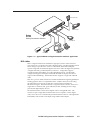
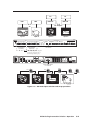
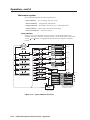
The Extron IN1508 is an eight-input video and stereo audio switcher that
incorporates a video scaler (figure 1-1). The switcher accepts:
•
Two NTSC/PAL/SECAM/NTSC 4.43 composite video inputs on
female BNC connectors
•
Two S-video (Y/C) inputs on 4-pin mini DIN connectors
•
One component (YUV) video input (progressive [Y, B-Y, R-Y] or interlaced
[Y, B-Y, R-Y]) on female BNC connectors
•
Two VGA – UXGA (RGBHV or RGBS) inputs on 15-pin HD connectors
•
One digital visual interface (DVI), direct digital input on a DVI-I female
connector (see “DVI video” in this chapter for an introduction to the DVI
video format)
With the proper adapters, the IN1508 can also be used with High Definition
Multimedia Interface (HDMI™) signals.
•
Eight unbalanced stereo or mono audio inputs (five inputs on RCA
connectors and three inputs on 3.5 mm mini stereo jacks)
The IN1508 scales the video inputs to a variety of standard VGA and HDTV
resolutions and any of up to 3 available refresh rates. The switcher outputs
RGBHV, RGBS, RGsB, or progressive component (Y, B-Y, R-Y) video on a 15-pin
HD (VGA) connector. It outputs stereo or mono audio on left and right RCA
connectors and a 3.5 mm 5-pole captive screw connector. The IN1508 allows all of
the input formats listed above to be displayed on a device with a fixed resolution
and aspect ratio, such as a liquid crystal display (LCD) projector, digital light
processor (DLP) projector, or plasma display.
The IN1508 seamlessly switches between the VGA and low-resolution video
inputs. Seamless switching allows switching between sources without a loss of
sync.
The switcher’s scaler upscales or downscales, converting the horizontal and
vertical sync timing and the number of lines of the video input to match the native
resolution of the display. This produces an undistorted, brighter picture.
The switcher is housed in a 1U high, 17.5" wide metal enclosure. With the included
mounting ears, the switcher is rack-mountable. With optional mounting hardware,
the switcher can be mounted under or through furniture or other mounting
surface. The switcher has an internal 100 VAC to 240 VAC, 50/60 Hz, 40 watts,
autoswitchable power supply that provides worldwide power compatibility.
1-2
IN1508 Scaling Presentation Switcher • Introduction
RS-232 Control
UT
TP
OU
A
B
L
R
L
6
T
PU 4
IO
D
AU
IN
5
8
R
7
3
2
1
UT
TP
L
OU
TED
LIS 3
1T2 .
U S I.T.E
B Y
R-
Y,
RG
Y,
B-
R
C
Sound System
6
I
B
DV
RG
7
B
RG
3 YC
Y
R1 VID
Y
z
60H
500V
-24
B-
I
P
U
5
Y
VID
N
100
4
2
T
Extron
IN1508
Scaling Presentation Switcher
LCD Projector
Laptop
VCR
DVD Player
Computer
Figure 1-1 — Typical IN1508 Scaling Presentation Switcher application
DVI video
DVI is a digital transmission standard for high-speed, lossless video interfaces,
such as between a computer and a direct digital monitor. The DVI standard, which
Silicon Image Corporation also refers to as PanelLink and PanelLink Digital,
specifies single link and dual link digital versions for either the digital only (DVI-D)
or digital and analog combined (DVI-I) connectors. A single link supports
resolutions higher than HDTV at a reduced blanking interval. The dual link
configuration supports the higher bandwidth demands of displays that do not
support reduced blanking. The IN1508 switcher supports a single link of DVI-D
video.
DVI uses a process called transmission minimized differential signaling (TMDS) for
sending graphics data to a compatible monitor. TMDS is based on an encoding
algorithm that converts 8 bits of data into a 10-bit transition-minimized
DC-balanced signal. The DVI standard, as supported by the switcher, allows for a
single link of 3 channels (red, green and blue) of data, enabling the use of large
pixel format digital display devices.
The IN1508 switcher converts direct digital video to analog RGB video. The
switcher accepts a single link of DVI-D video from a computer or other digital
video source device on a standard 25-pin female DVI-D connector. The Digital Flat
Panel (DFP) video format can be input using a DFP-to-DVI adapter.
IN1508 Scaling Presentation Switcher • Introduction
1-3
Introduction, cont’d
Standard DVI cable
DVI/DFP signals run at a very high frequency and are especially prone to bad
video connections, too many adapters, or excessive cable length. To avoid the loss
of an image or jitter, follow these guidelines:
•
Do not exceed 16.4 feet (5 meters) on the switcher’s input when using
standard DVI cables.
Extron’s IN9700 extension cable can be used to extend the length of the input
cable. See “IN9700 cable”, below.
•
Only use an input cable specifically designed for DVI signals.
•
Limit or avoid the use of adapters.
•
Use only approved DVI/HDMI connectors.
Use only cables specifically intended for DVI or HDMI interfaces. Use of
non-DVI or non-HDMI cables or modified cables can cause the switcher to be
unable to receive the DVI input.
IN9700 cable
Extron’s IN9700 extension cable can be used to stretch the length of the input cable,
so long as no adapters are used in the cable run. Use the following lengths as a
guideline:
Resolution
1024 x 768
1280 x 1024
1600 x 1200
Recommended maximum cable length
75 feet
60 feet
35 feet
Features
Inputs —
Video inputs — The switcher switches among:
•
Two fully-configurable RGB video inputs on 15-pin HD connectors
•
One HDTV component video, interlaced component video, or progressive
scan video on three BNC connectors
•
Two S-video inputs on 4-pin mini-DIN connectors
•
Two composite video inputs on single BNC connectors.
•
One single link of DVI-D on a DVI connector with EDID emulation
Audio inputs — The switcher switches among eight unbalanced stereo audio
inputs, five inputs on left and right RCA connectors and three inputs on
3.5 mm mini stereo jacks. Inputs can come from sources such as a VCR, DVD
player, computer audio card, or other audio device that outputs a stereo
line-level signal.
Outputs —
Video outputs — The IN1508 outputs scaled video signals as progressive
RGBHV, RGBS, RGsB, or component video, from 640 x 480 (VGA) up to
1600 x 1200 (UXGA), to match the optimum or native resolution of virtually
any display device, on a 15-pin HD connector.
The output refresh rate is selectable as desired through the on-screen display
menu. When used with LCD or DLA displays, Extron recommends the 60 Hz
setting. Higher output refresh rates can be used with CRT displays to reduce
flicker.
1-4
IN1508 Scaling Presentation Switcher • Introduction
Audio outputs — The switcher provides an unbalanced line level signal that is
identical to the input signal. This output can drive any line level compatible
audio unit, or a local device such as powered speakers.
Video output resolutions — The IN1508 outputs an image scaled up to the
following output resolutions:
•
640 x 480 (VGA) at 50 Hz, 60 Hz, and 75 Hz
•
800 x 600 (SVGA) at 50 Hz, 60 Hz, and 75 Hz
•
852 x 480 at 50 Hz and 60 Hz
•
1024 x 768 (XGA) at 50 Hz, 60 Hz, and 75 Hz
•
1280 x 768 at 60 Hz
•
1280 x 800 at 50 Hz and 60 Hz
•
1280 x 1024 (SXGA) at 50 Hz, 60 Hz, and 75 Hz
•
1024 x 852 at 50 Hz, 60 Hz, and 75 Hz
•
1024 x 1024 at 50 Hz, 60 Hz, and 75 Hz
•
1366 x 768 (wide XGA) at 50 Hz, 60 Hz, and 75 Hz
•
1365 x 1024 (plasma) at 50 Hz, 60 Hz, and 75 Hz
•
1400 x 1050 at 50 Hz and 60 Hz
•
1440 x 900 at 60 Hz and 75 Hz
•
1600 x 1200 (UXGA) at 50 Hz and 60 Hz
•
1680 x 1050 at 60 Hz
•
720 x 480 (HDTV 480p) at 60 Hz
•
720 x 576 (HDTV 576p) at 50 Hz
•
1280 x 720 (HDTV 720p) at 50 Hz and 60 Hz
•
1920 x 1080 (HDTV 1080i ) at 50 Hz and 60 Hz
•
1920 x 1080 (HDTV 1080p) at 60 Hz
Seamless Switching — The IN1508 provides a seamless transition between scaled
low resolution video inputs (inputs 1 through 4 [or inputs 1 through 5 if
input 5 is configured as interlaced component video]) and the high resolution
inputs (inputs 6 and 7 [or inputs 5 through 7 if input 5 is configured as
progressive component video or HDTV]).
Picture-in-picture — One input from either the low resolution (interlaced
component, S-video, and composite video) video inputs or the high
resolution (VGA, progressive component, and DVI) video inputs can be
selected as the primary picture. A second high resolution or low resolution
input can be selected as the secondary picture. The secondary picture is
displayed in a user-determined area of the output image. The primary and
secondary picture can be swapped with a touch of a button.
IN1508 Scaling Presentation Switcher • Introduction
1-5
Introduction, cont’d
Inverse 3:2 pulldown detection for NTSC video sources and 2:2 film detection for
PAL video sources — This advanced film mode processing feature helps
maximize image detail and sharpness for video sources that originated from
film. When film is converted to NTSC video, the film frame rate has to be
matched to the video frame rate in a process called 3:2 pulldown. Jaggies and
other image artifacts can result if conventional deinterlacing techniques are
used on film-source video. The IN1508’s advanced film mode processing
recognizes signals that originated from film. The switcher then applies video
processing algorithms that optimize the conversion of video that was made
with the 3:2 pulldown process. This results in richly detailed images with
sharply defined lines.
A similar process is used for PAL film-source video.
Quad-standard decoding — The IN1508’s video decoder provides accurate video
decoding of composite video and S-video in the NTSC, PAL, SECAM, and
NTSC 4.43 standards. The advanced 3-line adaptive comb filter that decodes
composite video reduces cross-color interference and hanging dots while
maintaining maximum image bandwidth and detail.
Picture controls — A wide variety of picture controls are available for fine picture
adjustments:
•
Position
•
Size
•
Brightness and contrast
•
Color and tint
•
Sharpness
Once these adjustments are made, the settings are stored in non-volatile
memory and automatically recalled when the same input source is selected
again.
On-screen menus — The switcher puts its menu displays on the output video
stream, for display by the output monitor or projector. The menu system
provides easy control of video adjustments. The on-screen menus also make
it easy to verify and adjust advanced settings such as output signal
resolution, refresh rate, sync format, and the reset to factory defaults
function.
Audio follow — When an input is selected on the front panel, the audio input
follows its corresponding video input signal (audio follow). Under RS-232
control, the audio input can be switched to follow either the main window
selection or the PIP window selection.
Operational flexibility — Operations such as input and scaling selection and
picture controls can be performed on the front panel or over the RS-232 link.
The RS-232 links allow remote control via a PC or control system.
1-6
•
Front panel control — The switcher’s front panel controller and onscreen menus support individual input selection, resolution selection,
volume control, and complete configuration of the switcher.
•
Infrared remote control — The switcher includes an Infrared (IR) remote
control that duplicates all of the front panel functionality and some
RS-232 functionality.
•
Simple Instruction Set (SIS) commands — The remote control protocol
uses Extron’s SIS commands for easy programming and operation.
IN1508 Scaling Presentation Switcher • Introduction
Freeze mode — Provides a high quality still image for applications that require
close examination of a specific video frame.
Blank mode — Suppresses the output video image. Blank silences the R, G, and B
video outputs but the switcher still outputs sync. This ensures that the
output device does not lose sync lock. Blank mode operates for video and
RGB signals that are processed by the scaling circuitry. On-screen displays
are not blanked.
Rack mountable — The 1U high switcher can be mounted in any conventional 19"
wide rack using the included rack mounting brackets.
Power — The 100 VAC to 240 VAC, auto-switchable, internal power supply of the
IN1508 provides worldwide power compatibility.
IN1508 Scaling Presentation Switcher • Introduction
1-7
Introduction, cont’d
1-8
IN1508 Scaling Presentation Switcher • Introduction
IN1508 Scaling Presentation Switcher
2
Chapter Two
Installation
Mounting the Switcher
Cabling and Rear Panel Views
Remote Control Battery Installation
Configuration
Installation, cont’d
Installation
Mounting the Switcher
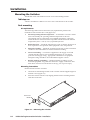
The IN1508 comes with rubber feet and a set of rack mounting brackets.
Tabletop use
Attach a self-adhesive rubber foot to each corner of the bottom of the switcher.
Rack mounting
UL requirements
The following Underwriters Laboratories (UL) requirements pertain to the
installation of the switcher into a rack (figure 2-1).
1.
Elevated operating ambient temperature — If installed in a closed or multiunit rack assembly, the operating ambient temperature of the rack
environment may be greater than room ambient temperature. Therefore,
install the MLC in an environment compatible with the maximum ambient
temperature (Tma = +122 °F, +50 °C) specified by Extron.
2.
Reduced air flow — Install the equipment in a rack so that the amount of air
flow required for safe operation of the equipment is not compromised.
3.
Mechanical loading — Mount the equipment in the rack so that a hazardous
condition is not achieved due to uneven mechanical loading.
4.
Circuit overloading — Connect the equipment to the supply circuit and
consider the effect that circuit overloading might have on overcurrent
protection and supply wiring. Appropriate consideration of equipment
nameplate ratings should be used when addressing this concern.
5.
Reliable earthing (grounding) — Maintain reliable grounding of rackmounted equipment. Pay particular attention to supply connections other
than direct connections to the branch circuit (e.g. use of power strips).
Mounting instructions
Rack mount the switcher as follows:
1.
Attach the rack mounting brackets to the switcher with the supplied eight #8
machine screws (figure 2-1).
2.
Insert the switcher into the rack, aligning the holes in the mounting bracket
with those in the rack.
UT
TP
OU
A
B
L
6
UT
DIO
AU 3
2
Rack-mount
Bracket
UT
TP
D
TE
LIS 3
1T2
E.
U S I.T.
C
6
I
B
DV
RG
7
B
RG
3 YC
C-Y
1 VID
Hz
-60
B-Y
I
50
V
40
0-2
P
U
T
Figure 2-1 — Mounting the switcher
IN1508 Scaling Presentation Switcher • Installation
Y
VID
N
10
2-2
L
OU
4
2
5
Y,
B
RG, C-Y
B-Y
R
INP
4
5
8
7
R
L
R
Secure the switcher to the rack using the supplied machine screws.
3.
Cabling and Rear Panel Views
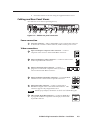
All connectors are on the rear panel (figure 2-2).
100-240V
50-60Hz
I
1
VID
3
6
YC
LISTED
C
VID
OUTPUT
1
T
2
3
4
5
A
6
L
L
YC
7
U
50/60Hz
OUTPUT
AUDIO INPUT
1
RGB
Y, B-Y, R-Y
RGB
P
U S 1T23
I.T.E.
N
4
2
3
Y
B-Y
5
4
R-Y
RGB
7
5
DVI
RS-232
B
R
R
R
2
L
8
8
6
7
8
9
10 11
12
Figure 2-2 — IN1508 rear panel connectors
Power connection
1
AC power connector — Plug a standard IEC power cord into this connector
to connect the switcher to a 100 to 240 VAC, 50 Hz or 60 Hz power source.
Video connections
2
Input 1 and Input 2 composite video connectors — Connect
composite video sources to these female BNC connectors.
1
I
VID
N
P
VID
U
T
3
2
Input 3 and Input 4 S-video connectors — Connect S-video sources
to these 4-pin mini DIN connectors.
3
YC
YC
4
4
5
Input 5 component video connectors — Connect a
progressive or interlaced component video (Y, B-Y, R-Y)
source to these female BNC connectors.
Y
Input 6 and Input 7 RGB video connectors — Connect RGBHV
or RGBS sources to these female 15-pin HD connectors.
B-Y
R-Y
5
6
RGB
RGB
6
Input 8 DVI video connector — Connect a single link of
DVI-D direct digital video to this female DVI connector. This
connector supports only a digital DVI source.
DVI
7
8
With the proper adapters, the IN1508 can also be used with HDMI signals.
7
Video output 15-pin HD connectors — Connect an RGB video
or progressive/HDTV component video display to this female
15-pin HD connector.
OUTPUT
IN1508 Scaling Presentation Switcher • Installation
RGB
Y, B-Y, R-Y
2-3
Installation, cont’d
Audio connections
8
9
Input 1 through Input 5 connectors — Connect unbalanced stereo or
mono audio sources (such as DVD players or VCRs) to these pairs (left
and right) of RCA connectors for audio input.
L
R
Input 6 through Input 8 connectors — Connect unbalanced stereo audio
sources (such as computers) to these 3.5 mm mini stereo jacks for unbalanced
audio input. Figure 2-3 shows how to wire the audio jack.
Tip (L)
Ring (R)
Sleeve ( )
Figure 2-3 — Input 6 through input 8 audio connector wiring
10
Output A connector — Connect an audio device, such as an amplifier or
powered speakers, to these left and right RCA connectors.
11
Output B connector — Connect an audio device, such as powered speakers,
to this 3.5 mm, 5-pole captive screw connector for balanced or unbalanced
audio output.
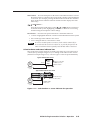
Figure 2-4 shows how to wire the captive screw audio connector. The
connector is included with the switcher, but you must obtain the cable. Insert
the wires into the appropriate openings in the captive screw connector.
Tighten the screws on top to fasten the wires.
CAUTION
Connect the sleeve(s) to ground ( ). Connecting the sleeve(s) to a
negative (-) terminal will damage audio output circuits.
Tip
Ring
R
Right
Tip
Ring
Left
R
Left
L
L
Tip
NO GROUND HERE.
Sleeve(s)
Tip
NO GROUND HERE.
Right
Unbalanced Stereo Output Balanced Stereo Output
Do not tin the wires!
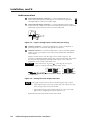
Figure 2-4 — Wiring the audio output connector
The length of exposed wires is critical. The ideal length is 3/16” (5 mm).
• If the stripped section of wire is longer than 3/16”, the exposed wires may
touch, causing a short circuit between them.
• If the stripped section of wire is shorter than 3/16”, wires can be easily
pulled out even if tightly fastened by the captive screws.
By default, the audio output follows the video switch.
2-4
IN1508 Scaling Presentation Switcher • Installation
RS-232 connection
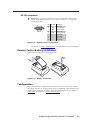
12
Remote port — Connect a host device, such as a computer or touch panel
control, to the IN1508 switcher via this 9-pin D connector for serial RS-232
control (figure 2-5).
5
1
9
6
Female
Pin
1
2
3
4
5
6
7
8
9
RS-232
—
TX
RX
—
Gnd
—
—
—
—
Function
Not used
Transmit data
Receive data
Not used
Signal ground
Not used
Not used
Not used
Not used
Figure 2-5 — Remote port pin assignments
See chapter 4, “Serial Communications”, for definitions of the SIS commands.
Remote Control Battery Installation
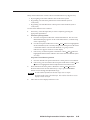
Install two AAA batteries as shown (figure 2-6).
Figure 2-6 — Battery installation
Configuration
The switcher must be configured for the video that is connected to input 5 and for
the output video device. Configuration can be accomplished using either the front
panel controls, the IR remote control, or the Simple Instruction Set. See chapter 3,
“Operation”, and chapter 4, “Serial Communications”.
IN1508 Scaling Presentation Switcher • Installation
2-5
Installation, cont’d
2-6
IN1508 Scaling Presentation Switcher • Installation
IN1508 Scaling Presentation Switcher
3
Chapter Three
Operation
Front Panel Controls and Indicators
Remote Control Buttons
Operations
Optimizing the Video
Optimizing the Audio
Troubleshooting
Operation, cont’d
Operation
Front Panel Controls and Indicators
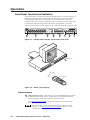
All of the switcher’s controls are on the front panel (figure 3-1). Many controls are
duplicated on the IR remote control (figure 3-8 on page 3-7). Front panel LEDs
provide graphic indication of some of the basic system functions. For more
complex tasks, such as system configuration, the switcher has a menu system that
is operated by using the front panel or IR remote control buttons. The menu
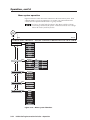
system reports via an on-screen display on the connected output device (figure 3-2).
IN1508
INPUT
IR
1
2
1
3
4
OUTPUT RATE
5
6
PIP
8
7
ON
VGA
1024x852
UXGA
SVGA
1024x1024
720p
XGA
1366x768
1080i
SXGA
1365x1024
1080p
2
3
SCALING PRESENTATION SWITCHER
PICTURE CONTROLS
CONT/
COL/
SIZE
BRT
TNT
SWAP
CENTER
4
MENU
5
ENTER
6
7
8
Figure 3-1 — IN1508 video switcher and switcher front panel
R
HE
N
IO
AT
NT
TR
EXT
LEC
NE
RO
T
INPU
E
TUR
PIC
UT
OUTP
O
AUDI
NCED
ADVA
AL
SC
08
15
SIN
NIC
ING
ITC
SW
E
ES
PR
O
e
lum
ut Vo
Outp in/Atten
Ga
Input Delay
Audio
08
IN15LER
A
EO
DIG
15HD
L
ITA
VID
SC
NU
ME
PIC
R
TE
EN
Menu Controls
L/
OL CO T
NTR
TN
CO NT/
RE CORT
B
TU
SIZ
E
R
NTE
CE
PIP
AP
SW
ON
E
UT
RAT
TP
OU
10
A
VG
GA
SV
A
XG
GA
SX
10
13
13
24
24
66
65
x8
x1
x7
x1
02
4
68
02
GA
UX
0p
i
80
10
p
80
10
72
52
4
UT
INP
4
3
2
1
IR
30°
R
7
6
M A/V
U
TE
SH
A
RP
Z
O
O
M
PH
A
SE
SI
Z
E
PA
N
R IN
EM 15
O 08
T
E
C
EN
TE
R
C
O
BR N
T T/
A ASP
SP
RARA
ECEC
TI TIOT T
O
C
TI O
N L/
T
M
EN
U
VI
M DEO
U
TE
5
A
M UD
U
TE
IO
EN
TE
FR
EE
Z
E
8
SW
A
P
O PI
N P
/O
FF
Menu Controls
Figure 3-2 — Menu system display
Infrared sensor
1
Infrared remote sensor — This sensor receives infrared (IR) signals from the
included IN1508 remote control. The IR remote control must be pointed
within 30 degrees of this sensor (figure 3-2) for best results.
See “Remote Control Buttons”, later in this chapter, for operation of the
remote control.
The switcher’s IR receiver can be disabled to avoid conflicts with other
remotes. See the IR receiver enable SIS command in chapter 4, “Serial
Communications” to disable the IR receiver.
3-2
IN1508 Scaling Presentation Switcher • Operation
Input controls
2
Input buttons — The Input 1 through Input 8 buttons (figure 3-3) select the
associated video input to scale and output. The switch can be a cut or a fade,
depending on the switch mode; see “Fade Switch selection box”, on page 3-24.
Audio always follows (switches with) the front panel video selection.
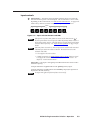
INPUT
1
2
3
4
5
6
7
8
Figure 3-3 — Input selection buttons and LEDs
If the picture-in-picture (PIP) feature is turned on (the PIP On LED, 4 , is
lit), the input buttons select an input for either the primary (main) window or
the secondary (PIP) window. If the PIP feature is turned off, the input buttons
select the main output only. See “Input selection operation” on page 3-10 for
details.
If the PIP feature is turned on, when an input is selected, the audio associated
with that input in the PIP window is muted. The audio does not become
unmuted until either:
• It is swapped to the main window.
• A Simple Instruction Set Audio follow source command has been issued
to configure the switcher to make the audio follow the PIP window. See
chapter 4, “Serial Communications”.
Input LEDs — The Input 1 through Input 8 LEDs indicate the selected video
and audio input(s).
An Input LED that is lit green indicates the primary (main) output.
An Input LED that is lit red indicates the secondary output (the input that is
displayed in the PIP window).
No input LED lights red if the PIP feature is turned off.
IN1508 Scaling Presentation Switcher • Operation
3-3
Operation, cont’d
Output Rate selection
3
Output Rate button — The Output Rate button (figure 3-4) cycles through
the available output screen resolutions. Use this button to select the “sweet
spot” resolution of the connected video display device. The switcher
defaults to a refresh rate of 60 Hz with each resolution selection using the
Output Rate button.
Eight IN1508 output resolutions are not available from the front panel. These
eight resolutions can be selected using the menu system (see “Resolution
selection box”, on page 3-21) and SIS commands (see chapter 4, “Serial
Communications”). The eight output resolutions not available from the front
panel are:
• 852 x 480
• 1440 x 900
• 1400 x 1050
• 1680 x 1050
• 1280 x 768
• 480p
• 1280 x 800
• 576p
Press
button (P)
OUTPUT RATE
P
P
P
P
VGA
SVGA
XGA
SXGA
P
P
P
P
1024x852
1024x1024
1366x768
1365x1024
P
P
P
P
UXGA
720p
1080i
1080p
Figure 3-4 — Output Rate buttons
The Output Rate LEDs indicate the selected resolution.
If any of the rates not available from the front panel are selected using the
menu system or SIS commands, no Output Rate LED is lit.
The Output Rate button allows you to select the resolution only; the refresh
rate defaults to 60 Hz for each front panel resolution selection. You can select
a different refresh rate using the menu system; see “Refresh Rate selection box”
later in this chapter for details.
There is a 1-second delay between selecting an output resolution from the front
panel (the desired Output Rate LED lights) and the selected change taking
effect. This ensures that the screen does not try to change resolutions while
you cycle through the available resolutions to the desired setting.
The switcher reports the selected resolution for approximately 3 seconds on
the connected output display.
3-4
IN1508 Scaling Presentation Switcher • Operation
Picture-in-Picture controls
4
PIP buttons —
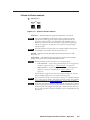
PIP
ON
SWAP
Figure 3-5 — Picture-in-Picture buttons
On button — The PIP On button toggles the PIP function on and off.
If you press and hold the PIP On button while you apply power to the
switcher, the switcher toggles the output signal type between RGB and
progressive component video. If an RGB signal type (RGBHV, RGBS, or
RGsB) was selected the last time the switcher was powered, the signal type
switches to component. If component video was selected, the signal type
switches to RGB.
The audio breakaway switching function, normally available under RS-232
control only, is not available when the PIP function is on.
On LED — When lit, the PIP On LED indicates that the switcher’s PIP
function is on.
Swap button — The PIP Swap button toggles the primary and secondary
pictures between the main image and the PIP window.
With regard to the PIP function, there are two groups of inputs:
•
Low resolution — Inputs 1 through 4 (and input 5 if it is configured as
interlaced component video; see “Input 5 selection” on page 3-18)
•
High resolution — Inputs 6 through 8 (and input 5 if it configured as
progressive component video/HDTV; see “Input 5 selection” on
page 3-18)
The PIP function toggles between the selected input in each group. The PIP
function cannot toggle between two inputs in the same group.
The size of the PIP window is set in the menu system, see “PIP Mode selection
box”, on page 3-24, for details. The position of the PIP window is set with the
centering adjustment; see “Picture adjustments”, on page 3-25, for details.
If PIP mode is off (the PIP Mode On LED is off), the Swap function continues
to work, toggling between the most recently selected low-resolution input and
the most recently selected high-resolution input. Unlike when PIP mode is on,
however, the input that is replaced in the main window is not displayed in the
PIP window.
IN1508 Scaling Presentation Switcher • Operation
3-5
Operation, cont’d
Picture Controls buttons
PICTURE CONTROLS
CONT/
COL/
SIZE
BRT
TNT
CENTER
Figure 3-6 — Picture Control buttons
5
Picture Controls buttons — The Picture Controls buttons provide a shortcut
to select individual or groups of image adjustments that are adjusted using
the , , , and buttons ( 7 ). These adjustments are also available via the
menu system.
Center control button — The Center button selects and deselects the display
centering adjustment. The adjustment range depends on the output
resolution selected. See “Picture adjustments”, on page 3-25.
Size control button — The Size button selects and deselects the display size
adjustment. The adjustment range depends on the output resolution selected.
See “Picture adjustments”, on page 3-25.
Contrast/Brightness control button — The Brightness/Contrast button
selects and deselects the display brightness and contrast adjustments. The
adjustment range for both brightness and contrast is from 0 to 128. See
“Picture adjustments”, on page 3-25.
Color/Tint control button — The Color/Tint button selects and deselects the
display color and tint adjustments. The color adjustment range is from 0 to
128. The tint adjustment range is from 0 to 128. See “Picture adjustments”, on
page 3-25.
The Color/Tint control affects only interlaced component video, S-video inputs,
and composite video inputs.
Menu control buttons
MENU
ENTER
Figure 3-7 — Menu control buttons
6
Menu button — The Menu button enters the IN1508’s main menu system and
backs out of the currently active submenu or selection. See “Main menu
system”, on page 3-16, and “Picture adjustments”, on page 3-25, for details.
7
Menu , , , and buttons — The Menu buttons navigate the main and
picture control menu systems. See “Main menu system”, on page 3-16, and
“Picture adjustments”, on page 3-25, for details.
When the connected output device is not displaying a menu or other switchergenerated message, pushing the Menu , , , or button pops up an output
volume status indicator bar on the output device. Use the Menu or
button to decrease the output volume. Use the Menu and button to
increase the volume.
3-6
IN1508 Scaling Presentation Switcher • Operation
8
Enter button — The Enter button:
•
Activates a highlighted submenu or function in the IN1508 main menu
system.
•
Exits a slider-type status indicator bar control.
•
Saves a changed value in a selection box control.
See “Main menu system”, on page 3-16, and “Picture adjustments”, on
page 3-25, for details.
Remote Control Buttons
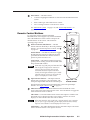
To control the switcher with the hand-held
IN1508 Remote control (figure 3-8), aim the hand-held
unit at the IR detector on the switcher and press the
desired buttons on the remote. The maximum
operating range is 30 feet.
9
Picture-In-Picture (PIP) buttons — The PIP
buttons function identically to the front panel PIP
buttons. See “Picture-in-picture controls” and 4 ,
on page 3-5.
On/Off button — The PIP On/Off button toggles
the PIP function on and off. When lit, the front
panel PIP On LED indicates that the switcher’s
picture-in-picture function is on.
PIP
ON/OFF
9
10
10
Input Selection buttons — The Input Selection
buttons select an input to scale and output. The
front panel Input LEDs indicate the selected input.
5
6
7
8
VIDEO
MUTE
AUDIO
MUTE
A/V
MUTE
FREEZE
11
MENU
ENTER
12
Swap button — The PIP Swap button toggles the
primary and secondary pictures between the main
image and the PIP window.
If PIP mode is off (the front panel PIP Mode On
LED is off), the Swap function continues to
work, toggling between the most recently
selected low-resolution input and the most
recently selected high-resolution input. Unlike
when PIP mode is on, however, the unselected
input is not displayed in a PIP window.
SWAP
13
SIZE
CENTER
ZOOM
PAN
SHARP
PHASE
CONT/
BRT
COL/
TINT
ASPECT
RATIO
IN1508
REMOTE
Figure 3-8 — IR
remote control
The Input Selection buttons function identically to the front panel Input
buttons. See “Input controls” and 2 on page 3-3.
11
Mute/Freeze buttons — The Mute and Freeze buttons blank the screen
and/or silence the audio and freeze the video. Press the buttons to toggle the
mutes and freeze mode on and off.
Video Mute — The Video Mute button switches the output to a blank screen.
The blank screen is deselected when a new input is selected. On-screen
displays are still available when the video is muted.
Video mute mutes the video signals only. Separate H and V sync, composite
sync, or sync-on-green (depending on the output format selected) is always
output to ensure that the connected display does not lose sync.
Audio Mute — The Audio Mute button silences the audio output. The audio
mute is deselected when a new input is selected.
IN1508 Scaling Presentation Switcher • Operation
3-7
Operation, cont’d
A/V Mute — The A/V Mute button switches the output to a blank screen and
silences the audio output. The blank screen and muted audio are deselected
when a new input is selected.
Freeze — The Freeze button toggles the freeze feature on and off. Freeze
stops the image at the moment you activate the feature and outputs a still
image. Freeze is deselected when a new input is selected.
12
Menu buttons — The Menu buttons function identically to the front panel
Menu buttons. See “Menu control buttons” and 6 , 7 , and 8 , starting on
page 3-6.
Menu button — The Menu button enters the main menu system and backs
out of the currently active submenu or selection. See “Main menu system”
and “Picture adjustments”, later in this chapter, for details.
, , , and buttons — The , , , and buttons navigate the main and
picture control menu systems. See “Main menu system”, on page 3-16, and
“Picture adjustments”, on page 3-25, for details.
When the connected output device is not displaying a menu or other switchergenerated message, pushing the Menu control , , , or button pops up an
output volume status indicator bar on the output device. Use the Menu
control or button to decrease the output volume. Use the Menu control
and button to increase the volume.
Enter button — The Enter button:
•
Activates a highlighted submenu or function in the IN1508 main menu
system.
•
Exits a slider-type status indicator bar control.
•
Saves a changed value in a selection box control.
See “Main menu system”, later in this chapter, for details.
13
Picture control buttons — The picture control buttons are a short cut to
selecting individual or groups of image status indicator bar displays that can
be adjusted using the , , , and buttons ( 14 ).
Size, Centering, Contrast/Brightness, and Color/Tint are also available from
the front panel (see “Picture Controls buttons” and 5 on page 3-6).
Sharp and Phase are not available from the front panel picture control buttons
and are front-panel accessible only by navigating through the main menu
system.
Size button — The Size button selects and deselects the display size
adjustment status indicator bars. The adjustment range depends on the
output resolution selected.
Center button — The Center button selects and deselects the display
centering adjustment status indicator bars. The adjustment range depends on
the output resolution selected.
Contrast/Brightness button — The Contrast/Brightness button selects and
deselects the display brightness and contrast adjustment status indicator bars.
The adjustment range for both brightness and contrast is from 0 to 127.
3-8
IN1508 Scaling Presentation Switcher • Operation
Color/Tint control button — The Color/Tint button selects and deselects the
display color and tint adjustment status indicator bars. The adjustment range
for both color and tint is from 0 to 127.
The Color/Tint control affects only certain interalaced component video,
composite video, and S-video, as shown in the following table.
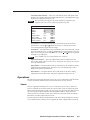
Input type
Color
RGB
No
YUVp
No
RGBcvS
No
YUVi
Yes
NTSC S-video
Yes
PAL S-video
Yes
Composite NTSC Yes
Composite Pal
Yes
Tint
No
No
No
No
Yes
No
Yes
No
Zoom button — The Zoom button selects and deselects the Zoom status
indicator bar. Use the and buttons to increase or decrease how much
zoom (enlargement) is applied to the image.
Pan button — The Pan button selects and deselects the horizontal and vertical
Pan status indicator bars. Use the and buttons to highlight the horizontal
(H) or vertical (V) pan status indicator bar. Use the and buttons to pan left
and right or up and down.
Pan is available only for an image that has been zoomed in.
Aspect Ratio button — The Aspect Ratio button selects and deselects the
aspect ratio setting selection box control. The aspect ratio options are 4:3 and
16:9. The default is 4:3.
Sharp button — The Sharp button selects and deselects the sharpness setting
adjustment status indicator bar. Sharpness uses variable filtering to affect
input picture detail and definition.
Phase button — The Phase button selects and deselects the phase setting
adjustment status indicator bar. The phase adjustment range is 0 to 31.
Operations
The following paragraphs detail the power-up process and then describe the menu
system, the picture, and the selection of the front panel security lockout.
Power
Power is applied when the power cord is connected to an AC source. When AC
power is applied, the switcher performs a self-test that cycles all of the front panel
LEDs on and off from left to right. An error-free power up self-test sequence leaves
the selected input LED and the selected Output Rate LED on. If the picture-inpicture feature was turned on when the switcher was powered down, the PIP On
LED and a secondary input LED are also lit.
The selected input, the picture adjustments, and other current settings are saved in
non-volatile memory. When power is applied, the latest configuration is retrieved.
IN1508 Scaling Presentation Switcher • Operation
3-9
Operation, cont’d
Input selection operation
Each of the eight inputs is assigned to one of two groups (see figure 3-9 on the next
page):
•
Low resolution — Inputs 1 through 4 (and input 5 if it is configured as
interlaced component video; see “Input 5 selection”, on page 3-18)
•
High resolution — Inputs 6 through 8 (and input 5 if it configured as
progressive component video/HDTV; see “Input 5 selection”, on page 3-18)
Input selection acts differently, depending on whether PIP mode is on or off:
•
•
PIP mode on — If the PIP mode is on (the PIP On LED is lit), pushing the
input button selects a new input for display in either the main window or the
PIP window. The window in which the selected input is displayed depends
on which group (high resolution or low resolution) the input is in. The
selected input replaces the previously selected input from the same group in
whichever window that input had been displayed.
°
In figure 3-9, when you push the Input 3 button, input 3 replaces input 1
in the PIP window.
°
In figure 3-9, when you push the Input 8 button, input 8 replaces input 6
in the main window.
PIP mode off — If the PIP mode is off (the PIP On LED is off), pushing the
input button selects a new input for display in the main window.
Picture-in-picture mode operation
The two images displayed when the PIP feature is on (the PIP On LED is lit) must
come from different input groups (one high resolution and one low resolution).
•
If the primary input (the image displayed in the main window) is a highresolution input, the secondary input (the image displayed in the PIP
window) must be a low-resolution input (figure 3-9).
•
If the primary input is a low-resolution input, the secondary input must be a
high-resolution input (figure 3-9).
The PIP function toggles between the selected input in each group. In figure 3-9,
when you push the Swap button:
•
Input 3 replaces input 8 in the main window.
• Input 8 replaces input 3 in the PIP window.
The PIP feature cannot toggle between two inputs in the same group.
If PIP mode is off (the PIP Mode On LED is off), the Swap function continues
to work, toggling between the most recently selected low-resolution input and
the most recently selected high-resolution input. Unlike when PIP mode is on,
however, the input that is replaced in the main window is not displayed in the
PIP window.
3-10
IN1508 Scaling Presentation Switcher • Operation
DVD
DSS
PC
PC
RGB 192
RGB 192
5:4
4:3
PC Graphics
TV
Uneven Frequency
Response
Rolloff
10
Rolloff
8
6
4
2
20
Input 1
Input 3
50
Input 6
100
10k
100k
1000
75k
Frequency (Hz)
Output
Voltage
Input 8
IN1508
INPUT
IR
1
2
3
4
OUTPUT RATE
5
Low Resolution
Input Group
6
PIP
8
7
ON
VGA
1024x852
UXGA
SVGA
1024x1024
720p
XGA
1366x768
1080i
SXGA
1365x1024
1080p
High Resolution
Input Group
PICTURE CONTROLS
CONT/
COL/
SIZE
BRT
TNT
SWAP
CENTER
SCALING PRESENTATION SWITCHER
MENU
ENTER
PIP On LED
NOTE In this example, input 5 is configured
as progressive component video, so
it is in the high resolution group.
100-240V
50-60Hz
I
1
VID
3
6
LISTED
YC
C
U S 1T23
VID
T
2
3
4
5
A
6
L
L
YC
B
7
U
50/60Hz
OUTPUT
AUDIO INPUT
1
RGB
Y, B-Y, R-Y
RGB
P
OUTPUT
I.T.E.
N
4
Y
B-Y
5
R-Y
RGB
7
DVI
L
8
R
R
R
2
8
Outputs Shown Below
on 4:3 Monitor
3
8
Press
3
SWAP
8
Press
Red
Green
Green
Rolloff
Uneven Frequency
Response
Red
10
Rolloff
8
6
4
2
Rolloff
Uneven Frequency
Response
20
10
Rolloff
50
100
10k
100k
1000
75k
Frequency (Hz)
Output
Voltage
8
6
4
2
20
50
100
10k
1000
75k
Frequency (Hz)
100k
Output
Voltage
Figure 3-9 — PIP mode input selection and swap operations
IN1508 Scaling Presentation Switcher • Operation
3-11
Operation, cont’d
Menu system operation
Figure 3-10 shows a flowchart of the submenus in the main menu system. Each
submenu leads to a series of submenus or to “slider” type status indicator bar
controls that accomplish individual tasks or groups of tasks.
In figure 3-10, and all other flowcharts in this chapter, solid lines indicate
screen changes initiated by the operator. Dashed lines indicate screen changes
that are the result of a timeout function.
No
menu
display
Menu
Menu
Timeout
EXTRON ELECTRONICS IN1508 SCALING PRESENTATION SWITCHER
INPUT
Enter
Center
Size
Zoom
Pan
Aspect
Advanced
Input 5
PICTURE
OUTPUT
Enter
Enter
Brightness
+64
Contrast
+45
Color
+64
Tint
+64
Sharpness
+64
Resolution
Refresh Rate
Sync Polarity
Signal Type
AUDIO
Enter
Output Volume
Input Gain/Atten
Audio Delay
ADVANCED
Enter
Freeze
Blank
Swap
PIP Mode
Fade Switch
Blue Mode
Reset
Figure 3-10 — Menu system flowchart
3-12
IN1508 Scaling Presentation Switcher • Operation
Menu button — Press the front panel or IR remote control Menu button to activate
the menu system or to back up one level from the currently selected submenu
or selection. (For example, pressing the Menu button in the Picture submenu
turns off the Picture submenu selections and the switcher displays the main
menu only.)
, , , and
buttons —
Press the front panel or IR remote control , , , and buttons to maneuver
around the menu system, highlighting submenus or selections or increasing
and decreasing selected picture control settings.
Enter button — Press the front panel or IR remote control Enter button to:
•
Activate a highlighted submenu or function in the IN1508 main menu system
•
Exit a slider-type status indicator bar control
•
Save a changed value in a selection box control
To return to normal operation (no menus), let the switcher remain idle for
20 seconds until the selected screen times out, or press the front panel or IR
remote control Menu button repeatedly until the Main Menu is deselected.
Selection boxes and status indicator bars
Most of the menu system selections are made using either on-screen selection box
controls (the top example in figure 3-11) or “sliding” status indicator bar controls
(the bottom example in figure 3-11). The two types of controls operate differently.
Typical selection box control
No
menu
display
Timeout
Y,B-Y,R-Y
RGBHV
RGBS
RGsB
Change does not take affect
until Enter is pressed to
activate the selection.
Press Menu or
to exit the screen.
Return to
higher level
screen.
Typical status indicator bar control
(0 to 128)
No
menu
display
Return to
higher level
screen.
Brightness
+96
Contrast
+64
(0 to 128)
Timeout
Changes take affect as you
move the slider controls.
Push Menu or Enter
to exit the screen.
Figure 3-11 — Selection box vs. status indicator bar operation
IN1508 Scaling Presentation Switcher • Operation
3-13
Operation, cont’d
Selection box control
The selection boxes (figure 3-11) show a list of possible selections. When you first
activate the selection box control, the selected option is marked with a . Use the
front panel or IR remote control and buttons to move the to highlight other
options.
Highlighting a different option by moving the does not automatically select
that option. You must push the front panel or IR remote control Enter button
to change the selection.
Press the front panel or IR remote control Enter button to make changes. The
selection box remains displayed until the on-screen timeout expires or until you
exit the screen by pushing the Menu or button.
Status indicator bar control
The status indicator bars (figure 3-12) resemble slide bars. Use the front panel or IR
remote control and buttons to shift the “slides” to the right and left, increasing
and decreasing the variable setting.
Changes made using the status indicator bar controls take effect as soon as you
increase or decrease the setting with the and buttons. If you decide that
you do not like the affect of the changes that you make, you have to change the
settings back to their original values.
No
menu
display
Menu System
Menu
INPUT
Timeout
PICTURE
Enter
Brightness
+96
Contrast
+45
Color
+64
(0 to 128)
Push Menu or Enter
to exit the screen.
Return to
higher level
screen.
Front Panel
Picture Control Buttons
COL/
TNT
Timeout
No
menu
display
Color
+64
Tint
+35
(0 to 128)
Select
Push Menu or Enter
to exit the screen.
Activates the
main menu.
IR Remote Control
Picture Control Buttons
No
menu
display
COL/
TINT
Timeout
Color
+64
Tint
+35
Activates the
main menu.
(0 to 128)
Select
Push Menu or Enter
to exit the screen.
Figure 3-12 — Accessing and operating typical status indicator bars
3-14
IN1508 Scaling Presentation Switcher • Operation
Many status indicator bar controls can be activated in three ways (figure 3-12):
•
By navigating to the status indicator bar via the menu system
•
By pushing one of the front panel Picture Control buttons (such as
Color/Tint)
•
By pushing one of the IR remote control picture control buttons (such as
Color/Tint)
Use the status indicator bars as follows:
1.
If necessary, select the input that you want to adjust by pressing the
appropriate input button.
2.
For menu system operation:
a.
Press the front panel or IR remote control Menu button. The on-screen
Main Menu display appears on the connected monitors, overlaid on top
of the output image.
b.
Use the front panel or IR remote control and buttons to highlight the
desired submenu (such as Picture) and press the front panel or IR remote
control Enter button. The selected submenu or a group of status
indicator bars appears on the on-screen display.
c.
If necessary, use the front panel or IR remote control and buttons to
highlight the desired status indicator bar on the selected submenu (such
as Color).
For picture control button operation:
3.
a.
Press the desired front panel or IR remote control picture control button.
b.
If necessary, press and release the front panel or IR remote control
buttons to highlight the desired adjustment status indicator bar.
and
Press and release the front panel or IR remote control and buttons to
decrease and increase the selected level by 1 step or press and hold the
buttons to flow through the adjustment range.
To make another adjustment to the same input, return to step 2.
To adjust another input, select that input. The switcher clears the on-screen
displays. Return to step 2.
4.
Allow the on-screen display timeout to occur.
IN1508 Scaling Presentation Switcher • Operation
3-15
Operation, cont’d
Main menu system
The main menu includes the following submenus:
• Input submenu — Size, centering, and aspect ratio
• Picture submenu — Image quality adjustments
• Output submenu — Resolution, refresh rate, sync, and signal format
• Audio submenu — Input audio volume and audio delay
• Advanced submenu — Advanced options
Input submenu
Figure 3-13 is a flowchart that shows an overview of the Input submenu, its
available selections, and their available settings. Use the front panel or IR remote
control and buttons to highlight the desired selection and press the Enter
button.
No
menu
display
Menu
H
Menu
Center
Timeout
V
Enter
Menu Menu
Timeout
INPUT
Enter
Menu
Menu
H
Enter
Size
Timeout
V
Timeout
Timeout
Menu
Menu
PICTURE
Timeout
Menu
Timeout
Menu
OUTPUT
Timeout
Menu
H
Enter
Pan
Enter
Aspect
Menu
AUDIO
Timeout
Press Enter to
select a change.
4:3
16:9
Timeout
Menu
Timeout
Timeout
Z
Timeout
Timeout
Menu
Menu
V
Menu
Menu
Enter
Zoom
Enter
Advanced
Menu
ADVANCED
Timeout
Menu
Enter
Input 5
Timeout
Select
Total Pixels
+800
Active Pixels
+640
Active Lines
+480
Phase
+8
Timeout
H-Start
0
V-Start
+127
Timeout
Menu
Timeout
Interlaced
Progressive
HDTV
Press Enter to
select a change.
Figure 3-13 — Input submenu flowchart
3-16
IN1508 Scaling Presentation Switcher • Operation
Ranges for Advance selections
varies based on input applied
and output rate selected.
Center selection
The Center selection displays two status indicator bars that show, and allow you to
adjust, the horizontal and vertical position of the main or picture-in-picture output
on the monitor.
If the PIP feature is turned off (the front panel PIP On LED is unlit), Center adjusts
the position of the main window.
If the picture-in-picture feature is turned on (the front panel PIP On LED is lit),
Center adjusts the position of the PIP window.
The center adjustments do not crop the image or add blank lines.
Use the front panel or IR remote control and buttons to highlight the horizontal (H)
or vertical (V) centering status indicator bar. Use the front panel or IR remote
control and buttons to move the image.
Size selection
The Size selection displays two status indicator bars that show, and allow you to
adjust, the horizontal and vertical size of the output. Use the front panel or IR
remote control and buttons to highlight the horizontal (H) or vertical (V) size
status indicator bar. Use the front panel or IR remote control and buttons to
increase or decrease the size.
Zoom selection
The Zoom selection displays a status indicator bar that allows you to adjust the
zoom level of the output. Use the front panel or IR remote control and buttons
to increase or decrease how much zoom (enlargement) is applied to the image.
Pan selection
The Pan selection displays two status indicator bars that allow you to pan (move)
horizontally and vertically on a zoomed image. Use the front panel or IR remote
control and buttons to highlight the horizontal (H) or vertical (V) pan status
indicator bar. Use the front panel or IR remote control and buttons to pan left
and right or up and down.
Aspect ratio selection
The Aspect ratio selection displays a selection box that shows the currently selected
aspect ratio and allows you to select another aspect ratio.
Use the front panel or IR remote control and buttons to highlight the desired
aspect ratio. Press the Enter button to change to the highlighted value. The default
is 4:3.
IN1508 Scaling Presentation Switcher • Operation
3-17
Operation, cont’d
Advanced screen
The Input submenu’s Advanced settings are a comprehensive set of
adjustments to optimize the switcher for non-standard video inputs. Most
users do not encounter such signals. For those users who do, the switcher
automatically adjusts these settings. The switcher’s automatic adjustments
are adequate for most inputs.
The Advanced screen provides a submenu of advanced selection options: active
pixels, active lines, phase, horizontal and vertical start, and total pixels. These
advanced settings are rarely needed for standard video and computer video
signals, but provide the user with manual control over scaling parameters that are
automatic. The knowledgeable user may need to adjust these settings to optimize
his or her input signal(s). Possible reasons to adjust these settings include tolerance
issues and nonstandard resolutions and frequencies. The settings are described in
more detail as part of the discussion on optimizing the video. See “Input
submenu’s Advanced selections”, on page 3-33.
To select one of the advanced settings, use the front panel or IR remote control
or button to highlight the desired status indicator bar.
Input 5 selection
The Input 5 selection displays a selection box that shows the currently assigned
component video format (interlaced [NTSC/PAL/SECAM], progressive [480p/576p],
or HDTV [720p/1080i/1080p]) for input 5 and allows you to select a different
format.
Use the front panel or IR remote control and buttons to highlight the desired
component video format. Press the Enter button to change to the highlighted
value. The default is progressive.
Picture submenu
Figure 3-14 is a flowchart that shows an overview of the Picture submenu, its
available status indicator bars, and their available settings. Use the front panel or
IR remote control and buttons to highlight the desired status indicator bar.
No
menu
display
Timeout
Menu Menu
Menu
INPUT
Timeout
Menu
PICTURE
Timeout
Enter
Menu
Select
Menu
OUTPUT
Brightness
+64
(0 to 128)
Contrast
+64
(0 to 128)
Color
+64
(0 to 128)
Tint
+64
(0 to 128)
Sharpness
+64
(0 to 128)
Timeout
Menu
AUDIO
Timeout
Menu
ADVANCED
Timeout
Figure 3-14 — Picture submenu flowchart
3-18
IN1508 Scaling Presentation Switcher • Operation
Brightness status indicator bar
The Brightness status indicator bar shows, and allows you to adjust, the brightness
setting for the selected input. Brightness adjusts the light intensity of the image on
the screen. Use the front panel or IR remote control and buttons to adjust the
brightness control through a range of 0 to 128. The default setting is 64.
Contrast status indicator bar
The Contrast status indicator bar shows, and allows you to adjust, the contrast
setting for the selected input. Contrast adjusts the difference between the input
signal’s brightest and darkest settings. Use the front panel or IR remote control
and buttons to adjust the contrast through a range of 0 to 128. At the minimum
setting, 0, the entire picture is shown at about the same brightness (gray). At the
maximum setting, 128, there is a marked difference between the dark and light
areas of the image. The default setting is 45 for high resolution inputs and 59 for
low resolution inputs.
Color status indicator bar
The color adjustment is available for interlaced component video, S-video, and
composite video inputs only. See the table on page 3-9.
The Color status indicator bar shows, and allows you to adjust, the color setting for
the selected input. Color increases and decreases the color intensity of the picture.
Use the front panel or IR remote control and buttons to adjust the contrast
through a range of 0 to 128. At the minimum setting, 128, the switcher removes
most of the color. The default setting is 64.
Tint status indicator bar
The tint adjustment is available for S-video and composite video inputs only.
See the table on page 3-9.
The tint status indicator bar shows, and allows you to adjust, the tint setting.
Tint is a relative measure of the amount of white in a given color and adjusts the
picture’s color toward red or green. Use the front panel or IR remote control and
buttons to adjust the tint control through a range of 0 to 128. Press the button to
increase the green (and decrease the red). Press the button to increase the red
(and decrease the green). The default setting is 64.
Sharpness status indicator bar
The Sharpness status indicator bar shows and allows you to adjust the sharpness
setting. Sharpness uses variable filtering to affect input picture detail and
definition. Use the front panel or IR remote control and buttons to increase or
decrease the sharpness filtering through a range of 0 to 128. The default setting
is 64.
IN1508 Scaling Presentation Switcher • Operation
3-19
Operation, cont’d
Output submenu
Figure 3-15 is a flowchart that shows an overview of the Output submenu, its
available selections, and their available settings. Use the front panel or IR remote
control and buttons to highlight the desired selection and press the Enter button.
Timeout
No
menu
display
Menu Menu
INPUT
Timeout
Menu
PICTURE
Timeout
Menu
Menu
OUTPUT
Enter
Resolution
Enter
Menu
Timeout
Press Enter to
select a change.
640 x 480
800 x 600
1024 x 768
1280 x 768
1280 x 1024
1024 x 852
1024 x 1024
1366 x 768
1365 x 1024
1400 x 1050
1600 x 1200
644 x 480
768 x 576
1280 x 720
1920 x 1080
1920 x 1080
1440 x 900
1680 x 1050
1280 x 800
852 x 480
Timeout
VGA
SVGA
XGA
SXGA
UXGA
480p
576p
720p
1080i
1080p
Press Enter to
select a change.
Timeout
Menu
Menu
AUDIO
Timeout
Menu
Timeout
Enter
Menu
Press Enter to
select a change.
Timeout
Menu
ADVANCED
Refresh Rate
Sync Polarity
Enter
Menu
Timeout
Menu
Signal Type
Enter
Menu
Timeout
Figure 3-15 — Output submenu flowchart
IN1508 Scaling Presentation Switcher • Operation
H– / V–
H– / V+
H+ / V–
H+ / V+
Press Enter to
select a change.
Timeout
3-20
Sync
Sync
Sync
Sync
Y,B-Y,R-Y
RGBHV
RGBS
RGsB
50 Hz
60 Hz
75 Hz
Timeout
Resolution selection box
The front panel Output Rate button can also be used to select most resolutions,
with the following exceptions:
• 852 x 480
• 1440 x 900
• 1400 x 1050
• 1680 x 1050
The Resolution selection box
identifies the currently selected
output resolution and allows
you to select a different output
resolution. The table at right
defines the combinations of
resolutions and refresh rates
that the switcher can output.
The default resolution is XGA.
To select a different resolution,
use the front panel or IR remote
control or button to
highlight the desired resolution
and press the Enter button.
• 1280 x 768
• 480p
Resolution
• 1280 x 800
• 576p
Aspect
ratio
50 Hz
60 Hz
75 Hz
640 x 480
VGA
4:3
●
●
●
800 x 600
SVGA
4:3
●
●
●
1024 x 768
XGA
4:3
●
●
●
16:9
●
1280 x 768
5:4
●
●
●
1024 x 852
4:3
●
●
●
1024 x 1024
1:1
●
●
●
1366 x 768
16:9
●
●
●
1365 x 1024
4:3
●
●
●
1400 x 1050
4:3
●
●
●
1280 x 1024
SXGA
1600 x 1200
UXGA
4:3
644 x 480
480p
4:3
●
●
Resolution and
768 x 576
576p
4:3
●
refresh rate are
●
1280 x 720
720p
16:9
●
crucial variables for
●
●
1920
x
1080
1080i
16:9
optimum image
●
1920 x 1080 1080p
16:9
quality. For best
results, set the
1440 x 900
16:10
●
switcher output to
1680 x 1050
16:10
●
match your display’s
●
●
1280 x 800
16:10
capabilities. See
●
852 x 480
4:3
●
“Optimizing the
Video”, on page 3-30,
for detailed guidelines for choosing the proper resolution and rate.
●
Refresh Rate selection box
The front panel Output Rate button can be used to select the resolution, but
every front panel rate selection defaults to 60 Hz. Different refresh rates can
be selected only by using this screen or RS-232 control.
The Refresh Rate selection box identifies the currently selected output refresh rate
and allows you to select a different rate.
To select a different rate, use the front panel or IR remote control
highlight the desired resolution and press the Enter button.
or
button to
Resolution and refresh rate are crucial variables for optimum image quality.
For best results, set the switcher output to match the capabilities of your
display. If necessary, see “Optimizing the Video”, on page 3-30, for detailed
guidelines for choosing the proper resolution and rate.
Sync Polarity selection box
The Sync Polarity selection box identifies the currently selected sync polarity and
provides the ability to select different sync polarities. The display or projector may
require video with positive or negative horizontal (H) and/or vertical (V) sync
polarity; consult the diplay or projector manual.
To select a different sync polarity, use the front panel or IR remote control or
button to highlight the desired sync format and press the Enter button. The default
setting is H–/V–.
IN1508 Scaling Presentation Switcher • Operation
3-21
Operation, cont’d
Signal Type selection box
The Signal Type selection box identifies the currently selected output signal format
(RGBHV, RGBS, RGsB, or progressive component video [Y, B-Y, R-Y]) and provides
the ability to select a different type. To select a different sync type, use the front
panel or IR remote control or button to highlight the desired sync type and
press the enter button. The default setting is RGBHV.
Another way to select the output signal type is to press and hold the PIP On
button while you apply power to the switcher. This action toggles the signal
type between RGBHV and progressive component video. If RGB was selected
the last time the switcher was powered, the signal type switches to component
video. If component video was selelected, the signal type switches to RGB.
Audio submenu
Figure 3-16 shows an overview of the Audio submenu, its available selections, and
their available settings. Use the front panel or IR remote control and buttons to
highlight the desired selection and press the Enter button.
No
menu
display
Timeout
Menu Menu
INPUT
Timeout
Menu
PICTURE
Timeout
Menu
OUTPUT
Menu
Enter
100
Output Volume
Enter
Timeout
(-53 dB to +9 dB)
Menu
0 dB
Menu
Menu
Input Gain/Atten
AUDIO
Enter
Timeout
Press Enter to
select a change.
Menu
Menu
Timeout
(0 to 100)
Menu
Timeout
ADVANCED
Audio Delay
Timeout
Enter
Menu
On
Off
Timeout
Figure 3-16 — Audio submenu flowchart
Output Volume status indicator bar
The Output Volume status indicator bar shows and allows you to adjust the audio
output level (attenuation). Use the front panel or IR remote control and buttons
to increase or decrease the volume through a range of 0 to 100. The default setting
is 100, that is, no attenuation (full volume).
Input Gain/Attenuation status indicator bar
The Input Gain/Attenuation status indicator bar shows and allows you to adjust
the audio level (gain or attenuation) for the selected input. Use the front panel or
IR remote control and buttons to increase or decrease the level frequencies
through a range of –53 dB to +9 dB. The default setting is 0 dB, no gain or
attenuation.
3-22
IN1508 Scaling Presentation Switcher • Operation
Audio Delay selection box
The Audio Delay selection box provides the ability to turn audio delay on and off.
Audio delay compensates for the latency period that is inherent in deinterlacing
NTSC, PAL, and SECAM video by delaying the audio output to match the video
output. Use the front panel or IR remote control and buttons to select On or
Off. The default is On.
Advanced submenu
Figure 3-17 is a flowchart that shows an overview of the Advanced submenu, its
available selections, and their available settings.
No
menu
display
Menu
Menu
Menu Menu
Timeout
Menu
INPUT
Timeout
OUTPUT
Menu
AUDIO
Menu
ADVANCED
PIP Mode
Enter
Fade Switch
Enter
Menu
Blue Mode
Enter
Menu
Timeout
Menu
Reset
Timeout
Menu
Timeout
Press Enter to
select a change.
On
Off
Enter
Timeout
Press Enter to
select a change.
On
Off
Enter
Timeout
Press Enter to
select a change.
PIP 1/4 Screen
PIP 1/9 Screen
PIP 1/16 Screen
PIP 1/25 Screen
Side by Side Norm AR
Side by Side Full Scrn
Timeout
Timeout
Timeout
Menu
Swap
Timeout
Timeout
Menu
Press Enter
to swap PIP.
Timeout
Press Enter to
select a change.
On
Off
Timeout
Menu
Menu
Menu
PICTURE
Timeout
Menu
Enter
Blank
Timeout
Menu
Menu
On
Off
Enter
Freeze
Press Enter to
select a change.
Timeout
Press Enter to
select a change.
Cancel
Ok
Timeout
Figure 3-17 — Advance submenu flowchart
Freeze selection box
The Freeze selection box provides the ability to turn the freeze feature on and off.
Freeze stops the image at the moment you activate the feature and outputs a still
image. Use the front panel or IR remote control and buttons to select On or Off
and press the Enter button.
When the output is frozen, the video input can be removed without losing the
displayed image.
If a different input is selected (see 2 on page 3-3), the switching action deselects
the freeze function and the frozen image is lost.
Blank selection box
The Blank selection box provides the ability to mute the scaled video, resulting in a
black screen (except for any active on-screen displays). Use the front panel or IR
remote control and buttons to select On or Off and press the Enter button.
If a different input is selected (see 2 on page 3-3), the blanking action is deselected
and the newly selected input is scaled and displayed.
IN1508 Scaling Presentation Switcher • Operation
3-23
Operation, cont’d
Swap selection
The Swap selection toggles the primary and secondary inputs between the main
image and the PIP window. Select swap by highlighting the Swap selection and
pressing the Enter or button. Repeatedly press the Enter or button to toggle
between the main and PIP windows. Press the , , or button to deselect Swap,
or allow the menu timeout (from the final button push) to clear the on-screen
displays. This on-screen display’s function is identical to pushing the front panel
Swap button.
If PIP mode is off (the front panel PIP Mode On LED off), the Swap function
continues to work, toggling between the most recently selected low-resolution
input and the most recently selected high-resolution input. Unlike when PIP
mode is on, however, the unselected input is not displayed in a PIP window.
PIP Mode selection box
The PIP Mode selection box displays the currently selected size and position for the
picture-in-picture window (if PIP mode is turned on) and allows you to select
another size and position.
The two side-by-side options are available only via this menu or a Simple
Instruction Set command (see chapter 4, “Serial Communications”). If either
side-by-side option is selected, the PIP size adjustment does not work.
Use the front panel or IR remote control and
size and position and press the Enter button.
buttons to highlight the desired
Fade Switch selection box
The Fade Switch selection box provides the ability to select between cuts and fades
when you select a new input. A fade switch fades the output to black, switches to
the new input, and then fades in from black. A cut selects the new input with no
masking affect.
Use the front panel or IR remote control and buttons to select On for fade
switches or Off for cuts and press the Enter button.
Blue Mode selection box
The Blue Mode selection box provides the ability to turn the blue mode feature on
and off. Blue mode is helpful in the setup of the color and tint of the incoming
video signal. In the blue mode, only the sync and blue video signals are passed to
the display. Use the front panel or IR remote control and buttons to select On
or Off and press the Enter button.
Reset selection box
The Reset selection box provides the ability to perform a system reset. Reset
returns the output rate selection to the XGA, 1024 x 768 at 60 Hz, setting; resets the
picture controls to their default values; sets all input audio levels to 0 dB; and
selects input 1. Use the front panel or IR remote control and buttons to select
Ok and press the Enter button to perform the reset or select Cancel and press the
Reset button to exit the screen without performing the reset.
3-24
IN1508 Scaling Presentation Switcher • Operation
Performing a system reset from the front panel
The front panel reset is identical to the Esc zXXX SIS command (see chapter 4,
“Serial Communications”) and the system reset that is available through the reset
system (see “Reset selection box” earlier in this chapter). But the front panel reset
does not require a connected computer or a connected monitor to view the onscreen displays.
A system reset returns the output rate selection to the XGA, 1024 x 768 at 60 Hz,
setting; resets the picture controls to their default values; sets all input audio levels
to 0 dB; and selects input 1.
Reset the switcher to the factory default settings by pressing and holding the
Output Rate button while you apply AC power to the switcher (figure 3-18).
Press and hold the Output Rate button while you apply power to the
switcher.
VGA
SVGA
XGA
SXGA
Power
After a brief delay, the switcher cycles all of the front panel
LEDs on and off from left to right and then back to the left.
Continue to hold the Output Rate button until the front panel cycle is complete.
Release the Output Rate button.
Figure 3-18 — Front panel system reset
Picture adjustments
The Picture Control buttons on the front panel and on the IR remote control
provide shortcuts to the fine tuning adjustments for the selected input. All of these
adjustments are also available using the main menu system. When you press one
of the front panel or IR remote control picture control buttons, the on-screen
display shows the corresponding image adjustment screen. The individual
descriptions in step 2 on page 3-27 identify the menu navigation required to reach
the screen using the main menu system.
Shortcuts for the centering, sizing, brightness, contrast, color, and tint adjustments
are available from the front panel and the IR remote control (figure 3-19 on
page 3-26). Shortcuts for the zoom, pan, aspect ratio, sharpness, and pixel phase
shift are available from the IR remote control only (figure 3-20 on page 3-27).
IN1508 Scaling Presentation Switcher • Operation
3-25
Operation, cont’d
No
menu
display
CENTER
PIP
ON
Window Center
H
–OR–
CENTER
V
Timeout
CENTER
PIP
CENTER
ON
Image Center
–OR–
CENTER
H Start
0
V Start
+31
Timeout
Press once
Window Center
H
–OR–
CENTER
Press again
V
Timeout
SIZE
PIP
ON
PIP Size < 1/4 >
–OR–
SIZE
Press
to select
a different PIP size.
Timeout
SIZE
PIP
SIZE
Image Size
ON
Active Pixels +662
Active Lines
–OR–
SIZE
Window Size
+532
Phase
–OR–
SIZE
0
Timeout
Press once
H
Press again
V
Timeout
CONT/
BRT
(0 to 128)
–OR–
CONT/
BRT
Contrast
+64
Brightness
+96
(0 to 128)
Timeout
COL/
TINT
(0 to 128)
–OR–
COL/
TINT
Color
+64
Tint
+64
(0 to 128)
= Front panel,
= IR remote control
Timeout
= PIP On LED lit,
NOTE
The
The
and
and
= PIP On LED unlit
buttons toggle between the top and bottom selection where applicable.
buttons move the slider on the selected status bar indicator.
Figure 3-19 — Picture adjustments flowchart, front panel and IR remote
control buttons
3-26
IN1508 Scaling Presentation Switcher • Operation
No
menu
display
ZOOM
Zoom
Timeout
PAN
H
Pan
V
Timeout
ASPECT
RATIO
Aspect Ratio 4:3
Press
to change
the aspect ratio.
Timeout
(0 to 63)
SHARP
Sharpness
+32
Timeout
(0 to 128)
PHASE
Phase
+64
Timeout
NOTE
The
The
and
and
= IR remote control
buttons toggle between the top and bottom selection where applicable.
buttons move the slider on the selected status bar indicator.
Figure 3-20 — Picture adjustments flowchart, IR remote control buttons
Color and Tint adjustments are available only for interlaced component video,
S-video, and composite video inputs.
1.
Press the appropriate picture adjustment button: centering (Center), sizing
(Size), brightness and contrast (Brt/Cont), color and tint (Col/Tnt), sharpness
filter (Sharp), fine pixel phase shift (Phase), or aspect ratio (Aspect). The
on-screen display shows the name of the adjustment and the current setting
value.
2.
For multiple status bar indicators, use the and buttons to highlight the
desired status bar indicator. Use the and buttons to move the slider on the
highlighted status indicator bar (change the value) for the following
adjustments:
•
Center: Press the Center button once to toggle between the Window
Centering display and the Image Centering display.
The Image Centering display is never shown if the PIP mode is on.
Image Centering display — This display consists of the Horizontal Start
and Vertical Start status indicator bars, which are advanced adjustments
that should be attempted only by knowledgeable A/V professionals. See
“Horizontal Start and Vertical Start status indicator bars”, on page 3-35.
IN1508 Scaling Presentation Switcher • Operation
3-27
Operation, cont’d
Window Centering display — This display consists of two status
indicator bars that show, and allow you to adjust, either the position
(centering) of the main image or the position of the PIP window,
depending on whether the PIP feature is off or on.
PIP is off — Center adjusts the horizontal and vertical position
of the main image on the monitor.
The adjustment range depends on the input rate applied and
the output resolution selected.
This adjustment is also available by using the front panel or IR
remote control to select Menu > Input > Center in the main menu
system (see “Center selection”, on page 3-17).
PIP is on — Center adjusts the position of the PIP window.
•
Size: The Size button calls one of three displays, depending on whether
PIP mode is on or off.
PIP is on — Size displays a single status indicator bar that allows you to
cycle through the 1/4, 1/9, 1/16, and 1/25 sizes of the PIP window. Use
the and buttons to cycle through the options.
This adjustment is also available by using the front panel or IR remote
control to select Menu > Advanced > PIP Mode in the main menu system
(see “PIP Mode selection box”, on page 3-24).
PIP is off — Size toggles between the Image Size display and the
Window Size display.
Image Size display — This display consists of the Active Pixels,
Active lines, and Phase status indicator bars, which are
advanced adjustments that should be attempted only by
knowledgeable A/V professionals. See “Active Pixels and
Active Lines status indicator bars” on page 3-36 and “Phase
status indicator” bar on page 3-38.
Window Size display — This display consists of two status
indicator bars that show, and allow you to adjust, either the
position (centering) of the main image or position of the PIP
window, depending on whether the PIP feature is off or on.
The adjustment range depends on the input rate applied and the output
resolution selected.
This adjustment is also available by using the front panel or IR remote
control to select Menu > Input > Size in the main menu system (see “Size
selection”, on page 3-17).
•
Brightness/Contrast: Brightness adjusts the light intensity of the image
on the screen. Contrast adjusts the difference between the input signal’s
brightest and darkest settings.
The brightness adjustment is also available by using the front panel or IR
remote control to select Menu > Picture > Brightness in the main menu
system (see “Brightness status indicator bar”, on page 3-19).
The contrast adjustment is also available by using the front panel or IR
remote control to select Menu > Picture > Contrast in the main menu
system (see “Contrast status indicator bar”, on page 3-19).
3-28
IN1508 Scaling Presentation Switcher • Operation
•
Color/Tint: Color increases and decreases the color intensity of the
picture. Tint is a relative measure of the amount of white in a given
color and adjusts the picture’s color toward red or green.
The color adjustment is also available by using the front panel or IR
remote control to select Menu > Picture > Color in the main menu system
(see “Color status indicator bar”, on page 3-19).
The tint adjustment is also available by selecting Menu > Picture > Tint in
the main menu system (see “Tint status indicator bar”, on page 3-19).
•
Zoom (IR remote control only): Zoom enlarges a portion of the scaled
image.
This adjustment is also available by using the front panel or IR remote
control to select Menu > Input > Zoom in the main menu system (see
“Zoom selection”, on page 3-17).
•
Pan (IR remote control only): Pan shifts the center of the image on an
image that has been zoomed in on.
Pan is available only for an image that has been zoomed in.
This adjustment is also available by using the front panel or IR remote
control to select Menu > Input > Pan in the main menu system (see “Pan
selection”, on page 3-17).
•
Sharpness filter (IR remote control only): The adjustment range is from
0 to 63.
This adjustment is also available by using the front panel or IR remote
control to select Menu > Picture > Sharpness in the main menu system (see
“Sharpness status indicator bar”, on page 3-19).
•
Fine pixel phase (IR remote control only): The adjustment range is from
0 to 31.
This adjustment is also available by using the front panel or IR remote
control to select Menu > Input > Advance > Phase in the main menu system
(see “Phase status indicator bar”, on page 3-38).
3.
For the aspect ratio selection box, use the and
forth between the two selections: 4:3 and 16:9.
buttons to toggle back and
This adjustment is also available by using the front panel or IR remote control
to select Menu > Input > Aspect in the main menu system (see “Aspect ratio
selection”, on page 3-17).
4.
Repeat steps 1 and 2 for each image adjustment to be made for that input.
5.
If you want to set picture adjustment on another input, press the appropriate
input button.
IN1508 Scaling Presentation Switcher • Operation
3-29
Operation, cont’d
Front panel security lockout
The front panel security lockout limits the operation of the IN1508 from the front
panel. When the switcher’s front panel is locked out, all of the front panel image
adjustment functions are disabled. You can still select inputs.
To toggle executive mode on or off, simultaneously press and hold the Color/Tint
and Center buttons (figure 3-21) for approximately 2 seconds. Release the buttons.
The on-screen display shows Front Panel Locked or Front Panel Unlocked to
indicate the mode. The on-screen display also shows Front Panel Locked if you
push a locked out button.
No
menu
display
Simultaneously press
and hold both buttons.
CENTER
COL/
TINT
2 seconds.
Front Panel Locked
–OR– Front Panel Unlocked
Timeout
Release both buttons.
Figure 3-21 — Toggle front panel lockout on or off
Optimizing the Video
Setting up a DVD source
To get the best results when using a DVD as a video source, Extron recommends
that the DVD player itself be set up to output an aspect ratio of 16:9 and not 4:3.
Because all DVDs are mastered as 16:9, having them set up for anything else causes
the player to internally scale and compress the signal. The DVD player’s scaling
and compression defeats the advantage of having 3:2 pulldown detection in the
IN1508.
All sizing adjustments to correct the aspect ratio should be done using the IN1508.
To change the output aspect ratio of most DVD players:
1.
Enter the DVD player’s setup or action menu while the disc is stopped.
2.
Select the 16:9 aspect ratio.
Resolution and refresh rates
Resolution and refresh rate are probably the most crucial variables for optimum
image quality. Every display has an optimal or native resolution and an optimal
refresh rate. These vary, depending on:
• The type of display technology
• Whether the display has a fixed number of pixels (a native resolution)
• The size of the pixels
• The size of the display or screen
• The distance of the viewer from the screen
For best results, set the switcher’s output resolution and refresh rate to match the
capabilities of your display.
3-30
IN1508 Scaling Presentation Switcher • Operation
The ideal resolution must lie within the compatible range of the display. For
example, some 27” to 36” presentation monitors are limited to input signals in
the 30 kHz to 50 kHz range. Check the Direct View Display Cross Reference
and the Projector Cross Reference on the Extron Web site (www.extron.com)
for the most up-to-date compatible ranges of most displays.
CRT displays — selecting the optimum resolution
While CRT displays do not have a native resolution, they do have a “sweet spot“
for input signal resolution. When the switcher is set to output at the sweet spot of
the CRT, it results in a detailed image with no visible scan lines. If the switcher is
set to output below the sweet spot, the displayed image has small scan lines
between the image lines. If the switcher is set to output above the sweet spot, the
image’s lines overlap and the image loses detail because there are more lines and
pixels than the display can clearly resolve. When experimenting to find the sweet
spot, start with the output refresh rate set at 75 Hz and the resolution shown in the
table on the next page. Then, with a critical eye, try lower resolutions until you
achieve a solid image with optimum image detail.
CRT displays — selecting the optimum refresh rate
CRTs tend to flicker at refresh rates below 70 Hz. To achieve a flicker-free image,
try an output refresh rate of 75 Hz.
Note that as the refresh rate increases, the horizontal scan rate also increases,
placing greater bandwidth demands on the video distribution system and the
display. If the bandwidth is too high, you may see a softer image because the signal
exceeds the bandwidth of the distribution system and the display. An extremely
high refresh rate can also create a compatibility problem in which the video signal
is beyond the scan rate of the display.
Fixed pixel displays — selecting the optimum resolution and refresh rate
Display devices that are based on LCD, DLP, D-ILA, and plasma technology have a
specific number of pixels, a native resolution. These displays typically can show
higher or lower resolution signals, but can do so only by scaling the image up or
down to the native resolution. To avoid additional image scaling by the display
(and more processing is inherently bad for image quality), it is important to know
your display’s native resolution.
Check the display’s operation manual to determine its native resolution. Set the
switcher to match this native resolution. The switcher’s refresh rate should be set
to 60 Hz for most LCD, plasma, D-ILA, and DLP projectors.
Higher refresh rates are not recommended for these display technologies. They
usually do not improve the image and may cause compatibility problems.
IN1508 Scaling Presentation Switcher • Operation
3-31
Operation, cont’d
Suggested sweet spot/ Suggested
native resolution
refresh rate
Display type
Comments
CRT Displays
15" data monitor
800 x 600, 1024 x 768
72 Hz / 75 Hz
17" data monitor
1024 x 768
72 Hz / 75 Hz
1024 x 768, 1280 x 1024
72 Hz - 85 Hz
27"-42" presentation monitor
800 x 600, 1024 x 768
72 hz / 75 Hz
Data projector or retro display with
7" CRTs
800 x 600, 1024 x 768
72 Hz - 85 Hz
Data projector or retro displays with
9" CRTs
1024 x 768, 1280 x 1024
72 Hz - 85 Hz
19"-21" data monitor
Projectors, flat panels, and plasma displays
DLP projectors
D-ILA projectors
LCD projectors
800 x 600, 1024 x 768,
1280 x 720, 1280 x 1024
60 Hz
1364 x 1024
60 Hz
800 x 600, 1024 x 768,
1280 x 1024, 1365 x 768
60 Hz
LCD 14"/15" flat panel display
1024 x 768
60 Hz
LCD 18" flat panel display
1280 x 1024
60 Hz
LCD 28" flat panel display
1280 x 768
60 Hz
Plasma 40" display (4:3)
640 x 480
60 Hz
Plasma 42" display (16:9)
852 x 480, 1024 x 768,
1280 x 768
Plasma 50" / 60" (16:9) (Boxlight,
Eizo, LG, Pioneer, Runco, Sharp,
Viewsonic)
1280 x 768
Plasma 50" / 60" (16:9) (Fujitsu, JVC,
Luce, Marantz, NEC, Panasonic,
RCA, Runco, Samsung, Toshiba)
1365 x 768
3-32
IN1508 Scaling Presentation Switcher • Operation
60 Hz
Check the display's
native resolution. For
848 x 600, set the
scaler to 800 x 600.
Check the display's
native resolution.
Very old units may be
640 x 480.
For Fujitsu / Sony 42"
plasmas with 1024 x
1024, set the scaler to
output 1024 x 768.
For Pioneer
56 Hz, 60 Hz,
PDP-505HD, use
65 Hz
56 Hz.
60 Hz
For NEC 50", set sync
format to RGBHV++.
Input submenu’s Advanced selections
Figure 3-22 shows the selections that are available from the Input > Advanced
screen. The switcher automatically adjusts for different input and output modes.
However, if the input signal has slightly different timing or is non-standard, some
settings may need to be manually adjusted. All settings for each input and output
mode (including non-standard input modes) are stored in non-volatile memory so
that the adjustments do not need to be repeated after the settings are optimized.
No
menu
display
Size
Menu Menu
Menu
Enter
Center
INPUT
(Variable*)
Timeout
Menu
Zoom
Pan
Total Pixels
+864
Timeout
Active Pixels
+696
(Variable*)
Active Lines
+556
(Variable*)
Phase
0
(Variable*)
H-Start
0
(0 to 62)
Inputs 1 - 4
(0 to 200)
Inputs 5 - 5
V-Start
(0 to 31)
0
Inputs 1 - 4
Aspect
Menu
(0 to 63)
Enter
* These variables are dependent on the
input resolution and output resolution.
Inputs 5 - 8
Advanced
Timeout
Figure 3-22 — Input submenu’s Advanced selections
To select one of the advanced settings, use the Menu
desired status indicator bar.
or
button to highlight the
The Input submenu’s Advanced settings are a comprehensive set of
adjustments to optimize the switcher for non-standard video inputs. Most
users do not encounter such signals. For those users who do, the switcher
automatically adjusts these settings. The switcher’s automatic adjustments
are adequate for most inputs.
Several Input submenu Advanced selections define the active (image) area of the
input (see figure 3-23 on the next page):
•
Active pixels — The number of pixels per line that are inside the input active
area. The baseline for the active pixels adjustment is the right edge of the
image. This value is often referred to as horizontal resolution.
•
Active lines — The number of lines per frame that are inside the input active
area. The baseline for the active lines adjustment is the bottom edge of the
image. This value is often referred to as vertical resolution.
For interlaced input signals, this variable refers to the total number of lines
per frame after deinterlacing, not the number of lines per field.
•
Horizontal start — The number of pixels per line that are inside the blanking
area to the left of the active area.
•
Vertical start — The number of lines per frame that are inside the blanking
area above the active area.
IN1508 Scaling Presentation Switcher • Operation
3-33
Operation, cont’d
Vertical
Start
Total
Lines
Blanking Area
Active Area
Active
Lines
Horizontal
Start
Active Pixels
Total Pixels
Figure 3-23 — Advanced input settings
•
Total pixels (RGBHV/RGBS/RGsB and progressive/HDTV component
only) — The total number of pixels per line, including the blanking on both
sides of the input active area (active, horizontal sync width, back porch, and
front porch).
The total number of lines per frame, including the blanking above and below
the active area, is determined by the input signal and is not user adjustable.
Use these controls to match the input video signal and to frame the active area.
The active pixels and total pixels adjustments are interactive. Setting one of
these variables may require adjusting the other.
3-34
IN1508 Scaling Presentation Switcher • Operation
Horizontal Start and Vertical Start status indicator bars
The input start controls adjust where the electronic scaling process takes effect. The
input start and active area should be manually adjusted, if necessary, to match the
input video signal, framing the active area of the input signal. If the start is set
incorrectly, the switcher may add blank borders on the leading edges (top or left
side) or it may crop the active area on the trailing edges (bottom or right side).
Figure 3-24 shows an image that is improperly started (as indicated by the dashed
lines). If the horizontal start adjustment is set to less than the amount of actual
blanking, the IN1508 starts scaling the input before the start of the active image.
This early scaling results in a blank border on the left side and cropping on the
right side, and looks as if the image is shifted to the right.
Vertical
Start
Active Blanking Area
Active Area
Horizontal
Start
Figure 3-24 — Incorrectly started image
IN1508 Scaling Presentation Switcher • Operation
3-35
Operation, cont’d
Similarly, if the vertical start adjustment is set to less than the amount of actual
blanking, the IN1508 starts scaling before the first line of the active image. This
early scaling results in a blank border on the top and cropping on the bottom, and
looks as if the image is shifted down.
Adjust the H Start status indicator bar to shift the switcher’s starting point
horizontally on the screen. Adjust the V Start status indicator bar to shift the
starting period vertically on the screen.
If improperly adjusted, the output position variable can result in an image similar
to figure 3-24. But, position only moves the image on the monitor. It does not add
blank borders or crop any part of the image. However, the apparent effect of blank
borders and a cropped image can be caused by the image being improperly
positioned on the monitor.
Active Pixels and Active Lines status indicator bars
Figure 3-25 shows an image whose active area is improperly set, as indicated by the
dashed lines. If the number of active image pixels that the switcher is set to scale
are less than the amount of actual active pixels that are input, the IN1508 only
scales the set active area and skips some of the input pixels. This early end to the
scaling process results in an output with fewer pixels than it should have, and looks
as if the image is stretched horizontally.
Blanking Area
Incorrect Active Area
Active
Lines
Active Area
Active Pixels
Figure 3-25 — Incorrect active area setting
Similarly, if the number of active image lines that the IN1508 is set to scale is less
than the amount of actual active lines that are input, the IN1508 scales only the set
active area and skips some of the input lines. This early end to the scaling process
results in an output that has fewer lines than it should have, and looks as if the
image is stretched vertically.
Depending on the RGB source, the input sampling rates in the following table may
have the same horizontal scan rate and vertical refresh rate. The switcher does not
detect pixel space differences (you can have different numbers of pixels in the
same horizontal and vertical rates) between input rates. The switcher applies the
3-36
IN1508 Scaling Presentation Switcher • Operation
default capture rate to the specified input frequency. It then maintains the aspect
ratio based on the difference between the input active area and the output
resolution (active area) by inserting blank borders around the images. If, however,
you want to fill the entire monitor, you can adjust the input aspect ratio by slightly
changing the number of active pixels and active lines to stretch the image. You may
also need to adjust the number of total pixels.
Adjust the Active Pixels status indicator bar to increase and decrease the number of
active pixels, shifting the starting period horizontally on the screen. Adjust the
Active Lines status indicator bar to increase and decrease the number of lines.
Active pixels
Active lines
Aspect ratio
Total pixels
Comment
Horizontal rate = 31.5 kHz, vertical rate 60 Hz
640
480
4:3
780
640
350
64:35
800
640
400
8:5
800
640
480
4:3
800
720
350
72:35
900
720
400
9:5
900
Progressive NTSC
Factory default
Horizontal rate = 15.7 kHz, vertical rate 60 Hz
768
480
8:5
910
NTSC 14.3
720
480
3:2
858
NTSC 13.5
640
480
4:3
780
NTSC 12.3 (default)
IN1508 Scaling Presentation Switcher • Operation
3-37
Operation, cont’d
Total Pixels status indicator bar
There are several methods to determine the correct value to use in the total pixels
variable. Usually, the best method is to use the input signal specifications. For
some input sampling rates, the switcher’s setting can result in fine vertical lines
(figure 3-26).
Blanking Area
Active
Area
Total Pixels
Figure 3-26 — Incorrect total pixels variable
These lines appear as fuzzy vertical bars when an alternating pixels pattern is
applied. When the total pixels setting is improperly adjusted the entire image can
have a noisy or darkened appearance. Adjusting the phase corrects this.
As an approximate setting, multiply the active pixels setting (see “Active Pixels and
Active Lines status indicator bars”, earlier in this chapter) by a factor of 1.3.
If the input pixel clock rate is known, the input total pixels setting can be calculated
with this equation:
total pixels = input pixels clock ÷ input horizontal scan rate
Once a preliminary setting is saved, some faint vertical lines may remain. Adjust
the total pixels variable as necessary until the lines are completely out of view or as
far apart as you can make them. If one line remains, it can be moved out of view
using the Phase status bar (see “Phase status indicator bar”, below).
The active pixels and total pixels adjustments are interactive. Setting one of
these variables may require adjusting the other.
Phase status indicator bar
The Phase adjustment is available for RGBHV, RGBS, RGsB, and progressive
component video inputs only.
The Phase status indicator bar shows, and allows you to adjust, the phase
adjustment setting. The phase control adjusts the amount of phase shift applied to
the input video signal. Use the front panel or IR remote control and buttons to
increase or decrease the amount of phase shift through a range of 0 to 31.
3-38
IN1508 Scaling Presentation Switcher • Operation
Optimizing the Audio
Each individual input audio level can be adjusted within a range of -53 dB to +9 dB,
so there are no noticeable volume differences between sources and for the best
headroom and signal-to-noise ratio. Adjust the audio gain and attenuation as
follows:
1.
Connect audio sources to all desired inputs and connect the audio output to
an output device such as an audio player. See “Audio connections”, in
chapter 2, “Installation”.
2.
Power on the audio sources, the switcher, and the audio players.
3.
Select an input, listening to the audio with a critical ear.
4.
As necessary, adjust each variable for the input (see “Input Gain/Attenuation
status indicator bar”, on page 3-22) for optimum audio quality.
5.
Select each input in turn and repeat step 4 for each input.
Troubleshooting
This section gives recommendations on what to do if you have problems operating
the switcher, and it provides examples and descriptions for some image problems
you may encounter.
The following tips may help you in troubleshooting.
•
Some symptoms may resemble others, so you may want to look through all
of the examples before attempting to solve the problem.
•
Be prepared to backtrack in case the action taken does not solve the problem.
•
It may help to keep notes and sketches in case the troubleshooting process
gets lengthy. This will also give you something to discuss if you call for
technical support.
•
Try simplifying the system by eliminating components that may have
introduced the problem or made it more complicated.
•
For sync-related problems: Portable digital projectors are designed to operate
close to the video source. Sync problems may result from using long cables
or from improper termination. A sync adapter, such as Extron’s ASTA (Active
Sync Termination Adapter), may help solve these problems.
•
For LCD and DLP projectors and plasma displays: In addition to the syncrelated information above, check the user’s manual that came with the
projector for troubleshooting tips, as well as for settings and adjustments.
Each manufacturer may have its own terms, so look for terms like “auto
setup”, “auto sync”, “pixel phase”, and “tracking”.
General checks
1.
Ensure that all devices are plugged in and powered on. The switcher is
receiving power if one of the Input LEDs is lit.
2.
Ensure that the input selected is active.
3.
Ensure that the proper signal format is supplied.
4.
Check the cabling and make corrections as necessary.
5.
Call the Extron S3 Sales & Technical Support Hotline if necessary.
IN1508 Scaling Presentation Switcher • Operation
3-39
Operation, cont’d
Specific problems
The table below shows some common operating problems and their solutions.
Problem
No image appears.
Possible cause
Power.
No video input.
No video output.
The output signal is
incompatible.
The output format is
incompatible for the
display.
The display may not
accept the output sync
format.
Freeze mode was
entered when the
image was black.
Video may be muted.
No audio output.
The image is
scrambled.
3-40
Solution
Ensure that the video source, the
switcher, and the display are
plugged into a live AC power
source and that the switcher is
turned on.
Check that the input device is
outputting a video signal.
Press the Menu button. If the onscreen display does not appear,
check the output connection.
Select an output rate that is
compatible with the display.
Press and hold the front panel
PIP On button while powering up.
the switcher. The IN1508 toggles
between the RGB and YUV output
formats.
Check the display’s sync capability
and select the correct output sync.
Issue the SIS command 0F to
deactivate freeze mode.
Issue the SIS command 1B to
disable video mute.
Power.
Ensure that the audio source, the
switcher, and the amplifier/
speakers are plugged into a live
AC power source and the switcher
is turned on.
The source is incorrect. Ensure that the source is
connected to the correct input and
that the volume has not been
turned down or muted.
The output is incorrect. The IN1508 outputs line level
audio only. Ensure that it is
connected to a mixer/amplifier or
to amplified speakers.
Volume is too low.
Increase the volume using the
Audio submenu.
Audio may be muted. Issue the SIS command 1Z to
disable audio mute.
The output signal is
Use the power up shortcuts to
incompatible.
select an output rate that is
compatible with the display.
IN1508 Scaling Presentation Switcher • Operation
Problem
Possible cause
Solution
The image is stretched Total pixels may be set Select Picture>Advanced>Total
horizontally.
too high.
Pixels and reduce the setting to
match the input signal.
Active pixels may be
Select Picture>Advanced>Active
set too low.
Pixels and increase the setting to
match the input signal.
The image is
Total pixels may be set Select Picture>Advanced>Total
compressed
too low.
Pixels and increase the setting to
horizontally.
match the input signal.
Active pixels may be
Select Picture>Advanced>Active
set too high.
Pixels and reduce the setting to
match the input signal.
The image is stretched Active lines may be
Select Picture>Advanced>Active
vertically
set too low.
Lines and increase the setting to
match the input signal.
The image is
Active lines may be
Select Picture>Advanced>Active
compressed vertically. set too high.
Lines and reduce the setting to
match the input signal.
The image is cropped Input horizontal
Select Picture>Advanced>
on the left.
start may be set too
H Start and reduce the setting
high.
to match the input signal.
Horizontal position
Press the front panel Center button
may be set too far to
and shift the image to the right.
the left.
Display may be set
Use the display’s position or size
incorrectly.
controls to fit the image on the
display.
The image is cropped Input horizontal
Select Picture>Advanced>
on the right.
start may be set too
H Start and increase the
low.
setting to match the input signal.
Horizontal position
Press the front panel Center button
may be set too far to
and shift the image to the left.
the right.
Display may be set
Use the display’s position or size
incorrectly.
controls to fit the image on the
display.
The image is cropped Input vertical start
Select Picture>Advanced>
on the top.
may be set too high.
V Start and reduce the setting
to match the input signal.
Vertical position may
Press the front panel Center button
be set too far to the top. and shift the image down.
Display may be set
Use the display’s position or size
incorrectly.
controls to fit the image on the
display.
IN1508 Scaling Presentation Switcher • Operation
3-41
Operation, cont’d
Problem
Possible cause
The image is cropped Input vertical start
on the bottom.
may be set too low.
Vertical position may
be set too near to the
bottom.
Display may be set
incorrectly.
Frozen image.
Output resolution
cannot be increased.
Select Picture>Advanced>
V Start and increase the
setting to match the input signal.
Press the front panel Center button
and shift the image up.
Use the display’s position or size
controls to fit the image on the
display.
Freeze is activated.
Issue the SIS command 0F to
deactivate freeze mode.
Active pixels and/or
Select Input>Advanced>Active
active lines may be too Area and reduce the active lines
high.
and/or active pixels to match the
input signal.
The output size
cannot be increased.
Output resolution is
too high.
Press the front panel Output Rate
button to decrease the resolution.
Multiple faint
vertical lines appear.
Input total pixels
setting is incorrect.
Select Picture>Advanced>Total
Pixels and experiment with
settings until the lines move
completely out of view or only
one remains. See “Single faint
vertical line appears”, below, if
necessary.
Single faint vertical
line appears.
Input phase setting
is incorrect.
The entire image is
too soft.
Some characters are
too soft.
Total pixels setting
cannot be decreased.
3-42
Solution
Select Input>Phase and
experiment with settings until the
line moves completely out of view.
Sharpness setting is too Select Picture>Sharpness and
low.
increase the sharpness setting.
The refresh rate may
Select Output>Refresh Rate and
be too high.
lower the refresh rate.
Total pixels setting
Select Picture>Advanced>Total
is incorrect.
Pixels and experiment with
settings until the characters are
sharp.
Input phase setting
Select Picture>Advance>Fine
is incorrect.
Phase and experiment with
settings until the characters are
sharp.
Horizontal start
Select Picture>Advanced>H
may be too high.
Start and reduce the setting to
match the input signal.
Active pixels setting
Select Picture>Advanced>Active
may be too high.
Pixels and reduce the setting to
match the input signal.
IN1508 Scaling Presentation Switcher • Operation
Problem
Possible cause
Total pixels setting
cannot be increased.
Active lines setting
cannot be increased.
Horizontal start
setting cannot be
increased.
Vertical start.
Solution
Active pixels setting
may be too low.
Select Picture>Advanced>Active
Pixels and increase the setting to
match the input signal.
Horizontal start
Select Picture>Advanced>H
may be too high.
Start and reduce the setting to
match the input signal.
Output resolution may Press the front panel Output Rate
be too low.
button to select a setting that is
greater than or equal to the active
area.
Vertical start
Select Picture>Advanced>
may be too high.
V Start and reduce the setting to
match the input signal.
Output resolution may Press the front panel Output Rate
be too low.
button to select a setting that is
greater than or equal to the active
area.
Total pixels setting
Select Picture>Advanced>Total
may be too low.
Pixels and increase the setting to
match the input signal.
Active pixels setting
Select Picture>Advanced>Active
may be too high.
Pixels and reduce the setting to
match the input signal.
Active lines setting
Select Picture>Advanced>Active
may be too high.
Lines and reduce the setting to
match the input signal.
IN1508 Scaling Presentation Switcher • Operation
3-43
Operation, cont’d
3-44
IN1508 Scaling Presentation Switcher • Operation
IN1508 Video Scaler and Switcher
4
Chapter Four
Serial Communications
Host-to-Switcher Instructions
Switcher-Initiated Messages
Switcher Error Responses
Using the Command/Response Table
Serial Communications
The switcher’s rear panel Remote 9-pin D female connector (figure 4-1) can be
connected to the RS-232 serial port output of a host device such as a computer
running the HyperTerminal utility or a control system. This connection makes
software control of the switcher possible.
5
1
9
6
Female
Pin
1
2
3
4
5
6
7
8
9
RS-232
—
TX
RX
—
Gnd
—
—
—
—
Function
Not used
Transmit data
Receive data
Not used
Signal ground
Not used
Not used
Not used
Not used
Figure 4-1 — Remote connector pin arrangement
The protocol is 9600 baud, 8-bit, 1 stop bit, no parity, and no flow control.
Host-to-Switcher Instructions
The switcher accepts (Simple Instruction Set) SIS™ commands through the
RS-232 port. SIS commands consist of one or more characters per command field.
They do not require any special characters to begin or end the command character
sequence. Each switcher response to an SIS command ends with a carriage return
and a line feed (CR/LF = ), which signals the end of the response character
string. A string is one or more characters.
Switcher-Initiated Messages
When a power-up occurs, the switcher responds by sending the following message
to the host:
Copyright 2005, Extron Electronics, IN1508, Version x.xx
Version x.xx is the firmware version number.
The switcher does not expect a response from the host; but, for example, the host
program might request a new status.
Switcher Error Responses
When the switcher receives an SIS command and determines that it is valid, it
performs the command and sends a response to the host device. If the switcher is
unable to perform the command because the command is invalid or contains
invalid parameters, the switcher returns an error response to the host. The error
response codes are:
E01 — Invalid input channel number (too large)
E09 — Invalid function number (too large)
E10 — Invalid command
E13 — Invalid value (out of range)
E17 — Invalid command for signal type
4-2
IN1508 Scaling Presentation Switcher • Serial Communications
Using the Command/Response Table
The command/response table begins on the next page. Except for the gain and
attenuation settings, upper or lower case letters are acceptable in the command
field. Command and response examples are shown throughout the table.
The table below shows the hexadecimal equivalent of each ASCII command.
ASCII to HEX Conversion Table
Space
Symbol definitions
Symbols ( Xn values), defined below, are used throughout the command/response
table that begins on page 4-4. The symbols represent variables in the command/
response table fields.
•
= CR/LF (carriage return/line feed) (hex 0D 0A)
X14
= Gain/attenuation (-53 dB to +9 dB, each step = 1 dB)
= CR (no line feed)
= Space
X15
= Output volume (0 to 100)
X16
= Detected input signal standard (input 1 through 4 or 5):
Esc
= Escape key
X1
= Input number 1 through 8
X2
= Switcher resolution:
01
02
03
04
05
06
07
08
09
10
X3
=
=
=
=
=
=
=
=
=
=
640 x 480 (VGA)
800 x 600 (SVGA)
1024 x 768 (XGA)
1280 x 1024 (SXGA)
1024 x 852
1024 x 1024
1366 x 768
1365 x 1024
1400 x 1050
1600 x 1200 (UXGA)
0 = none
1 = NTSC 3.58
2 = PAL
11
12
13
14
15
16
17
18
19
20
=
=
=
=
=
=
=
=
=
=
480p
576p
720p
1080i
1080p
1280 x 768
1440 x 900
1680 x 1050
1280 x 800
852 x 480
X17
X19
3 = 75 Hz
03 = 1/25
04 = Side-by-side normal
05 = Side-by-side full screen
= Output video type:
0 = Y, B-Y, R-Y
1 = RGBHV
X20
2 = HDTV
= PIP size:
00 = 1/4 (default)
01 = 1/9
02 = 1/16
= Video refresh rate:
1 = 50 Hz
2 = 60 Hz
= Input 5 video type:
0 = Interlaced component
1 = Progressive component
X18
3 = NTSC 4.43
4 = SECAM
2 = RGBS
3 = RGsB
= Output sync polarity:
0 = H–/V–
1 = H–/V+
2 = H+/V–
3 = H+/V+
X4
= On/off status (0 = off, 1 = on)
X5
= Picture adjustment range (000 through 128)
X21
= Aspect ratio (0 = 4:3, 1 = 16:9)
X6
= Horizontal shift range (000 through current horizontal
output resolution)
X22
= Menu buttons:
X7
= Vertical shift range (000 through current vertical
output resolution)
X8
= Sharpness level (00 through 128)
X9
= Horizontal start position (000 thru 200)
X10
= Vertical start position (000 thru {variable})
X11
= Pixel phase value (0 to 31)
X12
= Gain value (numeric dB value, 0 to +9)
X13
= Attenuation value (numeric dB value, -1 to -53)
00 = Menu
01 = Up
02 = Down
03 = Left
04 = Right
05 = Enter
X23
= Pixel and line values (The range depends on the input
resolution applied and the output resolution selected.)
X24
= Audio follow:
0 = Follow main window
1 = Follow PIP window
X25
2 = Toggle audio source
= Window size (The range depends on the input
resolution applied and the output resolution selected.)
IN1508 Scaling Presentation Switcher • Serial Communications
4-3
Serial Communications, cont’d
Command/response table for SIS commands
Command
ASCII Command
Response
(host to switcher)
(switcher to host)
Additional description
Input selection and PIP swap
Select video and audio input
Example:
View video and audio input
Swap PIP and main windows
X1 !
2!
!
%
Chn X1
Chn02
Chn X1
Pch X1
Select video and audio input X1 .
Select video and audio input 2.
Input X1 is selected.
X1 is the input in the PIP
window.
Audio/video breakaway switching
Audio/video breakaway switching is only available when the switcher’s PIP function is off (the front
panel PIP On LED is unlit). The switcher responds with an E10 error if the PIP On is lit (the PIP
function is active.
Switch audio input
Switch video input
X1 $
X1 &
In X1 •Aud
In X1 •Vid
Select audio input
Select video input
X1 .
X1 .
Switcher output video resolution
Set output resolution and rate
X2 * X3 =
Rte X2 * X3
Command character is “equals”.
5*3=
Rte5*3
Set the output to 1024x852 at
75Hz.
=
Rte X2 * X3
Set video mute on
1B
Vmt X4
Set the video output to black.
Set video mute off
0B
Vmt X4
Set the video output to the
selected input 1 through 8.
View video mute status
B
Vmt X4
Video mute is
Example:
View resolution and rate
Video mute
X4
(on or off).
Color
Color adjustments are available only for inputs 1 through 4. If input 5 is configured as interlaced
component video, its color can also be adjusted. Color adjustments are made to the selected input
only.
Set a specific color value
Increment color value
Decrement color value
View the color value
X5 C
+C
–C
C
Col X5
Col X5
Col X5
Col X5
Specify the color adjustment.
Increase the color setting by one.
Decrease the color setting by one.
Show the color setting.
Tint
Tint adjustments are available only for inputs 1 through 4. Tint adjustments are made to the
selected input only.
Set a specific tint value
Increment tint value
Decrement tint value
View the tint value
+T
–T
T
X5 T
Tin X5
Tin X5
Tin X5
Tin X5
Specify the tint adjustment.
Increase the tint setting by one.
Decrease the tint setting by one.
Show the tint setting.
Set a specific brightness value
X5 Y
Brt X5
Increment brightness value
Decrement brightness value
View the brightness value
+Y
–Y
Y
Brt X5
Brt X5
Brt X5
Specify the brightness
adjustment.
Increase the brightness by one.
Decrease the brightness by one.
Show the brightness setting.
Brightness
4-4
IN1508 Scaling Presentation Switcher • Serial Communications
Command/response table for SIS commands (cont’d)
Command
ASCII Command
Response
(host to switcher)
(switcher to host)
Additional description
X5 ^
+^
–^
^
Con X5
Con X5
Con X5
Con X5
Specify the contrast adjustment.
Increase the contrast by one.
Decrease the contrast by one.
Show the contrast setting.
+:
–:
:
Hsz X25
Hsz X25
Hsz X25
Widen the picture.
Make the picture narrower.
Window width is X25 .
+;
–;
:
Vsz+
Vsz–
Vsz X25
Make the picture taller.
Make the picture shorter.
Window height is X25 .
X6 H
+H
–H
H
Hph X6
Hph X6
Hph X6
Hph X6
Set the horizontal position to
Shift the picture right.
Shift the picture left.
Horizontal setting is X6 .
X7 /
+/
–/
/
Vph X7
Vph X7
Vph X7
Vph X7
Set the vertical position to
Shift the picture up.
Shift the picture down.
Vertical setting is X7 .
X8 D
+D
–D
D
Shp X8
Shp X8
Shp X8
Shp X8
Set the detail level.
Select the next higher detail level.
Select the next lower detail level.
Detail level is X8 .
X9 )
Hst X9
Set the horizontal location of the
first active pixel.
5)
Hst5
+)
–)
)
Hst X9
Hst X9
Hst X9
Shift active video 5 pixels to the
right from the current position.
Shift video to the right 1 pixel.
Shift video to the left 1 pixel.
Horizontal starting point is X9 .
X10 (
Vst X10
Set the vertical location of the
first active pixel.
2(
Vst2
+(
–(
(
Vst X10
Vst X10
Vst X10
Shift active video down 2 lines
from the current position.
Shift video down 1 line.
Shift video up 1 line.
Vertical starting point is X10 .
Contrast
Set a specific contrast value
Increment contrast value
Decrement contrast value
View the contrast value
Horizontal size (window)
Increase the horizontal size
Decrease the horizontal size
View the window width
Vertical size (window)
Increase the vertical size
Decrease the vertical size
View the window height
Horizontal shift
Set specific value
Nudge picture right (+4)
Nudge picture left (–4)
View position setting
X6 .
Vertical shift
Set specific value
Nudge picture up (+4)
Nudge picture down (–4)
View position setting
X7 .
Sharpness filter
Set a specific detail filter level
Increment detail filter value
Decrement detail filter value
View the detail filter value
Horizontal start
Set a horizontal start value
Example:
Increment horizontal start value
Decrement horizontal start value
View the horizontal start value
Vertical start
Set a vertical start value
Example:
Increment vertical start value
Decrement vertical start value
View the vertical start value
IN1508 Scaling Presentation Switcher • Serial Communications
4-5
Serial Communications, cont’d
Command/response table for SIS commands (cont’d)
Command
ASCII Command
Response
(host to switcher)
(switcher to host)
Additional description
Pixel phase
Set a pixel phase value
Example:
Increment pixel phase value
Decrement pixel phase value
View the pixel phase value
X11 U
Phs X11
6U
+U
–U
U
Phs6
Phs X11
Phs X11
Phs X11
Use a pixel phase setting of 6.
Increase the pixel phase setting.
Decrease the pixel phase setting.
Pixel phase value is X11 .
Enable freeze
Disable freeze
1F
0F
Frz1
Frz0
View the freeze status
Example:
F
F
Frz X4
Frz0
Output a “frozen” video image.
Turn off freeze (output motion
video).
Show the freeze status.
Freeze mode is off.
+{
–{
Zom
Zom
Zoom in on the video image.
Zoom out from the video image.
Freeze
Zoom
Zoom in
Zoom out
Audio gain and attenuation
The SIS commands for setting audio gain and attenuation are case sensitive. “G” sets gain and “g”
sets attenuation. Increment, decrement, and view are not case sensitive.
Set gain
X12 G
Aud X14
3G
Aud+03
X13 g
Aud X14
Example:
15g
Aud-15
Increment level
+G
Aud X14
Increase the selected input’s
audio level by +1 dB.
Decrement level
-G
Aud X14
View audio level
Example
G
G
Aud X14
Aud-03
Decrease the selected input’s
audio level by -1 dB.
View gain for the selected input.
The IN1508 reports that the
audio level for the selected input
is at -3 dB of attenuation.
Example:
Set attenuation
Set gain for the selected input to
X12 dB.
Set gain for the selected input to
3 dB.
Set attenuation for the selected
input to X13 dB.
Set attenuation for the selected
input to -15 dB.
Audio output volume
Set the output volume
X15 V
Vol X15
Set the volume for the audio
output.
Increment the output volume
+V
Vol X15
Increase the output’s volume
level by 1 step.
Decrement the output volume
-V
Vol X15
View the output volume
V
Vol X15
Decrease the output’s volume
level by 1 step.
Show the volume level.
Set the audio delay on
1@
Ad1
Set the audio delay off
View the audio delay
Example:
0@
@
@
Ad0
Ad X4
Ad1
Audio delay
4-6
IN1508 Scaling Presentation Switcher • Serial Communications
Delay audio to match the delay
inherent in video scaling.
Audio delay is on.
Command/response table for SIS commands (cont’d)
Command
ASCII Command
Response
(host to switcher)
(switcher to host)
Additional description
Set audio mute on
1Z
Amt X4
Mute the audio output.
Set audio mute off
View audio mute status
0Z
Z
Amt X4
Amt X4
Unmute the audio output.
Audio mute is X4 (on or off).
Audio mute
Front panel lock
Enable front panel lock
(lock image adjustments)
Disable front panel lock
1X
Exe1
0X
Exe0
View the lock status
Example:
X
X
Exe X4
Exe0
Lock front panel adjustments;
adjust the image via RS-232 only.
Adjustments and selections can
be made from the front panel.
Show lock status.
Front panel lock is off.
Query firmware version
Request part number
Q
N
x.xx
60-569-01
Show the firmware version.
Show the IN1508’s part #.
Request general information
I
(See below)
Chn X1 •Pch X1 •Std X16
Show the IN1508’s status.
Chn is the input selected for the
main window. Pch is the input
selected for the PIP window (0
when PIP mode is off). Std is the
autodetected input 1 through 4
(or 5) video standard.
ZapXXX
Reset all settings and
adjustments to the factory
default and erase all presets.
Information requests
Resets
Zap all IN1508 settings
Esc
zXXX
IN1508 Scaling Presentation Switcher • Serial Communications
4-7
Serial Communications, cont’d
Command/response table for special function SIS commands
The syntax for setting a special function is Xn * X? # where Xn is the value or variable
(such as X17 in the second example below), X? is the function number (such as
“2” = “Set input 5 video format” in the second example below), and # is the execute
command. To view a function’s setting, use X? #, where X? is the function number.
Command/Response Table for Special Function SIS Commands
Command
ASCII Command
Response
(host to switcher)
(switcher to host)
Additional description
–*0#
+*0#
–*1#
+*1#
Pan
Pan
Pan
Pan
Pan right on a zoomed image.
Pan left on a zoomed image.
Pan up on a zoomed image.
Pan down on a zoomed image.
In5 X17
Specify the video format
connected to input 5.
1*2#
In51
Input 5 is set to progressive
video.
2#
In5 X17
Enable fade mode
1*3#
Fad1
Disable fade mode (cut mode)
0*3#
Fad0
View fade mode
3#
Fad X4
X18 *4#
2*4#
4#
X4 *5#
1*5#
5#
Pmd X18
Pmd2
Pmd X18
Pip X4
Pip1
Pip X4
Set PIP window size.
PIP window is 1/16 screen size.
X19 *6#
Syn X19
Example:
View output sync format
Set output sync polarity
1*6#
6#
X20 *7#
Syn1
Syn X19
Pol X20
0 = Y, B-Y, R-Y.
1 = RGBHV (default).
2 = RGBS.
3 = RGsB.
RGBHV output.
Example:
View output sync polarity
1*7#
7#
Pol1
Pol X20
X4 *8#
Blu X4
Pan
Pan right
Pan left
Pan up
Pan down
Input 5 video type
Set input video format
Example:
View input video format
X17 *2#
Switch mode
Video fades to black during
switches.
Video cuts from one input to
another during switches.
1 = fade, 0 = cut.
PIP
Set PIP size
Example:
View PIP size
Set PIP mode
Example:
View PIP mode
0 = PIP off, 1 = PIP on.
PIP is on.
Switcher output settings
Set output sync format
0 = H–/V– (default).
1 = H–/V+.
2 = H+/V–.
3 = H+/V+.
H–/V+ polarity.
Blue screen
Set blue screen (blue & sync
output only)
Example:
View blue mode on/off
4-8
1*8#
8#
Blu1
Blu X4
IN1508 Scaling Presentation Switcher • Serial Communications
0 = off (normal output).
1 = on (blue video & sync output).
Blue & sync output for setup.
Command/response table for special function SIS commands (cont’d)
Command
ASCII Command
Response
(host to switcher)
(switcher to host)
1*9#
0*9#
9#
9#
Asp1
Asp0
Asp X21
Asp0
X22 *10#
3*10#
Mnu X22
Mnu3
X23 *11#
Tpx X23
Additional description
Input aspect ratio
Set the input aspect ratio to 16:9
Set the input aspect ratio to 4:3
View the selected aspect ratio
Example:
The aspect ratio is set to 4:3.
Menu buttons
Presses of the menu buttons
Example:
Emulate pushing a menu button.
Direct the switcher to respond as
if the front panel button was
pushed.
Total pixels
Set a total pixel value
Example:
Increment total pixel value
Decrement total pixel value
View the total pixel value
1344*11#
+*11#
–*11#
11#
Tpx1344
Tpx X23
Tpx X23
Tpx X23
Set an active pixel value
Example:
X23 *12#
1024*12#
Apx X23
Apx1024
Increment active pixel value
Decrement active pixel value
View the active pixel value
+*12#
–*12#
12#
Apx X23
Apx X23
Apx X23
Use a total pixel setting of 1344.
Increase the total pixel setting.
Decrease the total pixel setting.
Active pixels
Use an active pixel setting of
1024.
Increase the active pixel setting.
Decrease the active pixel setting.
Active lines
Set an active line value
Example:
Increment active line value
Decrement active line value
View the active line value
X23 *13#
Aln X23
768*13#
+*13#
–*13#
13#
Aln768
Aln X23
Aln X23
Aln X23
Use an active line setting of 768.
Increase the active line setting.
Decrease the active line setting.
X24 *14#
Afp X24
Set audio to follow the main or
PIP window selection.
Audio follow source
Set the audio to follow
View the audio follow setting
Example:
14#
14#
Afp X24
Afp1
Disable IR receiver
0*65#
IRD0
Enable IR receiver
1*65#
IRD1
Read IR receiver enable
65#
X4
Audio follows the PIP window.
IR receiver enable
Disable the IR receiver (do not
allow control by the infrared
remote).
Enable the IR receiver (allow
control by the infrared remote).
0= disable, 1 = enable (default).
IN1508 Scaling Presentation Switcher • Serial Communications
4-9
Serial Communications, cont’d
Command/response table for special function SIS commands (cont’d)
Command
ASCII Command
Response
(host to switcher)
(switcher to host)
Additional description
EDID emulation (DVI input 8 only)
Set EDID emulation
Example:
Read EDID emulation
X2 * X3 *41#
DDC X2 * X3
15*2*41#
DDC15*2
41#
DDC X2 * X3
Set the EDID to emulate a specific
resolution (default: 1024 x 768 at
60 Hz).
Set EDID emulation to 1080p at
60 Hz.
DVI auto-detect (DVI input 8 only)
When DVI auto-detect is enabled, the horizontal start and vertical start adjustments are disabled. If
you need to change these settings, disable DVI auto-detect.
Disable DVI auto detect
0*76#
IRD80
Disable the auto adjust feature
(allow the user to set horizontal
start and vertical start).
Enable DVI auto-detect
1*76#
DVI81
Read DVI auto-detect
76#
DVI8 X4
Allow the IN1508 to auto adjust the
DVI settings (default).
0= disable, 1 = enable (default).
4-10
IN1508 Scaling Presentation Switcher • Serial Communications
IN1508 Scaling Presentation Switcher
A
Appendix A
Specifications and Part Numbers
Specifications
Part Numbers
Specifications and Part Numbers
Specifications
Video input
Number/signal type ................... 2 composite video
2 S-video
1 component video (interlaced, progressive, or HDTV)
2 RGBHV, RGBS, RGsB
1 DVI-D digital video (single link)
Connectors ................................... 2 female BNC (composite video)
2 female 4-pin mini DIN (S-video)
3 female BNC (component video)
2 female 15-pin HD (RGB)
1 DVI female (DVI-I)
Nominal level ............................... 1 Vp-p for Y of component video and S-video, and for composite video
0.7 Vp-p for RGB and for R-Y and B-Y of component video
0.3 Vp-p for C of S-video
Minimum/maximum levels ....... 0 V to 1.0 Vp-p with no offset
Impedance .................................... 75 ohms
Horizontal frequency .................. 24 kHz to 100 kHz
Vertical frequency ....................... 50 Hz to 120 Hz
Resolution range .......................... 640 x 480 to 1600 x 1200, 480p, 576p, 720p, 1080i, and 1080p
Return loss .................................... <-30 dB @ 5 MHz
DC offset (max. allowable) ......... 0.5 V
Video processing
Encoder .........................................
Decoder .........................................
Digital sampling ...........................
Colors ............................................
9 bit digital
10 bit digital
24 bit, 8 bits per color; 140 MHz standard
16.78 million
Video output
Number/signal type ................... Scaled RGBHV, RGBS, RGsB; Y, R-Y, B-Y
Connectors ................................... 1 female 15-pin HD
Nominal level ............................... 1 Vp-p for Y of component video
0.7 Vp-p for RGB and for R-Y and B-Y of component video
Minimum/maximum levels ....... 0 V to 2.0 Vp-p
Impedance .................................... 75 ohms
Vertical frequency ....................... 50 Hz, 60 Hz, or 75 Hz, depending on selected output resolution
Scaled resolution .......................... 640x4801,2,3, 800x6001,2,3, 852 x 8001,2, 1024x7681,2,3, 1024x8521,2,3, 1024x10241,2,3,
1280x7682, 1280 x 8001,2, 1280x10241,2,3, 1366x7681,2,3, 1365x10241,2,3,
1400x10501,2, 1440 x 9002,3, 1600x12001,2, 1680 x 10502, 480p2, 576p1, 720p1,2,
1080i1,2, 1080p2
1
= at 50 Hz; 2 = at 60 Hz; 3 = at 75 Hz
Return loss .................................... -21 dB @ 5 MHz
DC offset ....................................... ±300 mV maximum with input at 0 offset
Sync
Input type .....................................
Output type ..................................
Standards ......................................
Input level .....................................
Output level ..................................
Input impedance ..........................
Output impedance .......................
A-2
RGBHV, RGBS, RGsB
RGBHV, RGBS, RGsB; Y, R-Y, B-Y (tri-level)
NTSC 3.58, NTSC 4.43, PAL, SECAM
0 V to 5 Vp-p
TTL: 5.0 Vp-p, unterminated
75 ohms
75 ohms
IN1508 Scaling Presentation Switcher • Specifications and Part Numbers
Max input voltage ........................ 5V p-p
Polarity .......................................... Positive or negative (switch-selectable)
Audio
Gain ................................................
Frequency response ....................
THD + Noise .................................
S/N ...............................................
Crosstalk .......................................
Stereo channel separation ..........
Unbalanced output: 0 dB; balanced output: +6 dB
20 Hz to 20 kHz, ±1.1 dB
0.03% @ 1 kHz at nominal level, 0 dB gain
>90 dB at rated maximum output
<-80 dB @ 1 kHz
>84 dB @ 1 kHz
Audio input
Number/signal type ................... 8 stereo, unbalanced
Connectors ................................... 5 pairs of RCA (tip-ring) jacks
(3) 3.5 mm mini stereo (tip-ring-sleeve) jacks
Impedance .................................... >10k ohms unbalanced, DC coupled
Nominal level ............................... +4 dBu (1.23 Vrms), -10 dBV (316 mVrms)
Maximum level ............................ +10.4 dBu, (unbalanced) at 1% THD+N
Input gain adjustment ................. -53 dBu to +9 dBu, adjustable per input
0 dBu = 0.775 Vrms, 0 dBV = 1 Vrms, 0 dBV
2 dBu.
Audio output
Number/signal type ................... 1 stereo, unbalanced
1 stereo, balanced/unbalanced
Connectors ................................... 1 pair of RCA (tip-ring) jacks
(1) 3.5 mm captive screw connector, 5 pole
Impedance .................................... 50 ohms unbalanced, 100 ohms balanced
Gain error ..................................... ±0.1 dB channel to channel
Maximum level (Hi-Z) ................ >+21 dBu, balanced at 1% THD+N
>+11 dBu, unbalanced at 1% THD+N
Maximum level (600 ohm) ......... >+14 dBm, balanced at 1% THD+N
>+10 dBm, unbalanced at 1% THD+N
Control/remote — decoder/scaler
Serial control port ........................
Baud rate and protocol ...............
Serial control pin configurations
IR controller module ...................
Program control ..........................
RS-232, 9-pin female D connector
9600 baud, 8 data bits, 1 stop bit, no parity
2 = TX, 3 = RX, 5 = GND
IN1508 Remote
Extron’s Simple Instruction Set (SIS™)
General
Power ............................................ 100 VAC to 240 VAC, 50/60 Hz, 30 watts, internal
Temperature/humidity .............. Storage: -40 to +158 °F (-40 to +70 °C) / 10% to 90%, noncondensing
Operating: +32 to +122 °F (0 to +50 °C) / 10% to 90%, noncondensing
Cooling .......................................... Convection
Rack mount .................................. Yes, with included brackets
Enclosure type .............................. Metal
Enclosure dimensions ................. 1.75" H x 17.5" W x 8.5" D (1U high, full rack wide)
4.4 cm H x 44.4 cm W x 21.6 cm D
(Depth excludes connectors and knobs. Width excludes rack ears.)
Product weight ............................. 7.0 lbs (3.2 kg)
IN1508 Scaling Presentation Switcher • Specifications and Part Numbers
A-3
Specifications and Part Numbers, cont’d
Shipping weight ...........................
Vibration .......................................
Listings ..........................................
Compliances .................................
MTBF .............................................
Warranty .......................................
10 lbs (5 kg)
ISTA 1A in carton (International Safe Transit Association)
UL, CUL
CE, FCC Class A, VCCI, AS/NZS, ICES
30,000 hours
3 years parts and labor
All nominal levels are at ±10%.
Specifications are subject to change without notice.
Part Numbers
Included parts
These items are included in each order for an IN1508:
Included parts
IN1508 Scaling Presentation Switcher
IN1508 infrared remote control
Rubber feet (self-adhesive) (4)
MBD 149 Rack and through-desk mounting kit
IEC power cord
Tweeker (small screwdriver)
IN1508 User’s Manual
Part number
60-569-01
70-077-03
27-044-01
Suggested adapters
Adapter
SVHSM-BNCF S-video male to 2 BNC adapter, female, 8"
BNC male to RCA female adapter
HDMIF-DVIDM HDMI female to DVI-D male adapter
HDMIM-DVIDF HDMI male to DVI-D female adapter
Part number
26-353-02
10-264-01
26-616-01
26-617-01
Cables
Bulk cables
Cable
RG6-1 bulk , 500'
RG6 male crimp connectors, qty. 50
MHR-2 mini high resolution 500' (150 m)
MHR-2P Plenum mini high resolution 500' (150 m)
BNC Mini HR crimp connectors, qty. 50
RG59 high resolution 500' (150 m)
RG59P Plenum high resolution 500' (150 m)
RG59 BNC male crimp connectors, qty. 30
Part number
22-098-02
100-260-01
22-123-03
22-129-03
100-250-51
22-145-02
22-146-02
100-257-51
Precut cables
Cable
RG6-1 3' (3 feet/0.9 meters)
SVHS cable, various lengths
BNC-4-25' MHR (25 feet/7.5 meters)
BNC-5-25' MHR (25 feet/7.5 meters)
A-4
IN1508 Scaling Presentation Switcher • Specifications and Part Numbers
Part number
26-383-01
26-316-xx
26-210-04
26-260-03
High performance DVI cables
Cable
IN9700/6 DVI male to male 6' (1.8 meters)
IN9700/25 DVI male to male 25' (7.6 meters)
IN9700/35 DVI male to male 35' (10.6 meters)
IN9700/50 DVI male to male 50' (15.2 meters)
IN9700/75 DVI male to male 75' (22.8 meters)
Part number
26-584-06
26-584-01
26-584-02
26-584-03
26-584-04
IN1508 Scaling Presentation Switcher • Specifications and Part Numbers
A-5
Specifications and Part Numbers, cont’d
A-6
IN1508 Scaling Presentation Switcher • Specifications and Part Numbers
Extron’s Warranty
Extron Electronics warrants this product against defects in materials and workmanship for a period
of three years from the date of purchase. In the event of malfunction during the warranty period
attributable directly to faulty workmanship and/or materials, Extron Electronics will, at its option,
repair or replace said products or components, to whatever extent it shall deem necessary to restore
said product to proper operating condition, provided that it is returned within the warranty period,
with proof of purchase and description of malfunction to:
USA, Canada, South America,
and Central America:
Europe, Africa, and the Middle East:
Extron Electronics
1001 East Ball Road
Anaheim, CA 92805, USA
Extron Electronics, Europe
Beeldschermweg 6C
3821 AH Amersfoort
The Netherlands
Asia:
Japan:
Extron Electronics, Asia
135 Joo Seng Road, #04-01
PM Industrial Bldg.
Singapore 368363
Extron Electronics, Japan
Kyodo Building
16 Ichibancho
Chiyoda-ku, Tokyo 102-0082
Japan
This Limited Warranty does not apply if the fault has been caused by misuse, improper handling
care, electrical or mechanical abuse, abnormal operating conditions or non-Extron authorized
modification to the product.
If it has been determined that the product is defective, please call Extron and ask for an Applications
Engineer at (714) 491-1500 (USA), 31.33.453.4040 (Europe), 65.383.4400 (Asia), or 81.3.3511.7655 (Japan)
to receive an RA# (Return Authorization number). This will begin the repair process as quickly as
possible.
Units must be returned insured, with shipping charges prepaid. If not insured, you assume the risk
of loss or damage during shipment. Returned units must include the serial number and a
description of the problem, as well as the name of the person to contact in case there are any
questions.
Extron Electronics makes no further warranties either expressed or implied with respect to the
product and its quality, performance, merchantability, or fitness for any particular use. In no event
will Extron Electronics be liable for direct, indirect, or consequential damages resulting from any
defect in this product even if Extron Electronics has been advised of such damage.
Please note that laws vary from state to state and country to country, and that some provisions of
this warranty may not apply to you.
www.extron.com
Extron Electronics, USA
1230 South Lewis Street
Anaheim, CA 92805
800.633.9876 714.491.1500
FAX 714.491.1517
Extron Electronics, Europe
Beeldschermweg 6C
3821 AH Amersfoort, The Netherlands
+800.3987.6673 +31.33.453.4040
FAX +31.33.453.4050
Extron Electronics, Asia
135 Joo Seng Rd. #04-01
PM Industrial Bldg., Singapore 368363
+800.7339.8766 +65.6383.4400
FAX +65.6383.4664
© 2008 Extron Electronics. All rights reserved.
Extron Electronics, Japan
Kyodo Building, 16 Ichibancho
Chiyoda-ku, Tokyo 102-0082
Japan
+81.3.3511.7655 FAX +81.3.3511.7656