1
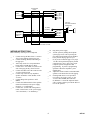
PABX LOOP TRUNK PORT
OR ELECTRONIC KEY
SYSTEM LINE BUTTON
TIP
RING
-24VDC POWER SUPPLY
A GROUND
A BATTERY
B GROUND
B BATTERY
PUNCHDOWN
BLOCK
(W/BL)
(BL/W)
(W/O)
(W/G)
(W/S)
(S/W)
(R/BL)
(BL/R)
26
1
27
28
30
5
31
6
(R/G)
(G/R)
(R/BR)
(BR/R)
33
8
34
9
(V/BR)
(BR/V)
(V/S)
(S/V)
49
24
50
25
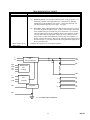
V-1101A
T (W/BL)
R (BL/W)
H (W/O)
DIR
(W/G)
BFT (W/S)
BFR (S/W)
A1 (R/BL)
A1 (BL/R)
MT (R/G)
MR (G/R)
ONE-WAY
AMPLIFIED SPEAKER
ASSEMBLIES
PG (R/BR)
OUT (BR/R)
AG
AB
BG
BB
(V/BR)
(BR/V)
(V/S)
(S/V)
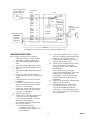
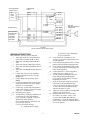
FIGURE 3
ELECTRONIC KEY SYSTEM LINE BUTTON ACCESS OR PABX LOOP TRUNK ACCESS
WIRING INSTRUCTIONS
Place a check by each step as it is completed.
__ 1. Add a strap on the V-1101A punchdown
block from Tip to BFT (W/BL to W/S).
__ 2. Add a strap from Ring to BFR (BL/W to
S/W).
__ 3. Add a strap from H to DIR (W/O to W/G).
__ 4. Add a strap from DIR to Red/Blue (W/G to
R/BL).
__ 5. Add a strap from Blue/Red to BG (BL/R to
V/S).
__ 6. Connect Tip of the one-way amplified
speaker assemblies to the V-1101A PG lead
(R/BR).
__ 7. Connect Ring of the speakers to the OUT
lead (BR/R).
__ 8. Connect the GND terminal of the speakers
(black lead of horns) to the power supply
Ground ("+" or "B Ground").
__ 9. Connect the –24 Vdc lead of the speakers
(white lead of horns) to the power supply
–24 Vdc ("-" or "B Battery").
__ 10. Plug in the power supply.
__ 11. Test the unit by connecting a lineman's test
set across the V-1101A Tip and Ring:
__
(a) Go "off hook" and speak. Your voice
should come out the speakers.
__
(b) If you hear the page: disconnect your
test set and go to step 12.
__
(c) If you do not hear the page:
(1) unplug the power supply;
(2) go back to step 1 and recheck all
your connections.
__ 12.
__ 13.
__ 14.
__
__
__ 15.
__ 16.
__
__
6
Connect the tip (W/BL) of the V-1101A to
Tip of your telephone system loop trunk port
(PABX) or C.O. line position (E-key).
Connect the Ring (BL/W) of the V-1101A
to Ring of the telephone system.
Test the system by dialing the proper trunk
access code (PABX) or pressing the
appropriate line key (E-key) and speaking
into the handset:
(a) If you hear the page, go to step 15.
(b) If you do not hear the page, verify proper
telephone system configuration and
programming. If you have programming
questions, contact the telephone system
manufacturer.
Adjust the volume controls on the individual
speakers to the desired levels.
If background music is to be provided:
(a) Connect the music source to the
V-1101A MT and MR (R/G and G/R).
(b) With the V-1101A idle adjust the music
source volume control to provide the desired
level at the speakers.
947101