1
Overview
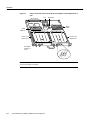
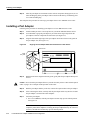
Figure 4-1
Catalyst RSM/VIP2-40 with One-Port PA-E3 Port Adapters in Port Adapter
Slots 0 and 1
Backplane
bus connector
Standoff
mounting
hole
Ribbon cables
Standoff
mounting
holes
Standoff
mounting
holes
Port adapter
securing screw
Port adapter
securing screw
PA-E3 in port
adapter slot 0
PA-E3 in port
adapter slot 1
LK
VR
C
R
C
R
TR
F
R
FE
L
E3 SERIAL
D
F
O
O
LL
VR
AB
EN
AIS
LK
LE
R
XM
C
R
C
R
TR
F
R
FE
AIS
F
O
O
L
R
XM
LL
T3 SERIAL
26452
D
LE
AB
EN
Port adapter
handles not
shown
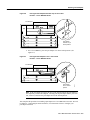
Note Port adapters have a handle attached, but this handle is not shown in the figure to allow a full
view of detail on each port adapter’s faceplate.
Depending on the circumstances, you might need to install a new port adapter on a
Catalyst RSM/VIP2 motherboard or replace a failed port adapter in the field. In either case, you need
the following items:
•
•
•
Number 1 Phillips screwdriver
Antistatic mat on which you can place the removed interface processor
Antistatic container in which you can place a failed port adapter for shipment back to the factory
Caution To prevent system problems, do not remove port adapters from the Catalyst RSM/VIP2
motherboard or attempt to install other port adapters on the Catalyst RSM/VIP2 motherboard while
the system is operating. To install or replace port adapters, first remove the Catalyst RSM/VIP2 from
its slot.
Note Each port adapter circuit board is mounted to a metal carrier and is sensitive to ESD damage.
The following procedures should be performed by a Cisco-certified service provider only. The
Catalyst RSM/VIP2 supports online insertion and removal (OIR), but individual port adapters do
not. To replace port adapters, you must first remove the Catalyst RSM/VIP2 from the chassis and
then install or replace port adapters as required. If a blank port adapter is installed on the
Catalyst RSM/VIP2 in which you want to install a new port adapter, you must first remove the
Catalyst RSM/VIP2 from the chassis and then remove the blank port adapter.
4-2
PA-E3 Serial Port Adapter Installation and Configuration