1
WatchGuard
Firebox System
Reference Guide
®
®
Firebox System 6.0
Notice to Users
Information in this guide is subject to change without notice. Companies, names, and data used in examples herein are
fictitious unless otherwise noted. No part of this guide may be reproduced or transmitted in any form or by any means,
electronic or mechanical, for any purpose, without the express written permission of WatchGuard Technologies, Inc.
Copyright, Trademark, and Patent Information
Copyright© 1998 - 2002 WatchGuard Technologies, Inc. All rights reserved.
Firebox, Firebox 1000, Firebox 2500, Firebox 4500, Firebox II, Firebox II Plus, Firebox II FastVPN, Firebox III,
Firebox SOHO, Firebox SOHO|tc, Firebox V100, Firebox V80, Firebox V60, Firebox V10, LiveSecurity,
RaipdStream, RapidCore, WatchGuard, WatchGuard Technologies, Inc., AppLock, AppLock/Web, Designing peace of
mind, DVCP technology, Enforcer/MUVPN, FireChip, HackAdmin, HostWatch, LockSolid, RapidCare, SchoolMate,
ServerLock, ServiceWatch, Smart Security. Simply Done, SpamScreen, Vcontroller are either registered trademarks
or trademarks of WatchGuard Technologies, Inc. in the United States and/or other courtries.
© Hi/fn, Inc. 1993, including one or more U.S. Patents: 4701745, 5016009, 5126739, and 5146221 and other
patents pending.
Microsoft®, Internet Explorer®, Windows® 95, Windows® 98, Windows NT® and Windows® 2000 are either
registered trademarks or trademarks of Microsoft Corporation in the United States and/or other countries.
Netscape and Netscape Navigator are registered trademarks of Netscape Communications Corporation in the United
States and other countries.
RC2 Symmetric Block Cipher, RC4 Symmetric Stream Cipher, RC5 Symmetric Block Cipher, BSAFE, TIPEM, RSA
Public Key Cryptosystem, MD, MD2, MD4, and MD5 are either trademarks or registered trademarks of RSA Data
Security, Inc. Certain materials herein are Copyright © 1992-1999 RSA Data Security, Inc. All rights reserved.
RealNetworks, RealAudio, and RealVideo are either a registered trademark or trademark of RealNetworks, Inc. in the
United States and/or other countries.
Java and all Jave-based marks are trademarks or registered trademarks of Sun Microsystems, Inc. in the United
States and other countries. All right reserved.
© 1995-1998 Eric Young (eay@cryptsoft). All rights reserved.
© 1998-2000 The OpenSSL Project. All rights reserved. Redistribution and use in source and binary forms, with or
without modification, are permitted provided that the following conditions are met:
1. Redistributions of source code must retain the above copyright notice, this list of conditions and the following
disclaimer.
2. Redistributions in binary form must reproduce the above copyright notice, this list of conditions and the following
disclaimer in the documentation and/or other materials provided with the distribution.
3. All advertising materials mentioning features or use of this software must display the following acknowledgment:
"This product includes software developed by the OpenSSL Project for use in the OpenSSL Toolkit. (http://
www.openssl.org/)"
4. The names "OpenSSL Toolkit" and "OpenSSL Project" must not be used to endorse or promote products derived from
this software without prior written permission. For written permission, please contact [email protected].
5. Products derived from this software may not be called "OpenSSL" nor may "OpenSSL" appear in their names without
prior written permission of the OpenSSL Project.
6. Redistributions of any form whatsoever must retain the following acknowledgment: "This product includes software
developed by the OpenSSL Project for use in the OpenSSL Toolkit (http://www.openssl.org/)"
THIS SOFTWARE IS PROVIDED BY THE OpenSSL PROJECT ``AS IS'' AND ANY EXPRESSED OR IMPLIED
WARRANTIES, INCLUDING, BUT NOT LIMITED TO, THE IMPLIED WARRANTIES OF MERCHANTABILITY
AND FITNESS FOR A PARTICULAR PURPOSE ARE DISCLAIMED. IN NO EVENT SHALL THE OpenSSL
PROJECT OR ITS CONTRIBUTORS BE LIABLE FOR ANY DIRECT, INDIRECT, INCIDENTAL, SPECIAL,
EXEMPLARY, OR CONSEQUENTIAL DAMAGES (INCLUDING, BUT NOT LIMITED TO, PROCUREMENT OF
SUBSTITUTE GOODS OR SERVICES; LOSS OF USE, DATA, OR PROFITS; OR BUSINESS INTERRUPTION)
HOWEVER CAUSED AND ON ANY THEORY OF LIABILITY, WHETHER IN CONTRACT, STRICT LIABILITY, OR
TORT (INCLUDING NEGLIGENCE OR OTHERWISE) ARISING IN ANY WAY OUT OF THE USE OF THIS
SOFTWARE, EVEN IF ADVISED OF THE POSSIBILITY OF SUCH DAMAGE.
This product includes cryptographic software written by Eric Young
([email protected]). This product includes software written by Tim
Hudson ([email protected]).
ii
WatchGuard Firebox System 6.0
© 1995-1998 Eric Young ([email protected])
All rights reserved.
This package is an SSL implementation written by Eric Young ([email protected]).
The implementation was written so as to conform with Netscapes SSL.
This library is free for commercial and non-commercial use as long as the following conditions are aheared to. The
following conditions apply to all code found in this distribution, be it the RC4, RSA, lhash, DES, etc., code; not just the
SSL code. The SSL documentation included with this distribution is covered by the same copyright terms except that
the holder is Tim Hudson ([email protected]).
Copyright remains Eric Young's, and as such any Copyright notices in the code are not to be removed. If this package is
used in a product, Eric Young should be given attribution as the author of the parts of the library used. This can be in
the form of a textual message at program startup or in documentation (online or textual) provided with the package.
Redistribution and use in source and binary forms, with or without modification, are permitted provided that the
following conditions are met:
1. Redistributions of source code must retain the copyright notice, this list of conditions and the following disclaimer.
2. Redistributions in binary form must reproduce the above copyright notice, this list of conditions and the following
disclaimer in the documentation and/or other materials provided with the distribution.
3. All advertising materials mentioning features or use of this software must display the following acknowledgement:
"This product includes cryptographic software written by Eric Young ([email protected])" The word 'cryptographic'
can be left out if the routines from the library being used are not cryptographic related :-).
4. If you include any Windows specific code (or a derivative thereof) from the apps directory (application code) you
must include an acknowledgement: "This product includes software written by Tim Hudson ([email protected])"
THIS SOFTWARE IS PROVIDED BY ERIC YOUNG ``AS IS'' AND ANY EXPRESS OR IMPLIED WARRANTIES,
INCLUDING, BUT NOT LIMITED TO, THE IMPLIED WARRANTIES OF MERCHANTABILITY AND FITNESS
FOR A PARTICULAR PURPOSE ARE DISCLAIMED. IN NO EVENT SHALL THE AUTHOR OR CONTRIBUTORS
BE LIABLE FOR ANY DIRECT, INDIRECT, INCIDENTAL, SPECIAL, EXEMPLARY, OR CONSEQUENTIAL
DAMAGES (INCLUDING, BUT NOT LIMITED TO, PROCUREMENT OF SUBSTITUTE GOODS OR SERVICES;
LOSS OF USE, DATA, OR PROFITS; OR BUSINESS INTERRUPTION) HOWEVER CAUSED AND ON ANY
THEORY OF LIABILITY, WHETHER IN CONTRACT, STRICT LIABILITY, OR TORT (INCLUDING NEGLIGENCE
OR OTHERWISE) ARISING IN ANY WAY OUT OF THE USE OF THIS SOFTWARE, EVEN IF ADVISED OF THE
POSSIBILITY OF SUCH DAMAGE.
The licence and distribution terms for any publicly available version or derivative of this code cannot be changed. i.e.
this code cannot simply be copied and put under another distribution licence [including the GNU Public Licence.]
The mod_ssl package falls under the Open-Source Software label because it's distributed under a BSD-style license. The
detailed license information follows.
Copyright (c) 1998-2001 Ralf S. Engelschall. All rights reserved.
Redistribution and use in source and binary forms, with or without modification, are permitted provided that the
following conditions are met:
1. Redistributions of source code must retain the above copyright notice, this list of conditions and the following
disclaimer.
2. Redistributions in binary form must reproduce the above copyright notice, this list of conditions and the following
disclaimer in the documentation and/or other materials provided with the distribution.
3. All advertising materials mentioning features or use of this software must display the following acknowledgment:
"This product includes software developed by Ralf S. Engelschall <[email protected]> for use in the mod_ssl
project (http://www.modssl.org/)."
4. The names "mod_ssl" must not be used to endorse or promote products derived from this software without prior
written permission. For written permission, please contact [email protected].
5. Products derived from this software may not be called "mod_ssl" nor may "mod_ssl" appear in their names without
prior written permission of Ralf S. Engelschall.
6. Redistributions of any form whatsoever must retain the following acknowledgment: "This product includes software
developed by Ralf S. Engelschall <[email protected]> for use in the mod_ssl project (http://www.modssl.org/)."
THIS SOFTWARE IS PROVIDED BY RALF S. ENGELSCHALL ``AS IS'' AND ANY EXPRESSED OR IMPLIED
WARRANTIES, INCLUDING, BUT NOT LIMITED TO, THE IMPLIED WARRANTIES OF MERCHANTABILITY
AND FITNESS FOR A PARTICULAR PURPOSE ARE DISCLAIMED. IN NO EVENT SHALL RALF S.
ENGELSCHALL OR HIS CONTRIBUTORS BE LIABLE FOR ANY DIRECT, INDIRECT, INCIDENTAL, SPECIAL,
EXEMPLARY, OR CONSEQUENTIAL DAMAGES (INCLUDING, BUT NOT LIMITED TO, PROCUREMENT OF
SUBSTITUTE GOODS OR SERVICES; LOSS OF USE, DATA, OR PROFITS; OR BUSINESS INTERRUPTION)
HOWEVER CAUSED AND ON ANY THEORY OF LIABILITY, WHETHER IN CONTRACT, STRICT LIABILITY, OR
TORT (INCLUDING NEGLIGENCE OR OTHERWISE) ARISING IN ANY WAY OUT OF THE USE OF THIS
SOFTWARE, EVEN IF ADVISED OF THE POSSIBILITY OF SUCH DAMAGE.
Reference Guide
iii
The Apache Software License, Version 1.1
Copyright (c) 2000 The Apache Software Foundation. All rights reserved.
Redistribution and use in source and binary forms, with or without modification, are permitted provided that the
following conditions are met:
1. Redistributions of source code must retain the above copyright notice, this list of conditions and the following
disclaimer.
2. Redistributions in binary form must reproduce the above copyright notice, this list of conditions and the following
disclaimer in the documentation and/or other materials provided with the distribution.
3. The end-user documentation included with the redistribution, if any, must include the following acknowledgment:
"This product includes software developed by the Apache Software Foundation (http://www.apache.org/)." Alternately,
this acknowledgment may appear in the software itself, if and wherever such third-party acknowledgments normally
appear.
4. The names "Apache" and "Apache Software Foundation" must not be used to endorse or promote products derived
from this software without prior written permission. For written permission, please contact [email protected].
5. Products derived from this software may not be called "Apache", nor may "Apache" appear in their name, without
prior written permission of the Apache Software Foundation.
THIS SOFTWARE IS PROVIDED ``AS IS'' AND ANY EXPRESSED OR IMPLIED WARRANTIES, INCLUDING,
BUT NOT LIMITED TO, THE IMPLIED WARRANTIES OF MERCHANTABILITY AND FITNESS FOR A
PARTICULAR PURPOSE ARE DISCLAIMED. IN NO EVENT SHALL THE APACHE SOFTWARE FOUNDATION
OR ITS CONTRIBUTORS BE LIABLE FOR ANY DIRECT, INDIRECT, INCIDENTAL, SPECIAL, EXEMPLARY,
OR CONSEQUENTIAL DAMAGES (INCLUDING, BUT NOT LIMITED TO, PROCUREMENT OF SUBSTITUTE
GOODS OR SERVICES; LOSS OF USE, DATA, OR PROFITS; OR BUSINESS INTERRUPTION) HOWEVER
CAUSED AND ON ANY THEORY OF LIABILITY, WHETHER IN CONTRACT, STRICT LIABILITY, OR TORT
(INCLUDING NEGLIGENCE OR OTHERWISE) ARISING IN ANY WAY OUT OF THE USE OF THIS SOFTWARE,
EVEN IF ADVISED OF THE POSSIBILITY OF SUCH DAMAGE.
This software consists of voluntary contributions made by many individuals on behalf of the Apache Software
Foundation. For more information on the Apache Software Foundation, please see <http://www.apache.org/>.
Portions of this software are based upon public domain software originally written at the National Center for
Supercomputing Applications, University of Illinois, Urbana-Champaign.
All other trademarks or trade names mentioned herein, if any, are the property of their respective owners.
Part No:
iv
WatchGuard Firebox System 6.0
Contents
CHAPTER 1 Internet Protocol Reference ..................... 1
Internet Protocol Header .................................................. 1
..................................................... 2
Internet Protocol Options ................................................. 6
Transfer Protocols ............................................................ 7
UDP ........................................................................... 7
TCP ........................................................................... 8
ICMP .......................................................................... 8
Other protocols ............................................................ 8
Standard Ports and Random Ports .................................... 9
IP header number list
CHAPTER 2 MIME Content Types
............................... 11
CHAPTER 3 Services and Ports ................................... 27
Ports Used by WatchGuard Products ............................... 28
Ports used by Microsoft Products .................................... 29
Well-Known Services List ................................................ 30
CHAPTER 4 Hardware Illustrations ............................. 39
Firebox Illustrations and Descriptions .............................. 39
Firebox II, Firebox II Plus, and Firebox II FastVPN ..............
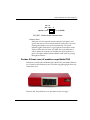
Firebox III front view (all models except Model 700) ...........
Reference Guide
39
43
v
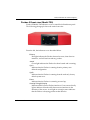
Firebox III front view (Model 700) ................................... 45
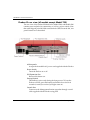
Firebox III rear view (all models except Model 700) ............ 46
Firebox III rear view (Model 700) .................................... 48
............................................................................... 49
CHAPTER 5 Types of Services ...................................... 51
Packet Filter Services ...................................................... 51
Any .......................................................................... 51
AOL ......................................................................... 52
archie ....................................................................... 52
auth (ident) ................................................................ 53
Citrix ICA (WinFrame) .................................................. 54
Clarent-gateway .......................................................... 54
Clarent-command ....................................................... 55
CU-SeeMe ................................................................. 56
DHCP-Server/Client ..................................................... 56
DNS ......................................................................... 57
Filtered-HTTP ............................................................. 57
Filtered-SMTP ............................................................ 58
finger ........................................................................ 58
Gopher ..................................................................... 59
HTTPS ...................................................................... 59
IMAP ........................................................................ 59
LDAP ........................................................................ 60
Lotus Notes ............................................................... 60
NNTP ....................................................................... 61
NTP .......................................................................... 62
Outgoing Services ....................................................... 62
pcAnywhere ............................................................... 62
ping ......................................................................... 63
POP2 and POP3 ......................................................... 63
PPTP ........................................................................ 64
RADIUS ..................................................................... 64
RIP ........................................................................... 65
SMB (Windows Networking) .......................................... 65
SNMP ....................................................................... 67
vi
WatchGuard Firebox System 6.0
SNMP-Trap ................................................................
SQL*Net ...................................................................
Sybase SQL-Server ......................................................
ssh ...........................................................................
syslog .......................................................................
TACACS ...................................................................
TACACS+ .................................................................
telnet .......................................................................
TFTP ........................................................................
Timbuktu ..................................................................
Time ........................................................................
traceroute .................................................................
WAIS ........................................................................
WatchGuard ..............................................................
WatchGuard Encrypted Connections ..............................
WatchGuard Logging ..................................................
WGAgent ..................................................................
whois .......................................................................
67
67
68
68
69
70
70
71
71
72
72
72
73
73
74
74
74
75
Proxied Services ............................................................ 75
DCE-RPC .................................................................. 75
FTP .......................................................................... 76
H323 ........................................................................ 77
HTTP ........................................................................ 77
Proxied-HTTP ............................................................. 78
RealNetworks ............................................................. 79
RTSP ........................................................................ 80
SMTP ....................................................................... 80
StreamWorks ............................................................. 81
VDOLive ................................................................... 82
CHAPTER 6 Common Log Messages
.......................... 85
CHAPTER 7 WebBlocker Content ............................... 97
WebBlocker Categories ................................................. 97
Searching for Blocked Sites .......................................... 100
Reference Guide
vii
CHAPTER 8 Resources ................................................ 101
Publishers .................................................................... 101
Books .......................................................................... 102
Non-Fiction .............................................................. 102
Fiction .................................................................... 103
White Papers & Requests for Comments ........................ 103
Mailing Lists ................................................................ 103
Web Sites .................................................................... 104
Newsgroups ................................................................ 106
CHAPTER 9 Out-of-Band Initialization Strings ......... 107
PPP Initialization Strings ............................................... 107
Modem Initialization Strings .......................................... 113
CHAPTER 10 Firebox Read-Only System Area .......... 117
Read-Only System Area ................................................ 117
Enhanced System Mode ............................................... 118
Initializing a Firebox using TCP/IP ................................. 118
Initializing a Firebox Using a Serial Cable ....................... 119
Booting from the system area ...................................... 120
Working with a Firebox booted from the read-only
system area .............................................................. 120
Troubleshooting ........................................................ 121
Initializing a Firebox Using a Modem ............................. 122
Initializing using Remote Provisioning ............................ 122
Managing Flash Disk Memory ....................................... 124
Making a backup of the current configuration ................. 124
Restoring a backup configuration ................................. 125
CHAPTER 11 Glossary
.................................................. 127
CHAPTER 12 Field Definitions ..................................... 173
Control Center ............................................................. 173
Connect to Firebox dialog box .................................... 173
Enter Read/Write Passphrase dialog box ........................ 174
Polling dialog box ..................................................... 174
Syslog Color dialog box ............................................. 174
viii
WatchGuard Firebox System 6.0
....................................... 175
Enter Encryption Key dialog box .................................. 175
Flash Disk Management Tool dialog box ....................... 175
Log Utility ................................................................... 176
Copy or Merge Logs dialog box .................................. 176
LogViewer ................................................................... 177
Find Keyphrase dialog box ......................................... 177
Preferences dialog box .............................................. 178
Search Fields dialog box ............................................ 178
Policy Manager ........................................................... 180
1-to-1 Mapping dialog box ......................................... 180
Add Address dialog box ............................................ 180
Add Dynamic NAT dialog box ..................................... 181
Add Exception dialog box .......................................... 181
Add External IP dialog box ......................................... 182
Add Firebox Group dialog box .................................... 182
Add IP Address dialog box ......................................... 182
Add Member dialog box ............................................ 183
Add Port dialog box .................................................. 183
Add Route dialog box ............................................... 184
Add Service dialog box .............................................. 184
Add Static NAT dialog box ......................................... 184
Advanced DVCP Policy Configuration dialog box ............ 185
Advanced Dynamic NAT dialog box ............................. 185
Advanced Export File Preferences dialog box ................. 186
Flash Disk Management Tool
Advanced Mobile User VPN Policy Configuration dialog
box .............................................................................. 186
Aliases dialog box ..................................................... 188
Authentication Servers dialog box ................................ 188
Basic DVCP Server Configuration dialog box .................. 192
Blocked Ports dialog box ........................................... 192
Blocked Sites dialog box ............................................ 193
Blocked Sites Exceptions dialog box ............................ 194
Certificate Authority Configuration ............................... 194
Configure Gateways dialog box ................................... 195
Reference Guide
ix
Configure IPSec Tunnels dialog box .............................. 195
Configure Tunnels dialog box ...................................... 196
Configure Tunnel dialog box ....................................... 196
Connect to Firebox dialog box .................................... 197
Default Gateway dialog box ........................................ 197
Default Packet Handling dialog box .............................. 197
DHCP Server dialog box ............................................. 199
DHCP Subnet Properties dialog box ............................. 200
DVCP Client Setup dialog box ..................................... 201
DVCP Client Wizard ................................................... 202
DVCP Server Properties dialog box ............................... 203
DVCP Server Properties dialog box ............................... 204
Dynamic NAT dialog box ............................................ 205
Edit Routing Policy dialog box ..................................... 206
Enter Firebox Access Passphrases dialog box ................. 207
Enter Tunnel Name dialog box ..................................... 207
Filter Authentication dialog box ................................... 208
Firebox Flash Disk dialog box ...................................... 209
Firebox Name dialog box ........................................... 210
FTP Proxy dialog box ................................................. 210
Generate Key dialog box ............................................ 211
High Availability dialog box ......................................... 211
Host Alias dialog box ................................................. 212
HTTP Proxy dialog box ............................................... 212
Incoming dialog box .................................................. 219
Incoming SMTP Proxy dialog box ................................. 220
IPSec Configuration dialog box .................................... 224
IPSec Logging dialog box ........................................... 225
Logging and Notification dialog box ............................. 226
Logging Setup dialog box .......................................... 227
Manual Security dialog box ......................................... 228
Mobile User Client - Select New Passphrase dialog box .... 228
Mobile User VPN Wizard ............................................ 228
Mobile User VPN dialog box ....................................... 231
NAT Setup dialog box ................................................ 232
x
WatchGuard Firebox System 6.0
Network Configuration dialog box ...............................
New MIME Type dialog box ........................................
New Service dialog box .............................................
Outgoing SMTP Proxy dialog box ................................
PPTP Logging dialog box ...........................................
Remote Gateway dialog box .......................................
Remote User Setup dialog box ....................................
Select Firebox Time Zone dialog box ............................
Select Gateway dialog box .........................................
Select MIME Type dialog box ......................................
Services dialog box ...................................................
Service Properties dialog box ......................................
Set Policy Ordering dialog box ....................................
Setup Firebox User dialog box ....................................
Setup New User dialog box ........................................
Setup Routes dialog box ............................................
Slash Notation dialog box ..........................................
SpamScreen dialog box .............................................
WatchGuard Find dialog box ......................................
WatchGuard VPN dialog box ......................................
233
238
238
239
241
241
242
244
244
244
244
245
247
247
248
248
249
249
250
250
Firebox Monitors ......................................................... 252
Add Displayed Service dialog box ................................ 252
Remove Site dialog box ............................................. 252
View Properties dialog box ......................................... 252
Historical Reports ........................................................ 254
Add Report Filter dialog box ....................................... 254
Historical Reports dialog box ...................................... 255
Report Properties dialog box ...................................... 256
HostWatch .................................................................. 260
Filter Properties dialog box ......................................... 260
Properties dialog box ................................................ 261
WatchGuard Security Event Processor ........................... 262
Set Log Encryption Key dialog box ............................... 265
Index ......................................................................... 267
Reference Guide
xi
xii
WatchGuard Firebox System 6.0
CHAPTER 1
Internet Protocol Reference
Internet Protocol (IP) specifies the format of packets and the addressing
scheme for sending data over the Internet. By itself, it functions like a
postal system allowing you to address a package and drop it into the
system. There is, however, no direct link between you and the recipient.
In other words, there is no package.
Most networks combine IP with higher-level protocols like Transmission
Control Protocol (TCP). Unlike simple IP, TCP/IP establishes a
connection between two host servers so that they can send messages back
and forth. TCP/IP provides the “packaging.”
Internet Protocol Header
IP is an Internet standard that enables the shipment of datagrams – selfcontained packets of information that include their own address and
delivery instructions. IP prepends a header to each datagram. The IP
header contains a minimum of twelve attributes as well as additional
optional attributes.
Reference Guide
1
CHAPTER 1: Internet Protocol Reference
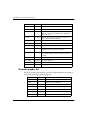
Attribute
Size
Description
Version
4 bits
IP format number (Current version = 4)
IHL
4 bits
Header length in 32-bit words (Minimum = 5)
TOS
8 bits
Type of service sets routing priorities. It is
generally under-utilized because few application
layers can set it.
Tot_Len
16 bits
Total length of packet measured in octets. It is
used in reassembling fragments.
ID
16 bits
Packet ID, used for reassembling fragments.
Flags
3 bits
Miscellaneous flags
Frag_Off
13 bits
Identifies fragment part for this packet.
TTL
8 bits
Time to live. It sets the maximum time the
datagram remains alive in the system.
Protocol
8 bits
IP protocol number. Indicates which of TCP,
UDP, ICMP, IGMP, or other Transport protocol
is inside.
Check
16 bits
Checksum for the IP header
Sour_Addr
32 bits
Source IP address
Dest_Addr
32 bits
Destination IP address
Options
24 bits
IP Options (Present if IHL is 6)
IP header number list
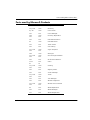
The IP Protocol header contains an 8-bit field that identifies the protocol
for the Transport layer for the datagram.
Keyword
2
Number
Protocol
0
Reserved
ICMP
1
Internet Control Message
IGMP
2
Internet Group Management
GGP
3
Gateway-to-Gateway
IP
4
IP-within-IP (encapsulation)
ST
5
Stream
TCP
6
Transmission Control Protocol
WatchGuard Firebox System 6.0
Internet Protocol Header
Reference Guide
Keyword
Number
Protocol
UCL
7
UCL
EGP
8
Exterior Gateway Protocol
IGP
9
Any private interior gateway
BBN-RCCMON
10
BBN RCC Monitoring
NVP-II
11
Network Voice Protocol
PUP
12
PUP
ARGUS
13
ARGUS
EMCON
14
EMCON
XNET
15
Cross Net Debugger
CHAOS
16
Chaos
UDP
17
User Datagram Protocol
MUX
18
Multiplexing
DCN-MEAS
19
DCN Measurement Subsystems
HMP
20
Host Monitoring
PRM
21
Packet Radio Measurement
XNS-IDP
22
XEROX NS IDP
TRUNK-1
23
Trunk-1
TRUNK-2
24
Trunk-2
LEAF-1
25
Leaf-1
LEAF-2
26
Leaf-2
RDP
27
Reliable Data Protocol
IRTP
28
Internet Reliable Transaction
ISO-TP4
29
ISO Transport Protocol Class 4
NETBLT
30
Bulk Data Transfer Protocol
MFE-NSP
31
MFE Network Services Protocol
MERIT-INP
32
MERIT Internodal Protocol
SEP
33
Sequential Exchange Protocol
3PC
34
Third Party Connect Protocol
IDPR
35
Inter-Domain Policy Routing Protocol
3
CHAPTER 1: Internet Protocol Reference
Keyword
Number
Protocol
XTP
36
XTP
DDP
37
Datagram Delivery Protocol
IDPR-CMTP
38
IDPR Control Message Transport
Protocol
TP++
39
TP++ Transport Protocol
IL
40
IL Transport Protocol
SIP
41
Simple Internet Protocol
SDRP
42
Source Demand Routing Protocol
SIP-SR
43
SIP Source Route
SIP-FRAG
44
SIP Fragment
IDRP
45
Inter-Domain Routing Protocol
RSVP
46
Reservation Protocol
GRE
47
General Routing Encapsulation
MHRP
48
Mobile Host Routing Protocol
BNA
49
BNA
ESP
50
Encapsulated Security Payload
AH
51
Authentication Header
I-NLSP
52
Integrated Net Layer Security TUBA
SWIPE
53
IP with Encryption
NHRP
54
NBMA Next Hop Resolution Protocol
55-60
Unassigned
61
Any host internal protocol
62
CFTP
63
Any local network
SAT-EXPAK
64
SATNET and Backroom EXPAK
KRYPTOLAN
65
Kryptolan
RVD
66
MIT Remote Virtual Disk Protocol
IPPC
67
Internet Pluribus Packet Core
68
Any distributed file system
69
SATNET Monitoring
CFTP
SAT-MON
4
WatchGuard Firebox System 6.0
Internet Protocol Header
Reference Guide
Keyword
Number
Protocol
VISA
70
VISA Protocol
IPCV
71
Internet Packet Core Utility
CPNX
72
Computer Protocol Network Executive
CPHB
73
Computer Protocol Heart Beat
WSN
74
Wang Span Network
PVP
75
Packet Video Protocol
BR-SATMON
76
Backroom SATNET Monitoring
SUN-ND
77
SUN NDPROTOCOL-Temporary
WB-MON
78
WIDEBAND Monitoring
WB-EXPAK
79
WIDEBAND EXPAK
ISO-IP
80
ISO Internet Protocol
VMTP
81
VMTP
SECUREVMTP
82
SECURE-VMTP
VINES
83
VINES
TTP
84
TTP
NSFNET-IGP
85
NSFNET-IGP
DGP
86
Dissimilar Gateway Protocol
TCF
87
TCF
IGRP
88
IGRP
OSPFIGP
89
OSPFIGP
SPRITE-RPC
90
Sprite RPC Protocol
LARP
91
Locus Address Resolution Protocol
MTP
92
Multicast Transport Protocol
AX.25
93
AX.25 Frames
IPIP
94
IP-within-IP Encapsulation Protocol
MICP
95
Mobile Internetworking Control
Protocol
SCC-SP
96
Semaphore Communications Security
Protocol
5
CHAPTER 1: Internet Protocol Reference
Keyword
Number
Protocol
ETHERIP
97
Ethernet-within-IP Encapsulation
ENCAP
98
Encapsulation Header
99
Any private encryption scheme
100
GMTP
101-254
Unassigned
255
Reserved
GMTP
Internet Protocol Options
Internet Protocol options are variable-length additions to the standard IP
header. Unfortunately, enabling IP options can be risky; hackers can use
them to specify a route that helps them gain access to your network.
Because most applications make it very obscure or difficult to use IP
options, they are rarely used.
There are several kinds of IP options:
Security
Control routing of IP packets that carry sensitive data. Security
options are rarely supported.
Stream ID (SID)
The stream ID option is rarely supported.
Source Routing
Both the loose source route option and the strict source route
option enable the source of an Internet packet to provide routing
information. Source routing options can be very dangerous,
because a clever attacker might use them to masquerade as
another site. However, loose source routing and the traceroute
facility can also help debug some obscure routing problems.
Record Route
The record route option was originally intended for use in testing
the Internet. Unfortunately, record route can record only ten IP
addresses. On the present Internet, typical long-haul
6
WatchGuard Firebox System 6.0
Transfer Protocols
transmissions can involve twenty or thirty hops, rendering the
record route option obsolete.
Time Stamp
The time stamp option helps measure network propagation
delays. This task is done more effectively, however, with higherlevel time protocols or time-stamp messages.
Transfer Protocols
The IP protocol encapsulates information contained in the transport layer.
The transport layer has several protocols that specify how to transmit
data between applications: for example, UDP, TCP, ICMP, and others.
UDP
User Datagram Protocol (UDP) is a connectionless, potentially unreliable
datagram protocol. It trades reliability for speed and low overhead. To
ensure accurate transmission, it requires that the application layer verify
that packets arrive at their destination.
Characteristics of UDP include:
• Often used for services involving the transfer of small amounts of
data where retransmitting a request is not a problem.
• Used for services such as time synchronization in which an
occasionally lost packet will not affect continued operation. Many
systems using UDP resend packets at a constant rate to inform their
peers about interesting events.
• Primarily used on LANs, in particular for Network File System (NFS)
services where its low overhead gives it a substantial performance
advantage. (Network File System is a popular TCP/IP service for
providing shared file systems over a network.) A lack of congestion
control means that using UDP for bulk data transfer over long-haul
connections is not recommended.
• Supports broadcasts.
• Provides abstraction of ports.
Reference Guide
7
CHAPTER 1: Internet Protocol Reference
•
A connection is described by its source and destination ports and its
source and destination IP addresses. In typical usage, port numbers
below 1024 are reserved for well-known services (destinations), and
the client side is supposed to use ports above 1023 for the source of
the connection. However, this rule has many notable exceptions. In
particular, NFS (port 2049) and Archie (port 1525) use server ports at
numbers above 1024. Some services use the same source and
destination port for server-to-server connections. Common examples
are DNS (53), NTP (123), syslog (514), and RIP (520).
TCP
Transmission Control Protocol (TCP) provides reliable stream-oriented
services. It trades speed and overhead for increased reliability. Like UDP,
TCP provides source and destination ports that are used in a similar
fashion.
TCP uses a rather complicated state machine to manage connections.
There are several attribute bits that control the state of a connection. Three
very important attribute bits of TCP packets are the SYN, ACK, and FIN
bits. The SYN bit is set only on the first packet sent in each direction for a
given connection. The ACK bit is set when the other side is
acknowledging the receipt of data to the peer. The FIN bit is set when
either side chooses to close the connection.
ICMP
The Internet Control Message Protocol (ICMP) is used primarily to
deliver error information about other services. It is otherwise quite similar
in practical operation to UDP. That is, it is connectionless and does not
guarantee that packets are delivered to their destination. One dangerous
ICMP packet is the ICMP redirect packet, which can change routing
information on the machines that receive it.
Other protocols
The vast majority of the traffic on the Internet uses one of the three
protocols mentioned above. There are some others that are of interest:
8
WatchGuard Firebox System 6.0
Standard Ports and Random Ports
IGMP (Internet Group Multicast Protocol)
A protocol primarily designed for hosts on multiaccess networks
to inform locally attached routers of their group membership
information.
IPIP (IP-within-IP)
An encapsulation protocol used to build virtual networks over the
Internet.
GGP (Gateway-Gateway Protocol)
A routing protocol used between autonomous systems.
GRE
A protocol used for PPTP.
ESP
An encryption protocol used for IPSec.
Standard Ports and Random Ports
UDP and TCP encapsulate information contained within the application
layer. The appropriate application processes are designated by source and
destination port numbers. These port numbers, along with the source and
destination IP addresses, specify a unique connection on the Internet.
For example, it is reasonable to have two telnet sessions from one host to
another. However, since telnet uses a well-known service number of 23,
something must distinguish these two connections. The other port in
these cases will be a port that is typically greater than 1023. This
alternative port designation is dynamically allocated by the operating
system on the client side.
Random ports can cause a great amount of trouble if they happen to
match a well-known service on a port above 1023. If some client machine
assigns a random port of 2049, the connection may mysteriously fail.
Similar problems can occur with the X Window and Archie services.
In practice, most operating systems cycle port numbers between 1024 and
a number somewhere in the range of 2100, depending on how many TCP
connections are currently open and whether a recently closed connection
used a similar port number. This makes the above problem rare.
Reference Guide
9
CHAPTER 1: Internet Protocol Reference
10
WatchGuard Firebox System 6.0
CHAPTER 2
MIME Content Types
A content-type header is used by applications to determine what kind of
data they are receiving, thus allowing them to make decisions about how
it should be handled. It allows clients to correctly identify and display
video clips, images, sound, or non-HTML data. People are probably most
familiar with the MIME content types sent in email.
The WatchGuard Proxied HTTP service uses content-type headers to
determine whether to allow or deny an HTTP transaction. Use Policy
Manager to configure the Proxied HTTP service to allow or deny contenttypes. Content types are also used in SMTP and are configurable in the
SMTP proxy. This chapter contains a list of the more commonly used
MIME content-types.
Wildcards may be used to select all subtypes within a type, thereby
denying all or allowing all of that MIME type. For example, to allow all
content-types that are text (including text/enriched, text/plain, and
others), use the content-type text/*.
New, registered MIME content types appear regularly. WatchGuard
recommends frequent checking of an online reference for the most current
list. One source of current MIME types is:
ftp://ftp.isi.edu/in-notes/iana/assignments/media-types
Reference Guide
11
CHAPTER 2: MIME Content Types
In addition, WatchGuard encourages you to email requests for inclusion
of new content types in our master list to:
[email protected]
12
Type
Subtype
Reference
text
plain
[RFC2646, RFC2046]
richtext
[RFC2045, RFC2046]
enriched
[RFC1896]
tab-separated-values
[Paul Lindner]
html
[RFC2854]
sgml
[RFC1874]
vnd.latex-z
[Lubos]
vnd.fmi.flexstor
[Hurtta]
uri-list
[RFC2483]
vnd.abc
[Allen]
rfc822-headers
[RFC1892]
vnd.in3d.3dml
[Powers]
prs.lines.tag
[Lines]
vnd.in3d.spot
[Powers]
css
[RFC2318]
xml
[RFC3023]
xml-external-parsed-entity
[RFC3023]
rtf
[Lindner]
directory
[RFC2425]
calendar
[RFC2445]
vnd.wap.wml
[Stark]
vnd.wap.wmlscript
[Stark]
vnd.motorola.reflex
[Patton]
vnd.fly
[Gurney]
vnd.wap.sl
[WAP-Forum]
vnd.wap.si
[WAP-Forum]
WatchGuard Firebox System 6.0
text
multipart
message
application
Reference Guide
t140
[RFC2793]
vnd.ms-mediapackage
[Nelson]
vnd.IPTC.NewsML
[IPTC]
vnd.IPTC.NITF
[IPTC]
vnd.curl
[Hodge]
vnd.DMClientScript
[Bradley]
parityfec
[RFC3009]
mixed
[RFC2045, RFC2046]
alternative
[RFC2045, RFC2046]
digest
[RFC2045, RFC2046]
parallel
[RFC2045, RFC2046]
appledouble
[MacMime, Patrick
Faltstrom
header-set
[Dave Crocker]
form-data
[RFC2388]
related
[RFC2387]
report
[RFC1892]
voice-message
[RFC2421, RFC2423]
signed
[RFC1847]
encrypted
[RFC1847]
byteranges
[RFC2068]
rfc822
[RFC2045, RFC2046]
partial
[RFC2045, RFC2046]
external-body
[RFC2045, RFC2046]
news
[RFC 1036, Henry
Spencer]
http
[RFC2616]
delivery-status
[RFC1894]
disposition-notification
[RFC2298]
s-http
[RFC2660]
octet-stream
[RFC2045, RFC2046]
13
CHAPTER 2: MIME Content Types
application
14
postscript
[RFC2045, RFC2046]
oda
[RFC2045, RFC2046]
atomicmail
[atomicmail, Borenstein]
andrew-inset
[andrew-inset, Borenstein]
slate
[slate, terry crowley]
wita
[Wang Info Transfer,
Larry Campbell]
dec-dx
[Digital Doc Trans, Larry
Campbell]
dca-rft
[IBM Doc Content Arch,
Larry Campbell]
activemessage
[Ehud Shapiro]
rtf
[Paul Lindner]
applefile
[MacMime, Patrick
Faltstrom]
mac-binhex40
[MacMime, Patrik
Faltstrom]
news-message-id
[RFC1036, Henry
Spencer]
news-transmission
[RFC1036, Henry
Spencer]
wordperfect5.1
[Paul Lindner]
pdf
[Paul Lindner]
zip
[Paul Lindner]
macwriteii
[Paul Lindner]
msword
[Paul Lindner]
remote-printing
[RFC1486, Rose]
mathematica
[Van Nostern]
cybercash
[Eastlake]
commonground
[Glazer]
iges
[Parks]
riscos
[Smith]
eshop
[Katz]
WatchGuard Firebox System 6.0
application
Reference Guide
x400-bp
[RFC1494]
sgml
[RFC1874]
cals-1840
[RFC1895]
pgp-encrypted
[RFC3156]
pgp-signature
[RFC3156]
pgp-keys
[RFC3156]
vnd.framemaker
[Wexler]
vnd.mif
[Wexler]
vnd.ms-excel
[Gill]
vnd.ms-powerpoint
[Gill]
vnd.ms-project
[Gill]
vnd.ms-works
[Gill]
vnd.ms-tnef
[Gill]
vnd.svd
[Becker]
vnd.music-niff
[Butler]
vnd.ms-artgalry
[Slawson]
vnd.truedoc
[Chase]
vnd.koan
[Cole]
vnd.street-stream
[Levitt]
vnd.fdf
[Zilles]
set-payment-initiation
[Korver]
set-payment
[Korver]
set-registration-initiation
[Korver]
set-registration
[Korver]
vnd.seemail
[Webb]
vnd.businessobjects
[Imoucha]
vnd.meridian-slingshot
[Wedel]
vnd.xara
[Matthewman]
sgml-open-catalog
[Grosso]
vnd.rapid
[Szekely]
vnd.enliven
[Santinelli]
15
CHAPTER 2: MIME Content Types
application
16
vnd.japannet-registration-wakeup
[Fujii]
vnd.japannet-verification-wakeup
[Fujii]
vnd.japannet-payment-wakeup
[Fujii]
vnd.japannet-directory-service
[Fujii]
vnd.intertrust.digibox
[Tomasello]
vnd.intertrust.nncp
[Tomasello]
prs.alvestrand.titrax-sheet
[Alvestrand]
vnd.noblenet-web
[Solomon]
vnd.noblenet-sealer
[Solomon]
vnd.noblenet-directory
[Solomon]
prs.nprend
[Doggett]
vnd.webturbo
[Rehem]
hyperstudio
[Domino]
vnd.shana.informed.formtemplat
e
[Selzler]
vnd.shana.informed.formdata
[Selzler]
vnd.shana.informed.package
[Selzler]
vnd.shana.informed.interchange
[Selzler]
vnd.$commerce_battelle
[Applebaum]
vnd.osa.netdeploy
[Klos]
vnd.ibm.MiniPay
[Herzberg]
vnd.japannet-jpnstore-wakeup
[Yoshitake]
vnd.japannet-setstore-wakeup
[Yoshitake]
vnd.japannet-verification
[Yoshitake]
vnd.japannet-registration
[Yoshitake]
vnd.hp-HPGL
[Pentecost]
vnd.hp-PCL
[Pentecost]
vnd.hp-PCLXL
[Pentecost]
vnd.musician
[Adams]
vnd.FloGraphIt
[Floersch]
vnd.intercon.formnet
[Gurak]
WatchGuard Firebox System 6.0
application
Reference Guide
vemmi
[RFC2122]
vnd.ms-asf
[Fleischman]
vnd.ecdis-update
[Buettgenbach]
vnd.powerbuilder6
[Guy]
vnd.powerbuilder6-s
[Guy]
vnd.lotus-wordpro
[Wattenberger]
vnd.lotus-approach
[Wattenberger]
vnd.lotus-1-2-3
[Wattenberger]
vnd.lotus-organizer
[Wattenberger]
vnd.lotus-screencam
[Wattenberger]
vnd.lotus-freelance
[Wattenberger]
vnd.fujitsu.oasys
[Togashi]
vnd.fujitsu.oasys2
[Togashi]
vnd.swiftview-ics
[Widener]
vnd.dna
[Searcy]
prs.cww
[Rungchavalnont]
vnd.wt.stf
[Wohler]
vnd.dxr
[Duffy]
vnd.mitsubishi.mistyguard.trustweb
[Tanaka]
vnd.ibm.modcap
[Hohensee]
vnd.acucobol
[Lubin]
vnd.fujitsu.oasys3
[Okudaira]
marc
[RFC2220]
vnd.fujitsu.oasysprs
[Ogita]
vnd.fujitsu.oasysgp
[Sugimoto]
vnd.visio
[Sandal]
vnd.netfpx
[Mutz]
vnd.audiograph
[Slusanschi]
vnd.epson.salt
[Nagatomo]
vnd.3M.Post-it-Notes
[O'Brien]
17
CHAPTER 2: MIME Content Types
application
18
vnd.novadigm.EDX
[Swenson]
vnd.novadigm.EXT
[Swenson]
vnd.novadigm.EDM
[Swenson]
vnd.claymore
[Simpson]
vnd.comsocaller
[Dellutri]
pkcs7-mime
[RFC2311]
pkcs7-signature
[RFC2311]
pkcs10
[RFC2311]
vnd.yellowriver-custom-menu
[Yellow]
vnd.ecowin.chart
[Olsson]
vnd.ecowin.series
[Olsson]
vnd.ecowin.filerequest
[Olsson]
vnd.ecowin.fileupdate
[Olsson]
vnd.ecowin.seriesrequest
[Olsson]
vnd.ecowin.seriesupdate
[Olsson]
EDIFACT
[RFC1767]
EDI-X12
[RFC1767]
EDI-Consent
[RFC1767]
vnd.wrq-hp3000-labelled
[Bartram]
vnd.minisoft-hp3000-save
[Bartram]
vnd.ffsns
[Holstage]
vnd.hp-hps
[Aubrey]
vnd.fujixerox.docuworks
[Taguchi]
xml
[RFC3023]
xml-external-parsed-entity
[RFC3023]
xml-dtd
[RFC3023]
vnd.anser-web-funds-transferinitiation
[Mori]
vnd.anser-web-certificate-issueinitiation
[Mori]
vnd.is-xpr
[Natarajan]
WatchGuard Firebox System 6.0
application
Reference Guide
vnd.intu.qbo
[Scratchley]
vnd.publishare-delta-tree
[Ben-Kiki]
vnd.cybank
[Helmee]
batch-SMTP
[RFC2442]
vnd.uplanet.alert
[Martin]
vnd.uplanet.cacheop
[Martin]
vnd.uplanet.list
[Martin]
vnd.uplanet.listcmd
[Martin]
vnd.uplanet.channel
[Martin]
vnd.uplanet.bearer-choice
[Martin]
vnd.uplanet.signal
[Martin]
vnd.uplanet.alert-wbxml
[Martin]
vnd.uplanet.cacheop-wbxml
[Martin]
vnd.uplanet.list-wbxml
[Martin]
vnd.uplanet.listcmd-wbxml
[Martin]
vnd.uplanet.channel-wbxml
[Martin]
vnd.uplanet.bearer-choice-wbxml
[Martin]
vnd.epson.quickanime
[Gu]
vnd.commonspace
[Chandhok]
vnd.fut-misnet
[Pruulmann]
vnd.xfdl
[Manning]
vnd.intu.qfx
[Scratchley]
vnd.epson.ssf
[Hoshina]
vnd.epson.msf
[Hoshina]
vnd.powerbuilder7
[Shilts]
vnd.powerbuilder7-s
[Shilts]
vnd.lotus-notes
[Laramie]
pkixcmp
[RFC2510]
vnd.wap.wmlc
[Stark]
vnd.wap.wmlscriptc
[Stark]
vnd.motorola.flexsuite
[Patton]
19
CHAPTER 2: MIME Content Types
application
20
vnd.wap.wbxml
[Stark]
vnd.motorola.flexsuite.wem
[Patton]
vnd.motorola.flexsuite.kmr
[Patton]
vnd.motorola.flexsuite.adsi
[Patton]
vnd.motorola.flexsuite.fis
[Patton]
vnd.motorola.flexsuite.gotap
[Patton]
vnd.motorola.flexsuite.ttc
[Patton]
vnd.ufdl
[Manning]
vnd.accpac.simply.imp
[Leow]
vnd.accpac.simply.aso
[Leow]
vnd.vcx
[T.Sugimoto]
ipp
[RFC2910]
ocsp-request
[RFC2560]
ocsp-response
[RFC2560]
vnd.previewsystems.box
[Smolgovsky]
vnd.mediastation.cdkey
[Flurry]
vnd.pg.format
[Gandert]
vnd.pg.osasli
[Gandert]
vnd.hp-hpid
[Gupta]
pkix-cert
[RFC2585]
pkix-crl
[RFC2585]
vnd.Mobius.TXF
[Kabayama]
vnd.Mobius.PLC
[Kabayama]
vnd.Mobius.DIS
[Kabayama]
vnd.Mobius.DAF
[Kabayama]
vnd.Mobius.MSL
[Kabayama]
vnd.cups-raster
[Sweet]
vnd.cups-postscript
[Sweet]
vnd.cups-raw
[Sweet]
index
[RFC2652]
index.cmd
[RFC2652]
WatchGuard Firebox System 6.0
application
Reference Guide
index.response
[RFC2652]
index.obj
[RFC2652]
index.vnd
[RFC2652]
vnd.triscape.mxs
[Simonoff]
vnd.powerbuilder75
[Shilts]
vnd.powerbuilder75-s
[Shilts]
vnd.dpgraph
[Parker]
http
[RFC2616]
sdp
[RFC2327]
vnd.eudora.data
[Resnick]
vnd.fujixerox.docuworks.binder
[Matsumoto]
vnd.vectorworks
[Pharr]
vnd.grafeq
[Tupper]
vnd.bmi
[Gotoh]
vnd.ericsson.quickcall
[Tidwell]
vnd.hzn-3d-crossword
[Minnis]
vnd.wap.slc
[WAP-Forum]
vnd.wap.sic
[WAP-Forum]
vnd.groove-injector
[Joseph]
vnd.fujixerox.ddd
[Onda]
vnd.groove-account
[Joseph]
vnd.groove-identity-message
[Joseph]
vnd.groove-tool-message
[Joseph]
vnd.groove-tool-template
[Joseph]
vnd.groove-vcard
[Joseph]
vnd.ctc-posml
[Kohlhepp]
vnd.canon-lips
[Muto]
vnd.canon-cpdl
[Muto]
vnd.trueapp
[Hepler]
vnd.s3sms
[Tarkkala]
iotp
[RFC2935]
21
CHAPTER 2: MIME Content Types
application
22
vnd.mcd
[Gotoh]
vnd.httphone
[Lefevre]
vnd.informix-visionary
[Gales]
vnd.msign
[Borcherding]
vnd.ms-lrm
[Ledoux]
vnd.contact.cmsg
[Patz]
vnd.epson.esf
[Hoshina]
whoispp-query
[RFC2957]
whoispp-response
[RFC2958]
vnd.mozilla.xul+xml
[McDaniel]
parityfec
[RFC3009]
vnd.palm
[Peacock]
vnd.fsc.weblaunch
[D.Smith]
vnd.tve-trigger
[Welsh]
dvcs
[RFC3029]
sieve
[RFC3028]
vnd.vividence.scriptfile
[Risher]
vnd.hhe.lesson-player
[Jones]
beep+xml
[RFC3080]
font-tdpfr
[RFC3073]
vnd.mseq
[Le Bodic]
vnd.aether.imp
[Moskowitz]
vnd.Mobius.MQY
[Devasia]
vnd.Mobius.MBK
[Devasia]
vnd.vidsoft.vidconference
[Hess]
vnd.ibm.afplinedata
[Buis]
vnd.irepository.package+xml
[Knowles]
vnd.sss-ntf
[Bruno]
vnd.sss-dtf
[Bruno]
vnd.sss-cod
[Dani]
vnd.pvi.ptid1
[Lamb]
WatchGuard Firebox System 6.0
image
audio
Reference Guide
isup
[RFCISUP]
qsig
[RFCISUP]
timestamp-query
[RFC3161]
timestamp-reply
[RFC3161]
vnd.pwg-xhtml-print+xml
[Wright]
jpeg
[RFC2045,RFC2046]
gif
[RFC2045,RFC2046]
ief
[RFC1314]
g3fax
[RFC1494]
tiff
[RFC2302]
cgm
[Francis]
naplps
[Ferber]
vnd.dwg
[Moline]
vnd.svf
[Moline]
vnd.dxf
[Moline]
png
[Randers-Pehrson]
vnd.fpx
[Spencer]
vnd.net-fpx
[Spencer]
vnd.xiff
[SMartin]
prs.btif
[Simon]
vnd.fastbidsheet
[Becker]
vnd.wap.wbmp
[Stark]
prs.pti
[Laun]
vnd.cns.inf2
[McLaughlin]
vnd.mix
[Reddy]
vnd.fujixerox.edmics-rlc
[Onda]
vnd.fujixerox.edmics-mmr
[Onda]
vnd.fst
[Fuldseth]
basic
[RFC2045,RFC2046]
32kadpcm
[RFC2421,RFC2422]
vnd.qcelp
[Lundblade]
23
CHAPTER 2: MIME Content Types
audio
video
24
vnd.digital-winds
[Strazds]
vnd.lucent.voice
[Vaudreuil]
vnd.octel.sbc
[Vaudreuil]
vnd.rhetorex.32kadpcm
[Vaudreuil]
vnd.vmx.cvsd
[Vaudreuil]
vnd.nortel.vbk
[Parsons]
vnd.cns.anp1
[McLaughlin]
vnd.cns.inf1
[McLaughlin]
L16
[RFC2586]
vnd.everad.plj
[Cicelsky]
telephone-event
[RFC2833]
tone
[RFC2833]
prs.sid
[Walleij]
vnd.nuera.ecelp4800
[Fox]
vnd.nuera.ecelp7470
[Fox]
mpeg
[RFC3003]
parityfec
[RFC3009]
MP4A-LATM
[RFC3016]
vnd.nuera.ecelp9600
[Fox]
G.722.1
[RFC3047]
mpa-robust
[RFC3119]
vnd.cisco.nse
[Kumar]
mpeg
[RFC2045,RFC2046]
quicktime
[Paul Lindner]
vnd.vivo
[Wolfe]
vnd.motorola.video
[McGinty]
vnd.motorola.videop
[McGinty]
vnd.fvt
[Fuldseth]
pointer
[RFC2862]
parityfec
[RFC3009]
vnd.mpegurl
Recktenwald]
WatchGuard Firebox System 6.0
model
model
Reference Guide
MP4V-ES
[RFC3016]
vnd.nokia.interleaved-multimedia
[Kangaslampi]
*
[RFC2077]
iges
[Parks]
vrml
[RFC2077]
mesh
[RFC2077]
vnd.dwf
[Pratt]
vnd.gtw
[Ozaki]
vnd.flatland.3dml
[Powers]
vnd.vtu
[Rabinovitch]
vnd.mts
[Rabinovitch]
vnd.gdl
[Babits]
vnd.gs-gdl
[Babits]
vnd.parasolid.transmit.text
[Dearnaley, Juckes]
vnd.parasolid.transmit.binary
[Dearnaley, Juckes]
25
CHAPTER 2: MIME Content Types
26
WatchGuard Firebox System 6.0
CHAPTER 3
Services and Ports
Well-known services are a combination of port number and transport
protocol for specific, standard applications. This chapter contains several
tables that list service names, port number, protocol, and description.
Reference Guide
27
CHAPTER 3: Services and Ports
Ports Used by WatchGuard Products
The WatchGuard Firebox, Management Station, and WatchGuard
Security Event Processor use several ports during normal functioning.
28
Port #
Protocol
Purpose
4100
TCP
Authentication applet
4101
TCP
WSEP and Management Station
4105
TCP
WatchGuard service
4106
TCP
WebBlocker
4107
TCP
WSEP and Firebox
4103
TCP
Retrieve WebBlocker database
4102
TCP
Used only in Firebox System (LSS) 3.0x
or earlier for logs
WatchGuard Firebox System 6.0
Ports used by Microsoft Products
Ports used by Microsoft Products
Reference Guide
Port #
Protocol
Purpose
137, 138
UDP
Browsing
67, 68
UDP
DHCP Lease
135
TCP
DHCP Manager
138
139
UDP
TCP
Directory Replication
135
TCP
DNS Administration
53
UDP
DNS Resolution
139
TCP
Event Viewer
139
TCP
File Sharing
137, 138
139
UDP
TCP
Logon Sequence
138
UDP
NetLogon
137, 138
139
UDP
TCP
Pass Through Validation
139
TCP
Performance Monitor
1723
47
TCP
IP
PPTP
137, 138
139
UDP
TCP
Printing
139
TCP
Registry Editor
139
TCP
Server Manager
137, 138
139
UDP
TCP
Trusts
139
TCP
User Manager
139
TCP
WinNT Diagnostics
137, 138
139
UDP
TCP
WinNT Secure Channel
42
TCP
WINS Replication
135
TCP
WINS Manager
137
TCP
WINS Registration
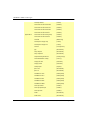
29
CHAPTER 3: Services and Ports
Port #
Protocol
Purpose
135
TCP
Client/Server
Communications
135
TCP
Exchange Administrator
143
TCP
IMAP
993
TCP
IMAP (SSL)
389
TCP
LDAP
636
TCP
LDAP (SSL)
102
TCP
MTA - X.400 over TCP/IP
110
TCP
POP3
995
TCP
POP3 (SSL)
135
TCP
RCP
25
TCP
SMTP
119
TCP
NNTP
563
TCP
NNTP (SSL)
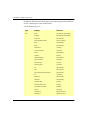
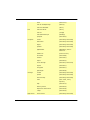
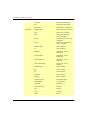
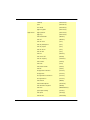
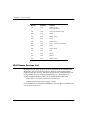
Well-Known Services List
In addition to the ports used by services described above, WatchGuard
maintains a list of well-known services. Because software developers
regularly add new services, this does not represent a comprehensive list
of all possible services. For more information, see J. Reynolds and J.
Postel, Assigned Numbers, RFC1700, available at these Web sites:
http://www.cis.ohio-state.edu/htbin/rfc/rfc1700.html
http://www.iana.org/assignments/port-numbers
If you would like to recommend additions to this list, please send them to:
[email protected].
30
WatchGuard Firebox System 6.0
Well-Known Services List
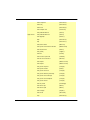
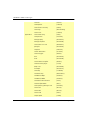
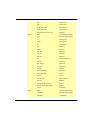
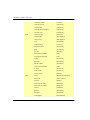
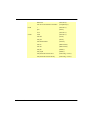
Service Name
Port #
Protocol
Description
tcpmux
1
TCP/UDP
TCP Port Service Multiplexer
compressnet
2,3
TCP/UDP
Management Utility
rje
5
TCP/UDP
Remote Job Entry
echo
7
TCP/UDP
Echo
discard
9
TCP/UDP
Discard
systat
11
TCP/UDP
Active Users
daytime
13
TCP/UDP
Daytime
qotd
17
TCP/UDP
Quote of the Day
msp
18
TCP/UDP
Message Send Protocol
chargen
19
TCP/UDP
Character Generator
ftp-data
20
TCP/UDP
File Transfer [Default Data]
ftp
21
TCP/UDP
File Transfer [Control]
ssh
22
TCP/UDP
SSH Remote Login Protocol
telnet
23
TCP/UDP
Telnet
smtp
25
TCP/UDP
Simple Mail Transfer
nsw-fe
27
TCP/UDP
NSW User system FE
msg-icp
29
TCP/UDP
MSG ICP
msg-auth
31
TCP/UDP
MSG Authentication
dsp
33
TCP/UDP
Display Support Protocol
time
37
TCP/UDP
Time
rap
38
TCP/UDP
Route Access Protocol
rlp
39
TCP/UDP
Resource Location Protocol
graphics
41
TCP/UDP
Graphics
nameserver
42
TCP/UDP
Host Name Server
nicname
43
TCP/UDP
whois
mpm-flags
44
TCP/UDP
MPM Flags
mpm
45
TCP/UDP
MPM
mpm-snd
46
TCP/UDP
MPM Send
ni-ftp
47
TCP/UDP
NI FTP
Reference Guide
31
CHAPTER 3: Services and Ports
32
Service Name
Port #
Protocol
Description
auditd
48
TCP/UDP
Digital Audit Daemon
tacacs
49
TCP/UDP
Login Host Protocol (TACACS)
re-mail-ck
50
TCP/UDP
Remote Mail Checking Protocol
la-maint
51
TCP/UDP
IMP Logical Address Maintenance
xns-time
52
TCP/UDP
XNS Time Protocol
domain
53
TCP/UDP
Domain Name Server
xns-ch
54
TCP/UDP
XNS Clearinghouse
isi-gl
55
TCP/UDP
ISI Graphics Language
xns-auth
56
TCP/UDP
XNS Authentication
xns-mail
58
TCP/UDP
XNS Mail
ni-mail
61
TCP/UDP
NI MAIL
acas
62
TCP/UDP
ACA Services
whois++
63
TCP/UDP
whois++
covia
64
TCP/UDP
Communications Integrator (CI)
tacacs-ds
65
TCP/UDP
TACACS-Database Service
sql*net
66
TCP/UDP
Oracle SQL*NET
bootps
67
TCP/UDP
Bootstrap Protocol Server
bootpc
68
TCP/UDP
Bootstrap Protocol Client
tftp
69
TCP/UDP
Trivial File Transfer
gopher
70
TCP/UDP
Gopher
netrjs-1
71
TCP/UDP
Remote Job Service
netrjs-2
72
TCP/UDP
Remote Job Service
netrjs-3
73
TCP/UDP
Remote Job Service
netrjs-4
74
TCP/UDP
Remote Job Service
deos
76
TCP/UDP
Distributed External Object Store
vettcp
78
TCP/UDP
vettcp
finger
79
TCP/UDP
Finger
www-http
80
TCP/UDP
World Wide Web HTTP
hosts2-ns
81
TCP/UDP
HOSTS2 Name Server
xfer
82
TCP/UDP
XFER utility
WatchGuard Firebox System 6.0
Well-Known Services List
Service Name
Port #
Protocol
Description
mit-ml-dev
83
TCP/UDP
MIT ML device
ctf
84
TCP/UDP
Common Trace Facility
mit-ml-dev
85
TCP/UDP
MIT ML device
mfcobol
86
TCP/UDP
Micro Focus Cobol
kerberos
88
TCP/UDP
Kerberos
sug-mit-tug
89
TCP/UDP
SU/MIT Telnet gateway
dnsix
90
TCP/UDP
DNSIX Secure Application Token Map
mit-dov
91
TCP/UDP
MIT Dover Spooler
npp
92
TCP/UDP
Network Printing Protocol
dcp
93
TCP/UDP
Device Control Protocol
objcall
94
TCP/UDP
Tivoli Object Dispatcher
supdup
95
TCP/UDP
SUPDUP
dixie
96
TCP/UDP
DIXIE Protocol Specification
swift-rvf
97
TCP/UDP
Swift Remote Virtual File Protocol
tacnews
98
TCP/UDP
TAC News
metagram
99
TCP/UDP
Metagram Relay
newacct
100
TCP
[unauthorized use]
hostname
101
TCP/UDP
NIC Host Name Server
iso-tsap
102
TCP/UDP
ISO-TSAP
gppitnp
103
TCP/UDP
Genesis Point-to-Point Trans Net
acr-nema
104
TCP/UDP
ACR-NEMA Digital Imag. Comm. 300
cso
105
TCP/UDP
CCSO name server protocol
csnet-ns
105
TCP/UDP
Mailbox Name Nameserver
3com-tsmux
106
TCP/UDP
3COM-TSMUX
rtelnet
107
TCP/UDP
Remote Telnet Service
snagas
108
TCP/UDP
SNA Gateway Access Server
pop2
109
TCP/UDP
Post Office Protocol - Version 2
pop3
110
TCP/UDP
Post Office Protocol - Version 3
sunrpc
111
TCP/UDP
SUN Remote Procedure Call
mcidas
112
TCP/UDP
McIDAS Data Transmission Protocol
Reference Guide
33
CHAPTER 3: Services and Ports
34
Service Name
Port #
Protocol
Description
auth(ident)
113
TCP/UDP
Authentication Service
audionews
114
TCP/UDP
Audio News Multicast
sftp
115
TCP/UDP
Simple File Transfer Protocol
ansanotify
116
TCP/UDP
ANSA REX Notify
uucp-path
117
TCP/UDP
UUCP Path Service
sqlserv
118
TCP/UDP
SQL Services
nntp
119
TCP/UDP
Network News Transfer Protocol
cfdptkt
120
TCP/UDP
CFDPTKT
erpc
121
TCP/UDP
Encore Expedited RPC
smakynet
122
TCP/UDP
SMAKYNET
ntp
123
TCP/UDP
Network Time Protocol
ansatrader
124
TCP/UDP
ANSA REX Trader
locus-map
125
TCP/UDP
Locus PC-Interface Net Map
unitary
126
TCP/UDP
Unisys Unitary Login
locus-con
127
TCP/UDP
Locus PC-Interface Conn Server
gss-xlicen
128
TCP/UDP
GSS X License Verification
pwdgen
129
TCP/UDP
Password Generator Protocol
cisco-fna
130
TCP/UDP
cisco FNATIVE
cisco-tna
131
TCP/UDP
cisco TNATIVE
cisco-sys
132
TCP/UDP
cisco SYSMAINT
statsrv
133
TCP/UDP
Statistics Service
ingres-net
134
TCP/UDP
INGRES-NET Service
epmap
135
TCP/UDP
DCE-RPC Endpoint resolution
profile
136
TCP/UDP
PROFILE naming system
netbios-ns
137
TCP/UDP
NETBIOS Name Service
netbios-dgm
138
TCP/UDP
NETBIOS Datagram Service
netbios-ssn
139
TCP/UDP
NETBIOS Session Service
imap
143
TCP/UDP
Internet Message Access Protocol
news
144
TCP/UDP
NewS
jargon
148
TCP/UDP
Jargon
WatchGuard Firebox System 6.0
Well-Known Services List
Service Name
Port #
Protocol
Description
sql-net
150
TCP/UDP
SQL-NET
bftp
152
TCP/UDP
Background File Transfer
sgmp
153
TCP/UDP
SGMP
sqlsrv
156
TCP/UDP
SQL Service
pcmail-srv
158
TCP/UDP
PCMail Server
sgmp-traps
160
TCP/UDP
SGMP-TRAPS
snmp
161
TCP/UDP
SNMP
snmptrap
162
TCP/UDP
SNMPTRAP
cmip-man
163
TCP/UDP
CMIP/TCP Manager
cmip-agent
164
TCP
CMIP/TCP Agent
smip-agent
164
UDP
CMIP/TCP Agent
namp
167
TCP/UDP
NAMP
rsvd
168
TCP/UDP
RSVD
send
169
TCP/UDP
SEND
xyplex-mux
173
TCP/UDP
Xyplex MUX
xdmcp
177
TCP/UDP
X Display Manager Control Protocol
NextStep
178
TCP/UDP
NextStep Window Server
bgp
179
TCP/UDP
Border Gateway Protocol
unify
181
TCP/UDP
Unify
irc
194
TCP/UDP
Internet Relay Chat Protocol
at-rtmp
201
TCP/UDP
AppleTalk Routing Maintenance
at-nbp
202
TCP/UDP
AppleTalk Name Binding
at-3
203
TCP/UDP
AppleTalk Unused
at-echo
204
TCP/UDP
AppleTalk Echo
at-5
205
TCP/UDP
AppleTalk Unused
at-zis
206
TCP/UDP
AppleTalk Zone Information
at-7
207
TCP/UDP
AppleTalk Unused
at-8
208
TCP/UDP
AppleTalk Unused
qmtp
209
TCP/UDP
Quick Mail Transfer Protocol
z39.50
210
TCP/UDP
ANSI Z39.50 (WAIS)
Reference Guide
35
CHAPTER 3: Services and Ports
36
Service Name
Port #
Protocol
Description
ipx
213
TCP/UDP
IPX
imap3
220
TCP/UDP
Interactive Mail Access Protocol v3
fln-spx
221
TCP/UDP
Berkeley rlogind with SPX auth
rsh-spx
222
TCP/UDP
Berkeley rshd with SPX auth
backweb
371
UDP
BackWeb
ulistserv
372
TCP/UDP
Unix Listserv
netware-ip
396
TCP/UDP
Novell Netware over IP
biff
512
UDP
Used by mail system to notify users
exec
512
TCP
Remote process execution
login
513
TCP/UDP
Login Host Protocol
who
513
UDP
Maintains databases showing who’s who
cmd
514
TCP
Like exec, but automatic
syslog
514
UDP
logging facilities
printer
515
TCP/UDP
Spooler
talk
517
TCP/UDP
Talk protocol
ntalk
518
TCP/UDP
another Talk
utime
519
TCP/UDP
Unixtime
router
520
UDP
RIP local routing process (on site)
timed
525
TCP/UDP
Timeserver
tempo
526
TCP/UDP
Newdate
courier
530
TCP/UDP
Rpc
conference
531
TCP/UDP
Chat
netnews
532
TCP/UDP
Readnews
netwall
533
TCP/UDP
For emergency broadcasts
uucp
540
TCP/UDP
Uucpd
uucp-rlogin
541
TCP/UDP
Uucp-rlogin Stuart Lynne
klogin
543
TCP/UDP
Kerberos (v4/v5)
kshell
544
TCP/UDP
krcmd Kerberos (v4/v5)
dhcpv6-client
546
TCP/UDP
DHCPv6 Client
dhcpv6-server
547
TCP/UDP
DHCPv6 Server
WatchGuard Firebox System 6.0
Well-Known Services List
Service Name
Port #
Protocol
Description
cybercash
551
TCP/UDP
Cybercash
remotefs
556
TCP/UDP
Rfs server
9pfs
564
TCP/UDP
Plan 9 file service
whoami
565
TCP/UDP
Whoami
msn
569
TCP
Microsoft Network
doom
666
TCP/UDP
Doom Id Software
kerberos-adm
749
TCP/UDP
Kerberos administration
webster
765
TCP/UDP
Network dictionary
phonebook
767
TCP/UDP
Phone
socks
1080
TCP/UDP
Socks
hermes
1248
TCP/UDP
Hermes
lotusnote
1352
TCP/UDP
Lotus Notes
netware-csp
1366
TCP/UDP
Novell NetWare Comm Service Platform
novell-lu6.2
1416
TCP/UDP
Novell LU6.2
netopia
1419
8000
UDP
TCP
Netopia Virtual Office
ms-sql-s
1433
TCP/UDP
Microsoft-SQL-Server
ms-sql-m
1434
TCP/UDP
Microsoft-SQL-Monitor
winframe
1494
TCP
WinFrame
watcom-sql
1498
TCP/UDP
Watcom-SQL
ingreslock
1524
TCP/UDP
Ingres
groupwise
1677
TCP
GroupWise
nfs
2049
TCP/UDP
Network File Server
www-dev
2784
TCP/UDP
World Wide Web - development
Squid
3128
TCP/UDP
Web proxy/caching service -- frequently scanned
for vulnerabilities
ccmail
3264
TCP/UDP
Cc:mail/lotus
ICQ
2109
4000
TCP
UDP
Used for chat
Firstclass
3000
30004
TCP
FirstClass (ftp channel on 510 TCP)
Reference Guide
37
CHAPTER 3: Services and Ports
38
Service Name
Port #
Protocol
Description
compuserve
4144
TCP
CompuServe Online
rfe
5002
TCP/UDP
Radio free ethernet
aol
5190
TCP
America OnLine
x11
6000
TCP/UDP
X Window System (through 6063)
font-service
7100
TCP/UDP
X Font Service
nas
8000
TCP/UDP
NCD Network Audio Server
iphone
6670
TCP
for connecting to the phone server
iphone
22555
UDP
for audio
iphone
25793
TCP
for the address server, in 4.x and 5.0
iphone
1490
TCP
for the conference engine in 4.x and 5.0
WatchGuard Firebox System 6.0
CHAPTER 4
Hardware Illustrations
WatchGuard supports several versions of Firebox hardware including the
Firebox II, Firebox II Plus, Firebox II FastVPN, and Firebox IIIs. The
hardware illustrations in this chapter are meant to assist with physically
installing, connecting, and monitoring a Firebox.
For more information on the Firebox III, see the Hardware Guide included
with this product.
Firebox Illustrations and Descriptions
The Firebox hardware platforms are specially designed and optimized
machines. They are small, efficient and reliable. WatchGuard Firebox
System software supports only Fireboxes that contain a flash disk:
• Firebox II, Firebox II Plus, Firebox II FastVPN, and Firebox IIIs
Firebox II, Firebox II Plus, and Firebox II FastVPN
These Fireboxes are rack-mountable, low-profile components, with an
indicator display panel in front and physical interfaces in back. Relative to
the Firebox II, the Firebox II Plus has a faster processor and more memory
Reference Guide
39
CHAPTER 4: Hardware Illustrations
to support larger installations. Its appearance is identical to the Firebox II,
with the exception of a gold faceplate.
Firebox II FastVPN
The Firebox II FastVPN is equipped with a PCI card that provides
accelerated cryptographic processing for public-key and bulk data
cryptographic algorithms for traffic through the Firebox. It approaches
data rates up to T3 and all of the mandatory algorithms used to
implement the IPSec standard for providing Internet Protocol security.
Firebox II Plus and Firebox II FastVPN Front View
From the outside, the Firebox II Plus and Firebox II FastVPN are identical.
Indicators are on a central, back-lit indicator panel. From the left, the
indicators are:
Traffic Processor
Volume
Load
Indicator Indicator
Disarmed (Red)
Armed (Green)
FIREBOX II
EXTERNAL
TRAFFIC
LOAD
Watch G
TECHNOL
TRUSTED
Sys A
Sys B
OPTIONAL
Security Triangle Display
Disarmed
Red light indicates the Firebox is either in the process of rebooting
or it detected an error, shut down its interfaces, and will not
forward any packets. In the latter condition, reboot the Firebox.
Armed
Green light indicates the Firebox has been booted and is running.
Sys A
Steady– Indicates that the Firebox is running a user-defined
configuration.
Blinking– Indicates that the Firebox is running in enhanced
system mode.
40
WatchGuard Firebox System 6.0
Firebox Illustrations and Descriptions
Sys B
Indicates that the Firebox is running from the read-only factory
default system area.
Security Triangle Display
Indicates traffic between the interfaces on the Firebox. Green
arrows briefly light to indicate allowed traffic between two
interfaces in the direction of the arrows. A red light at a triangle
corner indicates that the Firebox is denying packets at that
interface.
Traffic Volume Indicator
A stack of lights that functions as a meter to indicate levels of
traffic volume through the Firebox. Low volume indicators are
green; high volume indicators are yellow. The display updates
three times per second. The scale is exponential: the first light
represents 64 packets/second, the second light represents 128
packets/second, increasing to the eighth light, which represents
8,192 packets/second, which is the ceiling of the scale, but not the
Firebox.
Processor Load Indicator
A stack of lights that functions as a meter to indicate the system
load average. The system load average is the average number of
processes running (not including those in wait states) during the
last minute. The most significant load factor on a Firebox is the
number of proxies running. Low average indicators are green,
while high average indicators are yellow. The display updates
three times per second. The scale is exponential, with each
successive light representing a doubling of the load average. The
first light represents a load average of 0.15.
NOTE
A Firebox direct from the factory runs in Enhanced System Mode (Sys A).
In this mode, the functions of some of the indicators are modified.
Reference Guide
41
CHAPTER 4: Hardware Illustrations
Firebox II Plus and Firebox II FastVPN Rear View
The rear view of the Firebox II Plus and Firebox II FastVPN contains ports
and jacks for connectivity as well as a power switch. From the left, rear
panel features are as described:
AC
Receptacle
Ethernet Jacks
I
EXTERNAL
0
Power-On Power
Switch
Light
CONSOLE
PCMCIA
Slots
SERIAL
Console Serial
Input
Port
TRUSTED
A
10
100
A
OPTIONAL
10
100
A
Optional
External
Trusted
FIGURE 1. Firebox II Plus and Firebox II FastVPN — Rear
View
AC Receptacle
Accepts the detachable AC power cord supplied with the Firebox.
Power-On Light
Lights to indicate the Firebox is receiving AC power.
Power Switch
Turns the Firebox on or off.
PCMCIA Slots
The Firebox accepts one PCMCIA (standard PC-style) modem
card in either slot (but not both at once) to facilitate out-of-band
management. The PCMCIA interface may be used for other
options in the future.
Console Port
Connects to the Management Station or modem via a serial cable
supplied with the Firebox.
Serial Port
Included for future expansion.
42
WatchGuard Firebox System 6.0
Firebox Illustrations and Descriptions
.
Yel: 10
Grn: 100
Speed
A
Traffic
FIGURE 2. Firebox II Plus Ethernet Ports
Ethernet Ports
Indicators for each network interface display link status, card
speed, and activity. The network interface cards (NICs) are autosensing and adapt to wire speed automatically. The speed
indicator lights when there is a good physical connection to the
Firebox. When the card runs at 10 Mbit, the speed indicator is
yellow. When the card runs at 100 Mbit, the speed indicator is
green. The amber traffic indicator blinks when traffic is passing
through the Firebox.
Firebox III front view (all models except Model 700)
Indicators for the Firebox III Model 1000, Model 2500, and Model 4500 are
on a central back-lit indicator panel. The following photograph shows the
entire front view.
From the left, the indicators are as described on the next page.
Reference Guide
43
CHAPTER 4: Hardware Illustrations
Disarm
Red light indicates the Firebox detected an error, shut down its
interfaces, and will not forward any packets. Reboot the Firebox.
Armed
Green light indicates the Firebox has been booted and is running.
Sys A
Indicates that the Firebox is running from its primary userdefined configuration.
Sys B
Indicates that the Firebox is running from the read-only factory
default system area.
Power
Indicates that the Firebox is currently powered up.
Security Triangle Display
Indicates traffic between Firebox interfaces. Green arrows briefly
light to indicate allowed traffic between two interfaces in the
direction of the arrows. A red light at a triangle corner indicates
that the Firebox is denying packets at that interface.
Traffic
A stack of lights that functions as a meter to indicate levels of
traffic volume through the Firebox. Low volume indicators are
green, while high volume indicators are yellow. The display
updates three times per second. The scale is exponential: the first
light represents 64 packets/second, the second light represents
128 packets/second, increasing to the eighth light which
represents 8,192 packets/second.
Load
A stack of lights that functions as a meter to indicate the system
load average. The system load average is the average number of
processes running (not including those in wait states) during the
last minute. Low average indicators are green, while high average
indicators are yellow. The display updates three times per second.
The scale is exponential with each successive light representing a
doubling of the load average. The first light represents a load
average of 0.15. The most significant load factor on a Firebox is the
number of proxies running.
44
WatchGuard Firebox System 6.0
Firebox Illustrations and Descriptions
Firebox III front view (Model 700)
Firebox III Model 700 indicators are on a central back-lit indicator panel.
The following photograph shows the entire front view.
From the left, the indicators are as described below.
Disarm
Red light indicates the Firebox detected an error, shut down its
interfaces, and will not forward any packets.
Armed
Green light indicates the Firebox has been booted and is running.
Sys A
Indicates that the Firebox is running from its primary userdefined configuration.
Sys B
Indicates that the Firebox is running from the read-only factory
default system area.
Power
Indicates that the Firebox is currently powered up.
Security Triangle Display
Indicates traffic between Firebox interfaces. Green arrows briefly
light to indicate allowed traffic between two interfaces in the
direction of the arrows. A red light at a triangle corner indicates
that the Firebox is denying packets at that interface.
Reference Guide
45
CHAPTER 4: Hardware Illustrations
Firebox III rear view (all models except Model 700)
The rear view of the Firebox III Model 1000, Model 2500, and Model 4500
contains ports and jacks for connectivity as well as a power switch. (Note
that units shipped prior 2002 did not include the USB.) From the left, rear
panel features are as described:
AC Receptacle
Accepts the detachable AC power cord supplied with the Firebox.
Power Switch
Turns the Firebox on or off.
PCI Expansion Slot
Reserved for future use.
Factory Default
This button is active only during the boot process. To boot the
Firebox to SYS B, press this button and hold it down for 20-60
seconds (or until you see the Sys B light come on).
Console Port
Connects to the Management Station or modem through a serial
cable supplied with the Firebox using PPP.
46
WatchGuard Firebox System 6.0
Firebox Illustrations and Descriptions
.
Yel: 10
Grn: 100
Speed
A
Traffic
Ethernet Ports
(Shown on the previous page) Indicators for each network
interface display link status, card speed, and activity. The network
interface cards (NICs) are auto-sensing and adapt to wire speed
automatically. The speed indicator lights when there is a good
physical connection to the Firebox. When the card runs at 10Mbit,
the speed indicator is yellow. When the card runs at 100 Mbit, the
speed indicator is green. The amber traffic indicator blinks when
traffic is passing through the Firebox.
Reference Guide
47
CHAPTER 4: Hardware Illustrations
Firebox III rear view (Model 700)
The rear view of the Firebox III Model 700 contains ports and jacks for
connectivity as well as a power switch. From the left, rear panel features
are as described:
AC Receptacle
Accepts the detachable AC power cord supplied with the Firebox.
Power Switch
Turns the Firebox on or off.
Factory Default
This button is active only during the boot process. To boot the
Firebox to SYS B, press this button and hold it down for 20-60
seconds (or until you see the Sys B light come on).
Console Port
Connects to the Management Station or modem through a serial
cable supplied with the Firebox using PPP.
.
Yel: 10
Grn: 100
Speed
48
A
Traffic
WatchGuard Firebox System 6.0
Firebox Illustrations and Descriptions
Ethernet Jacks
(Shown above) Indicators for each network interface display link
status, card speed, and activity. The network interface
connections (NICs) are auto-sensing and adapt to wire speed
automatically. The speed indicator lights when there is a good
physical connection to the Firebox. When the card runs at 10Mbit,
the speed indicator is yellow. When the card runs at 100 Mbit, the
speed indicator is green. The amber traffic indicator blinks when
traffic is passing through the Firebox.
Reference Guide
49
CHAPTER 4: Hardware Illustrations
50
WatchGuard Firebox System 6.0
CHAPTER 5
Types of Services
This chapter describes well-known services, their protocols and ports as
well as special considerations for adding the service to a security policy
configuration. Rather than explain every service in detail, this chapter
explains the telnet service thoroughly as an example from which to
extrapolate configuration details for similar services. Services fall into two
broad categories–packet filters and proxies.
Packet Filter Services
Packet filter services examine the source and destination headers of each
packet. Packets are then either allowed or denied passage based on
whether the headers appear to be coming from and going to legitimate
addresses.
Any
The Any service should be used only to allow ALL traffic between any
two specific, trusted IP or network addresses. Configuring the Any
service opens a “hole” through the Firebox, allowing all traffic to flow
unfiltered between specific hosts. We strongly recommend that the Any
service be used only for traffic over a VPN.
Reference Guide
51
CHAPTER 5: Types of Services
The Any service has different semantics from other services. For example,
if you allow FTP to a specific host, all other FTP sessions are implicitly
denied by that service (unless you have also configured other FTP service
icons). The Any service, however, does not implicitly deny like other
services.
You also cannot use an Any service unless specific IP addresses, network
addresses, host aliases, group names, or user names are used in the From
or To lists – otherwise the Any service is deemed too permissive and will
not function.
Characteristics
•
•
•
Protocol: Any
Client Port: Ignore
Port Number: None
AOL
The America Online proprietary protocol allows access to the AOL
service through a TCP/IP network, instead of the usual dial-up
connection. The AOL client must be specifically configured to use TCP/IP
instead of a modem.
Characteristics
•
•
•
Protocol: TCP
Server Port(s): 5190
Client Port(s): client
archie
archie is a search protocol used to find files on FTP servers. Because there
are a limited number of archie servers, it is safe to provide outgoing archie
service. A current list of archie servers is available via anonymous FTP
from:
ftp://microlib.cc.utexas.edu/microlib/mac/info/archie-servers.txt
External hosts can be spoofed; WatchGuard cannot verify that these
packets were actually sent from the correct location. You can configure
52
WatchGuard Firebox System 6.0
Packet Filter Services
WatchGuard to add the source IP address to the Blocked Sites List
whenever an incoming archie connection is denied. All of the usual
logging options can be used with archie.
We recommend that you use the available WWW interfaces to archie,
such as: http://www.macsch.com/stress/archie.html
Characteristics
•
•
•
Protocol: UDP
Server Port(s): 1525
Client Port(s): greater than 1023
auth (ident)
auth (ident) is a protocol used to map TCP connections back to a user
name. It is used primarily by large public SMTP and FTP servers and
certain security packages. While useful for logging, the information is
seldom reliable, as attackers can make modified servers that return
incorrect information. Incoming auth service responds with “fake”
information to hide internal user information.
When using SMTP with incoming Static NAT, you must add auth to the
Services Arena. Configure auth to allow incoming to the Firebox. This
enables outgoing mail messages to flow unrestricted from behind the
Firebox to the numerous SMTP servers on the Internet that use auth to
verify other mail servers’ identities, and allows these servers to return
messages through the Firebox to their senders.
If you are not using incoming Static NAT, allow incoming auth to the IP
address of your mail server.
WatchGuard recommends that both incoming and outgoing auth services
be allowed, but be aware that such services can collect valid user names
which can be used for hacking purposes.
Characteristics
•
•
•
Reference Guide
Protocol: TCP
Server Port(s): 113
Client Port(s): greater than 1023
53
CHAPTER 5: Types of Services
•
RFC: 1413
Citrix ICA (WinFrame)
Citrix ICA is a protocol used by Citrix for their applications, including the
Winframe product. Winframe is a server-based application from Citrix
that provides access to Windows from a variety of clients. ICA uses TCP
port 1494 for its WinFrame software.
Adding the Citrix ICA service could compromise network security
because it allows traffic inside the firewall without authentication. In
addition, your Winframe server may be subject to denial of service
attacks. WatchGuard recommends using VPN options to provide
additional security for such a configuration. All of the usual logging
options can be used with WinFrame.
Characteristics
•
•
•
Protocol: TCP
Server Port(s): 1494, 1604
Client Port(s): client
For more information on adding the Citrix ICA service, refer to the
Advanced FAQs in the Knowledge Base. (Go to www.watchguard.com/
support and log in to the LiveSecurity Service.)
Clarent-gateway
Clarent Corporation is an IP telephony technology supplier to
mainstream carriers and service providers. Clarent products enable voiceover-IP for doing voice calls between Clarent gateways across the
Internet. This service supports the Clarent v3.0 product and later.
Clarent products use two sets of ports, one for gateway-to-gateway
communications (UDP ports 4040, 4045, and 5010) and one for gatewayto-command center communications (UDP ports 5001 and 5002). Use the
Clarent-command service icon for the latter.
Enable incoming connections only from specific external gateways to
your gateway or command center.
54
WatchGuard Firebox System 6.0
Packet Filter Services
Clarent also supports the use of PCAnywhere for management. Refer to
the PCAnywhere implementation notes for further information.
Adding the Clarent-gateway service could compromise network security
because it allows traffic inside the firewall based only on network address
which is not a reliable method of authentication. In addition, your Clarent
server may be subject to denial of service attacks in this configuration.
Where possible, WatchGuard recommends using VPN options to provide
additional security for such a configuration.
Characteristics
•
•
•
Protocol: UDP
Client Port: ignore
Port Number(s): 4040, 4045, 5010
Clarent-command
Clarent Corporation is an IP telephony technology supplier to
mainstream carriers and service providers. Clarent products enable voiceover-IP for doing voice calls between Clarent gateways across the
Internet. This service supports the Clarent v3.0 product and later.
The Clarent products use two sets of ports, one for gateway-to-gateway
communications (UDP ports 4040, 4045, and 5010) and one for gatewayto-command center communications (UDP ports 5001 and 5002). Use the
Clarent-gateway service icon for the former.
Enable incoming connections only from specific external gateways to
your gateway or command center.
Clarent also supports the use of PCAnywhere for management. Refer to
the PCAnywhere implementation notes for further information.
Adding the Clarent-command service could compromise network
security because it allows traffic inside the firewall based only on network
address which is not a reliable method of authentication. In addition, your
Clarent server may be subject to denial of service attacks in this
configuration. Where possible, WatchGuard recommends using VPN
options to provide additional security for such a configuration.
Reference Guide
55
CHAPTER 5: Types of Services
Characteristics:
•
•
•
Protocol: UDP
Client Port: ignore
Port Numbers(s): 5001, 5002
CU-SeeMe
CU-SeeMe is a program used to do video conferencing over the Internet.
For CU-SeeMe to work through the Firebox, you must ensure that you are
not on a network using outgoing Dynamic NAT, and configure the CUSeeMe service for both incoming and outgoing access.
The nature of the CU-SeeMe protocol dictates that you configure this
service for both incoming and outgoing, regardless of which side is
originating the connection. The CU-SeeMe icon allows the proper
combination of ports to enable use of CU-SeeMe versions 2.X and 3.X.
CU-SeeMe Version 2.X runs on UDP port 7648. Version 3.X, in addition to
UDP port 7648, runs on UDP port 24032 (for H.323 conferences) and TCP
port 7648 (video conference directories).
Characteristics
Because CU-SeeMe has a three-step send/receive/send sequence, its
protocol and port information is grouped in triads.
• Port Protocol, UDP; Source Port, port; Destination Port, 7648
• Port Protocol, TCP; Source Port, client; Destination Port, 7648
• Port Protocol, UDP; Source Port, ignore; Destination Port, 24032
DHCP-Server/Client
Dynamic Host Configuration Protocol (DHCP) provides a means of
dynamically allocating IP addresses to devices on a network.
Characteristics
•
•
•
•
56
Service Name: DHCP-Server or DHCP-Client
Protocol: UDP
Client Port: client
Port Number: Server: 68; Client: 67
WatchGuard Firebox System 6.0
Packet Filter Services
DNS
Domain Name Service (DNS) maps host names to IP addresses. You will
probably not need to add a DNS service icon unless you maintain a public
DNS server behind the Firebox, since outgoing UDP traffic is enabled by
default. The DNS multi-service icon allows UDP DNS traffic, as well as
TCP zone transfers to occur as specified. All of the usual logging options
can be used with DNS.
Characteristics
•
•
•
•
Protocol: Multi: TCP (for server-server zone transfers) and UDP (for
client-server lookups)
Server Port(s): 53
Client Port(s): ignore
RFC: 883
Filtered-HTTP
The multi-service rule Filtered-HTTP combines configuration options for
incoming HTTP on port 80 with a rule allowing all outgoing TCP
connections by default. Using Filtered-HTTP will NOT result in applying
the HTTP proxy rule set to any traffic. To proxy HTTP traffic, use the
Proxied-HTTP service. We recommend that incoming HTTP be allowed
only to any public HTTP servers maintained behind the Firebox.
External hosts can be spoofed. WatchGuard cannot verify that these
packets were actually sent from the correct location. Configure
WatchGuard to add the source IP address to the Blocked Sites List
whenever an incoming HTTP connection is denied. All of the usual
logging options can be used with HTTP.
Characteristics
•
•
•
Reference Guide
Protocol: Multi (includes top and http)
Client Port: ignore
Port Number: 80
57
CHAPTER 5: Types of Services
Filtered-SMTP
Filtered SMTP allows SMTP traffic (e-mail) without using the SMTP
proxy. One use of Filtered-SMTP eliminates the need for outgoing mail to
be routed through the SMTP proxy twice. With the Filtered SMTP icon
between the trusted network and the mail server on the optional network,
mail is only proxied when it is outbound to the Internet.
Characteristics
•
•
•
Protocol: TCP
Server Port(s): 25
Client Port(s): client
finger
finger is a protocol used to list information about users on a given host.
Although this information is often useful, it can also reveal too much
information that can be abused.
WatchGuard does not recommend putting finger servers on the Trusted
interface.
Characteristics
•
•
•
Protocol: TCP
Server Port(s): 79
Client Port(s): greater than 1023
Common Scenario
Description
There is a specially built finger server running on the Optional
interface.
Icons in the Services Arena
A finger service icon–Incoming allow from Any to the Optional
finger server.
58
WatchGuard Firebox System 6.0
Packet Filter Services
Gopher
Gopher is a data-retrieval protocol developed at the University of
Minnesota. As HTML has proliferated and Web browsers improved
Gopher servers replaced by Web servers. It is unlikely that you will ever
need to run a Gopher server.
Characteristics
•
•
•
Protocol: TCP
Server Port(s): 70 although servers can and are configured to use other
ports
Client Port(s): greater than 1023
HTTPS
HTTPS is a secured and encrypted version of the HTTP protocol. The
client and the web server set up an encrypted session over TCP port 443.
Because this session is encrypted on both ends, the proxy cannot examine
packet contents; therefore, this icon enables a packet-filter service, not a
proxy.
NOTE
The HTTPS service is needed only if you are hosting an HTTPS server, or
if you do not have an Outgoing, Filtered-HTTP, Proxy or Proxied HTTP
icon in your configuration.
Characteristics
•
•
•
Protocol: TCP
Server Port(s): 443
Client Port(s): client
IMAP
Internet Mail Access Protocol (IMAP) is a method of accessing e-mail or
bulletin board messages residing on a remote mail server as if they were
local. Thus e-mail stored on an IMAP server can be accessed from
Reference Guide
59
CHAPTER 5: Types of Services
multiple sites (such as home, work, or laptop) without the need to transfer
messages and files back and forth.
Characteristics
•
•
•
Protocol: TCP
Server Port(s): 143
Client Port(s): client
LDAP
Lightweight Directory Access Protocol (LDAP) is an open-standard
protocol for accessing online directory services. The protocol runs over
Internet transport protocols, such as TCP, and can be used to access standalone directory servers or X.500 directories.
Characteristics
•
•
•
Protocol: TCP
Server Port(s): 389
Client Port(s): client
Lotus Notes
Lotus Notes is an integrated client/server platform for conferencing,
databases, e-mail, and publishing and accessing compound documents.
Adding an icon for this service enables the proprietary Lotus Notes
protocol. Because the protocol supports encapsulation and tunneling, as
well as access to internal data, WatchGuard does not recommend adding
the Lotus Notes service for addresses outside of the trusted network.
Characteristics
•
•
•
60
Protocol: TCP
Server Port(s): 1352
Client Port(s): client
WatchGuard Firebox System 6.0
Packet Filter Services
NNTP
Network News Transfer Protocol (NNTP) is used to transmit Usenet news
articles.
The best way to use NNTP is to set Internal Hosts to internal news
servers, and external hosts to news feeds. In most cases NNTP has to be
enabled in both directions. If you are running a public newsfeed, you
must allow NNTP connections from all external hosts. External hosts can
be spoofed; WatchGuard cannot verify that these packets were actually
sent from the correct location.
Configure WatchGuard to add the source IP address to the Blocked Sites
List whenever an incoming NNTP connection is denied. All of the usual
logging options can be used with NNTP.
Characteristics
•
•
•
•
Protocol: TCP
Server Port(s): 119
Client Port(s): greater than 1023
RFC: 977
Common Scenarios
Scenario 1
Description
There exists a “public” NNTP server on the Optional network.
Icons in the Services Arena
An NNTP icon–Incoming Allow From Any To the server.
Scenario 2
Description
There exists a “public” NNTP server on the Trusted network.
Icons in the Services Arena
The configuration will be the same as for Scenario 1.
Reference Guide
61
CHAPTER 5: Types of Services
NTP
Network Time Protocol (NTP) is a protocol built on TCP/IP that ensures
accurate local timekeeping by synchronizing computer clocks with other
clocks located on the Internet. NTP is capable of synchronizing times
within milliseconds over extended time periods.
Characteristics
•
•
•
Protocol: UDP, TCP
Server Port(s): 123
Client Port(s): client
Outgoing Services
Outgoing TCP connections can be allowed or denied. This service icon
serves as a default setting for all outgoing TCP connections, and is
overridden by other service settings. Outgoing connections will not work
unless Proxied-HTTP, Filtered-HTTP, Outgoing, or Proxy icons are
present in the Services Arena. This icon will not enable outgoing FTP
which will function only with an FTP service.
pcAnywhere
pcAnywhere is an application used to remotely access Windows
computers. To enable this protocol, add the PCAnywhere service, and
then allow incoming access from the hosts on the Internet that need to
gain access to internal pcAnywhere servers, and to the internal
pcAnywhere servers.
pcAnywhere is not a particularly secure service and may compromise
network security, because it allows traffic inside the firewall without
authentication. In addition, your pcAnywhere server may be subject to
denial of service attacks. WatchGuard recommends using VPN options to
provide additional security.
Characteristics
•
•
62
Protocol: Multi: UDP and TCP
Server Port(s):
- 22/UDP
WatchGuard Firebox System 6.0
Packet Filter Services
•
- 5632/UDP
- 5631/TCP
- 65301/TCP
Client Port: ignore (all cases)
ping
ping can be used to determine whether a host can be reached and is
operable and on the network). To intercept DOS-based or Windows-based
traceroute packets, configure the ping service.
Like traceroute, it is generally a bad idea to allow ping into a network;
however, outgoing ping is useful for troubleshooting.
Characteristics
•
•
•
Protocol: ICMP
Server Port(s): Not Applicable
Client Port(s): Not Applicable
POP2 and POP3
POP2 and POP3 (Post Office Protocol) are mail transport protocols,
generally used to retrieve individual users’ mailboxes from a POP server.
Characteristics
•
•
•
Protocol: TCP
Server Port(s): 109 (POP2), and 110 (POP3)
Client Port(s): greater than 1023
Common Scenarios
Scenario 1
Description
A POP server on the Trusted interface, generally running on the
same machine as the SMTP server.
Reference Guide
63
CHAPTER 5: Types of Services
Icons in the Services Arena
No icons are needed for this scenario as the connections will never
reach the Firebox.
Scenario 2:
Description
A POP server on the Optional interface, generally running on the
same machine as the SMTP server.
Icons needed in the Services Arena
Either a Proxy icon or an Outgoing icon allowing all outgoing
TCP connections. In the absence of one of these, a POP icon
allowing outgoing connections to the server.
PPTP
PPTP is a VPN tunnelling protocol with encryption. It uses one TCP port
(for negotiation and authentication of a VPN connection) and one IP
protocol (for data transfer) to connect the two peers in a VPN. Configure
the PPTP service to allow incoming access from Internet hosts to an
internal network PPTP server. PPTP cannot access hosts’ static NAT
because incoming NAT cannot forward IP protocols. Because this service
enables a tunnel to the PPTP server and does not perform any security
checks at the firewall, use of this service should be limited. In addition,
older versions of PPTP were less secure and were prone to password
sniffing and denial of service attacks.
Characteristics
•
•
•
Protocol: TCP, IP
Server Port(s): 1723 (TCP); 47 (IP)
Client Port(s): client
RADIUS
The Remote Authentication Dial-In User Service (RADIUS) provides
remote users with secure access to corporate networks. RADIUS is a
client-server system that stores authentication information for users,
remote access servers, and VPN gateways in a central user database that
is available to all servers. Authentication for the entire network happens
64
WatchGuard Firebox System 6.0
Packet Filter Services
from one location. RADIUS prevents hackers from intercepting and
responding to authentication requests by transmitting an authentication
key that identifies it to the RADIUS client.
Characteristics
•
•
•
Protocol: UDP
Server Port(s): 1645
Client Port(s): client
RIP
RIP is a routing protocol that predates IP, making it one of the oldest
protocols on the Internet. It is used to automatically build routing tables
for local routers. Because it is directionless, it is quite similar to DNS in
configuration. You should enable RIP only if your Internet Service
Provider requires that you run a routing daemon.
Incorrect or deceptive routing information can wreak havoc with local
networks, could cause service denial problems, and possibly completely
compromise the local network. Enable this service only after careful
consideration.
Characteristics
•
•
•
Protocol: UDP
Server Port(s): 520
Client Port(s): greater than 1023
SMB (Windows Networking)
Server Message Block (SMB) is used by Windows to share files,
computers, printers, and other network resources.
If you set up replication, you may see repeated attempts to use the port
mapper service on port 135. This will eventually fail, and fall back to
using port 42. Refer to the RFC for DCE, and the DCE-RPC proxy sections
for more details.
Reference Guide
65
CHAPTER 5: Types of Services
NOTE
Allowing SMB through the Firebox is extremely insecure, and is strongly
discouraged unless used through a VPN connection. These configuration
settings are to be used only if there is no other alternative, and service
icon settings should be as specific as possible.
Characteristics
•
•
•
•
Protocol: SMB (over TCP and UDP)
Server Port(s): 137 (UDP), 138 (UDP), 139 (TCP), 42 (TCP for WINS
replication)
Client Port(s): 136 (UDP), 137 (UDP), 139 (TCP)
RFC: No RFC, but see:
http://www.microsoft.com
Common Scenarios
Scenario 1
Description
Clients on the Trusted interface need to talk to a Windows NT
server on the Optional network. Although not required, WINS
servers should be installed on both Trusted and Optional
networks; configure the clients on the Optional network to use the
Optional WINS server as a primary and the Trusted WINS server
as a secondary.
Configure the clients on the Trusted to use the Trusted WINS
server as a primary and the Optional WINS server as a secondary.
If you choose to use two WINS servers, it would be beneficial to
allow WINS replication across the Firebox as well as adding the
Browser Service to the WINS servers.
Icons in the Services Arena
SMB is a multi-service icon. You may, however, need to add these
icons to your services arena:
- One UDP icon for port 137. Set client port to “port” to enable
NetBIOS lookups.
66
WatchGuard Firebox System 6.0
Packet Filter Services
- One UDP icon for port 138. Set client port to “port” to enable the
NetBIOS datagram service to transfer information between
hosts.
- One TCP icon for port 139. Set client port to “client.” This sets up
a NetBIOS TCP channel for passing information between hosts.
SNMP
Simple Network Management Protocol (SNMP) can be used to collect
information about and configure remote computers. This has proven to be
dangerous. A great many Internet attacks have used SNMP.
Characteristics
•
•
•
Protocols: UDP, TCP
Server Port(s): 161 (trap servers use 162)
Client Port(s): greater than 1023
Because SNMP could cause quite unpredictable changes in a network if
enabled, carefully consider alternatives and log everything.
SNMP-Trap
Simple Network Management Protocol (SNMP) Traps are notification
messages that an SNMP agent (for example, a router) sends to a network
management station. These messages generally report an important event
that should be logged or otherwise investigated.
Characteristics
•
•
•
Protocols: UDP
Server Port(s): 162
Client Port(s): greater than 1023
SQL*Net
Oracle uses one port for its sql*net software. By default, this port is either
1526/tcp or port 1521/tcp, but it is user-configurable by editing the
tnsnames.ora file. To allow sql*net through the Firebox, set up a service
icon for the port that your sql*net server is using, with a protocol of tcp,
Reference Guide
67
CHAPTER 5: Types of Services
and a client port of ignore. Then set up incoming access from the allowed
external hosts to the sql*net server.
Characteristics
•
•
•
Protocols: TCP
Server Port(s): 1521, 1526
Client Port(s): ignore
Sybase SQL-Server
Sybase uses one port for the Sybase Central and SQL Advantage software.
There is no factory default port. Rather, the administrator configures the
port during the installation process using the Sybase Network
Connections dialog box. For WinSock TCP/IP, the port number is
specified as the number following the host name. For example, specify
MyHost,10000 as your connection information to set the Sybase SQLServer port to 10000.
The Sybase SQL-Server service is set to server port 10000. Verify that your
Sybase SQL-Server is configured for port 10000. If it is not, either
reconfigure the SQL-Server to port 10000 or create a new service with the
server port to the number that matches the SQL-Server installation. In that
case make sure to set the protocol to TCP and the client port to ignore, as
shown under Characteristics below.
With both the WatchGuard SQL-Server and a custom built service,
configure the rest of the service the same way: list the external clients that
should be allowed to connect to the Sybase server as Incoming From, and
the Sybase server address as Incoming To.
Characteristics
•
•
•
Protocols: TCP
Server Port(s): 10000
Client Port(s): ignore
ssh
Secure Shell (ssh) is a free program which allows remote login, command
execution, and file transfer to another computer over a network. It
68
WatchGuard Firebox System 6.0
Packet Filter Services
provides strong authentication and secure (encrypted) communications.
WatchGuard recommends the use of ssh in lieu of more vulnerable
protocols like telnet, rssh, and rlogin.
If you use ssh, you should also use its strong authentication mechanisms.
Strong encryption mechanisms are available for U.S. customers, Canadian
customers, and customers who have been approved for use of strong
encryption by WatchGuard and/or the U.S. Government. If you would
like to use strong encryption (128 bit, 3DES) or IPSec, please contact
WatchGuard Technical Support.
Unix versions are available from ftp.cs.hut.fi (see ftp://ftp.cs.hut.fi/pub/
ssh), and information on versions for Windows can be found at
DataFellows (http://www.datafellows.com).
Characteristics
•
•
•
•
Protocol: TCP
Server Port(s): 22
Client Port(s): less than 1024
RFC: No number yet, but see:
http://www.cs.hut.fi/ssh/
Common Scenario
Description
There are one or more ssh servers on the Trusted network.
Icons in the Services Arena
An ssh icon – Allowing Incoming To the desired Trusted servers,
and Allowing Outgoing From Any To Any.
syslog
syslog is a service used to log operating system events on Unix hosts. The
most common reason to enable syslog data on a firewall is to collect data
from a host outside the firewall.
Because the syslog port is blocked by default, to allow one log host to
collect logs from multiple Fireboxes:
• Remove port 514 from the Blocked Ports list
Reference Guide
69
CHAPTER 5: Types of Services
•
Add the WatchGuard Logging icon to the Services Arena
NOTE
Attacks often focus on flooding syslog with log entries so that attacks are
either lost in the noise or the disk fills up and attack attempts are not
recorded. Generally, syslog traffic should not pass through the Firebox.
Characteristics
•
•
Protocol: UDP
Server Port(s): 514
TACACS
TACACS user authentication is a server that uses existing user accounts
to authenticate users into a dial-up modem pool, eliminating the need to
maintain duplicate accounts on a UNIX system. TACACS does not
support TACACS+ or RADIUS.
Characteristics
•
•
•
Protocol: UDP
Server Port(s): 49
Client Port(s): greater than 1023
TACACS+
TACACS+ user authentication is a server that uses existing user accounts
to authenticate users into a dial-up modem pool, eliminating the need to
maintain duplicate accounts on a UNIX system. TACAS+ supports
RADIUS.
Characteristics
•
•
•
70
Protocol: TCP
Server Port(s): 49
Client Port(s): greater than 1023
WatchGuard Firebox System 6.0
Packet Filter Services
telnet
The telnet service is used to log in to a remote computer, and is similar to
using dial-up access except that the connection is made over a network.
Characteristics
•
•
•
•
Protocol: TCP
Server Port(s): 23
Client Port(s): greater than 1023
RFC: 854
Common Scenario
Description
Telnet access is not allowed in to any machines on the Trusted
network, but access is allowed out to External and/or Optional
machines.
Icons in the Services Arena
The Proxied-HTTP, Filtered-HTTP, Proxy, or Outgoing icon in the
Services Arena automatically set to Allow Outgoing but Deny
Incoming connections (the default WatchGuard stance). For a
different stance (for example, to allow selected Incoming, or to
restrict Outgoing), add the telnet services and configure as
needed.
TFTP
Trivial File Transfer Protocol (TFTP) is a simple file transfer protocol
similar to FTP that is usually used to download boot code to diskless
workstations. It supports timeout and retransmission techniques.
Use of this protocol is not recommended because it can allow
unauthorized remote access to system or user files without asking for a
password. WatchGuard recommends TFTP be used only for accessing
limited subdirectory trees that cannot result in root access. TFTP should
be restricted by using a TCP wrapper and filtering packets coming in on
port 111.
Reference Guide
71
CHAPTER 5: Types of Services
Characteristics
•
•
•
Protocols: UDP
Server Port(s): 69
Client Port(s): generally greater than 1023
Timbuktu
Timbuktu Pro is remote control and file transfer software used to gain
access to Windows computers. The protocol uses TCP port 1417 and UDP
port 407. Add the Timbuktu service and allow incoming access from the
hosts on the Internet that need to gain access to internal Timbuktu
servers, and to the internal Timbuktu servers.
Timbuktu is not a particularly secure service and may compromise
network security. It allows traffic inside the firewall without
authentication. In addition, the Timbuktu server may be subject to denial
of service attacks. WatchGuard recommends using VPN options to
provide additional security.
Characteristics
•
•
•
Protocols: UDP, TCP
Server Port(s): UDP 407, TCP 1417
Client Port(s): ignore (both cases)
Time
The Time service is similar to NTP and used to synchronize clocks
between hosts on a network. Time is generally less accurate and less
efficient than NTP over a WAN. WatchGuard recommends using NTP.
Characteristics
•
•
Protocols: UDP
Server Port(s): 37
traceroute
traceroute is an application that can be used to build maps of networks. It
is very helpful for network debugging, analyzing routes, and determining
72
WatchGuard Firebox System 6.0
Packet Filter Services
a site’s Internet Service Provider. The WatchGuard traceroute service is
for filtering Unix-based UDP-style traceroute only. For DOS-based or
Windows-based traceroute packet filtering, use the ping service instead
(see “ping” on page 63).
traceroute uses ICMP and UDP packets to build pathways across
networks using the UDP TTL field to return packets from every router
and machine between a source and a destination. Letting traceroute into a
network may enable an outsider to create a map of your private network.
However, outbound traceroute can be useful for troubleshooting.
Characteristics
•
•
•
Protocols: UDP, ICMP
Server Port(s): Not Applicable
Client Port(s): generally greater than 32768
WAIS
Wide Area Information Services (WAIS) is a protocol used to search for
documents over the Internet originally developed at Thinking Machines
Incorporated. Although WAIS servers are becoming rare, some WWW
sites use WAIS to scan searchable indices, so it might be a good idea to
enable outgoing WAIS.
WAIS is based on the ANSI Z39.50 search protocol, and the terms Z39.50
and WAIS are often used interchangeably.
Characteristics
•
•
•
Protocol: TCP
Server Port(s): 210 although servers can be (and often are) configured
on other ports, much like HTTP servers
Client Port(s): greater than 1023
WatchGuard
The basic WatchGuard service allows configuration and monitoring
connections to be made to the Firebox. WatchGuard recommends
allowing this service only to the Management Station. The service is
typically set up on the Trusted interface.
Reference Guide
73
CHAPTER 5: Types of Services
Characteristics
•
•
•
Protocol: TCP
Server Port(s): 4105
Client Port(s): client
WatchGuard Encrypted Connections
WatchGuard uses one of three levels of encrypted connections to allow
remote configuration and monitoring on ports 4101, 4102, and 4103. The
levels are low, medium, and strong encryption. The level you have
depends on your purchase agreement with WatchGuard. This service
allows or denies connections, and without it, you will not be able to access
a Firebox remotely. If you would like to use strong encryption (128 bit,
3DES) or IPSec, please contact WatchGuard Technical Support.
WatchGuard Logging
The WatchGuard Logging service is necessary only if a second Firebox
needs access to a Log Host on the Trusted interface of a Firebox. If there is
only one Firebox, this icon is unnecessary.
Characteristics
•
•
Protocol: TCP
Server Port(s): 4107
WGAgent
WatchGuard Agent is a service that is primarily used for the management
of software and security policies. It uses one TCP port allowing
WatchGuard Agents to communicate with each other using SSL secured
connection. For this service to work properly, add the HTTPS service as
well.
Characteristics
•
•
•
74
Protocol: TCP
Server Port(s): 4114
Client Port(s): client
WatchGuard Firebox System 6.0
Proxied Services
whois
The whois protocol gives information about who administers Internet
sites and networks. It is often useful for finding administrative contacts at
other sites.
Because very few sites run whois servers, the only service necessary to
access these sites is an Outgoing or a Proxy icon. In the absence of these,
use a whois icon allowing outgoing connections to the required whois
servers, the most common one being rs.internic.net.
Characteristics
•
•
•
Protocol: TCP
Server Port(s): 43
Client Port(s): greater than 1023
Proxied Services
This section describes the services proxied by the WatchGuard Firebox
System, including a separate description of the transparent proxies,
HTTP, SMTP, FTP, and RealNetworks. The proxied service opens packets
of its particular type, strips out any embedded forbidden data types, and
reassembles the packets with the proxy’s own origin and destination
headers.
Configuring and activating proxies is done the same way you add packet
filtering services.
DCE-RPC
The Distributed Computing Environment (DCE) Remote Procedure Call
(RPC) service allows connections bound for a trusted machine's port 135.
Initial calls typically result in a response from the trusted machine that
redirects the client to a new port for the actual service the client desires.
This service allows the initial port mapper requests used by remote
Windows Name Service (WINS) administration, remote Exchange
administration, Outlook, and other software that relies on DCE RPC. Be
Reference Guide
75
CHAPTER 5: Types of Services
aware that the standard SMB or NetBios ports may also need to be
allowed so that the above software will work properly.
NOTE
DCE-RPE allows all DCE RPC traffic through the firewall (to and from
the configured addresses and ports as appropriate)—it does not filter any
of the packets for harmful content.
Characteristics
•
•
•
•
Service Name: DCE-RPC
Protocol: DCE-RPC
Client Port: client
Port Number: 135
FTP
FTP is the File Transfer Protocol, one of the most common ways to move
files over the Internet.
Characteristics
•
•
•
•
Protocol: TCP
Server Port(s): 20 (command channel), 21 (data channel)
Client Port(s): greater than 1023
RFC: 414
Common Scenarios
Scenario 1
Description
There is a “public” FTP server on the Optional network.
Icons in the Services Arena
An FTP icon must be present for FTP to work. Incoming
connections must be Allowed To the FTP server, Outgoing
connections are usually Allowed From Any to To Any.
Scenario 2
76
WatchGuard Firebox System 6.0
Proxied Services
Description
There is a “public” FTP server on the Trusted network.
Icons in the Services Arena
Configuration is the same as for Scenario 1.
H323
The H323 service enables applications based on the H.323 protocol to be
used through the Firebox. Popular products that use this protocol include:
• Microsoft NetMeeting
• Intel Internet VideoPhone
This service does not do any filtering for harmful content, support QoS or
rsvp protocol, nor does it support any type of NAT.
Considerations
For incoming connections:
• Any external host must be able to route to the internal host directly.
Use the ping utility if necessary to ensure that the connection is valid.
• Dynamic NAT must be turned off for the incoming H323 connection
to work properly.
There are no equivalent special considerations for outgoing H323
connections.
Characteristics
•
•
•
•
Service Name: H323
Protocol: Multi (control, data, LDAP)
Client Port: client
Port Numbers: 1720 (control), 1503 (data), 389 (LDAP)
HTTP
HTTP is the Hypertext Transfer Protocol used by the World Wide Web to
move information around the Internet.
Reference Guide
77
CHAPTER 5: Types of Services
NOTE
The WatchGuard service called HTTP Proxy is not to be confused with an
HTTP caching proxy. An HTTP caching proxy is a separate machine, and
it performs caching of Web data.If you use an external caching proxy, you
must explicitly enable (by adding service icons) any outgoing services you
intend to use. If you do not, outgoing TCP connections won’t work
properly.
Characteristics
•
•
•
•
Protocol: TCP
Server Port(s): 80 (although servers can be run on any port, a common
alternative is 8080, and Secure Socket Layer (SSL) connections are
generally served on port 443)
Client Port(s): greater than 1023
RFC: 1945
Common Scenarios
Scenario 1
Description
“Public” HTTP server on the Optional network.
Icons in the Services Arena
An HTTP icon, with Incoming From Any to the HTTP server.
Scenario 2
Description
“Public” HTTP server on the Trusted network.
Icons in the Services Arena
Even with dynamic NAT, the HTTP server must have a “public”
address. Configuration is exactly the same as in Scenario 1.
Proxied-HTTP
Proxied-HTTP combines configuration options for HTTP on port 80 with
a rule allowing all outgoing TCP connections by default. Using the
78
WatchGuard Firebox System 6.0
Proxied Services
Proxied-HTTP rule ensures that all outgoing HTTP traffic, regardless of
port, will be proxied according to the HTTP proxy rules.
WatchGuard recommends that you allow incoming HTTP only to any
public HTTP servers maintained behind the Firebox. External hosts can be
spoofed, as WatchGuard cannot verify that these packets were actually
sent from the correct location.
Configure WatchGuard to add the source IP address to the Blocked Sites
List whenever an incoming HTTP connection is denied. Adjusting the
settings and MIME types is the same as for the HTTP Proxy.
RealNetworks
RealNetworks is a streaming media (audio and video) protocol developed
by RealNetworks (http://www.realnetworks.com). The RealNetworks
service allows the incoming UDP stream to reach the client. If the service
is not there, then when the UDP stream fails, the stream defaults back to
the TCP connection, so the audio still gets to the client. An outgoing TCP
rule is all that is required for RealNetworks to work. Many of the
requirements of the RealNetworks service are more appropriately
addressed using the RTSP service. For more information, see “RTSP” on
page 80.
Characteristics
•
•
•
•
Protocol: TCP and UDP
Server Port(s): 7070 (TCP control channel) and 6970-7170 (UDP data
channels)
Client Port(s): greater than 1023
RFC: no RFC, but see:
http://www.realnetworks.com
Common Scenarios
Scenario 1
Description
There are RealNetworks servers off the External interface,
scattered across the Internet.
Reference Guide
79
CHAPTER 5: Types of Services
Icons in the Services Arena
A RealNetworks service icon–The Incoming tab should be
empty. The Outgoing tab should allow from Any to Any.
Scenario 2:
Description
There is a RealNetworks server on the Trusted or the Optional
interface.
Icons in the Services Arena
A RealNetworks service icon–The Incoming tab should allow
from Any to the RealNetworks server. The Outgoing tab should
allow to Any from Any.
RTSP
The Real-Time Streaming Protocol (RTSP) establishes and controls either
a single or several time-synchronized streams of continuos media such as
audio and video. It is the protocol used by RealNetworks G2 and Apple
QuickTime real time streaming media players.
Characteristics
•
•
•
•
Protocol: RTSP
Server Port: 554
Client Port: any
RFC: 2326
NOTE
In addition to these TCP ports, there are some UDP ports that both the
client and the server use. The ports are determined dynamically but the
mostly commonly used ports on the client side are 6970 and 6971.
SMTP
Simple Mail Transfer Protocol (SMTP) is the Internet standard protocol
for transmitting and receiving e-mail. Generally SMTP servers are (by
nature) “public” servers.
80
WatchGuard Firebox System 6.0
Proxied Services
When using incoming Static NAT with SMTP, auth must be added (see
“auth (ident)” on page 53) to the Services Arena. Configure auth to allow
incoming auth to the Firebox. This enables outgoing mail messages to
flow unrestricted from behind the Firebox to the numerous SMTP servers
on the Internet that use auth to verify other mail servers’ identities and
allows these servers to return messages through the Firebox to the
senders.
Logging incoming SMTP is recommended, but may produce copious log
output. If you do not want to use the SMTP proxy, create a new service
using the Services dialog box with the TCP protocol and port 25.
Characteristics
•
•
•
•
Protocol: TCP
Server Port(s): 25
Client Port(s): greater than 1023
RFC: 821
Common Scenarios
Scenario 1
Description
There is an SMTP server on the Optional interface.
Icons in the Services Arena
A SMTP service icon – The Incoming tab should Allow To the
SMTP server from Any. The Outgoing tab should Allow To Any
from Any.
Scenario 2
Description
There is an SMTP server on the Trusted interface.
Icons in the Services Arena
This scenario is configured exactly as in Scenario 1.
StreamWorks
StreamWorks is a streaming protocol for video on demand developed by
Xing Technologies (see http://www.streamworks.com).
Reference Guide
81
CHAPTER 5: Types of Services
Characteristics
•
•
•
•
Protocol: UDP
Server Port(s): 1558
Client Port(s): 1558
RFC: No RFC, but see:
http://www.streamworks.com
Common Scenarios
Scenario 1
Description
There are StreamWorks servers off the External interface scattered
across the Internet.
Icons in the Services Arena
A StreamWorks service icon – The Incoming tab should be
empty. The Outgoing tab should allow from Any to Any.
Scenario 2
Description
There is a StreamWorks server on the Trusted or the Optional
interface.
Icons in the Services Arena
A StreamWorks service icon – The Incoming tab should allow
from Any to the StreamWorks server. The Outgoing tab should
allow to Any from Any.
VDOLive
VDOLive is a streaming protocol for video on demand developed by
VDOnet Corporation (http://www.vdo.net).
Characteristics
•
•
•
82
Protocol: TCP and UDP
Server Port(s): 7000 (TCP control channel) and dynamic ranges for
UDP data channels
Client Port(s): greater than 1023
WatchGuard Firebox System 6.0
Proxied Services
•
RFC: No RFC, but see:
http://www.vdo.net
Common Scenarios
Scenario 1
Description
There are VDOLive servers off the External interface, scattered
across the Internet.
Icons in the Services Arena
A VDOLive service icon – The Incoming tab should be empty.
The Outgoing tab should allow from Any to Any.
Scenario 2
Description
There is a VDOLive server on the Trusted or the Optional
interface.
Icons in the Services Arena
A VDOLive service icon – The Incoming tab should allow from
Any to the VDOLive server. The Outgoing tab should allow to
Any from Any.
Reference Guide
83
CHAPTER 5: Types of Services
84
WatchGuard Firebox System 6.0
CHAPTER 6
Common Log Messages
This chapter provides explanations for many of the log messages most
commonly generated by the Firebox. For more information on log
messages, refer to the In-Depth FAQs in the WatchGuard Knowledge
Base. Go to the following Web site and log into the LiveSecurity Service:
http://www.watchguard.com/support
Log messages in this chapter are arranged alphabetically.
xxx.xxx.xxx.xxx's mac address changed to XX:XX:XX:XX:XX:XX
Reports that the ARP table was changed or updated to reflect the
MAC address of a particular IP address. This occurs most
frequently in the case of High Availability where the active
Firebox has failed over and the standby Firebox assumes its IP
address.
authentication[] Time limit exceeded
Indicates that a user's authentication timed out. Because some
authentication methods are time-sensitive, the Firebox allows you
to configure a timeout value when waiting for user input. The
defaults vary depending on the authentication method being
used.
chat-ttyS0[x]: Failed
The Firebox failed to communicate with the modem. This is not a
problem if you do not have a modem and are not using out-ofReference Guide
85
CHAPTER 6: Common Log Messages
band management. The Firebox always attempts to communicate
with a PCMCIA modem and will report this error if none is found.
controld: ERROR: Receiving another configuration file from
firebox 10.1.16.2.
Indicates that the current configuration file is corrupted or
incomplete. The Event Processor will close the connection.
deny in eth0 tcp www.xxx.yyy.zzz www.xxx.yyy.zzz 25 1200 80
psh ack
A psh ack is an acknowledgement of a push. Push is a type of TCP
message that tells the receiving process to push the data directly
to the receiving application instead of caching it locally for
transmit. This message appears either because the source is a
blocked site or port, a spoofed source address, or an Any service
with logging enabled.
deny in eth0 tcp www.xxx.yyy.zzz www.xxx.yyy.zzz 2981 80 rst
(blocked site)
TCP connections are controlled through a series of packets
exchanged by the two computers involved in the connection. Old,
stale TCP connections are reset with an RST packet. RST packets
have a sequence number that must be valid according to certain
TCP rules. For example, Denial of Service (DoS) attacks can be
launched against some hosts by spoofing TCP RST packets
against connections that conflict with current connections. Bare
TCP RST packets can also be sent as a type of OS fingerprinting to
determine the target's operating system.
dns-proxy[xx] dns_setup_connect_udp: Unable to create UDP
socket for port: Invalid argument
The DNS proxy has only 256 file descriptors available for its use,
which limits the number of DNS connections in a NAT
environment. Every UDP request that uses dynamic NAT uses a
file descriptor for the duration of the UDP timeout. Every TCP
session that uses dynamic, static, or 1-o-1 NAT uses a file
descriptor for the duration of the session.
The file descriptor limit is rarely a problem, but an occasional site
may notice slow name resolution and many instances of the above
log message
You can work around this problem in two ways (the first method
is the most secure):
86
WatchGuard Firebox System 6.0
- Avoid using dynamic NAT between your clients and your DNS
server.
- Disable the outgoing portion of the DNS proxied service and
replace it with a filtered DNS service.
firewalld[xxx] cs_server() failed (keys didn't match)
The cs_server is the process that listens for management
connections to the Firebox. There are two conditions under which
the error shown above occurs:
- Incorrectly entered passphrase
- Attempt to make two concurrent read-write connections to the
Firebox
firewalld[xxx]: cs_server() failed (response incomplete)
The Control Center was unable to successfully complete a
connection to the Firebox. There are several potential causes of
this error; a common one is a very high traffic load at the time of
connection.
firewalld[] deny in eth0 68 54 24 29 www.xxx.yyy.zzz
www.xxx.yyy.zzz unknown ? (ip options)
IP options are obsolete IP parameters now used primarily for OS
fingerprinting and other types of IP stack-based probes. Most
routers strip IP options. By default, the Firebox denies them. This
feature can be modified using the Default Packet Handling dialog
box in Policy Manager.
firewalld[]: File synchronization completed
Indicates that the Management Station successfully completed the
transfer of a configuration file to the Firebox.
firewalld[] Pid xxx, died from signal 6.
A Pid is a process ID. In the Linux kernel, any new application is
assigned a process ID. In any case where a Pid dies, it is important
to determine what process was associated with the Pid number.
For instance, the Pid in a real log message may be 106. Earlier logs
could show that the HTTP Proxy was the process assigned Pid
106. In that case, this message would indicate that the HTTPproxy process aborted abnormally.
Reference Guide
87
CHAPTER 6: Common Log Messages
firewalld [xxx] proxy accept() failed (Connection reset by
peer)
Indicates that a Web browser reset or failed to complete a
connection. This occurs if the user clicks the Stop or Reload
buttons during load.
firewalld[]: Putting file wg.cfg (from x.x.x.x)
Indicates that the Management Station at x.x.x.x sent a new
configuration file to the Firebox.
firewalld[]: Restarted by x.x.x.x
Indicates that the Firebox was issued a restart command by a
Management Station at IP address x.x.x.x.
ftp-proxy []: Proxy bind() failed (Address already in use)
On rare occasions, the FTP Proxy attempts to bind to a port used
by a static process on the Firebox such as 4105 or 4110. When this
happens, the bind fails.
ftp-proxy[]: [x.x.x.x:11323 x.x.x.x:21] proxy connect
failed (Connection timed out)
Indicates that the proxy was unable to connect to a FTP server.
The Proxy Connect Timeout defines the amount of time (in
seconds) that the proxies will wait before giving up trying to
forward a connection to an unreachable or non-responsive host.
Once a connection is established, the standard proxy timeout
values apply. The default value for Proxy Connect Timeout is 10
seconds. If you experience trouble reaching sites through the
proxy that normally require more than 10 seconds before a
connection can be acknowledged (such as systems over slow links
in distant parts of the world, or heavily loaded servers), you can
try raising this value by adding (or editing) the following
property in the configuration file:
services.<service name>.proxies.ftp.connect_timeout:
<value>
Because this property is per proxy service, it may be different for
each FTP proxy icon configured.
fwcheck[x] fwcheck in low memory mode
Indicates that fwcheck is active because the Firebox passed its
predefined low memory threshold.
88
WatchGuard Firebox System 6.0
fwcheck[] Killing process http-proxy (pid x)
Fwcheck is the process responsible for low memory scavenging
on the Firebox. If Firebox memory is overloaded for some reason,
fwcheck kills other processes until memory usage returns to a
safer state.
http-proxy[] [x.x.x.x:1091 x.x.x.x:80] Request denied: No
URI found
This message indicates a connection to a Web server was not
compliant with RFC 2068. The problem is not with the code of the
Web page but with the server itself. Web servers create headers
when sending packets to clients. These headers contain
information about the page, including information the HTTP
Proxy requires to process the traffic. Part of this is a URI (Uniform
Resource Identifier). According to RFC 2068:
Uniform Resource Identifiers, (URIs) have been known by many
names: WWW addresses, Universal Document Identifiers,
Universal Resource Identifiers, and finally the combination of
Uniform Resource Locators (URL) and Names (URN). As far as
HTTP is concerned, Uniform Resource Identifiers are simply
formatted strings which identify–via name, location, or any other
characteristic–a resource.
RFC 2068 defines the syntax for a URI. ''URI not found'' means
either the URI was not defined or it was defined incorrectly. By
default, HTTP Proxy blocks pages with non-compliant URIs.
Solutions for this problem include:
- Contacting the Web server admin to request an update to make
their server RFC 2068—compliant
- Creating a Filtered-HTTP service for that site
http-proxy[] [x.x.x.x:1091 x.x.x.x:80] removing bogus HTTP
header '? HTTP\1.0'
Most browsers are lax about requiring precise HTTP header
syntax. If the Firebox HTTP Proxy encounters HTTP headers
either with incorrect syntax or not defined per RFC 2068, it strips
them during transfer. The rest of the document still transfers.
http-proxy[] can't read proxy info file
The proxy info file is a file on the Firebox describing the map
between HTTP Proxy services and their internal ports. It is created
by firewalld at the start of the boot sequence. Difficulty reading
Reference Guide
89
CHAPTER 6: Common Log Messages
this file indicates that firewalld is taking a long time to create it. A
possible cause is that the configuration file is corrupted.
http-proxy[]: no proxy services configured -- exiting
Indicates that no services defined on the Firebox make use of the
HTTP Proxy. The HTTP Proxy process starts, determines there are
no rules for the process, and then exits.
http-proxy[] proxy connect timeout
Indicates that the HTTP proxy sent a SYN to either an internal or
external HTTP server, but did not receive a SYN-ACK response
within the period of time specified in the Firebox configuration
file. The cause may be a downed HTTP server. The Proxy Connect
Timeout defines the amount of time (in seconds) that proxies wait
before they stop trying to forward a connection to an unreachable
or non-responsive host. Once a connection is established, the
standard proxy timeout values apply. You may try raising this
value by adding (or editing) the following property in the
configuration file:
default.proxies.http.timeout: 600
http-proxy[] [x.x.x.x:1620 x.x.x.x:80]
unexpectedly closed
server was
Indicates that the server closed the connection before the data
transfer was complete. This can be caused by busy Web servers or
bad network connectivity.
http-proxy[668] [x.x.x.xx:4584 x.x.x.x:80\] Response
denied: Content type required
One feature of the HTTP Proxy is MIME type content checking.
Web servers should send this information, but some do not. The
message above tells you that the HTTP Proxy denied the page
because it lacks a content type.
Some custom applications transfer data using pseudo-HTTP
transfers to enable them to work through most types of HTTP
proxies. If this message appears when a Web page is not being
accessed, it may be because data transfers are being attempted
using HTTP on ports other than 80. The Proxied-HTTP service (as
distinct from the HTTP proxy) proxies any outgoing port, not just
80.
90
WatchGuard Firebox System 6.0
http-proxy[205]: [x.x.x.x:8921 x.x.x.x:80] Error while
sending/receiving: Invalid transfer-encoding type
"Identity"
HTTP has a provision for defining the encoding type used in the
page data transfer. The default is called "Identity," which means
that no encoding or transformations are performed on the page
data. The RFC for HTTP 1.1 says the following about identity:
identity: The default (identity) encoding; the use of no
transformation whatsoever. This content-coding is used only in
the Accept-Encoding header, and SHOULD NOT be used in the
Content-Encoding header.
The HTTP Proxy strictly enforces the "should not" provision of the
RFC. It denies the Content-encoding type as invalid. Connections
to the offending server should be made through a packet filtered
port 80 service.
init[1]: Pid xx: exit 0 (could also be 1)
This message appears when a process that finished whatever it
was doing is now exiting normally. The xx indicates the Process
ID number.
ipseccfg[] Error, cfg entry (networking.ipsec.
remote_gw.195.sharedkey) must contain a shared key.
Indicates that the ipseccfg was unable to parse a shared key hash
from the configuration file, possibly due to a corrupted
configuration file. Try reconfiguring your VPN tunnel options
and/or Mobile User IPSec options.
ipseccfg[] Ipsec inbound policy (12) maps to a nonexistent
tunnel (xxxxxxxxx)
Indicates that the ipseccfg was unable to determine the correct
routing, possibly due to a corrupted configuration file. Try
reconfiguring your VPN tunnel options and/or Mobile User IPSec
options.
ipseccfg[] No inbound policies configured, aborting ipseccfg
This indicates that your Firebox has the IPSec component, but no
tunnels configured. It is harmless if you are not using IPSec VPN.
If you are using IPSec VPN when this message appears, your
configuration file might be corrupted. Try reconfiguring your
VPN tunnel options and/or your mobile user IPSec tunnel
options.
Reference Guide
91
CHAPTER 6: Common Log Messages
ipseccfg[] No remote gateway associated with xxx
Indicates that the ipseccfg was unable to parse a preconfigured
remote gateway from the configuration file, possibly due to a
corrupted configuration file. Try reconfiguring your VPN tunnel
options and/or Mobile User IPSec options.
ipseccfg[]: No Remote Gateways configured, aborting ipseccfg
Indicates there are no IPSec tunnels configured on the Firebox.
ipseccfg[] Unable to verify inbound remote user policy(12),
aborting ipsec config
If this error appears, your configuration file might be corrupted.
Try reconfiguring your VPN tunnel options and/or your mobile
user IPSec tunnel options.
ipseccfg[] Will proxyarp for x.x.x.x on ethx
ipseccfg is the process responsible for managing IPSec tunnels.
This message indicates that the ipseccfg determined that it needs
to proxy-ARP for this IP address. This usually occurs for Mobile
User VPN IP addresses.
kernel: eth2: Setting full-duplex based on MII#31 link
partner capability of 45e1
Indicates that the Firebox determined it can set the Ethernet
interface to full-duplex. Earlier Fireboxes had software-type link
negotiation. Later transceivers did this automatically in hardware.
This message should be seen only on older Fireboxes.
kernel GRE: short packet: 30984\\12)
A GRE packet was corrupted on its way to the Firebox. In other
words, the length in the packet was changed and reported an
incorrect number of bytes.
kernel MASQ failed tcp/udp checksum from 205.181.115.231
Usually indicates packet corruption. A checksum is a count of the
number of bits in a transmission unit. This number is included
with the unit so that the receiver can check to see whether the
specified number of bits arrived. If the counts match, the receiver
assumes that it received a complete transmission.
kernel Memory use at 90 percent, low memory condition in
effect
Indicates that fwcheck will activate because the Firebox passed its
predefined low memory threshold.
92
WatchGuard Firebox System 6.0
kernel Problem: block on freelist at xxxxxxxxx isn't free
If you see this log message, contact WatchGuard Technical
Support immediately. A small number of Fireboxes experienced a
manufacturing problem with their power supply, which causes
this symptom.
kernel:
Temporarily blocking host x.x.x.x
Indicates that an IP address was dynamically added to the
blocked site list.
Pid(x) exited status 1
Indicates that a process on the Firebox exited normally.
RBCAST: Error sending data on [some interface]: Network is
unreachable
The Firebox has a rebroadcaster service designed to take UDPdirected broadcast packets from one interface and put them on the
other interfaces. This service is infrequently used. It is enabled
when certain PPTP and MUVPN options are activated.
RBCAST only rebroadcasts directed broadcasts originating on a
primary interface IP address. In other words, secondary networks
will not be the source of an RBCAST. In addition, it will not
rebroadcast to remote interfaces such as PPTP and IPSec
addresses.
RBCAST errors most commonly indicate that your configuration
does not support its use. RBCAST is automatically enabled on
UDP ports 137 and 138 when VPN options are turned on. In
almost all cases, it is safe to ignore these messages.
If you want to obtain more information on this process, open your
configuration file with a text editor. Immediately after the line
that says:
options.proxies.rbcast.ports: 137 138 (might be
additional port numbers)
insert this line:
options.proxies.rbcast.verbose: ON
If you do not want to see RBCAST messages, use the text editor to
remove the line that says:
options.proxies.rbcast.ports: 137 138
Save this file with the text editor. Open it with Policy Manager,
and save it to the Firebox.
Reference Guide
93
CHAPTER 6: Common Log Messages
rbcast[] Error sending data on optional--will not use
anymore: Network is unreachable
The RBCAST service is unable to send broadcasts on the Optional
interface. Possible causes include:
- Nothing connected to the interface
- Improper or no rule regarding the traffic
The RBCAST service sends directed broadcasts on UDP ports to
other networks. An Outgoing service rule must be associated with
it.
received an unencrypted packet when crypto active
This message can be safely ignored. It indicates that an
unencrypted packet, (normally a connection notification that has
no data and no bearing on the actual connection), has been
received.
Request blocked by WebBlocker (proxy access blocked)
This generally indicates that some browser on the network is
trying to connect to an http proxy server. WebBlocker interprets
this as an attempt to bypass its protections and denies the attempt.
smtp-proxy[]: [x.x.x.x:35105 x.x.x.x:25] Bad command:
XXXXXX"
The client attempted a non-standard SMTP command not
recognized by the SMTP Proxy.
smtp-proxy[630]: [x.x.x.x:11323 x.x.x.x:25] proxy connect
failed (Connection timed out)
Indicates that the proxy was unable to connect to a mail server.
The Proxy Connect Timeout defines the amount of time (in
seconds) that the proxies will wait before giving up trying to
forward a connection to an unreachable or non-responsive host.
Once a connection is established, the standard proxy timeout
values apply. The default value for Proxy Connect Timeout is 10
seconds. If you have trouble reaching sites through the proxy that
normally require more than 10 seconds before a connection can be
acknowledged (such as systems over slow links in distant parts of
the world, or heavily loaded servers), you can try raising this
value by adding (or editing) the following property in the
configuration file:
94
WatchGuard Firebox System 6.0
-
For SMTP:
default.proxies.smtp.connect_timeout: <value>
Note that this property is global to all SMTP services, unlike the
FTP version described previously.
smtp-proxy[589]: [x.x.x.x:1098 x.x.x.x:25] proxy connect
failed (Operation now in progress)
This message indicates a Proxy Backlog. The Proxy Backlog
defines the number of connection requests held by the Firebox
until a proxy can be started to handle the connection. The default
Proxy Backlog value is 20. To raise (or lower) this value, add (or
edit) the following property in the configuration file:
options.proxies.backlog: <value>
smtp-proxy[703] [x.x.x.x:1327 x.x.x.x:25] removing ESMTP
keyword "AUTH"
This message indicates that a client attempted to send an
unsupported ESMTP command through the SMTP Proxy.
Tried to restart iked 3 times within 5 seconds of each
other--something's wrong!
Iked is the Firebox process responsible for negotiating IPSec
tunnels. This message usually occurs when IPSec mobile users are
in the configuration file with no associated network routing
policies. You can edit the configuration file with a text editor and
remove references to IPSec mobile users. If this error appears in
your logs, iked will not run and no IPSec tunnels will start.
tunneld[]: parse_ranges: some addresses may not be in
channel stack (stack is full)
This message indicates that you have a network range with more
than 50 IP addresses used for PPTP tunnels. The Firebox is limited
to 50 PPTP tunnels. Only the first 50 IP addresses are added to the
stack of available addresses.
webblocker[]: received new WebBlocker database from server
x.x.x.x (nnnn bytes, generated on day-month-year-time)
Indicates that the Webblocker process successfully retrieved the
webblocker database from the Management Station.
Reference Guide
95
CHAPTER 6: Common Log Messages
96
WatchGuard Firebox System 6.0
CHAPTER 7
WebBlocker Content
WebBlocker works in conjunction with the HTTP proxy to provide
content-based URL-filtering capabilities.
WebBlocker Categories
WebBlocker relies on a URL database built and maintained by
SurfControl. The Firebox automatically and regularly downloads a
current version of the WebBlocker database from the WatchGuard Web
site to your log host. The Firebox then copies the new version into
memory. This process ensures the most up-to-date Web filtering and
blocking capabilities.
SurfControl constantly searches the Internet to update the list of blocked
sites. The WebBlocker database contains the following 14 categories.
NOTE
In all of the categories, sites to be blocked are selected by advocacy rather
than opinion or educational material. For example, the Drugs/Drug
Culture category blocks sites describing how to grow and use marijuana
but does not block sites discussing the historical use of marijuana.
Reference Guide
97
CHAPTER 7: WebBlocker Content
Alcohol/Tobacco
Pictures or text advocating the sale, consumption, or production
of alcoholic beverages and tobacco products.
Illegal Gambling
Pictures or text advocating materials or activities of a dubious
nature that may be illegal in any or all jurisdictions, such as illegal
business schemes, chain letters, copyright infringement, computer
hacking, phreaking (using someone’s phone lines without
permission), and software piracy. Also includes text advocating
gambling relating to lotteries, casinos, betting, numbers games,
online sports, or financial betting, including non-monetary dares.
Militant/Extremist
Pictures or text advocating extremely aggressive or combative
behavior or advocacy of unlawful political measures. Topic
includes groups that advocate violence as a means to achieve their
goals. It also includes pages devoted to “how to” information on
the making of weapons (for both lawful and unlawful reasons),
ammunition, and pyrotechnics.
Drug Culture
Pictures or text advocating the illegal use of drugs for
entertainment. Includes substances used for other than their
primary purpose to alter the individual’s state of mind, such as
glue sniffing. This does not include (that is, if selected these sites
would not be WebBlocked under this category) currently illegal
drugs legally prescribed for medicinal purposes (such as, drugs
used to treat glaucoma or cancer).
Satanic/Cult
Pictures or text advocating devil worship, an affinity for evil,
wickedness, or the advocacy to join a cult. A cult is defined as: A
closed society that is headed by a single individual where loyalty
is demanded and leaving is punishable.
Intolerance
Pictures or text advocating prejudice or discrimination against
any race, color, national origin, religion, disability or handicap,
gender, or sexual orientation. Any picture or text that elevates one
group over another. Also includes intolerant jokes or slurs.
98
WatchGuard Firebox System 6.0
WebBlocker Categories
Gross Depictions
Pictures or text describing anyone or anything that is either
crudely vulgar, grossly deficient in civility or behavior, or shows
scatological impropriety. Topic includes depictions of maiming,
bloody figures, and indecent depiction of bodily functions.
Violence/Profanity
Pictures or text exposing extreme cruelty or profanity. Cruelty is
defined as: Physical or emotional acts against any animal or
person that are primarily intended to hurt or inflict pain. Topic
includes obscene words, phrases, and profanity in either audio,
text, or pictures.
Search Engines
Search engine sites such as AltaVista, InfoSeek, Yahoo!, and
WebCrawler.
Sports and Leisure
Pictures or text describing sporting events, sports figures, or other
entertainment activities.
Sex Education
Pictures or text advocating the proper use of contraceptives. Topic
includes sites devoted to the explanation and description of
condoms, oral contraceptives, intrauterine devices, and other
types of contraceptives. It also includes discussion sites devoted
to conversations with partners about sexually transmitted
diseases, pregnancy, and sexual boundaries. Not included in this
category are commercial sites selling sexual paraphernalia (topics
included under Sexual Acts).
Sexual Acts
Pictures or text exposing anyone or anything involved in explicit
sexual acts and/or lewd and lascivious behavior. Topic includes
masturbation, copulation, pedophilia, as well as intimacy
involving nude or partially nude people in heterosexual, bisexual,
lesbian, or homosexual encounters. It also includes phone sex
advertisements, dating services, adult personals, and sites
devoted to selling pornographic CD-ROMs and videos.
Reference Guide
99
CHAPTER 7: WebBlocker Content
Full Nudity
Pictures exposing any or all portions of human genitalia. Topic
does not include sites categorized as Partial/Artistic Nudity
containing partial nudity of a wholesome nature. For example, it
does not include Web sites for publications such as National
Geographic or Smithsonian magazine nor sites hosted by museums
such as the Guggenheim, the Louvre, or the Museum of Modern
Art.
Partial/Artistic Nudity
Pictures exposing the female breast or full exposure of either male
or female buttocks except when exposing genitalia which is
handled under the Full Nudity category. Topic does not include
swimsuits, including thongs.
Searching for Blocked Sites
To verify whether WebBlocker is blocking a site as part of a category
block, visit the Search/Submit form on the Cyber Patrol Web site.
100
1
Open a Web browser and go to:
http://www.cyberpatrol.com/cyberNOT/default.htm
2
3
Type the URL of the site to check.
Click See if the URL is on the CyberNOT List.
The search engine results notify you whether or not the site is on the CyberNOT list.
Use this site also to suggest a new site for both the CyberNOT and CyberYES list,
as well as to request a site review.
WatchGuard Firebox System 6.0
CHAPTER 8
Resources
There are many resources you can draw upon to support your efforts to
improve network security. This chapter lists several sources of
information commonly used by WatchGuard engineers, developers, and
Technical Support teams to learn more about network security in general
and the WatchGuard product line in particular. These include:
• Publishers
• Books
• White Papers and Requests for Comments
• Mailing Lists
• Web Sites
• Newsgroups
Publishers
Several publishers emphasize network security in their offerings.
Addison Wesley & Benjamin Cummings
Publishes a Computer Science series that includes several titles
about networking and network security.
http://www.awl.com/
Reference Guide
101
CHAPTER 8: Resources
O'Reilly
Publishes many books on network security.
http://www.ora.com/
Books
Non-Fiction
Amoroso, Edward and Bellovin, Steven. Intranet and Internet Firewall
Strategies. Indianapolis: Que Corporation, 1996. ISBN 1562764225
Chapman, Brent, and Zwicky, Elizabeth D. Building Internet Firewalls.
Sebastopol: O'Reilly & Associates, 1994. ISBN 1-56592-124-0.
Cheswick and Bellovin. Firewalls and Internet Security: Repelling the Wily
Hacker. Reading, MA: Addison Wesley Longman, Inc., 1994. ISBN 0-20163357-4.
Curry, David A. UNIX System Security: A Guide for Users and System
Administrators. Reading, MA: Addison Wesley Longman, Inc., 1992.
Denning, Dorothy E. Information Warfare and Security. Addison-Wesley,
1999. ISBN 0201433036.
Farley, Stearns, and Mark Farley Hsu, Tom Stearns, and Jeffrey Hsu, LAN
Times Guide to Security and Data Integrity. Berkeley: Osborne McGraw-Hill,
1996. ISBN 0-07-882166-5.
Garfinkel and Spafford, Simson Garfinkel and Gene Spafford. Practical
Unix and Internet Security. Sebastopol: O'Reilly & Associates, 1994. ISBN
1565921488.
Goncalves, Marcus, Firewalls Complete. New York: McGraw-Hill, 1998.
ISBN 0-07-024645-9.
McClure, Stewart; Scambray, Joel; and Kurtz, George. Hacking Exposed.
Second Edition. McGraw-Hill Publishing, January 2000. ISBN 0072127481.
Power, Richard. Tangled Web: Tales of Digital Crime from the Shadows of
Cyberspace. Que; September 2000. ISBN 078973443x.
102
WatchGuard Firebox System 6.0
White Papers & Requests for Comments
Schneier, Bruce. Applied Cryptography. Second Edition. New York: John
Wiley & Sons, Inc., 1996. ISBN 0-471-11709-9.
Schwartau, Winn. Cybershock: Surviving Hacker, Phreakers, Identity Theives,
Internet Terrorists and Weapons of Mass Disruption. New York: Thunder’s
Mouth Press, 2000. ISBN 1-56025-246-4.
Sheldon, Tom (Editor); Cox, Phil. Windows 2000 Security Handbook.
McGraw-Hill Publishing, November 2000. ISBN 0072124334.
Stevens, W. Richard. TCP/IP Illustrated. Reading MA: Addison Wesley
Longman, Inc., 1994. ISBN 0201633469. (Note: This is a 3-volume set.)
Vacca, John, Intranet Security. Rockland, MA: Charles River Media, Inc.,
1997. ISBN 1-886801-56-8.
Fiction
Stoll, Cliff. Cuckoo’s Egg. Pocket Books, 1995. ISBN 0671726889.
White Papers & Requests for Comments
Reynolds, J. and J. Postel, Assigned Numbers. Available at this Web site:
http://www.cis.ohio-state.edu/htbin/rfc/rfc1700.html
Request for Comments Editor
http://www.rfc-editor.org
Internet Request for Comments (RFC)
http://www.cis.ohio-state.edu/hypertext/information/rfc.html
Mailing Lists
[email protected]
WatchGuard sponsors a listserv for our customers. For more
information, see the Technical Support chapter in the User Guide.
[email protected]
Reference Guide
103
CHAPTER 8: Resources
Web Sites
WatchGuard Frequently Asked Questions
http://www.watchguard.com (Click Support, Log into
LiveSecurityService, click Knowledge Base, click In-Depth FAQs)
Attrition
http://www.attrition.org/
Bugtraq
http://www.securityfocus.com
Center for Education and Research in Information Assurance and
Security
http://www.cerias.purdue.edu/
Complete Intranet Firewalls Resource Page
http://www.intrack.com/intranet/firewall.shtml
CSI Firewall Product Search Center
http://www.gocsi.com/firewall.htm
Dave Central Linux Software Archive
http://linux.davecentral.com/4218_tutadmin.html
Explanation of Firewall Logs
http://www.robertgraham.com/pubs/firewall-seen.html
Firewall.com
http://www.firewall.com
Firewall and Proxy Server How To
http://metalab.unc.edu/mdw/HOWTO/Firewall-HOWTO.html
FishNet Security Information
http://www.kcfishnet.com/secinfo/types.html
Gene Spafford’s Homepage
http://www.cerias.purdue.edu/homes/spaf/
Honeynet Project
http://project.honeynet.org
Information Security Magazine
http://www.infosecuritymag.com
104
WatchGuard Firebox System 6.0
Web Sites
Internet Firewalls - Frequently Asked Questions
http://www.interhack.net/pubs/fwfaq
Internet Firewalls — Resources
http://www.cerias.purdue.edu/coast/firewalls
The Java Security Web Site
http://www.rstcorp.com/javasecurity/
National Institute of Standards and Technology, Computer Security
Resource Center
http://www-08.nist.gov
Note: Yes, the dash after “www” is correct.
NFR Security archives
http://www.nfr.net/firewall-wizards/
Laboratory of Computer Communications and Networking
http://www.cs.technion.ac.il/~cs236340/projects/winter2000/
dist_app/index.html
Microsoft Security
http://www.microsoft.com/security/
National Institute of Standards and Technology, Computer Security
Division
http://csrc.nist.gov/
Network Computing: Technology Solution Center
http://www.networkcomputing.com
The RealPlayer Website
http://service.real.com/firewall
Twenty Most Critical Internet Security Vulnerabilities
http://66.129.1.101/top20.htm
UNIX Security
http://www.itworld.com/nl/unix_sec
Vicomsoft Network Definitions Webpage
http://www.vicomsoft.com/knowledge/reference/
ks.reference.html
Reference Guide
105
CHAPTER 8: Resources
Dictionaries of Computer Terminology
http://www.webopedia.com/
http://www.whatis.com/
http://info.astrian.net/jargon/
Newsgroups
comp.security.firewalls
Use your newsreader or electronic messaging application to
subscribe to the comp.security.firewalls Usenet newsgroup.
Deja.com
Deja.com provides a Web-based alternative to news reader
services. In addition to comp.security.firewalls, it includes several
discussion groups and the occasional room discussing network
security issues. It can be found at: http://www.deja.com/
106
WatchGuard Firebox System 6.0
CHAPTER 9
Out-of-Band Initialization
Strings
This chapter provides a reference list of PPP and modem initialization
strings used to configure out-of-band (OOB) management.
The PPP client for Linux is called Pppd.
PPP Initialization Strings
These are the strings and syntaxes available for use when configuring a
Firebox for out-of-band management in Policy Manager:
asyncmap <map>
Set the async character map to <map>. This map describes which
control characters cannot be successfully received over the serial
line. Pppd will ask the peer to send these characters as a 2-byte
escape sequence. The argument is a 32-bit hex number with each
bit representing a character to escape. Bit 0 (00000001) represents
the character 0x00; bit 31 (80000000) represents the character 0x1f
or ^_. If multiple asyncmap options are given, the values are
ORed together. If no asyncmap option is given, no async character
map will be negotiated for the receive direction; the peer should
then escape all control characters. To escape transmitted
characters, use the escape option.
Reference Guide
107
CHAPTER 9: Out-of-Band Initialization Strings
escape xx,yy,..
Specifies that certain characters should be escaped on
transmission (regardless of whether the peer requests them to be
escaped with its async control character map). The characters to
be escaped are specified as a list of hex numbers separated by
commas.
Almost any character can be specified for the escape option,
unlike the asyncmap option which allows only control characters
to be specified. The characters that may not be escaped are those
with hex values 0x20 — 0x3f or 0x5e.
mpfto <period>
Specifies how long the PPP session should wait for a valid
management session to begin. If no valid session starts, then PPP
will disconnect after this timeout period. The default is 90
seconds.
mru n
Set the Maximum Receive Unit (MRU) value to n. Pppd will ask
the peer to send packets of no more than n bytes. The minimum
MRU value is 128. The default MRU value is 1,500. A value of 296
is recommended for slow links (40 bytes for TCP/IP header + 256
bytes of data).
mtu n
Set the Maximum Transmit Unit (MTU) value to n. Unless the
peer requests a smaller value via MRU negotiation, pppd will
request that the kernel networking code send data packets of no
more than n bytes through the PPP network interface.
passive
Enables the “passive” option in the LCP. With this option, pppd
will attempt to initiate a connection; if no reply is received from
the peer, pppd will then wait passively for a valid LCP packet
from the peer, instead of exiting, as it would without this option.
bsdcomp nr,nt
Request that the peer compress packets that it sends, using the
BSD-Compress scheme, with a maximum code size of nr bits, and
agree to compress packets sent to the peer with a maximum code
size of nt bits. If nt is not specified, it defaults to the value given
for nr. Values in the range 9 to 15 can be used for nr and nt; larger
108
WatchGuard Firebox System 6.0
PPP Initialization Strings
values give better compression but consume more kernel memory
for compression dictionaries. Alternatively, a value of 0 for nr or
nt disables compression in the corresponding direction. Use
nobsdcomp or bsdcomp 0 to disable BSD-Compress compression
entirely.
debug
Enables connection debugging facilities. When this option is
given, pppd logs the contents of all control packets sent or
received in a readable form.
default-asyncmap
Disables asyncmap negotiation, forcing all control.
default-mru
Disables Maximum Receive Unit (MRU) negotiation. With this
option, pppd uses the default MRU value of 1,500 bytes for both
the transmit and receive direction.
deflate nr,nt
Requests that the peer compress packets that it sends, using the
Deflate scheme with a maximum window size of 2**nr bytes, and
agree to compress packets sent to the peer with a maximum
window size of 2**nt bytes. If nt is not specified, it defaults to the
value given for nr. Values in the range 8 to 15 can be used for nr
and nt; larger values give better compression but consume more
kernel memory for compression dictionaries. Alternatively, a
value of 0 for nr or nt disables compression in the corresponding
direction. Use nodeflate or deflate 0 to disable Deflate
compression entirely.
NOTE
Pppd requests Deflate compression in preference to BSD-Compress if the
peer can do either.
idle n
Specifies that pppd should disconnect if the link is idle for n
seconds. The link is idle when no data packets (that is, IP packets)
are being sent or received. Note: It is not advisable to use this
option with the persist option without the demand option. If the
Reference Guide
109
CHAPTER 9: Out-of-Band Initialization Strings
active-filter option is given, data packets that are rejected by the
specified activity filter also count as the link being idle.
ipcp-accept-local
With this option, pppd accepts the peer’s idea of our local IP
address, even if the local IP address was specified in an option.
ipcp-accept-remote
With this option, pppd accepts the peer’s idea of its remote IP
address, even if the remote IP address was specified in an option.
ipcp-max-configure n
Sets the maximum number of IPCP configure-request
transmissions to n (default 10).
ipcp-max-failure n
Sets the maximum number of IPCP configure-NAKs returned
before starting to send configure-rejects instead to n (default 10).
ipcp-max-terminate n
Sets the maximum number of IPCP terminate-request
transmissions to n (default 3).
ipcp-restart n
Sets the IPCP restart interval (retransmission timeout) to n
seconds (default 3).
lcp-echo-failure n
When this option is given, pppd presumes the peer to be dead if n
LCP echo-requests are sent without receiving a valid LCP echoreply. If this happens, pppd will terminate the connection. Use of
this option requires a non-zero value for the lcp-echo interval
parameter. This option can be used to enable pppd to terminate
after the physical connection has been broken (for example, the
modem has hung up) in situations where no hardware modem
control lines are available.
lcp-echo-interval n
When this option is given, pppd sends an LCP echo-request frame
to the peer every n seconds. Normally the peer should respond to
the echo-request by sending an echo-reply. This option can be
used with the lcp-echo-failure option to detect that the peer is no
longer connected.
110
WatchGuard Firebox System 6.0
PPP Initialization Strings
lcp-max-configure n
Sets the maximum number of LCP configure-request
transmissions to n (default 10).
lcp-max-failure n
Sets the maximum number of LCP configure-NAKs.
lcp-max-terminate n
Sets the maximum number of LCP terminate-request
transmissions to n (default 3).
lcp-restart n
Sets the LCP restart interval (retransmission time-out) to n
seconds (default 3).
local
Do not use the modem control lines. With this option, pppd
ignores the state of the CD (Carrier Detect) signal from the
modem and does not change the state of the DTR (Data Terminal
Ready) signal.
maxconnect n
Terminates the connection when it has been available for network
traffic for n seconds; that is, n seconds after the first network
control protocol comes up.
modem
Use the modem control lines. This option is the default. With this
option, pppd will wait for the CD (Carrier Detect) signal from the
modem to be asserted when opening the serial device (unless a
connect script is specified), and it will drop the DTR (Data
Terminal Ready) signal briefly when the connection is terminated
and before executing the connect script.
netmask n
Sets the interface netmask to n, a 32-bit netmask in decimal dot
notation (for example, 255.255.255.0). When this option is given,
the value specified is ORed with the default netmask. The default
netmask is chosen based on the negotiated remote IP address; it is
the appropriate network mask for the class of the remote IP
address, ORed with the netmasks for any non-point-to-point
network interfaces in the system that are on the same network.
Reference Guide
111
CHAPTER 9: Out-of-Band Initialization Strings
noauth
Do not require the peer to authenticate itself.
nobsdcomp
Disables BSD-Compress compression; pppd will not request or
agree to compress packets using the BSD-Compress scheme.
noccp
Disables CCP (Compression Control Protocol) negotiation. This
option should be required only if the peer is buggy and gets
confused by requests from pppd for CCP negotiation.
nocrtscts
Disables hardware flow control (that is, RTS/CTS) on the serial
port. If neither the crtscts nor the nocrtscts option is given, the
hardware flow control setting for the serial port is left unchanged.
noipdefault
Disables the default behavior when no local IP address is
specified, which is to determine (if possible) the local IP address
from the hostname. With this option, the peer will have to supply
the local IP address during IPCP negotiation (unless it was
specified explicitly on the command line or in an options file).
nomagic
Disables magic number negotiation. With this option, pppd
cannot detect a looped-back line. This option should be needed
only if the peer is buggy.
nopersist
Exits once a connection has been made and terminated. This is the
default unless the persist or demand option has been specified.
novjccomp
Disables the connection-ID compression option in Van Jacobson—
style TCP/IP header compression. With this option, pppd will not
omit the connection-ID byte from Van Jacobson—compressed
TCP/IP headers, nor ask the peer to do so.
silent
Pppd does not transmit LCP packets to initiate a connection until
a valid LCP packet is received from the peer (as for the “passive”
option with older versions of pppd).
112
WatchGuard Firebox System 6.0
Modem Initialization Strings
xonxoff
Uses software flow control (that is, XON/XOFF) to control the
flow of data on the serial port.
Modem Initialization Strings
These parameters specify a chat session that occurs between the Firebox
and the modem to properly initialize the modem. In most cases the
default initializations work with a wide variety of modems. The default
initializations are known to work with the list of approved modems.
In the default initializations below, the parameters marked with ^ specify
what the Firebox should expect back from the modem, while the portions
marked with _____ specify what the Firebox sends to the modem:
"" +\p+\p+\d\r\pATH "" \dAT&F OK ATE0 OK ATS0=1 OK
^^ ________________ ^^ ______ ^^ ____ ^^ ______ ^^
1
2
3
4
5
6
7
8
9
Explanation of fields
Reference Guide
1
Specifies that the Firebox should expect nothing back from the
modem at this point in the chat.
2
Specifies that three plus characters (+++) should be sent with short
pauses in between, then a 1-second delay, then a return character, a
short pause, then the characters “ATH” are sent, finally followed by a
carriage return (which is not shown, but implied). This sequence
commands most modems to hang up.
3
Specifies that the Firebox should expect nothing back from the
modem at this point in the chat.
4
Send a 1-second delay followed by the characters “AT&F” to
command the modem to recall its factory-default configuration.
5
6
Expect “OK” back from the modem.
Send “ATE0” to the modem, which directs it not to echo back
command characters sent.
113
CHAPTER 9: Out-of-Band Initialization Strings
7
8
Expect “OK” back.
9
Expect back a final “OK” from the modem.
Send “ATS0=1” to direct the modem to answer incoming calls after
one ring.
For an out-of-band management connection, the modem needs to be set up to
answer the phone when it rings, and to use hardware flow control on the serial line.
The Flow Control and Modem Initialization fields on the OOB tab enable you to
make these settings.
Common initialization string values
Auto-answer
Send the string ATS0=x, where x = the number of rings before
answering. For a pickup after one ring, enter ATS0=1.
Special sequences
TIMEOUT value
The initial timeout value is 45 seconds. Once changed, the timeout
setting remains in effect until it is changed again.
EOT
The special reply string of EOT indicates that the chat program
should send an EOT character to the remote. This is normally the
end-of-file character sequence. A return character is not sent
following the EOT. The EOT sequence can be embedded into the
send string using the sequence Ctrl+D.
BREAK
The special reply string of BREAK will cause a break condition to
be sent. The break is a special signal on the transmitter. The break
sequence can be embedded into the send string using the \K
sequence.
Escape sequences
The expect and reply strings may contain escape sequences. All of the
sequences are legal in the reply string. Many are legal in the expect
sequence. Those that are not valid in the expect sequence are so indicated.
114
WatchGuard Firebox System 6.0
Modem Initialization Strings
"" or ‘ ‘
Expect or send a null string. If you send a null string, it will still
send the return character. This sequence can either be a pair of
apostrophes or quotes.
\b
Backspace.
\c
Suppress the new line at the end of the reply string. This is the
only method to send a string without a trailing return character. It
must be at the end of the send string. For example, the sequence
hello\c will simply send the characters h, e, l, l, o (not valid in
expect).
\d
Delay for 1 second (not valid in expect).
\K
Insert a BREAK (not valid in expect).
\n
Send a newline or linefeed character.
\N
Send a null character. The same sequence can be represented by
\0 (not valid in expect).
\p
Pause for a fraction of a second. The delay is 1/10th of a second
(not valid in expect).
\q
Suppress writing the string to the logging system. The string
?????? is written to the log in its place (not valid in expect).
\r
Send or expect a carriage return.
\s
A space character in the string. This can be used when it is not
desirable to quote the strings that contain spaces. For example, the
sequence 'HI TIM' and HI\sTIM are the same.
Reference Guide
115
CHAPTER 9: Out-of-Band Initialization Strings
\t
Send or expect a tab character
\\
Send or expect a backslash character
\ddd
Collapse the octal digits (ddd) into a single ASCII character and
send that character. Some characters are not valid in Ctrl+C; for
these characters, substitute the sequence with the control
character represented by C. For example, the character DC1 (17) is
shown as Ctrl+Q. Some characters are not valid in expect.
116
WatchGuard Firebox System 6.0
CHAPTER 10
Firebox Read-Only System
Area
WatchGuard ships all Fireboxes with a fixed, baseline set of functionality
stored on the read-only system area of the Firebox flash disk memory. It is
possible to start the Firebox using this read-only system area when the
primary user area is misconfigured or corrupted. This functionality
allows you to:
• Troubleshoot problems where all access to the Firebox is lost
• Reset Firebox passphrases when you do not know or have forgotten
them
Fireboxes shipped before Firebox System (LiveSecurity System) 4.1
shipped with the original, standard functionality called the read-only
system area. Fireboxes shipped with Firebox System 4.1 or later contain
both the older functions and a new set of features designed to enhance
usability, called the enhanced system area.
Read-Only System Area
All Fireboxes, both new and old, have a read-only system area which the
unit can be booted into utilizing the serial cable shipped with the Firebox.
When a Firebox is running from the read-only system area, the SysB light
on the front panel is yellow and the Armed light is green.
Reference Guide
117
CHAPTER 10: Firebox Read-Only System Area
With the Firebox running the read-only system area, use one of two
methods to initialize the Firebox and prepare it for configuration:
• Out-of-band via a modem
• Direct via a serial cable
Enhanced System Mode
By default, all Fireboxes (shipped with Firebox System 4.1 or later) boot
into an Enhanced System Mode. When a Firebox is running from the
Enhanced System Mode, the SysA light on the front panel flickers yellow
in a repeating pattern.
In a Firebox installed with Enhanced System Mode, the following
methods are available to initialize the Firebox and prepare it for
configuration:
• Out-of-band via a modem
• Direct via a serial cable
• Hands-Free Installation via a local area network
• IP connection using remote provisioning
Initializing an older Firebox with the Firebox System 4.1 or later
automatically upgrades the Firebox and enables the Firebox to run in the
Enhanced System Mode from that point forward. Until a Firebox is
initialized with Firebox System 4.1 or later, it cannot run in Enhanced
System Mode.
Initializing a Firebox using TCP/IP
TCP/IP is the recommended method for installing a new Firebox. It
requires that a Firebox is capable of running in Enhanced System Mode.
All Fireboxes shipped with Firebox System 4.1 or later can run in
Enhanced System Mode; any older box already initialized using System
4.1 or later is automatically upgraded to run in Enhanced System Mode.
To confirm that your Firebox is upgraded to run in Enhanced System
Mode, use a cross-over cable to connect any two Firebox Ethernet
118
WatchGuard Firebox System 6.0
Initializing a Firebox Using a Serial Cable
interfaces. Turn on the Firebox. A flickering SysA light indicates that the
Firebox is running System 4.1 or later.
To perform this procedure, you must have:
• A newly shipped Firebox or any model of Firebox already initialized
with System 4.1 or later
• Management Station running LSS/WFS that can attach via local LAN
connection to the Trusted interface of the Firebox
1
Use a cross-over cable to connect the Firebox External and Optional
ethernet interfaces.
A red, cross-over cable is included with the Firebox for this purpose.
2
Connect the Management Station to the same LAN as the Firebox
Trusted interface.
3
Turn the Firebox off and then on. Allow time for the Firebox to boot,
then confirm that the SysA light is flickering.
If the Firebox SysA light is not flickering, the Firebox is running release prior to
System 4.1 and you must use either the serial or modem initialization methods.
4
Use the QuickSetup Wizard to configure and initialize the Firebox.
When prompted to upload the security policy, select Use TCP/IP to
Configure.
For more information, see the QuickStart poster.
Initializing a Firebox Using a Serial Cable
For Fireboxes that shipped prior to Firebox System 4.1, the read-only
system area is accessible using the Flash Disk Management Tool. It is
necessary to restart the Firebox from the read-only system area to
• Initialize a Firebox version 4.0 or prior for the first time
• Troubleshoot problems where all access to the Firebox is lost
Before starting this procedure, establish a connection between the Firebox
console port and an available serial port on the Management Station. Use
a null modem cable (not a standard serial cable). A null modem cable is
shipped with the Firebox.
Also, make sure the Ethernet cables are plugged into the Trusted
interface.
Reference Guide
119
CHAPTER 10: Firebox Read-Only System Area
Booting from the system area
From Control Center:
1
Select Tools => Advanced => Flash Disk Management.
2
Select Boot From the System Area. Click Continue.
3
Enter the IP address you want to temporarily assign to the Firebox
Trusted interface. Click OK.
The Flash Disk Management Tool dialog box appears.
The read-only system area Setup dialog box appears.
The Firebox uses this address for only a brief period of time until the Firebox
reboots. However, the address must be available on the same IP subnet as the
Management Station. The COM Port Setup dialog box appears.
4
5
Select the COM port you want to open.
6
Click OK.
Turn the Firebox off and then on.
Check the Firebox front panel indicator lights. The SysB light should be
illuminated indicating that the Firebox is running from its read-only system area
configuration. An Operation Complete dialog box appears.
Working with a Firebox booted from the read-only system
area
After you successfully boot the Firebox from the read-only system area,
you can copy a new configuration file to the primary area of the Firebox
flash disk and reset Firebox passphrases. The read-only system area
configuration file enables you to communicate only with the Firebox
Trusted interface; while booted from the read-only system area, the
Firebox will not pass traffic or perform other normal operations.
NOTE
Do not attempt to use the read-only system area configuration file as a
base or template for your working configuration. It will not work. You
must create a new configuration file using the QuickSetup Wizard or open
an existing configuration file.
1
120
Verify that you can communicate with the Firebox.
The Firebox read-only system area configuration image allows the Firebox to
respond to network pings. Ping the temporary address assigned to the Trusted
interface. If the Firebox does not respond to the ping command, you may have a
connectivity problem.
WatchGuard Firebox System 6.0
Initializing a Firebox Using a Serial Cable
2
Start Policy Manager. Use it to copy a valid configuration file to the
primary area of the Firebox flash disk.
- Initializing an older Firebox for the first time– Create a valid
configuration file using Policy Manager.
- Recovering a previously configured Firebox– Use the
configuration file on the Management Station hard drive.
- Attempting to solve some other problem– Create a valid
configuration file using the Policy Manager.
3
Save the configuration file to the primary area of the Firebox flash
disk.
For instructions, see the User Guide chapter on Firebox Basics, “Saving a
Configuration to the Firebox.”
4
To test whether the configuration file saved successfully to the
Firebox, use Policy Manager to open it.
For instructions, see the User Guide chapter on Firebox Basics, “Opening a
Configuration File from the Firebox.”
Troubleshooting
The COM was successful, but I didn’t get the “Operation Complete”
dialog box when I rebooted the Firebox.
Check the cables. The null modem cable must be connected from
the Console port of the Firebox to the COM port on the
Management Station.
Confirm that the COM port is enabled.
Try a different cable or another device (like a modem) to test that
the COM port is responding.
If these solutions do not work, contact WatchGuard Technical
Support.
Why is the Flash Disk Management Tool unable to open the COM
port on my computer?
Enable the serial port (COM). The COM port must be enabled for
the Flash Disk Management Tool to recognize it.
Verify that you do not have two sessions of the Flash Disk
Management Tool open.
Reference Guide
121
CHAPTER 10: Firebox Read-Only System Area
Initializing a Firebox Using a Modem
The WatchGuard Firebox can accept both external and PCMCIA modems.
Use a modem for out-of-band initialization and configuration in cases
where the Firebox is located remotely from the Management Station
Before starting this procedure, make sure you have:
• Management Station running Firebox System 4.1 or later and
equipped with a modem, Dial-Up Networking software, and a
working telephone line
• Any Firebox model, equipped with an external modem and modem
cable or PCMCIA modem and a working telephone line
To initialize a Firebox via out-of-band over a modem, the Firebox must
first be prepared:
• Use the blue null serial cable and adaptors included with the Firebox
to connect the Firebox CONSOLE port and external serial port in a
loopback configuration. Connect the Firebox CONSOLE port and
external serial.
• Turn the power on the Firebox off then on. Confirm that the SysB light
is lit.
• The Firebox is now ready to accept the out-of-band connection.
Initializing using Remote Provisioning
Use remote provisioning to initialize a Firebox in the case where a router
sits between the Management Station and the Firebox network
connection. Because of the flexibility of being able to initialize a Firebox
from virtually any location on a network, it is a very versatile option.
However, remote provisioning has the following restrictions:
• During provisioning, the Firebox and the router should be the only
devices on the network
• You must be able to flush the local router’s ARP tables, preferably by
rebooting
• The Firebox must be running System 4.1 or later
• The Firebox is the only device behind a working router
122
WatchGuard Firebox System 6.0
Initializing using Remote Provisioning
•
•
•
The Management Station is running System 4.1 or later that has IP
connectivity to the network on which the Firebox is connected
The network address and the netmask of the net behind the router
must be known
One or more unused IP connections are behind the router.
In order to provision a Firebox remotely via an IP connection, the Firebox
must belong to one of the following categories:
• New Firebox– By default, newly shipped Fireboxes boot into
Enhanced System Mode which supports remote provisioning.
• Older Firebox– For Fireboxes shipped before Firebox System 4.1,
initialize the Firebox with Firebox System 4.1 software. Then use the
red cross-over cable supplied with the Firebox to connect the Trusted
and Optional Ethernet interfaces in a loopback configuration.
During remote provisioning, one light appears on the front panel Traffic
Volume Indicator for each successful IP address the Firebox claims. The
Firebox can claim up to eight addresses.
The Processor Load Indicator marks the total number of different MAC
addresses the Firebox sees on the cable. If the number exceeds eight, the
Firebox stops claiming addresses; the SysA light remains lit. This feature
is designed to prevent an uninitialized Firebox from claiming addresses
on a busy LAN. (If this happens, reboot into Enhanced System Mode and
try again.)
The Firebox and the router should be the only two devices on the LAN.
Complete the following:
Reference Guide
1
Attach both the Firebox External interface and the router’s interface to
a common local area network, or use the red cross-over cable to
connect them directly.
2
Turn the Firebox off and then on. Allow time for the Firebox to boot.
Confirm that there is a flashing pattern with a red, blinking, Trusted
deny light on the lower edge of the Security Triangle Display.
3
Flush the router ARP cache.
4
From Policy Manager on the Management Station, select File => Open
Firebox.
Rebooting the router will usually accomplish this.
123
CHAPTER 10: Firebox Read-Only System Area
5
Select an unused IP address behind the router on the same network to
which the Firebox is attached. Set the Firebox’s read-write passphrase
to wg. Set the timeout to 90 seconds. Click OK.
6
If the procedure is successful, the open operation on the Management
Station completes. You can then follow regular procedures described
in the User Guide to configure and download a new flash image to the
Firebox.
Managing Flash Disk Memory
The Flash Disk Management Tool performs specific tasks involving the
Firebox flash memory. The flash disk is divided into three areas:
• System (SysB)–Contains a permanently stored, basic Firebox
software image with the passphrase wg.
• Primary (SysA)–Contains the Firebox software image used in normal
operation and the enhanced read-only system area.
• SysA Continued–The remainder of the Firebox software image.
• PermFiles Area
The Flash Disk Management Tool performs three different tasks for
manipulating the Firebox boot configuration file.
Making a backup of the current configuration
To ensure that you always have a backup version of a current working
configuration, the backup configuration (everything but SysB) is stored
on the Management Station. From Control Center:
124
1
2
Select Tools => Advanced => Flash Disk Management.
3
Click Yes.
4
Use the Firebox drop list to select a Firebox or type the IP address
used by the Management Station to communicate with the Firebox.
Enter the configuration (read/write) passphrase. Click OK.
Select Make Backup of Current Image. Click Continue.
A verification prompt appears. Verify that the Management Station connects to the
Firebox Trusted interface either over the network (TCP/IP) or via a modem using
out-of-band management.
The Connect To Firebox dialog box appears.
WatchGuard Firebox System 6.0
Managing Flash Disk Memory
5
Select a file name for the Firebox backup.
6
Enter a key for encrypting the backup file. Click OK.
7
Click OK.
The Enter Encryption Key dialog box appears.
This ensures that no one can obtain sensitive information from the backup file.
When the backup is successful, an Operation Complete alert appears.
You do not need to reboot the Firebox.
Restoring a backup configuration
Restoring a configuration takes the files (SysA, SysA continued, and
PermFiles) and restores them to the Firebox.
Restore the backup configuration to the primary area of the Firebox flash
disk when:
• You incorrectly overwrite the primary configuration file.
• The primary configuration file is incorrectly configured or is
otherwise unusable.
NOTE
This procedure is possible only when a backup configuration file is on the
Management Station. See “Making a backup of the current
configuration” on page 124.
1
From Control Center, click the Control Center main menu button.
Select Tools => Advanced => Flash Disk Management.
The Flash Disk Management Tool dialog box appears.
2
Select Restore Backup Image. Click Continue.
3
Use the Firebox drop list to select a Firebox or type the IP address
used by the Management Station to communicate with the Firebox.
Enter the configuration (read/write) passphrase. Click OK.
The Connect To Firebox dialog box appears.
The Firebox copies the configuration files from the Managment Station to the
primary area of its flash disk and reboots.
Reference Guide
125
CHAPTER 10: Firebox Read-Only System Area
126
WatchGuard Firebox System 6.0
CHAPTER 11
Glossary
This glossary contains a list of terms, abbreviations, and acronyms
frequently used when discussing networks, firewalls, and WatchGuard
products.
access control
A method of restricting access to resources, allowing access only
to privileged entities.
active mode FTP
One of two ways an FTP data connection is made. In active mode,
the FTP server establishes the data connection. In passive mode,
the client establishes the connection. In general, FTP user agents
use active mode and Web user agents use passive mode.
activity light
An LED (light-emitting diode) that verifies that a piece of
hardware is working, communicating with the network, and
transmitting data.
address learning
A method by which hubs, switches, and routers determine the
unique address number for each node on a network to enable
accurate transmission to and from each node.
Reference Guide
127
CHAPTER 11: Glossary
Address Resolution Protocol (ARP)
A TCP/IP protocol used to convert an IP address into a physical
address such as an Ethernet address.
address space probe
An intrusion measure in which a hacker sequentially attacks IP
addresses. These probes are usually attempts to map IP address
space to look for security holes that a sender might exploit to
compromise system security.
agent
A computer program that reports information to another
computer or allows another computer access to the local system.
Agents can be used for good or malice. Many security programs
have agent components that report security information back to a
central reporting platform. However, agents can also be remotely
controlled programs hackers use to access machines.
AH (authentication header)
A protocol used in IPSec available for use with IPSec Branch
Office VPN. AH provides authentication for as much of the IP
header as possible (except for mutable fields that are
nondeterministic, such as TTL fields) and all upper protocols and
payload. It offers the functionality of ESP except for
confidentiality, which ESP’s encryption provides.
algorithm (encryption)
A set of mathematical rules (logic) used in the processes of
encryption and decryption.
algorithm (hash)
A set of mathematical rules (logic) used in the processes of
message digest creation and key/signature generation.
alias
A shortcut that enables a user to identify a group of hosts,
networks, or users with one identifying name. Aliases are used to
speed user authentication and service configuration.
Application Program Interface (API)
Software that allows dissimilar software products to interact upon
one another.
128
WatchGuard Firebox System 6.0
armed
A state of a Firebox in which it is actively guarding against
intrusion and attack.
ARP
See Address Resolution Protocol.
ARP table
A table of active ARP addresses on a computer.
ascending
A method of ordering a group of items from lowest to highest,
such as from A to Z.
ASN.1 (Abstract Syntax Notation One)
ISO/IEC standard for encoding rules used in ANSI X.509
certificates. Two types exist: DER (Distinguished Encoding Rules)
and BER (Basic Encoding Rules).
asymmetric keys
A separate but integrated user key pair, composed of one public
key and one private key. Each key is one way, meaning that a key
used to encrypt information cannot be used to decrypt the same
data.
attack
An attempt to hack into a system. Because not all security issues
represent true attacks, most security vendors prefer the use of the
word “event” or “incident.”
ATM (asynchronous transfer mode)
High-speed packet switching with dynamic bandwidth allocation.
authentication
A method of mapping a user name to a workstation IP address,
allowing the tracking of connections based on name rather than IP
address. With authentication, it does not matter which IP address
is used or from which machine a person chooses to work.
autopartitioning
A feature on some network devices that isolates a node within the
workgroup when the node becomes disabled, so as to not affect
the entire network or group.
Reference Guide
129
CHAPTER 11: Glossary
authorization
To convey official access or legal power to a person or entity.
backbone
A term often used to describe the main network connections
composing the Internet.
backdoor
A cipher design fault, planned or accidental, that allows the
apparent strength of the design to be easily avoided by those who
know the trick. When the design background of a cipher is kept
secret, a back door is often suspected.
bandwidth
The rate at which a network can transfer data.
Bandwidth Meter
A monitoring tool that provides a real-time graphical display of
network activities across a Firebox. Formerly known as the
Mazameter.
bastion host
A computer placed outside a firewall to provide public services
(such as WWW and FTP) to other Internet sites. The term is
sometimes generalized to refer to any host critical to the defense
of a local network. In WatchGuard documentation, also called the
Optional network.
bitmask
A pattern of bits for an IP address that determines how much of
the IP address identifies the host and how much identifies the
network.
block cypher
A symmetric cipher operating on blocks of plain text and cipher
text, usually 64 bits.
blocked port
A security measure in which a specific port associated with a
network service is explicitly disabled, blocking users outside the
firewall from gaining access to that service port. A blocked port
takes precedence over any service settings that are generally
enabled.
130
WatchGuard Firebox System 6.0
blocked site
An IP address outside the Firebox explicitly blocked so it cannot
connect with hosts behind the Firebox. Blocked sites can be
manual and permanent, or automatic and temporary.
Blue Screen of Death (BSoD)
A condition in which a Windows NT—based system encounters a
serious error, the entire operating system halts, and a screen
appears with information regarding the error. The name comes
from the blue color of the error screen.
boot up
To start a computer.
Branch Office Virtual Private Networking (BOVPN)
A type of VPN that creates a secure tunnel over an unsecure
network, between two networks that are protected by the
WatchGuard Firebox System, or between a WatchGuard Firebox
and an IPSec-compliant device. It allows a user to connect two or
more locations over the Internet while protecting the resources on
the Trusted and Optional networks.
bridge
A piece of hardware used to connect two or more networks so that
devices on the network can communicate. Bridges can only
connect networks running the same protocol.
broadcast
A network transmission sent to all nodes on a network.
broadcast address
An address used to broadcast a request to a network, usually to
discover the presence of a machine.
browser
See Web browser.
bus topology
A networking setup in which a single cable, such as thin Ethernet,
is used to connect one computer to another.
cable segment
A section of network cable separated by hubs, routers, or bridges
to create a subnet.
Reference Guide
131
CHAPTER 11: Glossary
cascade
A command that arranges windows so that they are overlapped,
with the active window in front.
cascading
Connecting hubs with 10BASE-T cable; sometimes requires a
crossover cable.
Category 3 cabling
A 10BASE-T unshielded twisted-pair cabling type commonly
used in today’s 10Mbps Ethernet networks.
Category 5 cabling
A higher grade of unshielded twisted-pair cabling required for
networking applications wich as 100Mbps Fast Ethernet.
CBC
See cipher block chaining.
CD-ROM (Compact Disc Read-Only Memory)
A disk on which data is stored.
certificate
An electronic document attached to a public key by a trusted third
party, which provides proof that the public key belongs to a
legitimate owner and has not been compromised.
certificate authority (CA)
A trusted third party (TTP) who creates certificates that consist of
assertions on various attributes and binds them to an entity and/
or to their public key.
certificate revocation list (CRL)
An online, up-to-date list of previously issued certificates that are
no longer valid.
certification
Endorsement of functionality by a trusted entity.
Challenge Authentication Protocol (CHAP)
A session-based, two-way password authentication scheme.
channel
A communications path between two computers or devices.
132
WatchGuard Firebox System 6.0
checkbox
A dialog box option that is not mutually exclusive with other
options. Clicking a checkbox inserts or removes an X or a
checkmark.
CIDR (Classless Inter-Domain Routing)
A routing mechanism designed to deal with the exhaustion of
Class B network addresses, and the subsequent allocation of
multiple Class C addresses to sites. CIDR is described in RFC
1519.
cipher block chaining
A form of DES encryption that requires the entire message to
decrypt rather than a portion of the message.
cipher text
The result of manipulating either characters or bits by way of
substitution, transposition, or both.
Class A, Class B, Class C
See Internet address class.
clear-signed message
A message that is digitally signed but not encrypted.
clear text
Characters in a human readable form prior to or after enryption.
Also called plain text.
client
A computer process that requests a service of another computer
and accepts the server's responses.
Client/Server
A network computing system in which individual computers
(clients) use a central computer (server) for services such as file
storage, printing, and communications. See peer-to-peer.
coax (coaxial) cable
A type of cable, used in Ethernet networking, with a solid central
conductor surrounded by insulator, in turn surrounded by a
cylindrical shield woven from fine wires.
Reference Guide
133
CHAPTER 11: Glossary
cold boot
The process of starting a computer by turning on the power to the
system unit.
collisions
Conflicts that occur when two packets are sent over the network
simultaneously. Both packets are rejected; Ethernet will
automatically resend them at altered timing.
communications software
Software such as email and faxing software that allows users to
send or receive data.
compress
To compact a file or group of files so that they occupy less disk
space. See also decompress.
compression function
A function that takes a fixed-size input and returns a shorter,
fixed-sized output.
connected enterprise
A company or organization with a computer network exchanging
data with the Internet or some other public network.
Control Center
A WatchGuard toolkit of applications run from a single location,
enabling configuration, management, and monitoring of a
network security policy.
Control Panel
The set of Windows 95/98, Windows NT, Windows 2000, and
Windows XP programs used to change system hardware,
software, and Windows settings.
conventional encryption
Encryption that relies on a common passphrase instead of a public
key cryptography. The file is encrypted using a session key, which
encrypts using a passphrase that a user is asked to choose.
cookie
A file or token passed from the Web server to the Web client (a
user’s browser) that is used to identify a user and could record
134
WatchGuard Firebox System 6.0
personal information such as ID and password, mailing address,
or credit card number.
coprocessor
A separate processor designed to assist in specific functions, such
as handling complex mathematics or graphics, and to temporarily
reduce the workload of the microprocessor.
corporate signing key
A public key that is designated by the security officer of a
corporation as the system-wide key that all corporate users trust
to sign other keys.
CPU (central processing unit)
The microprocessor chip that interprets and carries out
instructions. Also, simply, a term for a computer.
cracker
A codebreaker; a person who attempts to break encryption,
software locks, or network security. Can also be used as a
synonym for hacker.
CRL
See certificate revocation list.
cross-certification
Two or more organizations or certificate authorities that share
some level of trust.
crossover cable
A cable in which the receive and transmit lines (input and output)
are crossed. Crossover cables are necessary to connect hubs.
cryptanalysis
The art or science of transferring cipher text into plain text
without initial knowledge of the key used to encrypt the plain
text.
CRYPTOCard
An authentication system that uses an offline card to hash
encryption keys, which increases their safety against
unauthorized decryption.
Reference Guide
135
CHAPTER 11: Glossary
cryptography
The art and science of creating messages that have some
combination of being private, signed, and unmodified with nonrepudiation.
CSLIP (Compressed Serial Line Internet Protocol)
A protocol for exchanging IP packets over a serial line, which
compresses the headers of many TCP/IP packets.
custom filter rules
Filter rules created in WatchGuard Policy Manager to allow
specific content types through the Firebox.
data
Distinct pieces of information, usually formatted in a special way.
data compression
A way of storing data in a format that requires less space than
usual.
Data compression is particularly useful in communications
because it enables devices to transmit the same amount of data in
fewer bits.
datagram
A packet of data that stands alone. Generally used in reference to
UDP and ICMP packets when talking about IP protocols.
data transmission speed
The number of bits that are transmitted per second over a network
cable.
DCERPC (Distributed Computing Environment Remote Procedure
Call)
A call that allows connections bound for port 135 on a machine.
These initial calls typically result in a response from the trusted
machine that redirects the client to a new port for the actual
service the client wants.
decompress
To expand a compressed file or group of files so that the file or
files can be opened. See also compress.
136
WatchGuard Firebox System 6.0
decrypt
To decode data that has been encrypted and turn it back into plain
text.
dedicated server
A computer on a network that is assigned to function only as a
resource server and cannot be used as a client.
default
A predefined setting that is built into a program and is used when
an alternative setting is not specified.
default packet handling
The practice of automatically and temporarily blocking hosts that
originate probes and attacks against a network.
denial of service attack (DoS)
A way of monopolizing system resources so that other users are
ignored. For example, someone could Finger an unsecured host
continuously so that the system is incapable of running or
executing other services.
DES (Data Encryption Standard)
A block-oriented cipher that encrypts blocks of 64 bits. The
encryption is controlled by a key of 56 bits. See also Triple-DES.
descending
A method of ordering a group of items from highest to lowest,
such as from Z to A.
device
Networking equipment such as a hub, switch, bridge, or router.
DHCP (Dynamic Host Configuration Protocol)
A means of dynamically allocating IP addresses to devices on a
network.
DHCP server
A device that automatically assigns IP addresses to network
computers from a defined pool of numbers.
dialog box
A box that displays additional options when a command is chosen
from a menu.
Reference Guide
137
CHAPTER 11: Glossary
dial-up connection
A connection between a remote computer and a server using
software, a modem, and a telephone.
dictionary attack
An attack that attempts to reveal a password by trying logical
combinations of words.
Diffie-Hellman
A mathematical technique for securely negotatiating secret keys
over a public medium.
digital signature
An electronic identification of a person or thing created by using a
public key algorithm. Intended to verify to a recipient the
integrity of data and identity of the sender of the data.
dimmed
The grayed appearance of a command or option that is
unavailable.
disarmed
The state of a Firebox when it is not actively protecting a network.
DMZ (Demilitarized Zone)
Another name for the optional bastion network. One common use
for this network is as a public Web server.
DNS (Domain Name System)
A network system of servers that converts numeric IP addresses
into readable, hierarchical Internet addresses.
DoS
See denial of service attack.
dotted notation
The notation used to write IP addresses as four decimal numbers
separated by dots (periods), sometimes called dotted quad–
123.212.12.4 is an example.
double-click
To press the primary mouse button twice rapidly.
download
To transfer a file from a remote computer to a local computer.
138
WatchGuard Firebox System 6.0
driver
A software program that manipulates the computer hardware in
order to transmit data to other equipment.
drop-in configuration
A configuration in which the Firebox is physically located
between the router and the LAN without any of the computers on
the Trusted interface being reconfigured. This protects a single
network that is not subdivided into smaller networks.
drop-in network
A configuration that allows for distribution of logical address
space across the Firebox interface.
DSA (Digital Signature Algorithm)
A public key digital signature algorithm proposed by the National
Institute of Standards and Technology for DSS.
DSS (Digital Signature Standard)
A standard for digital signatures using DSA proposed by the
National Institute of Standards and Technology.
DVCP (Dynamic VPN Configuration Protocol)
A WatchGuard proprietary protocol that simplifies configuration
of VPNs.
dynamic NAT
(Also known as IP masquerading or port address translation) A
method of hiding network addresses from hosts on the external
network. Hosts elsewhere on the Internet see only outgoing
packets from the Firebox itself.
dynamic packet filtering
Filtering based not only on service types, but also on conditions
surrounding the initiation of a connection.
ECC (Elliptic Curve Cryptosystem)
A method for creating public key algorithms based on
mathematical curves over finite fields or with large prime
numbers.
encryption
The process of disguising a message to hide its substance.
Reference Guide
139
CHAPTER 11: Glossary
entropy
A mathematical measurement of the amount of uncertainty or
randomness.
ESMTP (Extended Simple Mail Transfer Protocol)
A protocol that provides extensions to SMTP for sending email
that supports graphics, audio, and video files, and text in various
foreign languages.
ESP (Encapsulation Security Payload)
A protocol used in IPSec used with IPSec Branch Office VPN and
MUVPN. ESP encapsulates and authenticates IP packets to be
passed over the tunnel, providing confidentiality, data integrity,
and origin authentication. ESP is similar to AH, except that it
provides encryption.
Ethernet
Networking standards, originally developed in 1973 and
formalized in 1980, involving the transmission of data at 10 Mbps
using a specified protocol.
Ethernet address
A unique address that is obtained automatically when an Ethernet
adapter is added to the computer. This address identifies the node
as a unique communication item and enables direct
communications to and from that particular computer.
event
Any network incident that prompts some kind of notification.
event processor
See WatchGuard Security Event Processor.
expand
To display all subordinate entries in an outline or in a folder.
extension
See file extension.
External interface
An interface connected to the external network that presents the
security challenge, typically the Internet.
External network
The network presenting the security challenge.
140
WatchGuard Firebox System 6.0
failover
Configuration that allows a secondary machine to take over in the
event of a failure in the first machine, allowing normal use to
return or continue.
failover logging
A process in which contact is automatically established with a
secondary log host, in the event that the Firebox cannot
communicate with the primary log host.
fail-shut mode
A condition in which a firewall blocks all incoming and outgoing
traffic in the event of a firewall failure. This is the opposite of failopen mode, in which a firewall crash opens all traffic in both
directions. Fail-shut is the default failure mode of the WatchGuard
Firebox System.
fast Ethernet
An Ethernet networking system that transmits data at 100 Mbps,
based on the Ethernet 802.3 standard.
field
An area in a form or Web page in which to enter or view specific
information about an individual task or resource.
file extension
A period and up to three characters at the end of a file name. The
extension can help identify the kind of information a file contains.
file server
A dedicated network computer used by client computers to store
and access files.
filtering process
An Ethernet switch or bridge process that reads the contents of a
packet and discards it if it does not need to be forwarded.
filtering rate
The rate at which an Ethernet device can receive packets and drop
them without any loss of incoming packets or delay in processing.
Reference Guide
141
CHAPTER 11: Glossary
filters
Small, fast programs in a firewall that examine the header files of
incoming packets and route or reject the packets based on the
rules for the filter.
fingerprint
A unique identifier for a key that is obtained by hashing specific
portions of the key data.
FIPS (Federal Information Processing Standard)
A U.S. government standard published by the National Institute
of Standards and Technology.
Firebox
The WatchGuard firewall appliance, consisting of a red box with a
purpose-built computer and input/output architecture optimized
as the resident computer for network firewall software.
Firebox Monitors
A WatchGuard Firebox System application that combines a set of
monitoring tools into a single user interface accessible from
Control Center.
firewall
Any technological measures taken to secure a computer network
against unwanted use and abuse via net connections.
firewalling
The creation or running of a firewall.
flash disk
An 8-megabyte, on-board flash ROM disk that acts like a hard
disk in a Firebox.
FTP (File Transfer Protocol)
The most common protocol for copying files over the Internet. See
also active mode FTP.
gateway
A system or host that provides access between two or more
networks. Gateways are typically used to connect networks that
are dissimilar.
142
WatchGuard Firebox System 6.0
graphical user interface (GUI)
The visual representation on a computer screen that allows users
to view, enter, or change information.
hack
To use a computer or network to perform illegal acts or gain
unauthorized access.
hacker
An individual who uses a computer or network to perform illegal
acts or gain unauthorized access. The term also can refer to an
individual who is simply a computer enthusiast or expert;
however, WatchGuard publications use the former definition.
hash code
A unique, mathematical summary of a document that serves to
identify the document and its contents. Any change in the hash
code indicates that the document’s contents have been altered.
header
A series of bytes at the beginning of a communication packet that
provide identification information about the packet such as its
computer of origin, the intended recipient, packet size, and
destination port number.
Help system
A form of online information about a software or hardware
system.
hexadecimal
A numbering system containing 16 sequential numbers as base
units before adding a new position for the next number.
Hexadecimal uses the numbers 0—9 and the letters A—F.
hierarchical trust
A graded series of entities that distribute trust in an organized
fashion, commonly used in ANSI X.509 to issue certifying
authorities.
High Availability
A WatchGuard Firebox System option that enables the installation
of two Fireboxes on one network in a failover configuration. At
Reference Guide
143
CHAPTER 11: Glossary
any given moment, one Firebox is in active mode while the other
is in standby mode, ready to take over if the first box fails.
Historical Reports
A WatchGuard Firebox System application that creates HTML
reports displaying session types, most active hosts, most used
services, and other information useful in monitoring and
troubleshooting a network.
HMAC
A key-dependent, one-way hash function specifically intended for
use with MAC (Message Authentication Code), and based upon
IETF RFC 2104.
home page
The first page of a Web site used as an entrance into the site.
host
A computer connected to a network.
host route
A setup in which an additional router is behind the Firebox and
one host is behind that router. A host route must be configured to
inform the Firebox of this additional host behind the additional
router.
HostWatch
A WatchGuard Firebox System application that provides a realtime display of the hosts that are connected from behind the
Firebox to hosts on the Internet.
HTML (HyperText Markup Language)
A set of rules used to format Web pages, including methods to
specify text characteristics, graphic placement, and links. HTML
files are read and interpreted by a Web browser.
HTTP (HyperText Transfer Protocol)
A communications standard designed and used to transfer
information and documents between servers or from a server to a
client.
144
WatchGuard Firebox System 6.0
HTTPS (Secure HTTP)
A variation of HTTP enabling the secure transmission of data and
HTML files. Generally used in conjunction with Secure Sockets
Layer (SSL).
hub
A device that receives and sends signals along the network
between the nodes connected to it.
hyperlink
An object on a Web page such as a graphic or underlined text that
represents a link to another location in the same file or a different
file. When clicked, the page or graphic appears.
IANA (Internet Assigned Number Authority)
The central authority charged with assigning parameter values to
Internet protocols. For example, IANA controls the assignment of
well-known TCP/IP port numbers. Currently IANA manages
port numbers 1 through 1023.
ICMP (Internet Control Message Protocol)
A protocol used to pass control and error messages back and forth
between nodes on the Internet.
identity certificate
A signed statement that binds a key to the name of an individual
and therefore delegates authority from that individual to the
public key.
IDS
See Intrusion Detection System.
IETF
See Internet Engineering Task Force.
IKE (Internet Key Exchange)
A protocol used with IPSec virtual private networks. Automates
the process of negotiating keys, changing keys, and determining
when to change keys.
implicit trust
A condition reserved for pairs located on a local keyring. If the
private portion of a key pair is found on a user’s keyring, PGP
Reference Guide
145
CHAPTER 11: Glossary
assumes that user is the owner of the key pair and implicitly trusts
himself or herself.
initialization vector
A block of arbitrary data that serves as the starting point for a
block cipher using a chaining feedback mode. See also cipher block
chaining.
initialize
To prepare a disk for information storage.
installation wizard
A wizard specifically designed to guide a user through the
process of installing software. See wizard.
integrity, data integrity
Assurance that data is not modified by unauthorized persons
during storage or transmittal.
interface
A boundary across which two independent systems meet and act
on or communicate with each other. The term generally refers to a
hardware interface–the wires, plugs, and sockets that hardware
devices use to communicate with each other.
Internet address class
To efficiently administer the 32-bit IP address class space, IP
addresses are separated into three classes that describe networks
of varying sizes:
Class A–If the first octet of an IP address is less than 128, it is a
Class A address. A network with a Class A address can have up to
about 16 million hosts.
Class B–If the first octet of an IP address is from 128 to 191, it is a
Class B address. A network with a Class B address can have up to
64,000 hosts.
Class C–If the first octet of an IP address is from 192 to 223, it is a
Class C address. A network with a Class C address can have up to
254 hosts.
Internet Engineering Task Force (IETF)
A large, open international community of network designers,
operators, vendors, and researchers concerned with the evolution
146
WatchGuard Firebox System 6.0
of the Internet architecture and the smooth operation of the
Internet.
intranet
A self-contained network that uses the same communications
protocols and file formats as the Internet.
Intrusion Detection System
A class of networking products devoted to detecting, monitoring,
and blocking attacks from hackers.
IP (Internet Protocol)
A protocol used by the Internet that enables computers to
communicate over various physical media.
IP address host
The 32-bit address that identifies a host. Technically, a host is a
network device connected to the Internet. In common usage, a
host is a computer or some other device that has a unique IP
address. Computers with more than one IP address are known as
multihomed hosts.
IP fragment
An IP datagram that is actually part of a larger IP packet. IP
fragments are typically used when an IP packet is too large for the
physical media that the data must cross. For example, the IP
standard for Ethernet limits IP packets to about 1,500 bytes, but
the maximum IP packet size is 65,536 bytes. To send packets larger
than 1,500 bytes over an Ethernet, IP fragments must be used.
IP masquerading
See dynamic NAT.
IP options
Extensions to the Internet Protocol used mainly for debugging
and special applications on local networks. In general, there are
no legitimate uses of IP options over an Internet connection.
IP options attack
A method of gaining network access by using IP options.
IPSec (Internet Protocol Security)
An open-standard methodology of creating a secure tunnel
through the Internet, connecting two remote hosts or networks.
Reference Guide
147
CHAPTER 11: Glossary
IPSec provides several encryption and authentication options to
maximize the security of the transmission over a public medium
such as the Internet.
IP spoofing
The act of inserting a false sender IP address into an Internet
transmission to gain unauthorized access to a computer system.
ISA (Industry Standard Architecture)
A unique network interface card on the motherboard of a
computer.
ISAKMP (Internet Security Association Key Management Protocol)
Defines the procedures for authenticating a communicating peer,
creation and management of security associations, key generation
techniques, and threat mitigation; for example, denial of service
and replay attacks.
ISO (International Organization for Standardization)
An organization responsible for a wide range of standards, like
the OSI model and international relationship with ANSI on X.509.
ISP (Internet service provider)
A business that sells access to the Internet. A government
organization or an educational institution may be the ISP for some
organizations.
ITU-T (International Telecommunication UnionTelecommunication)
Formerly the CCITT (Consultative Committee for International
Telegraph and Telephone), a worldwide telecommunications
technology standards organization.
IV
See initialization vector.
Java applet
A program written in the Java programming language that can be
included on an HTML page, much in the same way an image is
included. When someone uses a Java technology—enabled
browser to view a page that contains an applet, the applet’s code
is transferred to that user’s system and carried out by the
browser's Java virtual machine (JVM).
148
WatchGuard Firebox System 6.0
Kerberos
A trusted third-party authentication protocol developed at
Massachusetts Institute of Technology.
key
A means of gaining or preventing access, possession, or control
represented by any one of a large number of values.
key exchange
A scheme for two or more nodes to transfer a secret session key
across an unsecured channel.
key fingerprint
A uniquely identifying string of numbers and characters used to
authenticate public keys.
key ID
A code that uniquely identifies a key pair. Two key pairs can have
the same user ID, but they have different key IDs.
key length
The number of bits representing the key size; the longer the key,
the stronger it is.
key management
The process and procedure for safely storing and distributing
accurate cryptographic keys; the overall process of generating and
distributing cryptographic key to authorized recipients in a secure
manner.
key pair
A public key and its complementary private key.
keyring
A set of keys. Each user has two types of keyrings: a private
keyring and a public one.
key splitting
The process of dividing a private key into multiple pieces and
sharing those pieces among several users. A designated number
of users must bring their shares of the key together to use the key.
Also called secret sharing.
Reference Guide
149
CHAPTER 11: Glossary
LAN (local area network)
A computer network that spans a relatively small area generally
confined to a single building or group of buildings.
LDAP (Lightweight Directory Access Protocol)
A protocol that supports access and search operations on
directories containing information such as names, phone
numbers, and addresses across otherwise incompatible systems
over the Internet.
LED (light-emitting diode)
A small indicator light on a networking device that provides
indication of status and other information about the device.
link
See hyperlink.
Linux
An open source version of the UNIX operating system.
LiveSecurity Service
See WatchGuard LiveSecurity Service.
LogViewer
A WatchGuard Firebox System application that displays a static
view of a log file.
loopback interface
A pseudo interface that allows a host to use IP to talk to its own
services. A host is generally configured to trust packets coming
from addresses assigned to this interface. The Class A address
group 127.0.0.0 has been reserved for these interfaces.
mail server
Refers to both the application and the physical machine tasked
with routing incoming and outgoing electronic mail.
Management Station
The computer on which the WatchGuard Firebox System Control
Center and Policy Manager runs; sometimes referred to as the
administration host.
150
WatchGuard Firebox System 6.0
name resolution
The allocation of an IP address to a host name. See Domain Name
System.
NetBIOS (Network Basic Input / Output System)
An extension of the DOS BIOS that enables a computer to connect
to and communicate with a LAN (Local Area Network).
NetBEUI (NetBIOS Extended User Interface)
A non-routable networking protocol used by smaller, nonsubnetted networks for internal communications. Because
NetBEUI is not routable, network transmissions sent via NetBEUI
cannot be transmitted over the Internet.
network address translation (NAT)
A method of hiding internal network addresses from hosts on an
external network.
MAC (Machine Authentication Code)
A key-dependent, one-way hash function, requiring the use of the
identical key to verify the hash.
MAC address
Media Access Control address that is unique to a computer, and is
used to identify its hardware.
masquerading
A method of setting up addressing so that a firewall presents its
IP address to the outside world in lieu of the IP addresses of the
hosts protected by the firewall.
Mazameter
See Bandwidth Meter.
MD2 (Message Digest 2)
A 128-bit, one-way hash function that is dependent on a random
permutation of bytes.
MD4 (Message Digest 4)
A 128-bit, one-way hash function that uses a simple set of bit
manipulations on 32-bit operands.
Reference Guide
151
CHAPTER 11: Glossary
MD5 (Message Digest 5)
An improved, more complex version of MD4, but still a 128-bit,
one-way hash function.
message digest
A number that is derived from a message. A change to a single
character in the message will cause it to have a different message
digest.
MIME (Multipurpose Internet Mail Extensions)
Extensions to the SMTP format that allow binary data, such as
that found in graphic files or documents, to be published and read
on the Internet.
modem
A communications device that sends computer transmissions
over a standard telephone line.
motherboard
The main printed circuit board in a computer, which contains
sockets that accept additional boards (daughterboards).
MSDUN
Microsoft Dial-Up Networking is an executable program required
for remote user VPN.
multiple network configuration
A configuration used in situations in which a Firebox is placed
with separate logical networks on its interface.
National Institute for Standards and Technology
A division of the U.S. Department of Commerce that publishes
open interoperability standards called Federal Information
Processing Standards (FIPSs).
network address
The network portion of an IP address. For a class A network, the
network address is the first byte of the IP address. For a class B
network, the network address is the first two bytes of the IP
address. For a class C network, the network address is the first
three bytes of the IP address. In each case, the remainder is the
host address. In the Internet, assigned network addresses are
globally unique.
152
WatchGuard Firebox System 6.0
network address translation (NAT)
A method of hiding or masquerading network addresses from
hosts on another network, protecting the confidentiality and
architecture of the network.
netmask
An inverse mask of the significant bits of a network address. On a
local net, the range of addresses one can expect to be found
directly connected to the network. Because netmasks generally
occur with a Class C license address space of 8 bits, the netmask is
255.255.255.0. It can be a smaller number of bits if subnetting is in
effect. Some systems require the netmask to be an even number of
bits.
network adaptor, network interface card
A device that sends and receives data between the computer and
the network cabling. It may work either internally, such as a PCI,
or externally, such as a SCSI adaptor which connects to a
computer’s SCSI port.
network number
The portion of an IP address that is common to all hosts on a
single network and is normally defined by the set portion of the
corresponding netmask.
network range
The portion of an IP address that is allocated to individual hosts
on a single network and is normally defined by the cleared
portion of the corresponding netmask.
NFS (Network File System)
A popular TCP/IP service for providing shared file systems over
a network.
NIST
See National Institute for Standards and Technology.
node
A computer or CPU on a network.
Reference Guide
153
CHAPTER 11: Glossary
non-seed router
A router that waits to receive routing information (the routing
maintenance table) from other routers on the network before it
begins routing packets.
NTP (Network Time Protocol)
An Internet service used to synchronize clocks between Internet
hosts. Properly configured, NTP can usually keep the clocks of
participating hosts within a few milliseconds of each other.
Oakley
The Oakley Session Key Exchange provides a hybrid DiffieHellman session key exchange for use within the ISA/KMP
framework. Oakley provides the important property of Perfect
Forward Secrecy.
octet
A byte. Used instead of “byte” in most IP documents because
historically many hosts did not use 8-bit bytes.
one-time pad
A large, non-repeating set of truly random key letters used for
encryption, considered the only perfect encryption scheme.
one-way hash function
A function that produces a message digest that cannot be reversed
to produce the original.
Optional interface
An interface that connects to a second secured network, typically
any network of servers provided for public access.
Optional network
A network protected by the firewall but still accessible from the
Trusted and External networks. Typically, any network of servers
provided for public access.
OSI (Open Systems Interconnection)
A standard description or reference model for how messages
should be transmitted between any two points in a
telecommunication network. Its purpose is to guide product
implementors so that their products will consistently work with
other products.
154
WatchGuard Firebox System 6.0
out-of-band (OOB)
A management feature that enables the Management Station to
communicate with the Firebox using a telephone line and a
modem. OOB is very useful for remotely configuring a Firebox
when Ethernet access is unavailable.
packet
A unit of information containing specific protocols and codes that
allow precise transmittal from one node in a network to another.
packet filtering
A way of controlling access to a network by analyzing the
incoming and outgoing packets and letting them pass or halting
them based on the IP addresses of the source and destination.
Packet filtering is one technique, among many, for implementing
security firewalls.
passive mode FTP
See active mode FTP.
passphrase
An easy-to-remember phrase used for better security than a single
password; key crunching converts it into a random key.
password
A sequence of characters or a word that a user submits to a system
for purposes of authentication, validation, or verification.
password caching
The storage of a user’s username and password in a network
administrator database or encrypted file on a computer.
Password Authentication Protocol (PAP)
An authentication protocol that allows PPP peers to authenticate
one another. It does not prevent unauthorized access, but
identifies the remote end.
PCI (peripheral component interconnect)
A unique network interface card slot on the motherboard of a
computer.
Reference Guide
155
CHAPTER 11: Glossary
PCMCIA (Personal Computer Memory Code International
Association) card
A standard compact physical interface used in personal
computers. The most common application of PCMCIA cards is for
modems and storage.
perfect forward secrecy (PFS)
A cryptosystem in which the cipher text yields no possible
information about the plain text, except possibly the length.
PEM
See Privacy Enhanced Mail.
peer-to-peer
A network computing system in which all computers are treated
as equals on the network.
peripherals
Equipment such as disk drives, CD-ROM drives, modems, and
printers that are connected to a computer.
permission
Authorization to perform an action.
PGP
See Pretty Good Privacy.
PGP/MIME
An IETF standard (RFC 2015) that provides privacy and
authentication using the Multipurpose Internet Mail Extensions
(MIME) security content types described in RFC1847, currently
deployed in PGP 5.0 and later versions.
Phase 1, Phase 2
Stages in the IKE negotiation. Phase 1 authenticates the two
parties and sets up a key management security association for
protecting the data. Phase 2 negotiates data management security
association, which uses the data management policy to set up
IPSec tunnels in the kernel for encapsulating and decapsulating
data packets.
156
WatchGuard Firebox System 6.0
ping (packet Internet groper)
A utility for determining whether a specific IP address is
accessible. It works by sending a packet to the specified address
and waiting for a reply.
PKCS
See Public Key Crypto Standards.
PKI
See Public Key Infrastructure.
plain text
Characters in a human-readable form prior to or after encryption.
Also called clear text.
PLIP (Parallel Line Internet Protocol)
A protocol for exchanging IP packets over a parallel cable.
Plug and Play
A standard in the personal computer market that assures the user
that the product is as simple to install as possible.
Policy Manager
One component in the WatchGuard Firebox System that provides
a user interface for modifying and uploading a Firebox
configuration file.
pop-up window
A window that suddenly appears (pops up) when an option is
selected with a mouse or a function key is pressed.
port
A channel for transferring electronic information between a
computer and a network, peripherals, or another computer.
port address translation
See dynamic NAT.
portal
A Web site that serves as a gateway to the World Wide Web and
typically offers a search engine or links to other pages.
port forwarding
In the WatchGuard Firebox System, an option in which the
Firebox redirects IP packets to a specific masqueraded host
Reference Guide
157
CHAPTER 11: Glossary
behind the firewall based on the original destination port number.
Also called static NAT.
port space probe
An intrusion measure in which a hacker sequentially attacks port
numbers. These probes are usually attempts to map port space to
look for security holes which the sender might exploit.
port, TCP or UDP
A TCP or UDP service endpoint. Together with the hosts’ IP
addresses, ports uniquely identify the two peers of a TCP
connection.
PPP (Point-to-Point Protocol)
A link-layer protocol used to exchange IP packets across a pointto-point connection, usually a serial line.
PPPoE (Point-to-Point Protocol over Ethernet)
A specification for connecting the users on an Ethernet to the
Internet through a common broadband medium.
PPTP (Point-to-Point Tunneling Protocol)
A VPN tunnelling protocol with encryption. It uses one TCP port
(for negotiation and authentication of a VPN connection) and one
IP protocol (for data transfer) to connect the two peers in a VPN.
Pretty Good Privacy (PGP)
An application and protocol (RFC 1991) for secure email and file
encryption. PGP uses a variety of algorithms, like IDEA, RSA,
DSA, MD5, SHA-1, for providing encryption, authentication,
message integrity, and key management.
primary key (IPSec)
An IPSec key responsible for creating a security association.
Values can be set in time or data size.
principle of precedence
Rules that determine which permissions and prohibitions
override which others when creating a combination of security
policies.
158
WatchGuard Firebox System 6.0
Privacy Enhanced Mail (PEM)
A protocol to provide secure Internet mail (RFC 1421-1424),
including services for encryption, authentication, message
integrity, and key management. PEM uses ANSI X.509 certificates.
private key
The privately held "secret" component of an integrated
asymmetric key pair, often referred to as the decryption key.
protocol
A set of formal rules describing how to transmit data, especially
across a network. Low-level protocols define the electrical and
physical standards to be observed, bit- and byte-ordering, and the
transmission and error detection and correction of the bit stream.
High-level protocols deal with the data formatting, including the
syntax of messages, the terminal-to-computer dialog, character
sets, and sequencing of messages.
public key
The publicly available component of an integrated asymmetric
key pair, often referred to as the encryption key.
public key cryptography
Cryptography in which a public and private key pair is used, and
no security is needed in the channel itself.
probe
A type of hacking attempt characterized by repetitious, sequential
access attempts. For example, a hacker might try to probe a series
of ports for one that is more open and less secure.
provisioning
The process of setting the parameters of the Firebox or SOHO
before it is sent to a customer. With respect to the Firebox, the
minimum Policy Manager configuration is set with the most basic
services on the box, Ping and WatchGuard. Provisioning also sets
the IP addresses on the Firebox.
proxy ARP
The technique in which one host, usually a router, answers
Address Resolution Protocol (ARP) requests intended for another
machine. By “faking” its identity, the router accepts responsibility
for routing packets to the “real” destination.
Reference Guide
159
CHAPTER 11: Glossary
proxy server
A server that stands in place of another server. In firewalling, a
proxy server poses as a specific service but has more rigid access
and routing rules.
protocol
An agreed-upon format for transmitting data between two
devices. The protocol determines the following: the type of error
checking to be used, data compression method, if any; how the
sending device will indicate that it has finished sending a
message, and how the receiving device will indicate that it has
received a message.
pseudo-random number
A number that results from applying randomizing algorithms to
input derived from the computing environment, such as mouse
coordinates. See also random number.
Public Key Crypto Standards
A set of standards for public key cryptography developed in
cooperation with an informal consortium (Apple, DEC, Lotus,
Microsoft, MIT, RSA, and Sun) that includes algorithm-specific
and algorithm-independent implementation standards.
Public Key Infrastructure
A widely available and accessible certificate system for obtaining
an entity’s public key.
QuickSetup Wizard
A wizard that creates a basic Firebox configuration. It consists of a
series of windows that prompt for essential configuration
information for drop-in or advanced network installations.
RADIUS (Remote Authentication Dial-In User Service)
A protocol for distributed security that secures remote access to
networks and network services against unauthorized access.
RADIUS consists of two pieces–authentication server code and
client protocols.
random number
A necessary element in generating unique keys that are
unpredictable to an adversary. True random numbers are
160
WatchGuard Firebox System 6.0
typically derived from analog sources, and usually involve the
use of special hardware.
RC4 (Rivest Cipher 4)
A variable key size stream cipher, once a proprietary algorithm of
RSA Data Security, Inc.
RC5 (Rivest Cipher 5)
A block cipher with a variety of arguments, block size, key size,
and number of rounds.
related hosts
A method to place hosts on the Optional or External interface
when using a simple or drop-in network configuration. Examples
include placing a router on the External interface or an HTTP
server on the Optional interface.
related networks
Networks on the same physical wire as the Firebox interfaces but
with network addresses that belong to an entirely different
network.
repeater
A network device that regenerates signals so that they can extend
the cable length.
report
A formatted collection of information that is organized to provide
project data on a specific subject.
revocation
Retraction of certification or authorization.
RFC (Request for Comments)
RFC documents describe standards used or proposed for the
Internet. Each RFC is identified by a number, such as RFC 1700.
RFCs can be retrieved either by email or FTP.
ring topology
A basic networking topology in which all nodes are connected in a
circle with no terminated ends on the cable.
route
The sequence of hosts through which information travels to reach
its destination host.
Reference Guide
161
CHAPTER 11: Glossary
routed configuration or network
A configuration with separate network addresses assigned to at
least two of the three Firebox interfaces. This type of configuration
is intended for situations in which the Firebox is put in place with
separate logical networks on its interfaces.
router
A device, connected to at least two networks, that receives and
sends packets between those networks. Routers use headers and a
forwarding table to forward packets to their destination. Most rely
on ICMP to communicate with one another and configure the best
route between any two hosts.
RUVPN (Remote User VPN)
Remote User Virtual Private Networking establishes a secure
connection between an unsecured remote host and a protected
network over an unsecured network.
salt
A random string that is concatenated with passwords (or random
numbers) before being operated on by a one-way function. This
concatenation effectively lengthens and obscures the password,
making the cipher text less susceptible to dictionary attacks.
scalable architecture
Software and/or hardware constructed so that, after configuring a
single machine, the same configuration can be propagated to a
group of connected machines.
screening router
A machine that performs packet filtering.
SCSI (Small Computer System Interface)
A processor-independent standard for system-level interfacing
between a computer and intelligent devices including hard disks,
floppy disks, CD-ROM, printers, and scanners.
secondary network
A network on the same physical wire as a Firebox interface that
has an address belonging to an entirely different network.
162
WatchGuard Firebox System 6.0
secret key
Either the private key in public key (asymmetric) algorithms or
the session key in symmetric algorithms.
secret sharing
See key splitting.
secure channel
A means of conveying information from one entity to another
such that an intruder does not have the ability to reorder, delete,
insert, or read.
Secure Sockets Layer (SSL)
A protocol for transmitting private documents over the Internet.
SSL works by using a private key to encrypt data transferred over
an SSL connection.
SecurID server
Each time an end user connects to the specialized-HTTP server
running on the Firebox on port 4100, a Java-enabled applet opens
and prompts for the username, password, and whether or not to
use SecurID (PAP) Authentication. The username and password
are DES-encrypted using a secret key shared between the Java
client and the Firebox. The Firebox then decrypts the name and
password to create a RADIUS PAP Access-Request packet, and
then sends it to the configured RADIUS server.
Security Triangle Display
An LED indicator on the front of a Firebox that indicates the
directions of traffic between the three Firebox interfaces.
seed router
A router that supplies routing information (such as network
numbers and ranges) to the network.
segment
One or more nodes in a network. Segments are connected to
subnets by hubs and repeaters.
self-extracting file
A compressed file that automatically decompresses when doubleclicked.
Reference Guide
163
CHAPTER 11: Glossary
server
A computer that provides shared resources to network users.
server-based network
A network in which all client computers use a dedicated central
server computer for network functions such as storage, security,
and other resources.
Server Message Block (SMB)
A message format used by DOS and Windows to share files,
directories, and devices. NetBIOS is based on the SMB format, and
many network products use SMB. These SMB-based networks
include LAN Manager, Windows for Workgroups, Windows NT,
and LAN Server.
Services Arena
An area in Policy Manager that displays the icons that represent
the services (proxied and filtered) configured for a Firebox.
ServiceWatch
A graphical monitor that provides a real-time display that graphs
how many connections exist, by service.
session key
The secret (symmetric) key used to encrypt each set of data on a
transaction basis. A different session key is used for each
communication session.
session stealing
An intrusion maneuver whereby a hacker sends a command to an
already existing connection in order to have that command
provide the information needed to stage a separate attack.
setup keys (IKE)
IKE keys responsible for creating a security association.
SHA-1 (Secure Hash Algorithm)
The 1994 revision to SHA, developed by NIST, (FIPS 180-1). When
used with DSS, it produces a 160-bit hash, similar to MD4.
shared secret
A passphrase or password that is the same on the host and the
client computer. It is used for authentication.
164
WatchGuard Firebox System 6.0
SHTTP
See HTTPS.
sign
To apply a signature.
signature
A digital code created with a private key.
single sign-on
A sign-on in which one logon provides access to all resources on
the network.
slash notation
A format for writing IP addresses in which the number of bits in
the IP number is specified at the end of the IP address. For
example: 192.168.44.0/24.
SLIP (Serial Line Internet Protocol)
A protocol for exchanging IP packets over a serial line.
S/MIME (Secure Multipurpose Mail Extension)
A proposed standard for encrypting and authenticating MIME
data. S/MIME defines a format for the MIME data, the algorithms
that must be used for interoperability (RSA, RC2, SHA-1) and the
additional operational concerns such as ANSI X.509 certificates
and transport over the Internet.
SMS (Security Management System)
The former name of the GUI used to configure a Firebox. Now
known as the WatchGuard Policy Manager.
SMTP (Simple Mail Transfer Protocol)
A protocol for sending electronic messages between servers.
social engineering attack
An attack in which an individual is persuaded or tricked into
divulging privileged information to an attacker.
SOCKS
A protocol for handling TCP traffic through a proxy server. It can
be used with virtually any TCP application, including Web
browsers and FTP clients. It provides a simple firewall because it
checks incoming and outgoing packets and hides the IP addresses
of client applications.
Reference Guide
165
CHAPTER 11: Glossary
SOHO
Small Office—Home Office. Also the name of the WatchGuard
firewall devices designed for this segment of the market.
spam
Unsolicited email sent to many recipients, much like an electronic
version of junk mail.
spoofing
Altering packets to falsely identify the originating computer to
confuse or attack another computer. The originating computer is
usually misidentified as a trusted computer within an
organization.
SSL
See Secure Sockets Layer.
stance
The policy of a firewall regarding the default handling of IP
packets. Stance dictates what the firewall will do with any given
packet in the absence of explicit instructions. The WatchGuard
default stance is to discard all packets that are not explicitly
allowed, often stated as “That which is not explicitly allowed is
denied.”
star topology
A networking setup used with 10BASE-T cabling and a hub in
which each node on the network is connected to the hub like
points of a star.
static NAT
Network address translation in which incoming packets destined
for a public address on an external network are remapped to an
address behind the firewall.
stream cypher
A class of symmetric key encryption where transformation can be
changed for each symbol of plain text being encrypted; useful for
equipment with little memory to buffer data.
subnet
A network segment connected by hubs or repeaters. For example,
one could take a class C network with 256 available addresses and
166
WatchGuard Firebox System 6.0
create two additional netmasks under it that separate the first 128
and last 128 addresses into separate identifiable networks.
Subnetting enables a client with a single network to create
multiple networks; the advanced or multiple network
configurations can then be used when setting up the Firebox.
subnet mask
A 32-bit number used to identify which port of an IP address is
masked.
substitution cypher
A method in which the characters of the plain text are substituted
with other characters to form the cipher text.
switch
A device that filters and forwards packets between LAN
segments.
symmetric algorithm
Also called conventional, secret key, and single key algorithms;
the encryption and decryption key are either the same or can be
calculated from one another.
SYN flood attack
A method of denying service to legitimate users by overloading a
network with illegitimate TCP connection attempts.
syslog
An industry-standard protocol used for capturing log information
for devices on a network. Syslog support is included in Unixbased and Linux-based systems.
TCP (Transmission Control Protocol)
A reliable byte-streaming protocol that implements a virtual
connection. Most long-haul traffic on the Internet uses TCP.
TCP/IP (Transmission Control Protocol/Internet Protocol)
A common networking protocol with the ability to connect
different elements.
TCP session hijacking
An intrusion in which an individual takes over a TCP session
between two machines. A hacker can gain access to a machine
Reference Guide
167
CHAPTER 11: Glossary
because most authentication occurs only at the start of the TCP
session.
Telnet
A terminal emulation program for TCP/IP networks. It runs on a
computer and connects a workstation to a server on a network.
terminator
A resistor at the end of an Ethernet cable that absorbs energy to
prevent reflected energy back along the cable (signal bounce). It is
usually attached to an electrical ground at one end.
Thick Ethernet cable
Industry-standard Ethernet cable or any other cable that uses the
IEEE 802.3 Media Access Unit interface. Also called 10-BASE-5.
Thin Ethernet cable
IEEE 802.3, 10BASE2 cable that connects to the Ethernet cable
system with a cylindrical BNC connector. Usually, quarter-inch
black coaxial cable.
timestamping
Recording the time of creation or existence of information.
TLS
See Transport Layer Security.
TLSP
See Transport Layer Security Protocol.
token
An abstract concept passed between cooperating agents to ensure
synchronized access to a shared resource. Whoever has the token
has exclusive access to the resource it controls.
tooltip
A name or phrase that appears when the mouse pointer pauses
over a button or icon.
topology
A wiring configuration used for a network.
Transport Layer Security (TLS)
Based on the Secure Sockets Layer (SSL) version 3.0 protocol, TLS
provides communications privacy over the Internet.
168
WatchGuard Firebox System 6.0
Transport Layer Security Protocol (TLSP)
ISO 10736, draft international standard.
transposition cipher
A cipher in which the plain text remains the same but the order of
the characters is transposed.
triple-DES
An advanced form of encryption using three keys rather than one
or two. It is roughly as secure as single DES would be if it had a
112-bit key.
trust
Confidence in the honesty, integrity, or reliability of a person,
company, or other entity.
Trusted interface
The interface on the Firebox that connects to the internal network,
which should be protected to the maximum practical amount.
Trusted network
The network behind the firewall that must be protected from the
security challenge–usually, the Internet.
tunnel
An entity through which one network sends its data by way of
another network’s connections. Tunneling works by
encapsulating a network protocol within packets carried by the
second network. For example, Microsoft’s PPTP technology
enables organizations to use the Internet to transmit data across a
virtual private network (VPN). It does this by embedding its own
network protocol within the TCP/IP packets carried by the
Internet.
twisted-pair cable
A cable used for both network and telephone communications.
Also known as UTP (unshielded twisted pair) and 10BASE-T/
100BASE-T cable.
UDP (User Datagram Protocol)
A connectionless protocol. Used less frequently for long-distance
connections, largely because it lacks TCP’s congestion control
features. Used quite heavily in local area networks for NFS.
Reference Guide
169
CHAPTER 11: Glossary
URL (Universal Resource Locator)
The user-friendly address that identifies the location of a Web site
such as http://www.watchguard.com.
validation
A means to provide timeliness of authorization to use or
manipulate information or resources.
verification
The act of comparing a signature created with a private key to its
public key. Verification proves that the information was actually
sent by the signer and that the message has not been subsequently
altered by anyone else.
VPN (virtual private network)
A virtual, secured network over a public or unsecure network
(such as the Internet) where the alternative–a dedicated physical
network–is either prohibitively expensive or impossible to
create. Companies with branch offices commonly use VPNs to
connect multiple locations.
WAN (wide area network)
A computer network that spans a relatively large geographical
area. Typically, a WAN consists of two or more local area
networks (LANs).
WatchGuard installation directory
The directory into which the WatchGuard Firebox System
software is installed by default.
WatchGuard LiveSecurity Service
Part of the WatchGuard Firebox System offering, separate from
the software and the Firebox, which keeps network defenses
current. It includes the broadcast network that transmits alerts,
editorials, threat responses, and software updates via email; a
technical support contract; and a Web site containing information,
archives, online training, and the latest software.
WatchGuard Security Event Processor (WSEP)
A program that controls notification and logging on the log hosts.
It provides critical timing services for the Firebox and includes its
own GUI.
170
WatchGuard Firebox System 6.0
Web browser
Software that interprets and displays documents formatted for the
Internet or an intranet.
Web of Trust
A distributed trust model used by PGP to validate the ownership
of a public key.
Web page
A single HTML-formatted file.
Web site
A collection of Web pages located in the directory tree under a
single home page.
WebBlocker
An optional WatchGuard software module that blocks users
behind the Firebox from accessing undesirable Web sites based on
content type, time of day, and/or specific URL.
WINS (Windows Internet Name Service)
WINS provides name resolution for clients running Windows NT
and earlier versions of Microsoft operating systems. With name
resolution, users access servers by name rather than needing to
use an IP address.
wizard
A tool that guides a user through a complex task by asking
questions and then performing the task based on responses.
World Wide Web (WWW)
The collection of available information on the Internet viewable
using a Web browser.
World Wide Web Consortium (W3C)
An international industry consortium founded in 1994 to develop
common protocols for the evolution of the World Wide Web.
worm
A program that seeks access into other computers. After a worm
penetrates another computer, it continues seeking access to other
areas. Worms often steal or vandalize computer data. Many
viruses are actually worms that use email or database systems to
propagate themselves to other victims.
Reference Guide
171
CHAPTER 11: Glossary
XOR
Exclusive-or operation; a mathematical way to represent
differences.
X.509v3
An ITU-T digital certificate that is an internationally recognized
electronic document used to prove identity and public key
ownership over a communication network. It contains the issuer’s
name, the user’s identifying information, and the issuer’s digital
signature, as well as other possible extensions in version 3.
172
WatchGuard Firebox System 6.0
CHAPTER 12
Field Definitions
Control Center
Connect to Firebox dialog box
Firebox
Use the drop list or enter the IP address of the Firebox's Trusted
interface.
Passphrase
Enter the Firebox passphrase. When opening the Firebox in
Control Center, use the status (read-only) passphrase. When
opening the Firebox using VPN Manager or for configuration
changes using Policy Manager, enter the configuration (read/
write) passphrase. There can be only one read/write session open
to a Firebox at any time.
Timeout
Enter the time in seconds before an attempt to connect to the
Firebox times out. You can type or use the arrows to input the
time.
Arrows
Use the arrows to select your preferred value.
Reference Guide
173
CHAPTER 12: Field Definitions
OK
Closes this dialog and saves any changes.
Enter Read/Write Passphrase dialog box
Passphrase
Enter the configuration (read/write) passphrase for the Firebox.
There can be only one read/write session open to a Firebox at any
time.
OK
Closes this dialog box and saves any changes.
Polling dialog box
Polling Rate
Enter the seconds used to update the status and light information.
Frequent updates place more demand on the Firebox, although
they make the display more accurate. You can type or use the
arrows to input the seconds.
Arrows
Use the arrows to select your preferred value.
Max Log Entries
Enter the maximum of log entries maintained in Traffic Monitor.
Entering 0 will allow the maximum number of log entries that can
be displayed. You can type or use the arrows to input the seconds.
Arrows
Use the arrows to select your preferred value.
Show Welcome message at startup
Enable this checkbox to show the Welcome screen every time
Control Center is launched.
Syslog Color dialog box
Display Logs in Color
Enable this checkbox to display the Firebox logs according to the
specifications below.
174
WatchGuard Firebox System 6.0
Flash Disk Management Tool
Text Color
Use to change the log's text color.
Background Color
Use to change the log's background color.
Reset to Defaults
Click to reset the format of the Logs to Default.
Sample
Displays a sample log with format changes.
Flash Disk Management Tool
Enter Encryption Key dialog box
Encryption Key
Enter an encryption key to be used to encrypt your backup image.
An encryption key is the publicly available component of a key
pair.
Confirm
Reenter the encryption key to verify.
OK
Closes this dialog box and saves any changes.
Flash Disk Management Tool dialog box
Restore Backup Image
Select to copy the backup configuration file from the backup area
of the flash disk to the primary area, then reboot the Firebox.
Make Backup of Current Image
Select to copy the primary area configuration file to the backup
area of the Firebox flash disk.
Boot from the System Area (Factory Default)
Select to reboot the Firebox using the basic configuration file
stored in the system area. The password is wg.
Reference Guide
175
CHAPTER 12: Field Definitions
Continue
Click to continue with the selected Flask Disk Management
option.
Log Utility
Copy or Merge Logs dialog box
Copy each file individually
Select to copy an existing log file from one location or file name to
another. You can use this command with the currently active log
file or with another log file you specify below.
Merge all files to one file
Select to merge multiple log files into a single log file. Enter the
name of the new log file. The extension is automatically .wgl.
Merge all files text box
Enter the name of the new log file. The extension is automatically
.wgl.
Files to copy
Type or use the Browse button to find the full path and file name
of the files to copy or merge.
Browse
Click to find the full path and file name of the files to copy or
merge.
Copy to This Directory
Type or use the Browse button to specify the destination of the
copied or merged files.
Browse
Click to specify the destination of the copied or merged files.
Copy or Merge
Click to execute the selected command (copy or merge log files).
The name changes based on the checkbox enabled.
176
WatchGuard Firebox System 6.0
LogViewer
LogViewer
Find Keyphrase dialog box
Keyphrase
Enter the keyphrase you want to find in the current log file.
Use Whole Words
Select to use all the words in the keyphrase.
Case Insensitive
Select to make the keyphrase case insensitive.
In the main window
Select to show search results in the main window.
In a separate filter window
Select to show results in a separate filter window. This is an
interim window that pops up in which you can perform search
functions.
By marking them in the main window
Select to show results by marking them in the main window.
Find
Click to start the search.
Cancel
Closes this dialog box without saving any changes.
More or Less
This control toggles a control to define where the search output
appears.
More -- Click to access the results control.
Less -- Click to hide the results control.
Reference Guide
177
CHAPTER 12: Field Definitions
Preferences dialog box
General tab
Load this file always
Specify the file to load when Log Viewer is launched. You can
type or use the Browse button to specify the file.
Browse
Click this button to find the file to load when Log Viewer is
launched.
Load last file opened
Select to load the last file opened when Log Viewer is launched.
Don't load any files
Select to not load any files when Log Viewer is launched.
GMT Time
Click to have time zone set to Greenwich Standard Time.
Local Time
Click to have time zone set to your local time. To set the local time,
use Policy Manager (Setup => Time Zone).
Refresh file every
Select to set the time in seconds before the Firebox automatically
refreshes every file. You can type or use the arrows to input the
time.
Arrows
Use the arrows to select your preferred value.
Filter Data tab
Filter Data
Enable the check box(es) next to the columns you would like to
appear in the main window.
Search Fields dialog box
Search Parameters
Set the search parameters using the Field and Value columns.
178
WatchGuard Firebox System 6.0
LogViewer
- Click the Field column. Use the Field drop list to select a field
name.
- Click the Value column. Use the Value drop list to select a value,
or type in a specific value.
Search
Click to search the fields.
Close
Closes this dialog box without saving any changes.
More or Less
This control toggles a control to define where the search output
appears.
More -- Click to access the results control.
Less -- Click to hide the results control.
Match all
Select to match all values in the search.
Match any
Select to match any value in the search.
Delete
Click to delete the search fields selected.
Clear All
Click to clear all search fields.
In the main window
Select to show search results in the main window.
In a separate filter window
Select to show results in a separate filter window. This is an
interim window that pops up in which you can perform search
functions.
By marking them in the main view
Select to show results by marking them in the main window.
Reference Guide
179
CHAPTER 12: Field Definitions
Policy Manager
1-to-1 Mapping dialog box
Interface
Select the interface from the drop list. The choices are external,
trusted, optional, IPSec.
Number of hosts to NAT
Select the number of host that should be translated to NAT.
Arrows
Use the arrows to select your preferred value.
NAT base
Enter the base for the exposed NAT range.
Real base
Enter the base for the real IP address range.
OK
Closes this dialog box and saves any changes.
Add Address dialog box
Members
Lists existing groups, configured aliases, networks, and users.
Add
Select an alias, network, group, or address from the Members list.
Click Add to copy the selected member to the Members and
Addresses list.
Show Users
Displays the users and groups associated with the selected
member.
NAT
Click to open the NAT Setup dialog box. This dialog box enables
you to specify the public address to be used for this service.
Add Other
Click to open the Add Member dialog box. This dialog box
enables you to configure a new host or network member.
180
WatchGuard Firebox System 6.0
Policy Manager
Selected Members and Addresses
Lists the names and addresses of selected members.
OK
Closes this dialog box and saves any changes.
Add Dynamic NAT dialog box
From
Select from the drop list or select the ... to enter the IP address or
host alias of the origin of outgoing packets. For example, use the
trusted host alias to enable NAT from the Trusted network.
...
Click to enter the IP address. The Add Address dialog box opens.
To
Use the drop list or enter the IP address to specify the destination
of outgoing packets.
...
Click to enter the IP address. The Add Memeber dialog box opens.
OK
Closes this dialog box and saves any changes.
Add Exception dialog box
From
Select from the drop list or select the ... to enter the IP address of
the host alias on which to not perform dynamic NAT.
...
Click to enter the IP address. The Add Address dialog box opens.
To
Select from the drop list or select the ... to enter the IP address or
host alias of the host on which to not perform dynamic NAT.
...
Click to enter the IP address. The Add Member dialog box opens.
OK
Closes this dialog box and saves any changes.
Reference Guide
181
CHAPTER 12: Field Definitions
Add External IP dialog box
Add External IP
A list of IP addresses available for the Firebox External interface.
Add
Enter the IP address available for the External Interface in the text
box and click Add.
Delete
Removes the selected IP address from the list of External IP
addresses.
OK
Closes this dialog box and saves any changes.
Add Firebox Group dialog box
Add Firebox Group
Enter the group name to add to Firebox users list. You use groups
to define users accounts to such factors as authentication method
or system used.
OK
Closes this dialog box and saves any changes.
Add IP Address dialog box
Enter IP Address
Enter the IP address of the WatchGuard Security Event Processor.
The WSEP must be on a network address accessible by the
Firebox.
Log Encryption Key
Enter the log encryption key for the WatchGuard Security Event
Processor. The log encryption key must be identical on both the
Firebox and the WSEP.
OK
Closes this dialog box and saves any changes.
182
WatchGuard Firebox System 6.0
Policy Manager
Add Member dialog box
Choose Type
Use the drop list to select the new type:
Host IP Address - Designate a single host by IP address.
Network IP Address - Designate an entire network by IP address
using slash notation.
Host Range - Designate a range of IP addresses within a single
network.
Value
Enter the value identifying the selected type. For example, use a
single IP address with a type of Host IP Address.
OK
Closes this dialog box and saves any changes.
Add Port dialog box
Protocol
Use the drop list to select the protocol used for the service.
TCP - TCP-based services
UDP - UDP-based services
HTTP - Services examined by the HTTP proxy
IP - Filter a service using something other than TCP (protocol
number 6) or UDP (protocol 17) for the next level protocol. Select
IP to create a protocol number service.
Client Port
Use the drop list to select the port number or numbers you want
to use.
Port
Enter the port number. For TCP and UDP services where you can
enter a range of port numbers, enter the first number in the range.
OK
Closes this dialog box and saves any changes.
Reference Guide
183
CHAPTER 12: Field Definitions
Add Route dialog box
Route
Select to add a new route to the network protected by the Firebox.
Net - Select when an entire network is behind a router.
Host - Select when only one host is behind a router.
IP Address
Enter the IP address of the host behind the router.
Network Address
Enter the network address behind the router using slash notation.
Gateway
Enter the gateway IP address. You must specify an address that is
on the same network as the Firebox.
OK
Closes this dialog box and saves any changes.
Add Service dialog box
Name
Enter the name of the new service.
Comments
Enter comments or a description of this version of the service to
assist with identification.
Add Static NAT dialog box
External IP Address
Select from the drop list the publice address to be used for the
service. If the public address does not appear in the drop list, click
Edit to open the Add External IP Address dialog box.
Edit
Click to open the Add External IP Address dialog box. You use
this dialog box if the public address does not appear iin the
External IP Address drop list.
184
WatchGuard Firebox System 6.0
Policy Manager
Internal IP Address
Enter the final destination of incoming packets on the Trusted
network.
Set internal port to different port than service
This feature is rarely used. It enables you to redirect packets to not
only a specific internal host but also to an alternative port.
Internal Port
If you enable the above checkbox, enter the final port destination
of incoming packets to the Trusted network.
OK
Closes this dialog box and saves any changes.
Advanced DVCP Policy Configuration dialog box
Allow access to
Select or enter the host or network and port/protocol/client port
you want to allow access via DVCP.
Dst Port
Enter a port number to restrict the routing policy to a single
destination port.
Protocol
Select a protocol type to restrict the routing policy to a particular
protocol.
Src Port
Enter a port number to restrict the routing policy to a single
source port.
OK
Closes this dialog box and saves any changes.
Advanced Dynamic NAT dialog box
Dynamic NAT
List the hosts for which dynamic NAT will be disabled.
Add
Click to add a host.
Reference Guide
185
CHAPTER 12: Field Definitions
Remove
Click to remove a host.
Disable NAT between optional and trusted
Enable this checkbox to disable NAT between the Optional and
Trusted interfaces.
Advanced Export File Preferences dialog box
Make the security policy readonly in the Secure VPN Client
Enable this checkbox to allow the Mobile User read-only access to
their security policy.
Virtual Adapter Settings of the Secure VPN Client
Select the Virtual Adapter rule you want applied to the mobile
user. Choose from the following in the drop list:
Disabled: The mobile user cannot use a Virtual Adapter to
connect to the Secure VPN Client.
Preferred: It is preferred but not required for the mobile user to
use a Virtual Adapter to connect to the Secure VPN Client.
Required: The mobile user must use a Virtual Adapter to connect
to the Secure VPN Client.
OK
Closes this dialog box and saves any changes.
Advanced Mobile User VPN Policy Configuration dialog
box
Allow access to
Select or enter the host or network and port/protocol/client port
you want to allow access via Mobile User VPN.
Dst Port
Enter a port number to restrict the routing policy to a single
destination port.
Protocol
Select a protocol type to restrict the routing policy to a particular
protocol.
186
WatchGuard Firebox System 6.0
Policy Manager
Src Port
Enter a port number to restrict the routing policy to a single
source port.
OK
Closes this dialog box and saves any changes.
Advanced NAT Settings dialog box
Server-Based tab
Enable Service-Based NAT
Enable this checkbox to allow service-based NAT, which is
dynamic NAT on a per-service basis. Once enabled, use the
Outgoinb tab of each service icon to refine your NAT
configuraiton.
1-to-1 NAT Setup tab
Enable 1-to-1 NAT
Check to enable 1-to-1 NAT. This type of NAT redirects packets
sent to one range of addresses to a different range of addresses.
1-to-1 NAT Setup list
Lists the IP addresses to be redirected.
Add
Select to add other IP addresses to be redirected. The 1-to-1
Mapping dialog box opens.
Edit
Select to edit the IP addresses choosen from the list above. The 1to-1 Mapping dialog box opens.
Remove
Select to remove IP addresses choosen from the list above.
Dynamic NAT Exceptions tab
Exception entries
Dynamic NAT Exceptions allows you to configure exceptions to
simple dynamic NAT and service-based dynamic NAT. Dynamic
NAT Exceptions do not apply to 1-to-1 NAT.
Reference Guide
187
CHAPTER 12: Field Definitions
Add
Select to add an address to the exception entries list. The Add
Exception dialog box appears.
Remove
Select to remove the address chosen from the exception entries list
above.
Aliases dialog box
Aliases
A list of host and network aliases.
Add
Click to add Aliases. The Host Alias dialog box opens.
Edit
Select an alias from the list and click to edit it. The Host Alias
dialog box opens.
Remove
Click to remove the selected alias from the list.
OK
Closes this dialog box and saves any changes.
Authentication Servers dialog box
Firebox Users tab
Users
A list of configured Firebox users that belong to the groups below.
Firebox groups identify currently active RUVPN and MUVPN
users.
Add
Click to access the Setup Firebox User dialog box.
Edit
Click to modify the selected item in the list above. The Setup
Firebox User dialog box opens.
Remove
Click to remove the selected item from the list above.
188
WatchGuard Firebox System 6.0
Policy Manager
Groups
A list of Firebox user groups. Groups enable you to configure
services for multiple users at the same time. Two Firebox user
groups used for remote user virtual private networking are
automatically added to the basic configuration file: ipsec_users
and ruvpn_users.
Add
Click to open the Add Firebox Group dialog box.
Remove
Click to remove the selected item from the list above.
NT Server tab
Host Name
Enter the host name for the Windows NT Server.
Reference Guide
189
CHAPTER 12: Field Definitions
Find IP
Click to find the host IP address.
IP Address
Enter the Windows NT server IP address.
Use Local Groups
Enable this checkbox to use local groups.
NT Server list
Lists all the NT Servers on the network.
Test
Click to test the connection.
RADIUS Server tab
IP Address (primary)
Enter the IP address of the primary RADIUS server. The server
must be accessible by the Firebox.
Port (primary)
Enter the port number configured on the primary RADIUS server
to receive authentication requests.
Secret
Enter the value of the secret between the Firebox and the RADIUS
server. The shared secret is case-sensitive and must be identical on
the Firebox and on the RADIUS server.
Specify backup RADIUS server
Enable this checkbox to specify a backup for the Radius server.
IP Address (backup)
Enter the IP address of the backup RADIUS server. The server
must be accessible by the Firebox.
Port (backup)
Enter the port number configured on the backup RADIUS server
to receive authentication requests.
190
WatchGuard Firebox System 6.0
Policy Manager
CRYPTOCard Server tab
IP Address
Enter the IP address of the CRYPTOCard server. The server must
be accessible by the Firebox.
Port
Enter the port number configured on the CRYPTOCard server to
receive authentication requests.
Administrator Password
Enter the administrator password for the CRYPTOCard server.
This password must be represented identically on both the
CRYPTOCard server and the Firebox.
Timeout
Enter the length of inactivity time before an authenticated session
times out.
Secret
Enter the CRYPTOCard server shared secret. This secret must be
identical on both the CRYPTOCard server and the Firebox.
SecurID Server tab
IP Address (Primary)
Enter the IP address of the primary SecurID server. The server
must be accessible by the Firebox.
Port (Primary)
Enter the port number configured on the primary SecurID server
to receive authentication requests.
Secret
Enter the SecurID server's secret.
Specify backup SecurID server
Enable this checkbox to specify a backup SecurID server.
IP Address (Backup)
Enter the IP address of the backup SecurID server. The server
must be accessible by the Firebox.
Reference Guide
191
CHAPTER 12: Field Definitions
Port (Backup)
Enter the port number configured on the backup SecurID server
to receive authentication requests.
Basic DVCP Server Configuration dialog box
Basic DVCP Server Configuration
A list of clients configured to use Dynamic VPN Configuration
Protocol (DVCP) to connect to the Firebox.
Add
Click to add a new client to the list. The DVCP Client Wizard
launches.
Edit
Click to edit the selected client from the list. The DVCP Client
Wizard launches.
Remove
Click to remove the selected client from the list.
OK
Closes this dialog box and saves any changes.
Cancel
Closes this dialog box without saving any changes.
Logging
Click to access the Logging and Notification dialog box.
Blocked Ports dialog box
Blocked Ports
A list of currently blocked ports.
Add
Enter the port number to add to the Blocked Ports list and click
Add.
Remove
Click to remove the selected blocked port from the Blocked Ports
list.
192
WatchGuard Firebox System 6.0
Policy Manager
Auto-block sites that attempt to use blocked ports
Enable the checkbox to ensure that attempts from a single location
to penetrate your network are prevented without your direct
intervention. You can click the Logging button to configure
logging and notification of attempts on blocked ports.
OK
Closes this dialog box and saves any changes.
Cancel
Closes this dialog box without saving any changes.
Logging
Click to access the Logging and Notification dialog box. You can
configure the Firebox to log all attempts to use blocked ports or to
notify a network administrator when someone attempts to access
a blocked port.
Blocked Sites dialog box
Blocked Sites
A list of currently blocked sites.
Add
Click to access the Add Blocked Sites dialog box.
Remove
Click to remove the selected blocked site from the Blocked Sites
list.
Duration for Auto-Blocked Sites
Enter the number of minutes for sites to be blocked when
attempting to access a blocked site.
OK
Closes this dialog box and saves any changes.
Cancel
Closes this dialog box without saving any changes.
Logging
Click to access the Logging and Notification dialog box. You can
configure the Firebox to log all attempts to use blocked sites or to
Reference Guide
193
CHAPTER 12: Field Definitions
notify a network administrator when someone attempts to access
on blocked sites.
Import
You can create a list of blocked sites in an external file. Click to
load the external file into your blocked sites list.
Blocked Sites Exceptions dialog box
Blocked Sites Exceptions list
A list of current blocked site exceptions.
Add
Open the Add Site dialog box to select the exception type and
enter the host or network IP address.
Remove
Select the exception and click to remove it from the list above.
Certificate Authority Configuration
IP Address
Enter the IP address of your Certificate Authority (CA) to get the
certificate for the mobile user.
Passpharse
Enter the passphrase of your Certificate Authority (CA) to get the
certificate for the mobile user.
Timeout
The duration in seconds the Management Station waits for a
response from the Certificate Authority. Use the arrows to select
your preferred value.
Arrows
Use the arrows to select your preferred value.
OK
Closes this dialog box and saves any changes.
194
WatchGuard Firebox System 6.0
Policy Manager
Configure Gateways dialog box
Configure Gateways
A list of all currently configured gateways. A gateway specifies a
point of connection for one or more tunnels.
Tunnels
Click to access the Configure Tunnels dialog box.
Add
Click to access the Remote Gateways dialog box where you can
configure new gateways.
Edit
Select a gateway from the list. Click Edit to access the Remote
Gateways dialog box and modify gateway settings.
Remove
Click to remove the selected gateway from the configured
gateway list.
OK
Closes this dialog box and saves any changes.
Configure IPSec Tunnels dialog box
Gateway Name
Displays the gateway name.
Key Negotiation
Displays the key negotiation, either ISAKMP or Manual.
IP Address
Enter the IP address used for the IPSec tunnel.
Shared Key
Enter the shared key.
Tunnels
Lists the tunnels configured for IPSec.
Add
Click to add a tunnel.
Edit
Click to edit a tunnel.
Reference Guide
195
CHAPTER 12: Field Definitions
Remove
Click to remove a tunnel.
Configure Tunnels dialog box
Configure Tunnels
A list of the gateway, name, and type of configured tunnels.
Add
Click to configure a new IPSec tunnel.
Edit
Click to access the Configure Tunnels dialog box where you can
edit the selected tunnel.
Remove
Click to delete the selected tunnel.
OK
Configure Tunnel dialog box
Identity tab
Name
Enter the name of a tunnel. This name is used to identify the
tunnel in monitoring and administration tools.
Phase 2 Settings tab
Type
Select the security association protocol type from the drop list:
ESP (Encapsulated Security Payload) or AH (Authentication
Header).
Authentication
From the drop list select an authentication method.
None - No authentication
MD5-HMAC - 128-bit algorithm
SHA1-HMAC - 160-bit algorithm
196
WatchGuard Firebox System 6.0
Policy Manager
Encryption
Select the degree of encryption from the drop list.
Force key expiration
Select the checkbox to force key expiration.
Connect to Firebox dialog box
Firebox
Type or use the drop list to select the IP address or the name of the
Firebox to which you want to establish a connection.
Passphrase
Enter the status (read-only) passphrase of the Firebox. The
passphrase will not appear in clear text.
Timeout
The duration in seconds the Management Station waits for a
response from the Firebox for returning a message indicating that
the device is unreachable. Use the arrows to select your preferred
value.
Arrows
Use the arrows to select your preferred value.
OK
Click to initiate the connection attempt.
Default Gateway dialog box
IP Address
Enter the default gateway IP address. This is frequently the
address of the router connected to the Internet pipeline.
OK
Closes this dialog box and saves any changes.
Default Packet Handling dialog box
Dangerous Activities
The Firebox can automatically identify and block sites from which
certain types of attacks originate. These include: spoofing attacks,
Reference Guide
197
CHAPTER 12: Field Definitions
port space probes, IP options, address space probes, and SYN
flood attacks.
Block Spoofing Attacks
"Spoofing" occurs when someone alters packets to falsely identify
the originating computer to confuse or attack another computer.
The originating computer is usually misidentified as a trusted
computer within an organization. Sometimes improperly
configured computers elsewhere on the Internet send packets that
falsely identify themselves and thus appear to be spoofed.
Block IP Options
Enable this checkbox to block sites from which an IP Options
attack originates. IP options are extensions to the Internet Protocol
used primarily for testing network configurations. IP options can
also be used to pose as another computer on the Internet.
Block SYN Flood Attacks
Enable this checkbox to block SYN Flood attacks. SYN Flood
attacks are a type of Denial of Service (DoS) attack that seek to
prevent your public services, like email, from being accessible to
users on the Internet.
Block Port Space Probes
Enable this checkbox to block port space probes. Port space
probes make requests on sequential port numbers and are usually
attempts to map network port space to compromise security.
Block Address Space Probes
Enable this checkbox to block address space probes. Address
space probes make requests on sequential IP addresses and are
usually attempts to map IP address space to look for security
holes that an attacker can exploit to compromise security.
SYN Validation Timeout
Select how long (in seconds) until SYN Validation timesout.
Arrows
Use the arrows to select your preferred value.
Maximum Incomplete Connections
Select the maximum number of incomplete connections.
198
WatchGuard Firebox System 6.0
Policy Manager
Arrows
Use the arrows to select your preferred value.
Auto-Block source of packets not handled
Enable this checkbox to auto-block the source of packets blocked
due to another packet handling option. When enabled, the
Firebox automatically temporarily rejects all communication
attempts from a site that has been sending IP options or probes.
Adjust the auto-block duration using the Blocked Sites dialog box.
Auto-blocking is a separate function from blocking sites
manually.
Send an error message to clients whose connections are blocked
Enable this checkbox to cause the Firebox to send an ICMP (port
unreachable) message to an auto-blocked site. Some operating
systems do not handle error messages correctly and may
inadvertently terminate other connections when they receive
them.
Log incoming packets sent to broadcast addresses
Enable this checkbox to make the Firebox log incoming packets
sent to broadcast addresses. Communicating with a broadcast
address can indicate an information-gathering activity. Default is
to log incoming packets.
Log outgoing packets sent to broadcast addresses
Enable this checkbox to have the Firebox log packets originating
from behind the firewall and set to your network's broadcast
address. Default is to log outgoing packets.
OK
Closes this dialog box and saves any changes.
Cancel
Closes this dialog box without saving any changes.
Logging
Click to access the Logging and Notification dialog box.
DHCP Server dialog box
Enable DHCP Server
Enable this checkbox to activate the DHCP server.
Reference Guide
199
CHAPTER 12: Field Definitions
Default Lease Time
Enter the number of hours before the DHCP relay times out.
Arrows
Use the arrows to select your preferred value.
Max Lease Time
Enter the maximum number of hours in any lease time.
Arrows
Use the arrows to select your preferred value.
DHCP Server list
A list of address ranges distributed by the DHCP server including
the subnet network address and the starting and ending IP
addresses.
Add
Click to access the DHCP Subnet Properties dialog box and add a
new address range.
Edit
Select an address range in the list and click to open the DHCP
Subnet Properties dialog box.
Remove
Select an address range from the list above and click to remove
from the list of address ranges available to the DHCP server.
DHCP Subnet Properties dialog box
Subnet
Enter the DHCP subnet network address in slash notation.
Start
Enter the first address in the IP address range for distribution by
the DHCP server.
End
Enter the last address in the IP address range for distribution by
the DHCP server.
200
WatchGuard Firebox System 6.0
Policy Manager
DVCP Client Setup dialog box
Enable this Firebox as a DVCP Client
The Firebox can be treated as a client in an Enhanced DVCP
network even if the Management Station and Firebox itself are not
upgraded with Enhanced DVCP (VPN Manager 2.0 or later).
Enable this checkbox to enable this Firebox to be a DVCP client
and then add the servers to which it can be connected.
Firebox Name
Enter the Firebox name as it should appear in all monitoring and
configuration tools. Use this name to identify the Firebox among
other DVCP devices.
Enable debug log messages for the DVCP Client
Enable this checkbox to enable detailed log messages from the
Firebox client to facilitate with troubleshooting and debugging the
IPSec tunnel between the Firebox and the DVCP server.
Debugging options can considerably increase the number of log
messages and are recommended only during troubleshooting.
DVCP Servers
A list of DVCP servers configured on your network. Any Firebox
can act as a DVCP server.
Add
Click to open the DVCP Server Properties dialog box and add a
new DVCP server.
Edit
Select a server from the list and click to edit the server properties.
The DVCP Server Propeties dialog box opens.
Remove
Click to remove the selected server from the list above.
OK
Closes this dialog box and saves any changes.
Reference Guide
201
CHAPTER 12: Field Definitions
DVCP Client Wizard
Name and Key screen
Enter Client Name
Enter the name to be assigned to the network client. This name is
used to identify the client in administration and monitoring tools
such as Control Center and VPN Manager.
Enter Shared Key
Enter a shared key for this client's DVCP account.
Access and Connections screen
Allow Client Access To
Using slash notation, enter the address of the primary network to
which the client has access behind the Firebox.
Telecommuter IP Address
Select only for WatchGuard SOHO Telecommuter devices. Enter
the virtual IP address of the Telecommuter on the internal
network of the Firebox.
Private Network
Select for private network devices. Enter the IP address of the
private network.
Encryption and Authentication screen
Type
Select the type of encryption:
Encapsulated Security Payload
Authentication Only
Authentication
Select the type of authentication from the drop list.
None - No authentication
MD5-HMAC - 128-bit algorithm
SHA1-HMAC - 160-bit algorithm
202
WatchGuard Firebox System 6.0
Policy Manager
Encryption
Select the level of encryption from the drop list:
None - No encryption
DES-CBC - 56-bit encryption
3DES-CBC - 168-bit encryption
Key expires
Select the key expiration date based on kilobytes and/or hours.
Arrows
Use the arrows to select your preferred value.
Additional Access screen
Configured policies
Lists the networks to which you want to provide access.
Add
Click to add a network.
Remove
Click to remove a network.
Telecommuter IP Address
Select to specific an IP address as a Telecommuter. Enter the IP
address in the box.
Private Network
Select for private network devices. Enter the IP address of the
private network.
DVCP Server Properties dialog box
IP Address
Enter the DVCP server IP address.
Shared Secret
Enter the shared secret used by DVCP to encrypt traffic over the
VPN tunnel between the Firebox and another DVCP-compliant
device. The shared secret must be identical on both devices.
OK
Closes this dialog box and saves any changes.
Reference Guide
203
CHAPTER 12: Field Definitions
DVCP Server Properties dialog box
Enable this Firebox as a DVCP Server
The Firebox can dynamically assign VPN policies to requesting
devices using DVCP (Dynamic VPN Configuration Protocol).
Enable debug log messages for the DVCP Server
When the Firebox is acting as a DVCP server, it can process log
messages reporting its status. This feature is particularly useful
when troubleshooting VPN tunnels and the DVCP server itself.
Domain Name
Enter a company or organization name to be used to uniquely
identify this certificate.
External Interface IP Address
Enable this checkbox to use the External Interface IP address for
the CRL distribution poin
Custom IP Address
Enable this checkbox to use a custom IP address for the CRL
distribution point. Enter the custom IP address in the text box.
CRL Publication Period
Select the CRL publication period in hours using the arrows.
Arrows
Use to specify the amount of time.
Client Certificate Lifetime
Select the client certification lifetime in days using the arrows.
Arrows
Use to specify the amount of time.
Root Certificate Lifetime
Select the root certificate lifetime in days using the arrows.
Arrows
Use to specify the amount of time.
Enable debug log messages for CA
Enable this checkbox to run and save the debug log messages.
204
WatchGuard Firebox System 6.0
Policy Manager
Dynamic NAT dialog box
Enable Dynamic NAT
Select to enable dynamic NAT.
TCP Idle Timeouts
Enter the time in seconds for TCP idle timeouts. For more
information on TCP, see chapter 1 of the Reference Guide.
Arrows
Use the arrows to select your preferred value.
TCP Finish Timeout
Enter the TCP finish timeout in seconds. For more information on
TCP, see Chapter 1 of the Reference Guide.
Arrows
Use the arrows to select your preferred value.
UDP Finish Timeout
Enter the UDP finish timeout in seconds. For more informationa
on UDP, see chapter 1 of the Reference Guide.
Arrows
Use the arrows to select your preferred value.
Use Dynamic NAT on these networks
Enter the UDP finish timeout in seconds. For more informationa
on UDP, see chapter 1 of the Reference Guide.
Add
Enter, in the box, the IP address of the network to which you want
to add dynamic NAT and click Add.
Remove
Click to remove a network from the list above.
OK
Closes this dialog box and saves any changes.
Cancel
Closes this dialog box without saving any changes.
Help
Click to access the online Help system.
Reference Guide
205
CHAPTER 12: Field Definitions
Advanced
Click to access the Advanced Dynamic NAT dialog box.
Edit Routing Policy dialog box
Local
Select whether the local end of the policy represents either a single
host or an entire network. Then enter the host or network IP
address.
Remote
Select whether the remote end of the policy represents either a
single host or an entire network. Then enter the host or network IP
address.
Disposition
Select the disposition from the drop list.
Block: IPSec will not allow traffic that matches the rule in
associated tunnel policies. You cannot bypass a policy that has a
network at the other end point.
Bypass: IPSec will not allow traffic that matches the rule in
associated tunnel policies. You cannot bypass a policy that has a
network at the other end point.
Secure: IPSec will encrypt all traffice that matches the rule in
associated tunnel policies.
Tunnel
Select the tunnel from the drop down list.
OK
Closes this dialog box and saves any changes.
Cancel
Closes this dialog box without saving any changes.
More or Less
Click to enable or disable the advanced routing policy
configuration options-Dst Port, Protocol, and Src Port
206
WatchGuard Firebox System 6.0
Policy Manager
Dst Port
Enter a port number to restrict the policy to a single destination
port. To enable communication to all ports, enter 0.
Protocol
Select a protocol type to restrict the routing policy to a particular
protocol. Options include TCP and UDP.
Src Port
Enter a port number to restrict the policy to a single source port.
To enable communication to all ports, enter 0.
Enter Firebox Access Passphrases dialog box
Status Passphrase
Enter the Status passphrase , which is used for establishing readonly connections to your Firebox. Read-only access allows you to
view logs and status of the Firebox but not change configurations.
Confirm
Re-enter the Status passphrase to verify.
Configuration Passphrase
Enter the Configuration passphrase, which is used for
establishing read/write connections to your Firebox. Reat/Write
access allows you full configuraiton access to the Firebox.
Confirm
Re-enter the Configuration passphrase to verify.
OK
Closes this dialog box and saves any changes.
Enter Tunnel Name dialog box
Tunnel Name
Enter the tunnel name. The name is used as an identifier in Policy
Manager.
OK
Closes this dialog box and saves any changes.
Reference Guide
207
CHAPTER 12: Field Definitions
Cancel
Closes this dialog box without saving any changes.
Filter Authentication dialog box
Authentication Enabled Via
Select an authentication methodology and configure global
settings. The Firebox supports five types of authentication:
Firebox, Windows NT Server, Radius Server, CRYPTOCard
Server, and Secured Server. The Firebox uses only one type of
authentication at a time.
Firebox
Enable this checkbox to allow authentication via a Firebox.
NT Server
Enable this checkbox to allow authentication via Windows NT
Server.
Radius Server
Enable this checkbox to allow authentication via a Radius server.
CRYPTOCard Server
Enable this checkbox to allow authentication via a CRYPTOCard
server.
SecurID Server
Enable this checkobx to allow authentication via a SecurID Server.
Logon Timeout
Enter the number of seconds before an attempt to connect, log on,
and authenticate times out.
Arrows
Use the arrows to select your preferred value.
Session Timeout
Enter the number of hours before an inactive session times out.
Arrows
Use the arrows to select your preferred value.
OK
Closes this dialog box and saves any changes.
208
WatchGuard Firebox System 6.0
Policy Manager
Firebox Flash Disk dialog box
Save to firebox
Check to save the Flash Image and/or configuraiton file to the
firebox, which you specify by checking the circles below.
Save Configuration File ONLY
Check to save the Configuration File to the Firebox.
Save Configuration File and New Flash Image
Check to save the Configuration File and Flash Image to the
Firebox.
Make backup of current flash image before saving
Check to make a backup copy of the current flash image before
saving to the Firebox. Specify where to save the backup copy in
the Backup Image section below.
Encryption Key
Enter the encryption key for the Firebox.
Confirm
Re-enter the Encryption Key to verify.
Backup Image
Enter the file path of where you want to save the backup of the
current flash image.
Browse
Select to browse the file structure to find the place to save the
backup of the current flash image.
Recommended action
Displays the recommended action.
Continue
Select to continue with Flash Disk process.
Details
Select to show the details for the Flash Image and Configuration
File.
Reference Guide
209
CHAPTER 12: Field Definitions
Firebox Name dialog box
Name
Enter a unique Firebox name. This name is used to identify the
Firebox in monitoring, reporting, logging, and status tools.
OK
Closes this dialog box and saves any changes.
FTP Proxy dialog box
Make incoming FTP connection read only
Enable this checkbox to make the FTP service read only for
incoming FTP requests.
Make outgoing FTP connections read only
Enable this checkbox to prevent internal personnel from
transfering files to an FTP.
Deny incoming SITE command
Enable this checkbox to prevent users from using the SITE
command, which would (if not denied) allow them to execute
arbitrary programs on the FTP server. This is set to Deny by
default since allowing its use can be very dangerous.
Force FTP session timeout
Enable this checkbox to disconnect FTP sessions after a designated
time for idle or hung connections.
Idle timeout
Enter or select the duration in seconds that an idle or hung FTP
connection remains before terminated by the firewall.
Arrows
Use the arrows to select your preferred value.
Log incoming accounting/auditing information
Enable this checkbox to record the number of bytes transferred
per incoming FTP session. You can then retrieve this "byte count"
information by running Historical Reports and specifying the
statistical parameters you want.
210
WatchGuard Firebox System 6.0
Policy Manager
Log outgoing accounting/auditing information
Enable this checkbox to record the number of bytes transferred
per outgoing FTP session. You can then retrieve "byte count"
information by running Historical Reports and specifying the
statistical parameters you want.
OK
Closes this dialog box and saves any changes.
Generate Key dialog box
Generate Key
Enter a phrase and press OK to generate a key.
OK
Closes this dialog box and saves any changes.
High Availability dialog box
Enable High Availability
Enable this checkbox to enable High Availability if you have
purchased this optional product.
IP Address (External interface)
Enter the External interface IP address for the standby Firebox.
Default Heartbeat (External interface)
Enable this checkbbox if you want to use the External interface as
the default heartbeat for the Standby Firebox. A heartbeat is a
signal emitted at regular intervals by software to show it is still
functioning.
IP Address (Trusted interface)
Enter the Trusted interface IP address for the standby Firebox.
Default Heartbeat (Trusted interface)
Enable this checkbbox if you want to use the Trusted interface as
the default heartbeat for the Standby Firebox. A heartbeat is a
signal emitted at regular intervals by software to show it is still
functioning.
IP Address (Optional interface)
Enter the Optional interface IP address for the standby Firebox.
Reference Guide
211
CHAPTER 12: Field Definitions
Default Heartbeat (Optional interface)
Enable this checkbbox if you want to use the Optional interface as
the default heartbeat for the Standby Firebox. A heartbeat is a
signal emitted at regular intervals by software to show it is still
functioning.
Host Alias dialog box
Host Alias Name
The name used to identify a host alias. Select a name that is easily
remembered.
Alias Members
A list of individuals, hosts, networks, or groups that are members
of this host alias.
Add
Click to open the Add Address dialog box to add a new member
to the Alias Members list.
Remove
Click to remove the selected item from the list above.
OK
Closes this dialog box and saves any changes.
HTTP Proxy dialog box
Settings tab
Remove client connection info
Enable this checkbox to remove all outgoing information about
local clients. During the course of an HTTP connection, clients
(browsers) often send headers describing which browser and
version they are, what operating system they are running on, and
other information about your internal network -- paths can be sent
describing file systems, as well as the location of the page that was
accessed prior to the current request.
Remove cookies
Enable this checkbox to strip cookies from client submissions as
well as server requests. Cookies are a few dozen bytes of
212
WatchGuard Firebox System 6.0
Policy Manager
information stored on client machines and retransmitted the next
time a client visits the server from which the cookie originated.
Deny submissions
Enable this checkbox to deny the GET (if there is a question mark
in the URL), POST, and PUT commands, disabling form
submission.
Deny Java applets
Enable this checkbox to prohibit content that has embedded Java
commands. Note that enabling this feature can result in some .zip
files being denied by the proxy.
Deny ActiveX applets
Enable this checkbox to prohibit content that has embedded
ActiveX commands.
Remove unknown headers
Enable this checkbox to remove unknown headers, including any
current or future unofficial header additions.
Log accounting/auditing information
Enable this checkbox to log accounting/auditing information.
Require Content Types
Enable this checkbox to require all HTTP traffic to have content
types in the header.
Idle Timeout
Enter or select the duration in seconds before the proxy terminates
idle or hung HTTP requests.
Arrows
Use the arrows to select your preferred value.
Use Caching Proxy Server
You can specify an HTTP caching proxy, such as Squid, and
others. To do so, enable the checkbox and enter the IP address and
the port of the caching proxy server in the fields below.
NOTE
This is not the WatchGuard HTTP Proxy. The HTTP caching proxy is a
separate machine that must be located off the External interface of the
Reference Guide
213
CHAPTER 12: Field Definitions
Firebox and performs caching of Web data. It is not supplied by
WatchGuard.
IP
Enter the IP address of the HTTP caching proxy.
Port
Enter the port number of the HTTP caching proxy.
Safe Content tab
Allow only safe content types
Enable this checkbox to permit only the content types listed in the
box below. This arrangement allows you to easily block
everything and allow in only those MIME types you deem
acceptable security risks. For a list of content types, see Chapter 2
in the Reference Guide.
Allowed Content Types list
With the Allow only safe content types checkbox enabled, only
those content types listed here will pass through the HTTP proxy.
Add
Click to add a new entry to the list above.
Remove
Click an entry from the list above and click to remove it.
Deny unsafe path patterns
Select to deny unsafe path patterns.
Unsafe Path Patterns list
With the Deny unsafe path patterns checkbox enabled, the path
patterns listed here will be denied.
Add
Click to add a new entry to the unsafe path patterns list.
Remove
Click to remove the selected item from the list above.
214
WatchGuard Firebox System 6.0
Policy Manager
WebBlocker Controls tab
Activate WebBlocker
Enable this checkbox to filter Web sites based on the rule set
defined by the WB tabs.
Auto-download the WebBlocker database
Enable this checkbox to have the log host automatically check the
WatchGuard Web site database once a day. If the database is
different from the one being used at a site, the log host obtains a
new database and loads it into the Firebox. When disabled, the log
host does not perform database checking.
Message for blocked user
Enter a custom message to be sent to users' browsers when they
are denied a page because of WebBlocker rules. It must be plain
text and cannot contain HTML or the greater than (>) or less than
(<) characters. Several metacharacters are permitted:
%u -- Full URL of the denied request
%s -- Blocked status: The reason the request was blocked.
%r -- WebBlocker category causing the denial
WB: Schedule tab
Schedule
Click hour blocks to toggle from Operational (bright green) to
Non-Operational (dark green) hours.
WB: Privileges tab
Block all outgoing Web access
Enable this checkbox to completely disable all access to the Web
during the hours selected on the WB: Schedule tab.
Block specific Web access
WebBlocker differentiates URLs based on their content. Select the
types of content accessible during operational and nonoperational hours.
Alcohol/Tobacco
Pictures or text advocating the sale, consumption, or production
of alcoholic beverages and tobacco products.
Reference Guide
215
CHAPTER 12: Field Definitions
Illegal Gambling
Pictures or text advocating materials or activities of a dubious
nature that may be illegal in any or all jurisdictions, such as illegal
business schemes, chain letters, copyright infringement, computer
hacking, phreaking (using someone's phone lines without
permission), and software piracy. Also includes text advocating
gambling relating to lotteries, casinos, betting, numbers games,
online sports, or financial betting, including non-monetary dares.
Militant/Extremist
Pictures or text advocating extremely aggressive or combative
behavior or advocacy of unlawful political measures. Topic
includes groups that advocate violence as a means to achieve their
goals. It also includes pages devoted to "how to" information on
the making of weapons (for both lawful and unlawful reasons),
ammunition, and pyrotechnics.
Drug Culture
Pictures or text advocating the illegal use of drugs for
entertainment. Includes substances used for other than their
primary purpose to alter the individual's state of mind, such as
glue sniffing. This does not include (that is, if selected these sites
would not be WebBlocked under this category) currently illegal
drugs legally prescribed for medicinal purposes (such as, drugs
used to treat glaucoma or cancer).
Satanic/Cult
Pictures or text advocating devil worship, an affinity for evil,
wickedness, or the advocacy to join a cult. A cult is defined as: A
closed society that is headed by a single individual where loyalty
is demanded and leaving is punishable.
Intolerance
Pictures or text advocating prejudice or discrimination against
any race, color, national origin, religion, disability or handicap,
gender, or sexual orientation. Any picture or text that elevates one
group over another. Also includes intolerant jokes or slurs.
Gross Depictions
Pictures or text describing anyone or anything that is either
crudely vulgar, grossly deficient in civility or behavior. Topic
216
WatchGuard Firebox System 6.0
Policy Manager
includes depictions of maiming, bloody figures, and indecent
depiction of bodily functions.
Violence/Profanity
Pictures or text exposing extreme cruelty or profanity. Cruelty is
defined as: Physical or emotional acts against any animal or
person that are primarily intended to hurt or inflict pain. Topic
includes obscene words, phrases, and profanity in either audio,
text, or pictures.
Search Engines
Search engine sites such as AltaVista, InfoSeek, Yahoo!, and
Google.
Sports and Leisure
Pictures or text describing sporting events, sports figures, or other
entertainment activities.
Sex Education
Pictures or text advocating the proper use of contraceptives. Topic
includes sites devoted to the explanation and description of
condoms, oral contraceptives, intrauterine devices, and other
types of contraceptives. It also includes discussion sites devoted
to conversations with partners about sexually transmitted
diseases, pregnancy, and sexual boundaries. Not included in this
category are commercial sites selling sexual paraphernalia (topics
included under Sexual Acts).
Sexual Acts
Pictures or text exposing anyone or anything involved in explicit
sexual acts and/or lewd and lascivious behavior. Topic includes
masturbation, copulation, pedophilia, as well as intimacy
involving nude or partially nude people in heterosexual, bisexual,
lesbian, or homosexual encounters. It also includes phone sex
advertisements, dating services, adult personals, and sites
devoted to selling pornographic CD-ROMs and videos.
Full Nudity
Pictures exposing any or all portions of human genitalia. Topic
does not include sites categorized as Partial/Artistic Nudity
containing partial nudity of a wholesome nature. For example, it
does not include Web sites for publications such as National
Geographic or Smithsonian magazine nor sites hosted by
Reference Guide
217
CHAPTER 12: Field Definitions
museums such as the Guggenheim, the Louvre, or the Museum of
Modern Art.
Partial/Artistic Nudity
Pictures exposing the female breast or full exposure of either male
or female buttocks except when exposing genitalia which is
handled under the Full Nudity category. Topic does not include
swimsuits, including thongs.
WB: Exceptions tab
Allowed Exceptions
Use exceptions to override any WebBlocker setting. Exceptions
take precedence over all other rules. These blocked URLs apply
only to HTTP traffic and are not related to the Blocked Sites list.
Add network or host IP addresses to be allowed through the
HTTP proxy at all times.
Add
Click to add an entry to the list above.
Remove
Click to remove a selection from the list above.
Denied Exceptions
Add network or host IP addresses to be denied by the HTTP
proxy at all times.
Add
Click to add an entry to the list above.
Remove
Click to remove a selection from the list above.
218
WatchGuard Firebox System 6.0
Policy Manager
Define Exceptions dialog box
Select type of exception
You can choose from the following three exceptions.
Lookup Domain Name: If you know the URL of the Web site
exception, enter the URL in the text box and click Lookup to add
to the Results list.
Host Address: If you know the host IP address of the Web site
exception, enter the IP address and enable the checkbox to block a
specific port or specific directory pattern.
Network Address: If you know the network IP address of the
Web site exception, enter the IP address and enable the checkbox
to block a specific port or specific directory pattern.
OK
Closes this dialog box and saves any changes.
Incoming dialog box
Use ESP
Select to use Encapsulated Security Payload.
SP1
Select the SP1 from the drop list.
Arrows
Use the arrows to select your preferred value.
Encryption
Select the encryption strength from the drop list.
Encryption Key
Enter the encryption key.
Key
Click to create an encryption key.
Authentication
Select the authentication from the drop list.
Authenciation Key
Enter an authentication key.
Reference Guide
219
CHAPTER 12: Field Definitions
Key
Click to create an encryption key.
Use AH
Select to use an Authentication Header.
SP1
Select the SP1 from the drop list.
Arrows
Use the arrows to select your preferred value.
Authentication
Select the authentication from the drop list.
Authentication Key
Enter an authentication key.
Key
Click to create an encryption key.
Use Incoming settings for Outgoing
Enable the checkbox to use incoming settings for outgoing.
Incoming SMTP Proxy dialog box
General tab
Idle Timeout
The duration in seconds that an idle or hung SMTP connection
remains before terminated by the firewall.
Arrows
Use the arrows to select your preferred value.
Maximum Recipients
The maximum number of users one message can be addressed to.
This restriction can help reduce spam.
Arrows
Use the arrows to select your preferred value.
Maximum Size
The maximum size of a single email message. This restriction can
help prevent the mail spool from filling up.
220
WatchGuard Firebox System 6.0
Policy Manager
Arrows
Use the arrows to select your preferred value.
Line Length
The maximun line length of a single email.
Arrows
Use the arrows to select your preferred value.
Allow Characters
Enter the allowable characters for address validation.
Allow 8-bit Characters
If enabled, the firewall allows messages that have 8-bit characters
in usernames of sender and recipient addresses. This is intended
to accommodate international messages that rely more heavily on
accented versions of alphabetic characters.
Allow Source-Routed Addresses
If enabled, sender and recipient addresses are allowed to contain
source routes. Source routes specify what path a message is to
take from host to host, perhaps specifying certain mail routers or
"backbone" sites. For example,
@backbone.com:[email protected] means that the host
named Backbone.com must be used as a relay host to deliver mail
to [email protected].
ESMTP tab
Allow DBAT/CHUNKING
Enable thic checkbox to allow DBAT/CHUNKING.
Allow Remote Message Queue Starting
Enable this checkbox to allow remote message queue starting.
Allow AUTH
Enable this checkbox to allow authentication.
AUTH list
A list of AUTH types.
Add
Type an AUTH type in the text box to the left and click to enter it.
Reference Guide
221
CHAPTER 12: Field Definitions
Remove
Click to remove the selected AUTH type.
Content Types tab
Allow only safe content types and block file patterns
Check to enable the safe content types and block file pattern rules
that you specify below.
Safe Content Types and Blocked File Patterns list
A list of safe content types and blocked file patterns.
Add
Click to access the Select MIME Type dialog box from which you
can select known MIME content types as well as add new MIME
types. A list of content types can be found in the Online Help
system and in Chapter 2.
Remove
Click to remove the selected item from the list above.
Deny attachments based on these file name patterns
A list of file name patterns denied by the Firebox if they appear in
email attachments.
Add
Enter the file name pattern you want to add to the list and click
add.
Remove
Click to remove the selected item from the list above.
Deny Message
Enter a message to be shown when a content type is denied. A
default message is provided. Use the variable %t to add the
content type to the message. Use the variable %f to add the file
name pattern to the message.
Address Patterns tab
Category
Use the drop list to select a pattern type (allowed or denied) and
direction (incoming or outgoing).
222
WatchGuard Firebox System 6.0
Policy Manager
Address Patterns
The Firebox checks host names of the SMTP client and mail
sender against this list of allowed and denied address patterns.
This feature can reduce such things as: unsolicited commercial
email, forgeries, and unauthorized mail relaying.
Add
Enter the new address pattern and click Add.
Remove
Click to remove an address pattern from the Address Pattern list.
Headers tab
Allow these Headers
A list of all allowed, incoming email header types. A default list is
provided.
Add
Enter the email header you want to add to the list and click Add.
Remove
Click to remove the selected email header from the list.
Logging tab
Log removal of unknown headers
Click to log unknown headers that are filtered by the proxy.
Log removal of unknown ESMTP extensions
Click to log unknown ESMTP extensions that are filtered by the
proxy.
Log accounting/auditing information
Click to log accounting and auditing information.
Reference Guide
223
CHAPTER 12: Field Definitions
IPSec Configuration dialog box
IPSec Routing Policies
A list of current IPSec virtual private networking routing policies.
The list displays:
Local Address - The IP address of the local Firebox
Remote Address - The IP address of the remote IPSec-compliant
device
Disposition - Security disposition of the policy
Tunnel - Identifying name of the tunnel used by the policy
Destination Port - (optional) The port to which the Firebox sends
communications for the policy
Protocol - (optional) The protocol used by the policy
Source Port - (optional) The port from which the Firebox receives
all communication for the policy
DVCP - Identify if use DVCP
Move Up
The Firebox handles policies in the order listed top to bottom in
the IPSec Routing Policies list. Initially, the policies are listed in
the order created. Use the Move Up and Move Down buttons to
reorder the policies from the most specific to the least specific to
ensure that sensitive connections are routed along the higher
security tunnels.
Move Down
The Firebox handles policies in the order listed top to bottom in
the IPSec Routing Policies list. Initially, the policies are listed in
the order created. Use the Move Up and Move Down buttons to
reorder the policies from the most specific to the least specific to
ensure that sensitive connections are routed along the higher
security tunnels.
Add
Click this button to open the Add Routing Policy dialog box and
add a new IPSec routing policy.
224
WatchGuard Firebox System 6.0
Policy Manager
Edit
Select a policy from the list above and click this button to modify
it. The Edit Routing Policy dialog box opens.
Remove
Select an item from the list above and click this button to remove
it.
OK
Closes this dialog box and saves any changes.
Cancel
Closes this dialog box without saving any changes.
Gateways
Click to open the Configure Gateways dialog box from which you
can create a new gateway.
Tunnels
Click to open the Configure Tunnels dialog box from which you
can create a new tunnel.
Logging
Click to open the IPSec Logging dialog box.
Help
Click to access the online Help system.
IPSec Logging dialog box
Enable configuration dump after IKE interpretation
A configuration dump can assist in troubleshooting IPSec tunnels
at the time problems occur.
Enable extra IKE debugging
In addition to the standard status messages logged by the Firebox
regarding IKE, you can enable richer, more thorough debugging
messages. This option can generate a high volume of log entries,
slowing the passage of VPN traffic, and is recommended only for
debugging purposes.
Enable IKE packet tracing
The Firebox can trace IKE packets and log their movements. This
option often generates a high volume of log entries, slowing
Reference Guide
225
CHAPTER 12: Field Definitions
passage of VPN traffic. It is generally only used by WatchGuard
Technical Support to assist with debugging an IPSec VPN tunnel
problem.
Logging and Notification dialog box
Category
A list of logging and notification categories. This list changes
depending on the service or option. Click the event name to
display and set its properties.
Enter it in the log
Enable this checkbox to enter an event in the log. All denied
packets are logged by default.
Send notification
Enable this checkbox to send notification when the event occurs.
Clear this checkbox to disable notification for the event.
E-mail
Enable this checkbox to send an event notification via email. You
set the email recipient in the Notification tab of the WSEP user
interface.
Pager
Enable this checkbox to send an event notification via pager. You
set the pager number in the Notification tab of the WSEP user
interface.
Popup Window
Enable this checkbox to send an event notification via a popup
window.
Custom programs
Click to send an event notification via a custom program. Enter or
use Browse to find the path of the custom program.
Browse
Click to browse for the program path.
Launch Interval
Enter the number of minutes between events.
226
WatchGuard Firebox System 6.0
Policy Manager
Arrows
Use the arrows to select your preferred value.
Repeat Count
Enter the number of events to be counted before a new
notification is launched.
Arrows
Use the arrows to select your preferred value.
OK
Closes this dialog box and saves any changes.
Logging Setup dialog box
WSEP Log Hosts tab
WacthGuard Security Event Processors
A list of log hosts to run the WatchGuard Firebox system.
Add
Click to add a new log host to the list. The Add IP Address dialog
box opens.
Edit
Select a log host from the list and click to edit its properties. The
Edit IP Address dialog box opens.
Remove
Select a log host from the list and click to remove it.
Up
Select a log host and click to move it up in the list.
Down
Select a log host and click to move it down in the list.
Syslog tab
Enable Syslog Logging
Enable this checkbox to enable the syslog logging function. Note
that syslog logging is not encrypted. The Firebox sends the
syslogs to the defined syslog server. This can be the same machine
as the WatchGuard Security Event Processor.
Reference Guide
227
CHAPTER 12: Field Definitions
Syslog Server
Enter the interface to set as the Syslog Server.
Syslog Facility
Enter or use the drop list to set the Syslog facility.
Manual Security dialog box
Manual Security
View the manual security incoming and outgoing properties. You
can change these settings by clicking the Settings button.
Mobile User Client - Select New Passphrase dialog box
User Name
Displays the Mobile User name.
Passphrase
Enter a new passpharse for the Mobile User client. For greater
security, use 8 characters or more.
Accept
Select to accept the passphrase entered.
Skip This User
Select to not change the passphrase of this user.
Skip All
Select to not change the passphrase for all users.
Mobile User VPN Wizard
Select User screen
Select User Name
Select a user from the drop list to create a new Mobile User VPN
account.
Add New
Click to add a new Firebox user to the Mobile User VPN group.
228
WatchGuard Firebox System 6.0
Policy Manager
Enter Shared Key
Enter a shared key for this user's mobile VPN account.
Define Access screen
Allow user access to
Enter the network resource you want to allow for this mobile user.
Virtual IP Address to mobile user
Enter the virtual IP address to use for IPSec connections.
Encryption and Authentication screen
Type
Select the type of encryption from the drop list for this mobile
user's connection.
Authentication
Select the authentication from the drop list for this mobile user's
connection.
Encryption
Select the encryption from the drop list for this mobile user's
connection.
Key Expires
Set the method by which the key will expire. The choices are
Kilobytes or hours.
Additional Access screen
Configured policies
Lists networks that the mobile user has access to.
Add
Click to add a network that the mobile user can access.
Remove
Click to remove a network that the mobile user can access.
Virtual IP Address for mobile users
Enter the virtual IP address for mobile users.
Reference Guide
229
CHAPTER 12: Field Definitions
External Authentication Groups screen
Group Name
Enter the group name for the Externally Authenticated Group.
Passphrase
Enter the passphrase that will be used to encrypt the MUVPN
Client Export file for this group.
IPSec Tunnel Authentication screen
Use Passphrase
Enable this checkbox to use a passphrase to negotiate the
encryption and/or authentication.
Use Certificate
Enable this checkbox to use a certificate to negotiate the
encryption and/or authentication.
Export File Preferences screen
Security Policy is readonly in the client
Enable this checkbox to allow the Mobile User read-only access to
their security policy.
Virtual Adapter
Select the Virtual Adapter configuration setting you want applied
to the mobile user. Choose from the following in the drop list:
Disabled: The mobile user cannot use a Virtual Adapter to
connect to the Secure VPN Client.
Preferred: It is preferred but not required for the mobile user to
use a Virtual Adapter to connect to the Secure VPN Client.
Required: The mobile user must use a Virtual Adapter to connect
to the Secure VPN Client.
Network Resources screen
Network Resources list
Lists the network resources allow for this mobile user.
Add
Click to add network resources for the mobile user.
230
WatchGuard Firebox System 6.0
Policy Manager
Remove
Click to remove network resources for the mobile user.
IPSec Connections screen
IPSec Connections list
Lists the virtual IP address to user for IPSec connections.
Add
Click to add virtual IP addresses used for IPSec connections.
Remove
Click to remove virtual IP addresses used for IPSec connections.
External Authentication screen
Authentication Server
Type or select an external authentication server used to verify the
mobile user’s credentials.
Certificate Authority screen
IP Address
Enter the IP address of your Certificate Authority (CA) to get the
certificate for the mobile user.
Passpharse
Enter the passphrase of your Certificate Authority (CA) to get the
certificate for the mobile user.
Timeout
The duration in seconds the Management Station waits for a
response from the Certificate Authority. Use the arrows to select
your preferred value.
Mobile User VPN dialog box
Type
Choose type from the drop list.
Value
Enter the value of the type.
Reference Guide
231
CHAPTER 12: Field Definitions
OK
Closes this dialog box and saves any changes.
NAT Setup dialog box
Enable Dynamic NAT
Enable this checkbox to enable Dynamic NAT. The default
configuration of dynamic NAT enables it from the Trusted
network to the External network.
Dynamic NAT Entries
A list of all Dynamic NAT entries.
Up
Select an entry and click to move it up in the list.
Down
Select an entry and click to move it down in the list.
Add
Click to add a new Dynamic NAT entry to the list above. This
Add Dynamic NAT dialog box opens.
Remove
Select an entry and click to remove it.
OK
Closes this dialog box and saves any changes.
Cancel
Closes this dialog box without saving any changes.
Help
Click to access the online Help system.
Advanced
Click to access the Advanced NAT Settings dialog box. You use
this dialog box to enable service-based dynamic NAT, setup 1-to-1
NAT, and define dynamic NAT exceptions.
232
WatchGuard Firebox System 6.0
Policy Manager
Network Configuration dialog box
Interfaces tab
External Interface
The Firebox allows dynamic IP support on the External Interface.
Due to this fact, you have four configuration choices for the
External interface of the Firebox.
Routed Mode: You can choose static, DHCP, or PPPoE.
If you choose static, enter the IP address and Default Gateway for
the External interface.
If you choose DHCP, enter nothing. The External IP address is
obtained automatically.
If you choose PPPoE, enable the Obtain an IP address
automatically and enter the PPP User Name and Password.
Re-enter the password for verification. This creates a dynamic
PPPoE configuration. If you want a static PPPoE
configuration, enable the Use the following IP address and enter
the IP address.
Drop-in Mode: You can only choose static.
If you choose static, enter the IP address and Default Gateway
used for all interfaces.
Properties
Drop-in static, DHCP, and PPPoE configurations require
advanced setup. Click Properties to access the Advanced dialog
box.
Aliases
Drop-in static, Routed static, and DHCP configurations allow
static NAT. To setup static Nat, click Aliases to access the Adding
External IP dialog box.
Trusted Interface
Enter the IP address for the Trusted Interface.
Optional Interface
Enter the IP address for the Optional Interface.
Reference Guide
233
CHAPTER 12: Field Definitions
Configure interfaces in Drop-in mode
Enable this checkbox to configure the Firebox in Drop-in mode.
The Interface dialog box changes to allow only one IP address and
Default Gateway. This is because in a Drop-in configuration the
Firebox is put in place with the same network address on all
Firebox interfaces.
Advanced Drop-In tab
Automatic
Enable this checkbox to make proxy ARP automatic for the related
hosts listed below.
Proxy ARP for hosts on the following network
Select the network, Trusted, Optional, or External, you want to
use proxy ARP.
Related Hosts
A list of related hosts that use proxy ARP.
Add
Enter the host IP address, select the interface, and click Add to
add a related host to the Related Host list.
Remove
Select a host IP address from the Relates Host list and click
Remove to delete a releated host.
Advanced DHCP tab
DHCP Initialization Timeout
Enter the duration in seconds the Management Station waits for a
response from the DHCP server. The Firebox receives the IP
address, gateway, and netmaks from the DHCP server managed
by your Internet Service Provider (ISP).
DHCP Device Name
Enter the host name that is used during the DHCP exchange.
DHCP Lease Time
Enter the amount of time in Days, h (hours), and m (minutes)
before the Firebox will renegotiate the DHCP lease.
234
WatchGuard Firebox System 6.0
Policy Manager
Enable DHCP dedbugging
Enable this check to allow DHCP debugging. DHCP debugging
generates large amounts of data. Do not enable DHCP debugging
unless you are having connection problems and need help from
Technical Support.
Advanced PPPoE tab
PPPoE Initialization Timeout
Enter the duration in seconds the Management Station waits for a
response from the PPPoE server. The Firebox receives the IP
address, gateway, and netmaks from the PPPoE server managed
by your Internet Service Provider (ISP).
LCP Echo Timeout
Enter the LCP Echo timeout in mileseconds.
LCP Echo Failure
Enter the LCP Echo failure rate in number of tries.
Service Name
Enter the Service name of the PPPoe server.
Access Concentrator Name
Enter the Access Concentrator name for the PPPoE server.
Enable PPPoE debugging
PPPoE debugging generates large amounts of data. Do not enable
PPPoE debugging unless you are having connection problems
and need help from Technical Support.
Secondary Networks tab
Secondary Networks
A list of secondary networks on the interface you specify in the
drop down menu
IP Address
Enter the IP address of the secondary network you want to add to
the interface you specify in the drop down menu.
Trusted (drop down menu selection)
Select to view or add the secondary networks on the Trusted
interface.
Reference Guide
235
CHAPTER 12: Field Definitions
Optional (drop down menu selection)
Select to view or add the secondary networks on the Optional
interface.
External (drop down menu selection)
Select to view or add the secondary network on the External
interface.
Add
Click to add the secondary network to the interface you specify in
the drop list.
Remove
Click to remove the secondary network to the interface you
specify in the drop list.
WINS/DNS tab
DNS Servers (Primary and Secondary)
Enter the primary and secondary name of the domain name
server (DNS). The server values entered in this dialog box are
used by the DHCP server, RUVPN, and other features of the
firewall.
Domain Name
Enter the DNS domain name. The server values entered in this
dialog box are used by the DHCP server, RUVPN, and other
features of the firewall.
WINS Servers (Primary and Secondary)
Enter the name of the primary and secondary WINS server. The
server values entered in this dialog box are used by the DHCP
server, RUVPN, and other features of the firewall.
OOB tab
Baud Rate
Select the baud rate for the console from the drop list.
Flow Control
From the drop list, select the desired flow control.
Local Host IP
Enter the IP address of the local host.
236
WatchGuard Firebox System 6.0
Policy Manager
Firebox IP
Enter the IP address for the Firebox.
PPP Initialization
Enter the PPP initialization string. This is a list of commands that
can be found in Chapter 9 of the Reference Guide.
Modem Initialization
These specify a chat session that occurs between the Firebox and
the modem to properly initialize the modem. In most cases the
default initialization is sufficient. A list of strings appear in the
Reference Guide.
Baud Rate
From the drop list select the PCMCIA expansion configuration
baud rate.
Flow Control
From the drop list select the flow control for the PCMCIA
expansion configuration.
Local Host IP
Enter the IP address for the local host.
Firebox IP
Enter the IP address for the Firebox.
PPP Initialization
Enter the PPP initialization string. This is a list of commands that
can be found in Chapter9 of the Reference Guide.
Modem Initialization
These specify a chat session that occurs between the firebox and
the modem to properly initialize the modem. In most cases the
default initialization is sufficient. A list of strings appears in the
Reference Guide.
BUG Need to find out if in GUI and if so, where should it be in chapter.
WINS Servers (Primary and Secondary)
Enter the name of the primary and secondary WINS server. The
server values entered in this dialog box are used by the DHCP
server, RUVPN, and other features of the firewall.
Reference Guide
237
CHAPTER 12: Field Definitions
DNS Servers (Primary and Secondary)
Enter the primary and secondary name of the domain name
server (DNS). The server values entered in this dialog box are
used by the DHCP server, RUVPN, and other features of the
firewall.
Domain Name
Enter the DNS domain name. The server values entered in this
dialog box are used by the DHCP server, RUVPN, and other
features of the firewall.
New MIME Type dialog box
MIME Type
Enter a new MIME type. MIME stands for Multipurpose Internet
Mail Extensions, a specification about how to pass audio, video,
and graphic content via email or HTML.
Description
Enter a description of the new MIME type.
OK
Closes this dialog box and saves any changes.
New Service dialog box
Name
Enter the name for a new service as it will appear in monitoring
and administration tools as well as the Service Arena.
Description
Enter a brief description of the new service. The description
appears in the Services dialog box when the user clicks the name
of the service on the Services dialog box.
Settings
The specific connection settings that define the service. A service
is characterized by a combination of port (or port range), protocol,
and client port.
238
WatchGuard Firebox System 6.0
Policy Manager
Add
Click to access the Add Port dialog box and to configure the new
service. You can configure more than one port for the service.
Remove
Click to remove the selected item from the list above.
OK
Closes this dialog box and saves any changes you have made.
Outgoing SMTP Proxy dialog box
General tab
Allow these Header Patterns
A list of currently allowed header types. To add another header
type, enter it in the field below the list box and click the Add
button.
Add
Click to add a new header pattern enter in the text box.
Remove
Click to remove the selected item from the list above.
Idle
Enter the interval in seconds before timing out.
Masquerading tab
Domain Name
Enter the official domain name -- the one that is visible outside the
firewall.
Substitute the above for these address patterns
Enter the address patterns behind the firewall that are to be
replaced by the official domain name entered in the field above.
All patterns entered here appear as the official domain names
outside the firewall. Click Add and the address pattern appears in
the list of masqueraded addresses.
Add
Click to add the new address pattern entered in the text box to the
list.
Reference Guide
239
CHAPTER 12: Field Definitions
Remove
Click to remove the selected item from the list above.
Don't substitute for these address patterns
Enter the addresses to appear "as is" outside the firewall.
Add
Click to add the new address pattern to the list.
Remove
Click to remove the selected item from the list above.
Masquerade Message IDs
When this feature is enabled, message IDs in the Message-ID and
Resent-Message-ID header fields are converted to a new ID
composed of an encoded version of the original ID, plus a time
stamp, plus the official host name entered in the Domain Name
field above.
Masquerade MIME boundary strings
When this feature is enabled, the firewall converts MIME
boundary strings in messages and attachments to a string that
does not reveal internal host names and other identifying strings.
Logging tab
Log removal of unknown headers
Click to log unknown headers that are filtered by the proxy.
Log Message-ID masquerading
Click to log the original and replacement Message-ID headers.
Log MIME masquerading
Logs the original and replacement MIME boundary strings, and
the replacement of the Content-Type header
Log domain masquerading
Click to log the original and replacement domains in HELO and
MAIL FROM commands.
Log accounting/auditing information
Click to log accounting and auditing information.
240
WatchGuard Firebox System 6.0
Policy Manager
PPTP Logging dialog box
Enable Control Channel Protocol Logging (TCP 1732)
Check to enable control channel protocol logging.
Enable Data Channel Protocol Logging (IP 47)
Check to enable data channel protocol logging.
Enable Data Channel Packet Logging (IP 47)
Check to enable data channel packet logging.
Remote Gateway dialog box
Name
This name identifies a gateway within the administration and
monitoring tools but is not passed to other devices.
Key Negotiation Type
An IPSec tunnel can use either isakmp (dynamic) or manual key
negotiation type. Dynamic is the most frequently used type.
Remote ID Type
Enter the Remote ID type of the remote gateway.
Shared Key
Enable this checkbox and enter the shared key. The shared key
field is only available for isakmp-negotiated gateways. The
identical key must be entered on the IPSec-compliant device at the
other end of the gateway.
Firebox Certificate
Enable this checkbox to use a Firebox certificate.
More
Click to show and set the Phase 1 settings. Phase 1 refers to the
initial phase of the IKE negotiation. It involves authentication,
session negotiation, and key exchange.
Local ID Type
In the drop list, specify IP Address, Domain Name, or User Name.
To determine local ID type, in Policy Manager, select Setup =>
Name.
Authentication
In the drop list, specify the type of authentication: SHA1 or MD5.
Reference Guide
241
CHAPTER 12: Field Definitions
Encryption
In the drop list, specify the type of encryption: DES or 3DES.
Diffie-Hellman Group
In the drop list, specify the Diffie-Hellman group. Diffie-Hellman
refers to a mathematical technique for securely negotiating secret
keys over a public medium. Diffie-Hellman groups are collections
of parameters used to achieve this. WatchGuard supports groups
1 & 2.
Enable Perfect Forward Secrecy
Enable this checkbox to enable Perfect Forward Secrecy. Perfect
Forward Secrecy (PFS) is a guarantee that only one key has been
generated from a single Diffie-Hellman exchange and that this
key is not used to derive additional keys.
Enable Aggressive Mode
Enable this checkbox to enable Aggressive Mode. Mode refers to
an exchange of messages in Phase 1. Main Mode is the default.
Negotiation Timeouts
Specify the negotiation timeouts in either kilobytes or hours.
OK
Closes this dialog box and saves any changes.
Remote User Setup dialog box
Mobile User VPN tab
Mobile User VPN
A list of License IDs for Mobile User VPN.
Logging
Click to access the Logging and Notification dialog box.
Regenerate
Click to regenerate the configuration files for Mobile User VPN
host machines.
Advanced
Click to access the Advanced Export File Preferences dialog box
where you set rules that apply to the mobile user connection.
242
WatchGuard Firebox System 6.0
Policy Manager
Add
Click to add another Mobile User VPN to the list.
Edit
Select an item from the list and click to edit its properties.
Remove
Click an item in the list and click to delete it.
Mobile User Licenses tab
Mobile User Licenses
A list of Mobile User License keys.
Add
Enter the license key you want to add to the list and click Add.
Remove
Select a key from the list and click to remove it.
PPTP tab
Activate Remote User
Enable this checkbox to allow an active remote user.
Enable Drop from 128-bit to 40-bit
Enable this checkbox to enable a drop from 128-bit to 40-bit
encryption.
PPTP
A list of the pool of IP and network addresses for remote clients
using PPTP.
Logging
Click to access the Logging and Notification dialog box.
Add
Click to add another IP or network address for remote clients.
Remove
Select an item from the list and click to delete it.
Reference Guide
243
CHAPTER 12: Field Definitions
Select Firebox Time Zone dialog box
Select Firebox Time Zone
Select a Firebox time zone from the list.
OK
Closes this dialog box and saves any changes.
Cancel
Closes this dialog box without saving any changes.
Select Gateway dialog box
Select Gateway
Select a gateway from the list and click OK to open the Configure
Tunnel dialog box.
OK
Closes this dialog box and opens the Configure Tunnel dialog
box.
Select MIME Type dialog box
Select MIME Type
Select a MIME type from the list. MIME types are listed in
Chapter 2 of the Reference Guide.
New Type
Click to enter a new MIME Type.
MIME Type
View the MIME type details.
Description
View the MIME type descriptions.
Services dialog box
Services
A list of available services divided into three categories: proxies,
New
Click to open the New Service dialog to add a service.
244
WatchGuard Firebox System 6.0
Policy Manager
Edit
Click to edit the selected service properties. Only custom, userfilter services can be edited.
Remove
Click to remove the selected service properties. Only custom,
user-filter services can be removed.
Details
The port and protocol information that defines a service.
Comments
Displays any comments associated with the selected service.
Help
Click to access the online Help system.
Add
Click to add an existing service to the Services list.
Service Properties dialog box
Incoming tab
Incoming Connections Are
Incoming connections are those that originate from beyond the
firewall and whose destination is somewhere behind the firewall.
Select a disposition for incoming connections from the drop list:
-
Disabled - Traffic via this service is forbidden. When a service is
disabled, no logging events are recorded.
- Enabled and Denied - Traffic via this service is forbidden,
however you can configure logging and notification settings to
alert when attempts are made to use this service.
- Enabled and Allowed - Traffic via this service is allowed
incoming. Configure From and To to restrict source and
destination.
Reference Guide
245
CHAPTER 12: Field Definitions
From
Restricts the source of incoming connections by host, network,
user name, or alias. The Any global icon indicates that the service
is allowed inbound from any source.
Add
Click to open the Add Member dialog box.
Remove
Click to remove the selected item from the list above.
To
A list of outbound connections that meet the connection criterion.
Add
Click to open the Add Member dialog box.
Remove
Click to remove the selected item from the list above.
Logging
Click to access the Logging and Notification dialog box.
Auto-block sites that attempt to connect via
Check to automatically block sites that attempt to connect via the
defined service.
Outgoing tab
Outgoing connections are
Select a disposition for outgoing connections from the drop list.
This is usually Disabled, Enabled and Denied, and Enabled and
Allowed.
From
A list of outbound connections that meet the connection criterion.
Add
Click to add a new item to the list.
Remove
Select an item in the list and click to remove it.
To
A list of outbound connections that meet the connection criterion.
246
WatchGuard Firebox System 6.0
Policy Manager
Add
Click to add a new item to the list.
Remove
Select an item in the list and click to remove it.
Logging
Click to access the Logging and Notification dialog box.
Choose Dynamic NAT Setup
Select from the drop list the Dynamic NAT setup.
Properties tab
Name
Specifies the name of the service.
Properties
Lists the service's properties.
Comments
Lists any comments for the service's properties.
Set Policy Ordering dialog box
Set Policy Ordering
List the policies in order.
Up
Moves a selected policy up in the Set Policy Ordering list.
Down
Moves a selected policy down in the Set Policy Ordering list.
OK
Closes this dialog box and saves your selection.
Setup Firebox User dialog box
Username
Enter the name of the user to add to the Firebox.
Reference Guide
247
CHAPTER 12: Field Definitions
Password
Enter the user password.
Member Of
A list of all groups to which the user named above is a member.
Arrows
Use the arrow to move a user in or out of a group.
Not Member Of
A list of groups to which the above named user is not a member.
Add
Click to add the user to a group.
Setup New User dialog box
User Name
Enter the new user's name to create a new account.
Passphrase
Enter the pass phrase for the new user's account.
Setup Routes dialog box
Routes
A list of all current routes. A route is a sequence of hosts through
which information travels to reach its destination host.
Add
Click to add a new route. The Add Route dialog box opens.
Edit
Select a route from the list then click to edit its properties. The
Add Route dialog box opens.
Remove
Select a route from the list then click to remove it.
OK
Closes this dialog box and saves any changes.
248
WatchGuard Firebox System 6.0
Policy Manager
Slash Notation dialog box
Close
Click to close the slash notation box.
SpamScreen dialog box
RBL Server
Enter the RBL server. A RBL (Real Time Black Hole List) is a name
server that has DNS record for sites considered to be spammers.
Allow
Select to allow spam mail handling.
Tag
Select to tag certain spam mail handling. Enter the tag
information in the text box.
Deny
Select to deny the spam mail handling.
Advanced Spam Mail Filtering
Enable this checkbox to use advanced spam mail filtering.
RBL list
List the RBLs SpamScreen is configured to use.
Add
Click to add RBLs entered in the text box to the left of the RBL list.
Remove
Click to remove RBLs from the RBL list.
Exceptions to Spam List (Email Address Patterns)
Lists the exceptions to spam list.
Add
Click to add exceptions entered in the text box to the exceptions
list.
Remove
Click to remove exceptions from the exceptions list.
Reference Guide
249
CHAPTER 12: Field Definitions
WatchGuard Find dialog box
Find what
Enter the information you are looking for.
Address
Select to look for an IP, Network, User, Alias, or other address.
Port Number
Select to look for a port number.
Protocol
Select to look for TCP, UDP, HTTP or other protocol.
Found these services
Lists what was found based on search criteria you entered.
Find
Click to find the information to specified.
WatchGuard VPN dialog box
WatchGuard VPN tab
Remote Fireboxes
A list of remote Fireboxes configured for VPN tunnels using the
WatchGuard VPN protocol.
Add
Click to open the WatchGuard VPN Setup dialog box and add
another remote Firebox.
Edit
Select a remote device from the list above and click Edit to open
the WatchGuard VPN Setup dialog box and modify tunnel
configuration properties.
Remove
Select a remote device from the list above and click this button to
remove.
OK
Closes this dialog box and saves any changes.
250
WatchGuard Firebox System 6.0
Policy Manager
Encryption tab
RC4 (40-bit)
Click to enable 40-bit encryption between two WatchGuard
Fireboxes using the WatchGuard VPN protocol.
RC4 (128-bit)
Click to enable stronger, 128-bit encryption between two
WatchGuard Fireboxes using the WatchGuard VPN protocol.
Encryption Key
Enter a pass phrase or secret. Click Make a Key to hash the pass
phrase which will appear below. The hashed encryption key must
be identical on both Fireboxes.
If you are running different versions of WatchGuard Firebox
System software, verify that the hashes match exactly on the two
Fireboxes.
Make a Key
Click to hash the key.
Key
Displays the hashed encryption key.
Options tab
Activate WatchGuard VPN
Enable this checkbox to enable WatchGuard VPN protocol.
Without this checkbox enabled, any configuration of tunnels and
remote networks will be ignored by the Firebox.
Add Source to Blocked List When Denied
Enable this checkbox to automatically block sites when the source
fails to properly connect to the Firebox. Failure can be a result of
improper configuration, encryption keys that do not match, or an
attempt to hack the VPN tunnel policy.
Activate Incoming Log
You have the option of logging incoming traffic using
WatchGuard VPN protocol. Activating logging often generates a
high volume of log entries, however, which can significantly slow
the passage of VPN traffic. It is recommended only for debugging
purposes.
Reference Guide
251
CHAPTER 12: Field Definitions
Activate Outgoing Log
You have the option of logging outgoing traffic using
WatchGuard VPN protocol. Activating logging often generates a
high volume of log entries, however, which can significantly slow
the passage of VPN traffic. It is recommended only for debugging
purposes.
Firebox Monitors
Add Displayed Service dialog box
Name
Enter a name for the new service to display in ServiceWatch.
Port Number
Enter the port number used by this service. Note that you can
assign only a single port number.
Line Color
Select a unique line color to identify this service.
Remove Site dialog box
Remove Site
This action requires changing the Firebox configuration file. Enter
the configuration passphrase (read/write) of the Firebox.
View Properties dialog box
Samples tab
Number of Samples
Determine how many samples are displayed within the sample
interval.
Drag the slider to select your preferred value
252
WatchGuard Firebox System 6.0
Firebox Monitors
Sample Interval
Configure the interval between display updates. Use the slider
control from slowest (represented by the tortoise on the left) to
fastest (represented by the hare on the right).
Number of Samples
Determine how many samples are displayed within the sample
interval.
BandwidthMeter tab
Net Interface Displayed
Select the Firebox interface displayed by the Bandwidth Meter.
Amplitude Scale
Select the scale that suits the speed and type of connection.
Custom Scale (Kb/s)
Enter a custom scale in Kb/s.
ServiceWatch tab
Maximum Amplitude
Control the amplitude of the ServiceWatch display. Use smaller
numbers for lighter volumes of traffic and larger numbers for
higher volumes of traffic.
Add
Click Add to configure a new service and associated line color.
Remove
Click to remove the selected item from the list above.
Services
A list of services that appear in the ServiceWatch display. Each
service is identified by name, port number, and a line color.
Reference Guide
253
CHAPTER 12: Field Definitions
Historical Reports
Add Report Filter dialog box
Filter tab
Filter Name
The name of the filter as it will appear in the Filter drop list in the
Report Properties Setup tab.
Type
Include - Select this option to include in the report all log records
that match any of the filter's criteria.
Exclude - Select this option to exclude from the report all log
records that match any of the filter's criteria.
Host Filter tab
Hosts
Restrict report output to only those records that specifically
reference a host or list of hosts. Enter the host IP address below
and click Add.
Host IP
Enter the name of a new host IP to be added to the hosts list.
Add
Click to add an item to the list on the left.
Remove
Click to remove the selected item from the list to the left.
Port Filter tab
Ports
Restrict report output to only those records that specifically
reference a port or list of ports. Enter the port number below and
click Add.
Port
Enter the port number.
254
WatchGuard Firebox System 6.0
Historical Reports
Add
Click to add an item to the list on the left.
Remove
Click to remove the selected item from the list on the left.
User Filter tab
Users
Restrict report output to only those records that specifically
reference an authenticated user or list of users. Enter the user
name below and click Add.
User
Enter the user.
Add
Click to add the entered item to the list on the left.
Remove
Click to remove the selected item from the list on the left.
Historical Reports dialog box
Add
Click to create a new report.
Edit
Click to modify the settings for the selected report.
Remove
Click to remove the selected item from the list above.
Run
Enable the checkboxes next to the reports you would like to
generate. Click Run to generate the selected reports.
Filters
Click to open the Filters dialog box. Filters restrict report output
by criteria you establish such as date range, users, or services.
Exit
Close this dialog box and exit Historical Reports.
Reference Guide
255
CHAPTER 12: Field Definitions
Help
Click to access the online Help system.
Reports
A list of reports created and ready to be scheduled using the
WatchGuard Security Event Processor. For each report, there is a
ReportName.rep created in [WatchGuard installation
directory]\report-def.
Report Properties dialog box
Setup tab
Report Name
The name of the report as it appears in Historical Reports, the
WatchGuard Security Event Processor and the title of the output.
Log Directory
Browse to designate the location of the log files (.wgl and .idx)
used for this report. The default location for log files is the \logs
subdirectory of the WatchGuard installation directory.
HTML Report
Select to generate report in standard HTML 3.0. HTML reports
use frames.
WebTrends Export
Select to generate report in format acceptable for WebTrends for
Firewalls and VPNs. Additional information on the format can be
found at http://www.webtrends.com/developers/
dev_logfile.htm.
256
WatchGuard Firebox System 6.0
Historical Reports
Text Export
Select to generate report in a comma-delimited text file (.cdf). The
text file fields are the following:
Record type
Time
Client IP address
Client DNS name (if DNS is on and resolved)
Client port (or proxy for HTTP, FTP, SMTP, and RealAudio)
Server port
Authenticated user name
Argument (either a URL or a variety of denied packet/service
information)
Filter
A drop list of filters created using the Filters dialog box. You can
only apply one pre-configured filter to a report.
Output Directory
The location of report output files. The default location is the
\reports subdirectory of the WatchGuard installation directory.
Overwrite Previous Text Export
If exporting a report as a .txt file, selecting this option will result in
the previous text-based report being overwritten with the new
file.
Firebox tab
Firebox List
A list of devices for which you are generating a report.
Firebox IP or Unique Name
Historical Reports can generate reports for any Firebox in the
distributed enterprise. You must identify Fireboxes by their IP
address and SOHO devices by their unique name. The unique
SOHO name is configured using DVCP Client Wizard.
Add
Click to add a new Firebox IP or unique name to the Firebox List.
Reference Guide
257
CHAPTER 12: Field Definitions
Remove
Click to remove the selected item from the list on the left.
Time Filters tab
Time Stamps
Local Time -- Report uses date and time of the Management
Station local time zone to display records.
Stamp sGMT -- Report uses Greenwich Mean Time to display
records.
Time Span
The span of time reported upon. The default is the entire log file.
Options include specific time intervals or a custom, specific time
filter.
Start
If Specific Time Filter selected in Time Span, this field defines the
beginning of the report interval.
End
If Specify Time Filter selected in Time Span, this field defines the
ending of the report interval.
Sections tab
Sections
A list of report methods. A single report can include multiple
sections, each describing a different feature of the log files. Enable
the checkbox next to the sections you would like included in this
report.
Check All
Click to select all report section types.
Reset All
Click to disable all section types.
Authentication Resolution on IP addresses
Select to run authentication resolution on IP addresses.
DNS Resolution on IP addresses
Select to run DNS resolution on IP addresses.
258
WatchGuard Firebox System 6.0
Historical Reports
Consolidated Sections tab
Consolidated Sections
A list of reports available to run against multiple devices. Enable
the checkbox next to the consolidated section you want to
generate.
Check All
Click to select all consolidated section types.
Reset All
Click to disable all consolidated section types.
Preferences tab
Elements to Graph
The top number of elements in a particular section to graph.
Elements to Rank
The top number of elements in a particular section to rank.
Graph
The type of graph to use to display the top rankings of each
section.
Proxied Summaries Sorted By
Select whether the report sorts entries by bandwidth in byte count
or number of connections. Only proxied services can be
summarized and sorted in this fashion.
Detail Sections
The number of records that appear on each HTML page. The
default is 1,000.
Reference Guide
259
CHAPTER 12: Field Definitions
HostWatch
Filter Properties dialog box
Inside Hosts tab
Display all hosts
Enable this checkbox to display all hosts.
Displayed hosts
A list of all displayed hosts.
New Host
Enter a new host to add to the list.
Add
Click to add the new host to the list.
Remove
Select an item from the list and click to delete it.
Outside Hosts tab
Display all hosts
Enable this checkbox to display all hosts.
Displayed hosts
A list of all displayed hosts.
New Host
Enter a new host to add to the list.
Add
Click to add the new host to the list.
Remove
Select an item from the list and click to delete it.
Authenticated Users tab
Display all authenticated users
Check to display all authenticated users.
New User
Enter a new user to add to the list.
260
WatchGuard Firebox System 6.0
HostWatch
Add
Click to add a new user to the list.
Remove
Select an item in the list and click to delete it.
Displayed authentication users
A list of all authenticated users.
Ports tab
Display all ports
Check to display all ports.
Displayed ports
A list of all displayed ports.
New Port
Enter a new port number to add to the list.
Add
Click to add the new port number to the list.
Remove
Select an item from the list and click to delete it.
Properties dialog box
Host Display tab
Display DNS
Enable this checkbox to display DNS.
Display User (User Authentication)
Enable this checkbox to display users.
Display Details
Enable this checkbox to display details.
Aligned
Enable this checkbox to align the text.
Reference Guide
261
CHAPTER 12: Field Definitions
Line Color tab
Denied
Displays the line color used for denied entires in the log.
Dynamic NAT
Displays the line color used for dynamic entires in the log.
Proxy
Displays the line color used for proxy entires in the log.
Normal
Displays the line color used for normal entires in the log.
Misc. tab
Icon legend
Displays the icons used in Policy Manager for Telnet, HTTP, Mail,
FTP, and Other services.
Sample interval
Displays the sample interval and allows you to change it.
Limit monitored connections at
Enter the limit of monitored connections.
WatchGuard Security Event Processor
WSEP: Firebox List
Firebox list
A list of Fireboxes logging to the log host and their current status.
Close
Closes this dialog box and saves any changes.
Save Changes
Click to save changes.
Discard Changes
Click to discard changes.
262
WatchGuard Firebox System 6.0
WatchGuard Security Event Processor
Help
Click to access the online Help system.
WSEP: Log Files tab
Roll Log Files by Time Interval
Enable this checkbox to specific the log rollover time interval.
When this interval is reached, the WSEP saves the log file with a
time stamp. It continues to write new log records to the base
Firebox log file identified either by Firebox name or by IP address.
Daily
Select this option to force log rollovers once per day.
Weekly
Select this option to force log rollovers once per week.
First of the Month
Select this option to force log rollovers on the first day of every
month.
Custom
Select this option to create your own custom rollover interval in
hours. Enter the number of hours between rollovers.
Next Log Roll is Scheduled For
Set the time of the first log roll over to a specific date and time of
day. Subsequent log rollovers take place on the interval selected
above.
Next Log Roll is Scheduled For
Set the time of the first log rollover to a specific date and time of
day. Subsequent log rollovers take place on the interval selected
above.
Next Log Roll is Scheduled For
Set the time of the first log rollover to a specific date and time of
day. Subsequent log rollovers take place on the interval selected
above.
Roll Log Files By Number of Entries
Specify the maximum number of log entries in thousands. When
this number is exceeded, the WSEP saves the log file with a time
Reference Guide
263
CHAPTER 12: Field Definitions
stamp. It continues to write new log records to the base log file
identified either by Firebox name or IP address.
Approximate Size
Displays the approximate size of a log file when it contains the
number of log record entries selected in By Number of Entries.
WSEP: Reports tab
Reports
Enable the checkbox next to the reports to be generated on a
regular schedule. The reports listed here are created using the
Historical Reports tool.
Daily
Select to run the highlighted report on a daily basis.
Weekly
Select to run the highlighted report on a weekly basis.
First of the Month
Select to run the highlighted report on the first day of every
month.
Custom
Select to run the highlighted report on a custom time interval.
Enter the interval in hours.
Next Scheduled Report Is
Set the time of the first scheduled report generation to a specific
date and time of day. Subsequent reports will take place on the
interval selected.
WSEP: Notification tab
Email Address
Set the address to which the WSEP sends email notifications. It
sets the value of the MZ_MAILTO environment variable, which is
read by notification programs. For email notification to wokr
under Windows, networking must be installed and configured.
Email notification is performed via SMTP.
264
WatchGuard Firebox System 6.0
WatchGuard Security Event Processor
NOTE
The email address entered in this field is not verified. Validate the address
before entering it into the email address text box
Pager Number
The telephone number of the pager contacted by the WSEP. To
use the pager option, a modem must be connected to the log host.
Entering a value in this field assigns a value to the environment
variable MZ_PAGER in notification programs.
Pager Code
The pager code number passed to the pager program. The code
appears on the pager display. The pager program looks for a
suitable dial-out modem for paging on COM2 of the event
processor.
Mail Host
The SMTP host that performs email notifications. Enter either the
IP address or host name.
Set Log Encryption Key dialog box
Log Encryption Key
Enter the key used to encrypt communication between the Firebox
and the WSEP. The key must be identical on both the Firebox and
the WSEP. Use a key that you can easily remember but would be
difficult for a potential intruder to guess.
Confirm Log Encryption Key
Reenter the log encryption key to verify.
Reference Guide
265
CHAPTER 12: Field Definitions
266
WatchGuard Firebox System 6.0
Index
booting from system area 120
C
1-to-1 NAT Setup dialog box 180
checksum 92
Citrix ICA 54
Clarent-command service 55
Clarent-gateway service 54
COM Port Setup dialog box 120
AC receptacle 46
configuration files
corrupted 86
Add Address dialog box 180
making backup of 124
Add Displayed Service dialog box 252
restoring backup 125
Add Dynamic NAT dialog box 181
successful transfer 87
Add Exception dialog box 181
Configure
Gateways dialog box 195
Add External IP dialog box 182
Configure IPSec Tunnels dialog box 195
Add Firebox Group dialog box 182
Configure Tunnel dialog box 196
Add IP Address dialog box 182
Configure Tunnels dialog box 196
Add Member dialog box 183
Connect To Firebox dialog box 124, 125
Add Port dialog box 183
Connect to Firebox dialog box 173, 197
Add Report Filter dialog box 254
console port 46, 48
Add Route dialog box 184
content types
Add Routing Policy dialog box 184
and SMTP 11
Add Service dialog box 184
described 11
Add Static NAT dialog box 184
MIME 11
Advanced DVCP Policy Configuration dialog
content-type headers 11
box 185
Control Center, dialog boxes in 173
Advanced Dynamic NAT dialog box 185
Copy or Merge Logs dialog box 176
Advanced Mobile User VPN Policy Configuration cs_server process 87
dialog box 186
CU-SeeMe service 56
ANSI Z39.50 73
A
Any service 51
AOL service 52
Archie service 52
Armed light 44, 45, 117
ARP tables, updated 85
auth (ident) service 53
authentication
and ssh 69
timeout 85
B
Basic DVCP Configuration dialog box 192
Blocked Ports dialog box 192
Blocked Sites dialog box 193
Blocked Sites Exceptions dialog box 194
blocked sites, searching for 100
Reference Guide
D
Default Gateway dialog box 197
Default Packet Handling dialog box 197
DHCP Subnet Properties dialog box 200
DHCP-Server service 56
dialog boxes
1-to-1 NAT Setup 180
Add Address 180, 181
Add Displayed Service 252
Add Exception 181
Add External IP 182
Add Firebox Group 182
Add IP Address 182
Add Member 183
Add Port 183
Add Report Filter 254
Add Route 184
267
Add Routing Policy 184
Add Service 184
Add Static NAT 184
Advanced DVCP Policy Configuration 185
Advanced Dynamic NAT 185
Advanced Mobile User VPN Policy
Configuration 186
Basic DVCP Configuration 192
Blocked Ports 192
Blocked Sites 193
Blocked Sites Exceptions 194
COM Port Setup 120
Configure Gateways 195
Configure IPSec Tunnels 195
Configure Tunnel 196
Configure Tunnels 196
Connect to Firebox 124, 125, 173, 197
Copy or Merge Logs 176
Default Gateway 197
Default Packet Handling 197
DHCP Subnet Properties 200
Dynamic NAT 205
Dynamic NAT Exceptions 187
Edit Routing Policy 206
Enhanced DVCP Client Setup 201
Enhanced DVCP Server Properties 204
Enter Encryption Key 125, 175
Enter Read/Write Passphrase 174
Filter Properties 260
Find Keyphrase 177
Firebox Flash Disk 209
Firebox Name 210
Flash Disk Management Tool 120, 125, 175
FTP Proxy 210
HIgh Availability 211
Historical Reports 255
Host Alias 212
HTTP Proxy 212
Incoming SMTP Proxy 220
IPSec Configuration 224
IPSec Logging 225
Logging and Notification 226
Logging Setup 227
Member Access and Authentication
Setup 228
Mobile User Client - Select New
Passphrase 228
NAT Setup 232
Network Configuration 233
New MIME Type 238
New Service 238
Operation Complete 120
Outgoing SMTP Proxy 239
Polling 174
PPTP Logging 241
268
Preferences 178
Properties 245, 261
read-only system area Setup 120
Remote Gateway 241
Remote Site 252
Remote User Setup 242
Report Properties 256
Search Fields 178
Select MIME Type 244
Services 244
Set Log Encryption Key 265
Set Policy Ordering 247
Setup Firebox User 247
Setup New User 248
Setup Routes 248
SpamScreen 249
Syslog Color 174
View Properties 252
WatchGuard Find 250
WatchGuard VPN 250
Disarm light 44, 45
DNS service 57
DVCP Client Wizard 202
Dynamic NAT dialog box 205
Dynamic NAT Exceptions dialog box 187
E
Edit Routing Policy dialog box 206
encrypted connections 74
Enhanced DVCP Client Setup dialog box 201
Enhanced DVCP Server Properties dialog
box 204
Enhanced System Mode
and Sys A light 118
confirming capability of 118
described 118
Enter Encryption Key dialog box 125, 175
Enter Read/Write Passphrase dialog box 174
ESMTP keywords 95
ESP 9
Ethernet ports 47, 49
F
Factory Default button 46, 48
factory default system area
and Sys B light 44, 45
Filter Properties dialog box 260
WatchGuard Firebox System 6.0
Filtered-HTTP service 57
Filtered-SMTP service 58
Find Keyphrase dialog box 177
finger service 58
Firebox Flash Disk dialog box 209
Firebox flash disk memory 117
Firebox II 42
Firebox III
booting 46, 48
Model 700 45
ports and jacks 46, 48
rear panel 46, 48
system load average 44
traffic through 44, 45
Firebox III rear view
Model 1000 46
Model 2500 46
Model 4500 46
Model 700 48
Firebox Monitors, dialog boxes 252
Firebox Name dialog box 210
Firebox read-only system area
described 117
running from 118
visual indicators 117
Fireboxes
and modems 85
booted from system area 120
configuring for out-of-band management 107
failed connection to 87
flash disk memory 117
flash memory 124
initializing using modem 122
initializing using remote provisioning 122
initializing using serial cable 119
installed with Enhanced System Mode 118
issued reboot command 88
out-of-band over modem 122
Flash Disk Management Tool
described 119, 121, 124
dialog boxes 175
Flash Disk Management Tool dialog box 120,
125, 175
flash disk, components of 124
FTP Proxy dialog box 210
FTP servers, and archie service 52
FTP service 76
fwcheck 88, 92
Reference Guide
G
Gateway-Gateway Protocol 9
GGP 9
gopher service 59
GRE 9
GRE packet 92
H
H323 service 77
hands-free installation 118
High Availability dialog box 211
Historical Reports dialog box 255
Historical Reports, dialog boxes 254
Host Alias dialog box 212
HostWatch, dialog boxes 260
HTTP caching proxy 78
HTTP Proxy dialog box 212
HTTP service 77
HTTP, headers 89
HTTPS service 59
I
ICMP 8
identity 91
IGMP 9
Iked 95
IMAP service 59
Incoming SMTP Proxy dialog box 220
indicator
load 44
traffic 44
indicator lights 120
initialization strings
for out-of-band managament 107
modem 113
PPP 107
installation, hands-free 118
Intel Internet VideoPhone 77
Internet Control Message Protocol 8
Internet Group Multicast Protocol 9
Internet Protocol
described 1
header 1
header number list 2
options 6
269
IP
described 1
header 1
header number list 2
options 6
IPIP 9
IPSec Configuration dialog box 224
IPSec Logging dialog box 225
ipseccfg, log messages about 91, 92
IP-within-IP 9
L
LDAP service 60
lights
Armed 44, 45, 117
Disarm 44, 45
Power 44, 45
Sys A 44, 45, 118, 123
Sys B 44, 45, 122
SysB 117, 120
load indicator 44
log messages, list of 85
Logging and Notification dialog box 226
Logging Setup dialog box 227
logging, dialog boxes 176
LogViewer
dialog boxes 177
Lotus Notes service 60
M
MAC addresses 85
Member Access and Authentication Setup dialog
box 228
Microsoft NetMeeting 77
MIME content types
list of 11
missing 90
Mobile User Client - Select New Passphrase
dialog box 228
Mobile User VPN Wizard 228
modems
initialization strings 113
initializing Firebox using 122
270
N
NAT Setup dialog box 232
Network Configuration dialog box 233
Network File System 7
network security, additional information on 101
New MIME Type dialog box 238
New Service dialog box 238
NFS 7
NNTP service 61
NTP service 62
O
Operation Complete dialog box 120
Optional interface 83
Outgoing SMTP Proxy dialog box 239
out-of-band initialization 122
out-of-band initialization strings 107
P
pcAnywhere service 62
PCI expansion slot 46, 48
PCMCIA
slots on Firebox II 42
PCMCIA slots on Firebox II 42
Pid 87
ping service 63
Policy Manager, dialog boxes 180
Polling dialog box 174
POP2 service 63
POP3 service 63
ports
Firebox III 46, 48
random 9
standard 9
used by Microsoft products 29
used by WatchGuard products 28
Power light 44, 45
power switch 46, 48
PPP initialization strings 107
Pppd 107
PPTP Logging dialog box 241
PPTP service 64
Preferences dialog box 178
process ID 87
WatchGuard Firebox System 6.0
Process Load Indicator 44
Processor Load Indicator 123
Properties dialog box 245, 261
protocols
ESP 9
GGP 9
GRE 9
ICMP 8
IGMP 9
Internet 1
IPIP 9
TCP 8
UDP 7
Proxied-HTTP service 78
Proxy Backlog 95
Proxy Connect Timeout 88, 90, 94
proxy info file 89
proxy services 75
psh ack 86
push 86
R
random ports 9
RBCAST 93, 94
read-only system area Setup dialog box 120
read-only system area. See Firebox read-only
system area
RealNetworks service 79
Real-Time Streaming Protocol 80
Remote Gateway dialog box 241
remote provisioning
initializing using 122
restrictions of 122
Remote User Setup dialog box 242
Remove Site dialog box 252
Report Properties dialog box 256
RIP service 65
RST packets 86
RTSP service 80
S
Search Fields dialog box 178
secure shell (ssh) service 68
Security Triangle Display 44, 45
Select MIME Type dialog box 244
serial cable, initializing using 119
Reference Guide
services
Any 51
AOL 52
Archie 52
archie 52
auth (ident) 53
Citrix ICA 54
Clarent-command 55
Clarent-gateway 54
CU-SeeMe 56
DHCP-Server 56
DNS 57
Filtered-HTTP 57
Filtered-SMTP 58
finger 58
FTP 76
gopher 59
H323 77
HTTP 77
HTTPS 59
IMAP 59
LDAP 60
Lotus Notes 60
NNTP 61
NTP 62
pcAnywhere 62
ping 63
POP2 63
POP3 63
PPTP 64
proxied 75
Proxied-HTTP 78
RealNetworks 79
RIP 65
RTSP 80
SMB 65
SMTP 80
SNMP 67
SNMP-Trap 67
SQL*Net 67
SQL-Server 68
ssh 68
StreamWorks 81
syslog 69
TACACS 70
TACACS+ 70
telnet 71
TFTP 71
Timbuktu 72
Time 72
traceroute 72
types 51
VDOLive 82
WAIS 73
WatchGuard Logging 74
271
well-known 27, 30, 51
whois 75
Services dialog box 244
Set Log Encryption Key dialog box 265
Set Policy Ordering dialog box 247
Setup Firebox User dialog box 247
Setup New User dialog box 248
Setup Routes dialog box 248
Simple Mail Transfer Protocol 80
Simple Network Management Protocol
(SNMP) 67
SMB service 65
SMTP service
described 80
with static incoming NAT 53
SNMP service 67
SNMP-Trap service 67
SpamScreen dialog box 249
SQL*Net service 67
SQL-Server service 68
ssh service 68
standard ports 9
static NAT 53
StreamWorks service 81
Sys A light 44, 45, 118, 123
Sys B light 44, 45, 117, 120, 122
Syslog Color dialog box 174
syslog service 69
system area, booting from 120
system load average 44
T
TACACS service 70
TACACS+ service 70
TCP 1, 8
TCP connections 62
TCP/IP 1
telnet service 71
TFTP service 71
Thinking Machines Incorporated 73
Timbuktu service 72
Time service 72
traceroute service 72
traffic indicator 44
transfer protocols
described 7
ESP 9
GGP 9
272
GRE 9
ICMP 8
IGMP 9
IPIP 9
TCP 8
UDP 7
Transmission Control Protocol 1, 8
Trivial File Transfer Protocol (TFTP) 71
Trusted interface 83
types of services 51
U
UDP 7
Uniform Resource Identifiers 89
URIs 89
User Datagram Protocol 7
V
VDOLive service 82
VDOnet Corporation 82
View Properties dialog box 252
VPNs, and Any service 51
W
WAIS service 73
WatchGuard encrypted connections 74
WatchGuard Find dialog box 250
WatchGuard Logging service 74
WatchGuard Security Event Processor
dialog boxes 262
WatchGuard VPN dialog box 250
WebBlocker
categories 97
database 97
searching for blocked sites 100
webblocker database 95
well-known services 27, 30, 51
whois service 75
Wide Area Information Services (WAIS) 73
Windows networking 65
Winframe 54
WatchGuard Firebox System 6.0