1
Controls and Functions
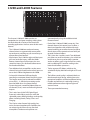
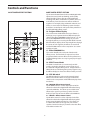
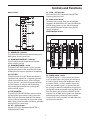
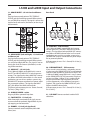
31 - MAIN 2 – control knob
The L Series mixers provide a second set of output
connectors carrying a duplicate of the MAIN MIX
signal for the purpose of feeding another speaker
zone or recorder. The MAIN 2 control knob is used to
set the volume of the MAIN 2 output.
USB I/O Section
The L series consoles incorporate a sophisticated
USB I/O with on board AD and DA converters
providing a digital audio path for connecting to a
PC running most any recording and/or playback
software. The INPUT and ASSIGN switch give you
added flexibility in routing the digital audio signal to
and from the PC.
32 - PHONES – control knob
This control adjusts the overall level of the
Headphone Output.
31
32
34
35
36
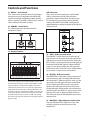
33- Graphic Equalizer
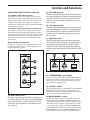
34 – SEND – USB input send switch
The USB INPUT switch allows you to select one of
two stereo (or two channel) signal paths to feed the
USB output to send to the connected PC. When the
INPUT switch is in the up position, the USB signal will
feed from the MAIN left right mix. When the INPUT
switch is in the down position, the USB signal will
feed from the AUX 1 and AUX 2 buses which enables
you to create a unique mix to send to the PC.
33
35 – RETURN – USB return switch
The USB RETURN switch allows you to select one of
two stereo return paths to receive USB audio from
the connected PC. When the ASSIGN switch is in the
up position, the USB signal will return to the MAIN
mix bus. When the ASSIGN switch is in the down
position, the USB signal will return to the last pair
of stereo channels which enables you to playback a
recorded track in the MAIN mix, and you can use the
channels AUX sends to feed any of the AUX buses.
This will let you hear the USB playback tracks in the
monitor mixes.
The L Series 9-band stereo Graphic Equalizer allows you
to contour the frequency response of the MAIN mix bus
signal, providing a maximum of 12dB of cut/boost for
each frequency band. This is an especially useful tool for
cutting frequencies that cause annoying feedback. The
frequency response is flat when the sliders are in the center position. Moving a slider in the positive direction will
boost that frequency by as much as 12dB, and moving
the slider in the negative direction will cut that frequency
by up to 12dB.
36 – MONITOR – USB headphone enable switch
Press the USB MONITOR switch down if you want
to hear the signal from the USB return in the
headphones.