1
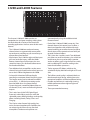
Controls and Functions
Mono Inputs
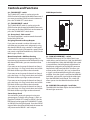
Stereo Inputs
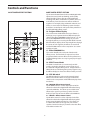
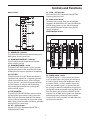
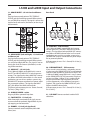
INPUT CHANNEL SECTION
The following section details each part of the L1200
and L2000’s INPUT CHANNELS including the LOW
CUT, 3-BAND EQ, the MONITOR and EFX sends, PAN,
GAIN and VOLUME controls.
1 – PEAK LED
The L1200 and L2000’s MIC/LINE pre-amp also
includes a PEAK LED which, when illuminated,
indicates that the input signal is near overload.
2 - GAIN Control Knob
Each of the L1200 and L2000 channel’s pre-amp
stage has a variable GAIN control to help set a clean
level. The Mic/Line inputs’ GAIN control has a range
of -6 to -50dB on the MIC input and +14 to -30dB on
the LINE input. The Stereo inputs’ GAIN control has a
range of -10 to -50dB on the MIC input and +20 to
-20dB on the LINE input.
1
2
3
4
3 - LOW CUT Switch
Each of the L Series’ channels include a LOW CUT (or
high pass) filter which rolls off the low frequencies
from 75Hz and below at the rate of 18dB per octave.
5
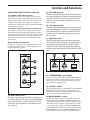
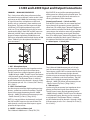
Auxiliary Buses ( 4 - 7 )
The L Series include several auxiliary signal paths,
or buses, that can be used to create independent
mixes for sending to the internal or external effects
processors, or to an external monitor system.
These buses start by sending the signal from each
individual channel, which is set with one of the
auxiliary control knobs. Then, the mix of all the
channels auxiliary level is ultimately sent to either
an internal effects processor, or to an output jack to
connect to an external effect or monitor system. To
help you control your effects and monitor mixes, the
L series has four auxiliary buses, with switching to
give you a possibility of 2 monitor mixes with two
effects sends, or 3 monitor mixes and one effects
send.
6
7
8
9
10
PRE….? POST….? What’s That?
In order to operate your mixer correctly, it is
important to understand the concept of PRE and
POST fader sends. An auxiliary bus that is set up
as PRE Fader routes, or sends, the signal to its
output from a point in the channels’ circuit that is
electronically before the channel Fader. That means
the channel Fader has no effect on the PRE aux
level. A Pre Fader send is what you want to use for
a monitor mix, so when the level is changed for the
mix in the main PA speakers using the channel Fader,
the level in the monitor set by the aux control
11
12
13
14
15
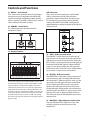
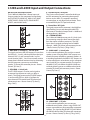
1 to 24 on the L2000
1 to 16 on the L1200
25/26 to 31/32 on the L2000
17/18 to 23/24 on the L2000