1
Chapter 4: Wireless CallFinder Application Options
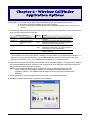
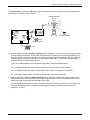
Connection Situation #4: CF100 to Telco POTS Line
National
Cellular Network
Local
PSTN
FXO
CF100
Wireless
CallFinder
POTS
Line
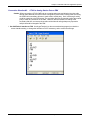
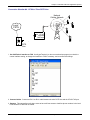
1. Set CallFinder’s Interface to FXO. Use HyperTerminal (or other communications program) to check the
current Interface setting, to change the Interface to FXO if necessary, and to confirm that change.
2. Connect Cables. Connect an RJ11-to-RJ11 cable between the telco POTS line and the CF100 FXO port.
3. Purpose. This setup allows cell phone users to have toll-free access to land-line phone numbers in the local
PSTN where the CallFinder is located.
Multi-Tech Systems, Inc.
CallFinder GSM Cellular Gateway
21