1
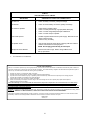
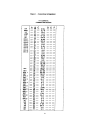
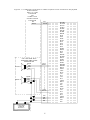
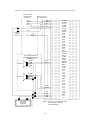
NOTE: When the V-1109RTVA is connected to a 1A2 Key System, connect W/O to Lamp Battery or Ground. See Figure 3. Unplug the power supply before making any connections to the control unit. Do not locate the control unit closer than 18 inches or further than five feet from power supply. Do not use a lamp tester to check signals; use a voltmeter. A lamp tester when first applied is a short circuit to electronic circuits. Do not apply power to the control unit until all connections have been double checked. NOTE: For "Meet Me Page" on 1A2, connect A-Leads from spare button using 10K Ohm resistors in series with each A-Lead. The other side of resistors are connected to the BK/G (inhibit) of V-1109RTHF. Refer to Figure 3 for connections. Mounting Power Connections Mount the unit in a vacant space in an equipment cabinet, rack or key system cabinet, allowing enough room at the rear of the unit to plug in an amphenol connector. Mount a 66B type punchdown block near the unit and label it per Figure 1. Cabling A 25 pair cable with a female connector should be ran from the unit to the connection block. The cable should be terminated on the connection block in standard color code order. Verify that the connections are correct prior to plugging the other end of the cable into the V-1109RTVA Page Unit. The V-1109RTVA is designed to use -24VDC battery. Connect the V/BR lead to Talk Ground. Connect the BR/V lead to Talk Battery (-24VDC filtered). Connect the V/S lead to Signal Ground. Connect the S/V lead to Signal Battery (-24VDC unfiltered). Speaker Connections The outputs for paging zones start at the BK/BR pair (zone 1) through the V/O pair (zone 9). Refer to Figure 3 for typical speaker connections using Valcom one-way amplified speaker assemblies. Connections to PABX System Page and Music Level Set-up The V-1109RTVA may be accessed by connecting the W/BL and BL/W to the Tip and Ring respectively of a Loop Start Trunk Circuit. Refer to Figure 2 for connections. The V-1109RTVA has volume controls for the following functions: Connections to Electronic Key Systems The V-1109RTVA may be accessed by a C.O. line position of an Electronic Key System by connecting the W/BL, BL/W of the V-1109RTVA to a spare line position of the Electronic Key. This line position must be equipped with a trunk card. Refer to Figure 2 for connections. Control Set-Up: 1. Master Page Control: This control sets the level of the page out of the page control unit. The control should be rotated clockwise to about 50% of its travel. After setting control, the individual speaker volume controls should be set to the desired level. 2. All Call Level: The All call level should be set to produce the same audio level as the phone to speaker page control. THIS ADJUSTMENT SHOULD BE MADE AFTER INDIVIDUAL SPEAKER LEVELS HAVE BEEN SET. Connections to 1A2 Key System The V-1109RTVA may be connected to a spare button of a 1A2 Key Telephone by making the following connections: (A 400 type line card is not needed in this application). Master Page Control - located on back of unit below amphenol connector All Call Master Control - located on front of unit Background music input control Zones 1-5 Background music input control Zones 6-9 W/BL, BL/W of V-1109RTVA to spare button Tip and Ring O/W to Lamp Lead of spare button for lamp connections W/GR to Lamp Ground lead of spare button 3