1
5: Header Formats
5.9 Get Statistics Report (Master, Reader, or Control Mode)
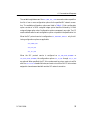
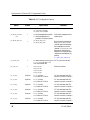
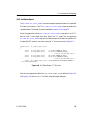
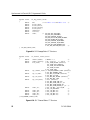
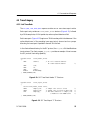
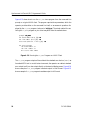
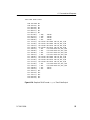
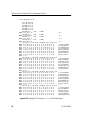
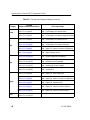
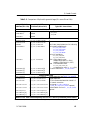
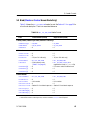
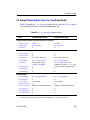
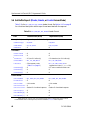
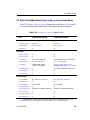
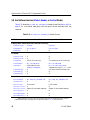
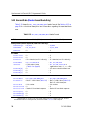
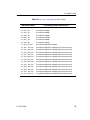
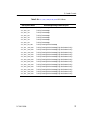
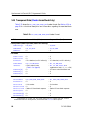
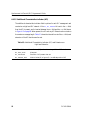
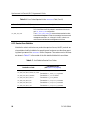
Table 5–11 shows the DLI_PROT_GET_STATISTICS_REPORT header format. See
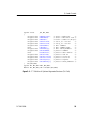
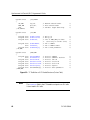
Section 4.4.4 on page 47 for a functional description and the report format associated
with the response.
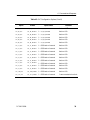
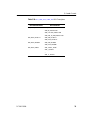
Table 5–12: DLI_PROT_GET_STATISTICS_REPORT Header Format
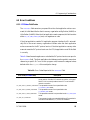
Field
Command Value (Write)
Response Value (Read)
Freeway Header (network byte-order; used in DLI calls only):
usFWPacketType
usFWCommand
usFWStatus
= FW_DATA
= FW_ICP_WRITE
= 0
= FW_DATA
= FW_ICP_READ
= 0
usICPClientID
usICPServerID
a usICPCount
= 0
= 0
= 16 (non-DLI calls only)
= 0
= 0
= 16 + data size (non-DLI calls only)
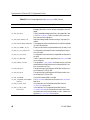
usICPCommand
iICPStatus
= DLI_ICP_CMD_WRITE
= Client memory order
(Table 5–2 on page 61)
= 0
= 0
= 0
= DLI_ICP_CMD_READ
= DLI_ICP_CMD_STATUS_OK or
negative error code (slc_errs.h file)
= ICP return node from Attach cmd
= 0
= 0
ICP Header a
usICPParms[0]
usICPParms[1]
usICPParms[2]
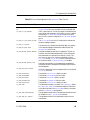
Protocol Header a
usProtCommand
iProtModifier
usProtLinkID
usProtCircuitID
=
=
=
=
usProtSessionID
usProtSequence
usProtXParms[0]
usProtXParms[1]
=
=
=
=
DLI_PROT_GET_STATISTICS_REPORT =
0
=
Link number
=
0 = Summary of all channels
=
1…7 = Individual channel
Session ID from Attach response
=
0
=
0
=
0
=
DLI_PROT_GET_STATISTICS_REPORT
0
Link number
0 = Summary of all channels
1…7 = Individual channel
Session ID from Attach response
0
0
0
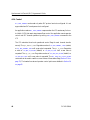
a Requirements for non-DLI calls: ICP Header fields must be in network byte-order, Protocol Header
fields must be in client byte order, and the ICP Header usICPCount field is required.
DC 900-1564A
71