1
Table of Contents
Important Information .......................................................................................................... 18
Safety Information .................................................................................................................. 19
Intended Use .......................................................................................................................... 22
Using Different Telephone Types............................................................................................ 28
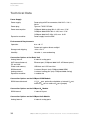
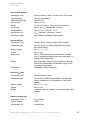
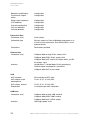
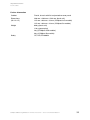
Technical Data........................................................................................................................ 30
Copyright ................................................................................................................................ 34
Environmental Notice ............................................................................................................. 35
Installing and Switching on the PBX .................................................................................. 36
Preparation............................................................................................................................. 37
Important Information on the Installation Site .................................................................... 37
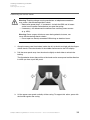
Assembling the PBX (Use as Desktop Device) ................................................................. 38
Wall Mounting of the PBX.................................................................................................. 38
Removing the Cover Panel ................................................................................................ 39
Overview of the Connections and Other Device Components .......................................... 40
Plugging in the Module ...................................................................................................... 46
Network Provider.................................................................................................................... 47
Connecting the Analog Connection Directly to the External Analog Port .......................... 49
Connecting an ISDN Connection (NT) Directly to the External S0 Port............................. 49
Connecting the Ethernet Port with the Internet.................................................................. 50
Analog End Devices ............................................................................................................... 53
Connecting Analog End Devices Directly to the Internal a/b Port...................................... 53
Installing Cables and Wall Sockets at the Internal a/b Port ............................................... 55
ISDN End Devices.................................................................................................................. 57
Connecting ISDN End Devices Directly to the Internal S0 Port ......................................... 57
Available Bus Variants for the Installation of an Internal S0 Bus........................................ 58
Connecting the Cable and the Wall Sockets to the Internal S0 Port (Internal S0 Bus) ...... 61
Connecting ISDN End Devices Directly to the internal UP0 Port ....................................... 63
Connecting the Cable and the Wall Sockets to the Internal UP0 Port ................................ 64
VoIP End Devices................................................................................................................... 67
Connecting VoIP End Devices to the Ethernet Port........................................................... 67
Printers and Storage Media ................................................................................................... 69
Connecting the USB Printer and Storage Media to the USB Host .................................... 69
Inserting the SD Memory Card.......................................................................................... 70
2
COMpact 3000 analog/ISDN/VoIP - Firmware Version 4.0 - Version of the Manual 03 02/11