1
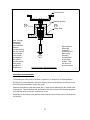
Rear Panel Features:
1
3
2
4
5
6
1)
2)
3)
4)
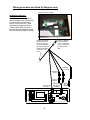
Left RCA Out: Hook-up for the left audio out (white male RCA jack)
Right RCA Out: Hook-up for the right audio out (red male RCA jack)
Power Harness Connection: This plug connects to the power harness mating plug
Optional Headphone Connections: Green is right positive, Gray is left positive and Black is
the ground
5) Antenna Connections: This connects to the antenna if applicable.
6) DIN Connectors: The source component harness (P/N 8010730) connects here. A cable tie
will mount through holes provided in PCB, and is recommended for wire strain relief. A
second component harness is needed to utilize both mini-din connectors.
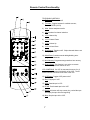
Front Button Panel Features:
1) Power: This button turns LCM1210FD on and off. Dimly lit when in stand-by mode
2) Channel ∆ ∇: Pressing ∆ will select channels higher and pressing ∇ will select channels
lower than current channel.
3) Volume ∆ ∇: Pressing ∆ will raise the volume and pressing ∇ will lower the volume.
4) Select: Each press of this button selects the next source (1-3). Note that some sources
produce an image, depending upon whether components are connected to all sources.
5) Latch: Sliding this latch forward will release the 12.1” monitor to drop into playing position.
6) AP: Places the tuner in auto-program mode. Auto program will scan all channels available
and store active channels into memory for easy selection with the channel up/down buttons.
7) Bright ∆ ∇: Pressing this button ∆ will increase monitor brightness, and pressing this button ∇
will decrease monitor brightness.
8) Contrast ∆ ∇: Pressing this button ∆ will increase picture contrast, and pressing this button ∇
will decrease contrast.
9) Color ∆ ∇: Pressing this button ∆ will increase color separation and pressing this button ∇ will
decrease color separation.
2