1
Chapter 2
Installation
Before you begin, turn off power to all devices with which you plan to connect.
To prevent damage to your equipment due to static electric discharge, properly
ground all devices on the installation. Consult your dealer for technical details if
necessary.
Single Station Installation
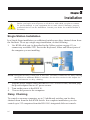
In a Single Stage installation, no additional switches are daisy chained down from
the first unit. To set up a single stage installation, do the following:
1. Use KVM cable sets (as described in the Cables section on page 12), to
connect any available CPU Port to the Keyboard, Video and Mouse ports of
the computer you are installing.
NOTE: Disregard the Daisy Chain ports at this time. Use Daisy Chain Ports for daisy chaining
the KL0116 to additional KH0116 switches. See the next section in this chapter for
more information on daisy chaining.
2.
3.
4.
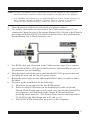
Plug the power adapter cable into the KL0116’s Power Socket, and then plug
the power adapter into an AC power source.
Turn on the power to the KL0116.
Turn on the power to the computers.
Daisy Chaining
To control even more computers, up to 31 additional switches can be daisy
chained down from the first KVM switch. In a complete installation, you can
control up to 512 computers from the KL0116’s integrated slide-out console.
118
6