1
1
2
Connect the modem to your PC
1. Turn your PC OFF.
2. Connect the serial cable to both the modem and a spare COM port at the back
of the PC.
3. Connect the supplied phone cord to the modem LINE jack and a phone wall
socket.
4. Connect the supplied power adaptor unit to the modem and a power point.
5. Turn the modem on – the power light should light up.
Install the modem drivers
For Windows Vista
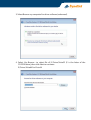
1. Windows will detect the modem automatically; please insert the driver CD
supplied and click Locate and install driver software (recommended).
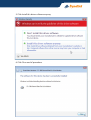
2. Select I don’t have the disc. Show me other options.