1
2
Chapter 2
COPY FUNCTIONS
This chapter explains how to use the copy functions.
NORMAL COPYING
This section explains how to make a regular copy.
If "Auditing mode" has been enabled (p.39), enter your 3-digit account number.
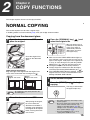
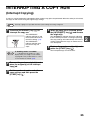
Copying from the document glass
1
Open the document cover/SPF, and
place the original.
3
Press the [ORIGINAL] key (
select the original size.
) and
When the original size is
selected, the tray with the
same size of paper is
automatically selected.
(When there are two or
more paper trays)
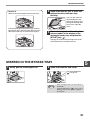
Place the original face
down on the document
glass.
[How to place the original]
Align the edge of the original with the original size
scale, to be centred with the centring mark ( ).
mark
Original size scale
mark
Original size scale
● Make sure that the PAPER SIZE indicator lights up.
If the indicator is not lit, no tray has the same size of
paper as the original. Load paper of the required size
in a tray, or select the bypass tray with the [PAPER
SELECT] key ( ) and copy from the bypass tray.
● The bypass tray must be manually selected.
● To copy on paper of a different size than the original,
select the paper with the [PAPER SELECT] key ( ).
● If the ORIGINAL SIZE indicator is blinking, rotate the
original so that it is in the same orientation as the
blinking ORIGINAL SIZE indicator.
4
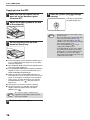
Set the number of copies.
5
Press the [START] key (
copying.
) to begin
The copy is delivered to
the paper output tray.
Note
2
An original up to A3 can be placed on the
document glass.
Close the document cover/SPF.
After placing the original,
be sure to close the
document cover/SPF. If
left open, parts outside of
the original will be copied
black, causing excessive
use of toner.
Note
• The paper output tray can hold up to 250
sheets of paper.
• About one minute after copying ends, "Auto
clear" activates and restores the copy
settings to the initial settings. (p.8) The
setting for "Auto clear time" can be changed
in the system settings. (p.36)
• Press the [CLEAR] key (
) to stop
copying in the middle of a run.
15