1
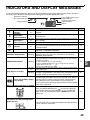
INDICATORS AND DISPLAY MESSAGES
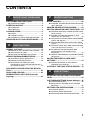
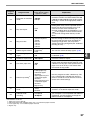
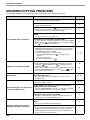
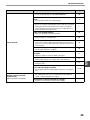
If one of the following indicators lights up or one of the following messages appears in the display, check the
meaning of the indicator or message in the following table and take appropriate action.
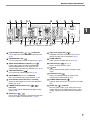
Maintenance indicator
Paper required indicator
Toner cartridge replacement
required indicator
Developer replacement
required indicator
Misfeed indicator
Display
Indication
Maintenance
indicator
Developer
replacement
required indicator
Toner cartridge
replacement
required indicator
Steadily
lit
Cause and solution
Service by an authorised SHARP service technician is
required.
Steadily
lit
Developer is required. Contact your authorised service
representative.
Steadily
lit
Blinking
Replacement of toner cartridge will be needed soon. Prepare a
new cartridge.
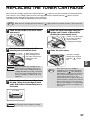
Toner cartridge must be replaced. Replace it with a new one.
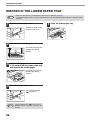
The tray is out of paper. Load paper. It is also possible that the
tray is not inserted completely into the machine. Make sure it is
inserted correctly.
A paper misfeed has occurred. Remove the misfeed as
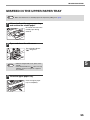
explained in "MISFEED REMOVAL".
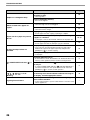
The original is not placed in the correct orientation. Rotate the
original so that it is in the same orientation as the blinking
ORIGINAL SIZE indicator.
Paper required
indicator
Steadily
lit
Misfeed indicator
Blinking
ORIGINAL SIZE indicator
PAPER SIZE indicator
Blinking
Blinking
Steadily
lit
[CH] appears in display
Blinking
Letters and numbers appear
in the display
A blinking PAPER SIZE indicator means that the size of paper loaded
in the tray is different from the paper size setting for the tray. Change
the paper size setting.
To clear the display, do one of the following:
• Use the [PAPER SELECT] key (
) to change the tray selection.
• Open and close the tray.
• Press the [CLEAR ALL] key (
).
The front cover or the side cover is open. Close the front cover
or the side cover.
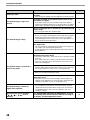
The toner cartridge is not installed correctly. Reinstall the toner
cartridge. If [CH] still blinks in the display after reinstalling the toner
cartridge, contact your authorised service representative.
Turn off the power switch, wait about 10 seconds, and then turn on
the switch again. If this does not clear the message, write down the
code that appears and then unplug the power cord and contact
your authorised service representative. Tell your authorised
service representative what code appeared and the circumstances
under which it appeared.
Page
–
–
–
57
10
50
15,16
12
–
57
–
When "Use close paper size" is disabled
Misfeed location indicator lights up at
the optional 2 x 250-sheet/250-sheet
paper feed unit
Press the [PAPER SELECT] key ( ) to manually select the
tray and then press the [ON LINE] key (
). Printing will
begin. If you are selecting the bypass tray, load paper in the
bypass tray.
27
The side cover of the 2 x 250-sheet/250-sheet paper feed unit
is open. Close the side cover.
–
49
5