1
9
Backlighting
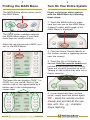
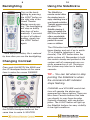
Turn on the backlighting by pressing
the LIGHT button on
the right side of the
Home Theater
Master remote control. The backlighting
will stay on briefly,
then turn off automatically. If you wish
to turn it off without
waiting, simply tap
the LIGHT button
again.
* Note that your battery life is reduced
by how often you use the backlighting.
Changing Contrast
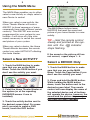
Press and Hold BOTH the MAIN and
the UP thumbpad button at the same
time to make the screen DARKER.
10
Using the SideKickTM
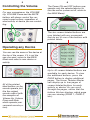
The SideKickTM
remote control offers
the simplest way to
enjoy watching one of
your favorite activities.
Typically programmed
for either TV or
Satellite viewing, it
does not replace the
MX700TM, but it does
offer a comfortable,
ultra simple interface
perfect for casual
users or children.
The ON button turns on your entire
home theater and sets it up to watch
TV or Satellite (whatever is your
favorite). The OFF button turns the
entire system off. Remember to hold
the remote steady and pointed at the
system until all components are correctly powered on or off. Turning on
the system may take ten to twenty
seconds.
TIP – You can tell when to stop
pointing the SideKickTM when
the command LED indicator
stops flashing.
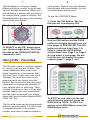
Press and Hold BOTH the MAIN and
the DOWN thumbpad button at the
same time to make it LIGHTER.
CHANNEL and VOLUME control buttons will operate the device programmed into these buttons.There are
also three Favorite buttons that take
you directly to your three favorites
(typically channels) with one button
press. The LIGHT button will light up
the SideKick buttons for easy visibility
in low-light conditions.