1
Part No. T0289, Rev A
August, 2008
Page 3 of 97
Applications Ware
Applications Ware
Introduction
This section explains how the Applications Ware are organized, implemented, and
modified.
Applications Ware
Licenses and
Upgrades
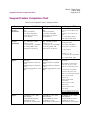
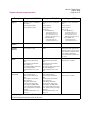
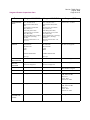
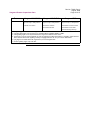
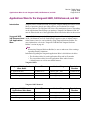
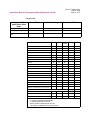
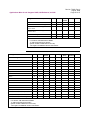
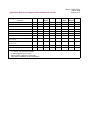
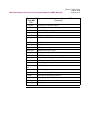
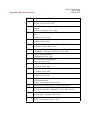
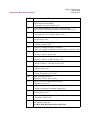
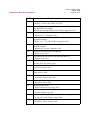
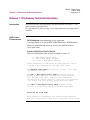
The Rel 7.1.R00A Applications Ware is divided into four base licenses and four to
five upgrade licenses (depending on the platform). Customers are required to purchase only one base license and can purchase optional upgrade licenses to add to the
base license. Compatibility of upgrade licenses with base licenses and various products is totally dependent upon a specfic product and its capabilities.
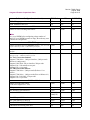
Applications Ware Base Licenses
• IP+ Applications Ware License (242D, 340E, 342, 7310, 7330)
• IP SAFE Applications Ware License (3400 and 6800)
Note
The IPSafe Applications Ware license now includes SSH Server with
external Radius Authentication.
• SNA+ Applications Ware
• Multi-Service Applications Ware
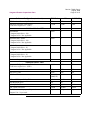
License Upgrades
• Voice Applications Ware License Upgrade
• Security Applications Ware License Upgrade
• AS/400 BSC Applications Ware License Upgrade
• Advance Voice (Premium Services + SIP)
• Premium Voice Services Applications Ware License Upgrade (Note: This
option software upgrade license is available in the 340E and 342 models for
release 6.5 to 7.0.) For the 340E, 342, 3460, 6840, 6841, 7310, and 7330,
these services are included in the Advanced Voice Applications Ware License,
starting with Rel 7.1.R00A.
Note
A license refers to both a legal document that allows a customer to use features
and to the software that contains the features.
One base license must be purchased for each hardware platform.
Default Software
Images and
Functionality
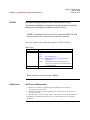
Each license contains a large number of software features and functions. In addition,
each hardware platform has a default factory image that contains a subset of the full
license.
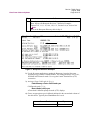
In some cases, the default image might not completely meet your needs. You can
either create a new Vanguard customer image using the Software Builder application
on the Vanguide CD-ROM, or use our Vanguard Customer Ware Program.