1
Getting Connected cont.
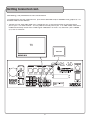
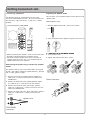
Connecting TVs/Monitors to the CDG-6000RV
The CDG-6000RV has two VIDEO OUTPUT jacks which send video and/or decoded CD+G graphics to TVs
and other video monitor devices.
1. Connect an RCA style video cable from a VIDEO OUTPUT on the CDG-6000RV to the VIDEO INPUT
jack on your TV or other monitor. You may need to manually switch your TV to video mode, while some
models automatically switch when a video signal is detected. On most TVs, the INPUT jack is labeled
A/V, AUX or VIDEO IN.
��
�������
9