1
s
XT55 Hardware Interface Description
Confidential / Preliminary
Note:
mo b i l e
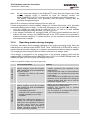
Do not connect the charger to the GSM_BATT+ lines. Only the charger input of the
external charging circuit is intended as input for charging current! The
GSM_POWER pin of XT55 is the input only for indicating a connected charger!
The battery manufacturer must guarantee that the battery complies with the
described charging technique.
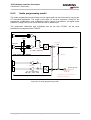
What to do if software controlled charging does not start up?
If trickle charging fails to raise the battery voltage to 3.2V within 60 minutes +10%, processor
controlled charging does not begin. To start fast charging you can do one of the following:
· Once the voltage has risen above its minimum of 3V, you can try to start software
controlled charging by pulling the GSM_IGT line to ground.
· If the voltage is still below 3V, driving the GSM_IGT line to ground switches the timer off.
Without the timer running, the GSM/GPRS part of the XT55 module will not proceed to
software controlled charging. To restart the timer you are required to shortly disconnect
and reconnect the charger.
3.5.4
Operating modes during charging
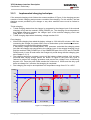
Of course, the battery can be charged regardless of the engine's operating mode. When the
GSM engine is in Normal mode (SLEEP, IDLE, TALK, GPRS IDLE or GPRS DATA mode), it
remains operational while charging is in progress (provided that sufficient voltage is applied).
The charging process during the Normal mode is referred to as Charge mode.
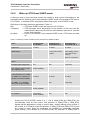
If the charger is connected to the charger input of the external charging circuit and the
module’s GSM_POWER pin while GSM/GPRS part of XT55 is in POWER DOWN mode, the
GSM/GPRS part of the XT55 goes into Charge-only mode.
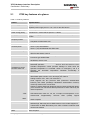
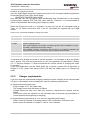
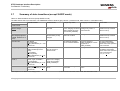
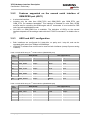
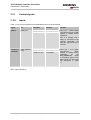
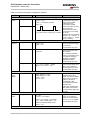
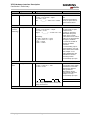
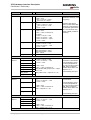
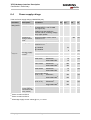
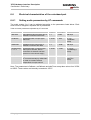
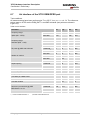
Table 9: Comparison Charge-only and Charge mode
Charge-only mode
Charge mode
How to activate mode
Features
Connect charger to charger input of · Battery can be charged while GSM engine
external charging circuit and module’s
remains operational and registered to the
GSM_POWER pin while the GSM/GPRS
GSM network.
part of the XT55 is
· In IDLE and TALK mode, the serial interfaces
are accessible. AT command set can be used
· operating, e.g. in IDLE or TALK mode
to full extent.
· in SLEEP mode
· In the NON-CYCLIC SLEEP mode, the serial
interfaces are not accessible at all. During the
CYCLIC SLEEP mode they can be used as
described in Chapter 3.6.3.
Connect charger to charger input of · Battery can be charged while GSM engine is
external charging circuit and module’s
deregistered from GSM network.
GSM_POWER pin while the GSM/GPRS · Charging runs smoothly due to constant
part of the XT55 is
current consumption.
·
The AT interface is accessible and allows to
· in POWER DOWN mode
use
the commands listed below.
· in Normal mode: Connect charger to
the GSM_POWER pin, then enter
AT^SMSO.
IMPORTANT: While trickle charging is in
progress, be sure that the application is
switched off. If the application is fed from
the trickle charge current the module
might be prevented from proceeding to
software controlled charging since the
current would not be sufficient.
XT55_hd_v00.02
Page 45 of 116
17.03.2004