1
Appendix E: Audio/Serial Ports: Operation & Multi-Port Configuration
Appendix E: Audio/Serial Ports: Operation & MultiPort Configuration
This appendix details audio & serial interface operation for those models that
have this feature:
• SDBX/SA2-1
• SDBX/DA2
These extender products contain daughter boards that allow bi-directional stereo
audio and a full-duplex serial data link to be sent across the CATx
interconnection cable in addition to PS/2 keyboard, mouse and video.
Serial Interface - Set Up and Operation
No setting up or user adjustments are required. Please note that on dual access
Local Units, the serial link is always active.
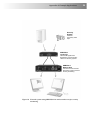
The Remote Unit’s serial port is wired as DTE - the same as that on a PC. To
connect a serial printer or other DTE (rather than DCE device) to the Remote
Unit, you will need a Null-Modem crossover cable between the Remote Unit
and the printer. Select Xon/Xoff software flow control on the printer and PC.
A serial touch screen may be plugged directly into the Remote Unit.
Serial Interface – Handling Multiple Serial Devices
The extender’s serial interface transmits/receives six signals (3 signals in each
direction).
Normally, four of these signals are used for hardware handshaking (in addition
to TX & RX). However, because each handshaking line can support signals up
to 19,200 Baud it is possible to configure the serial interface to handle up to
three simple 2-wire (Tx/Rx only) serial links.
To do this, you will need to construct a custom breakout cable. Please contact
Technical Support for further information.
45