1
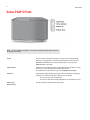
Sonos PLAY:5
7
Creating a Stereo Pair
The Stereo Pair setting allows you to group two PLAY:1s, PLAY:3s or PLAY:5s in the same room to create a wider stereo
experience. In this configuration, one unit serves as the left channel and the other serves as the right channel. You cannot
create a mixed stereo pair—the Sonos components in the stereo pair must be the same.
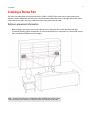
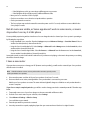
Optimum placement information
• When creating a stereo pair, it is best to place the two Sonos components 8 to 10 feet away from each other.
• Your favorite listening position should be 8 to 12 feet from the paired Sonos components. Less distance will increase
bass, more distance will improve stereo imaging.
Note: The Stereo Pair setting is for use with PLAY:1, PLAY:3 and PLAY:5 units only. You cannot
create a mixed stereo pair—both Sonos components in the stereo pair must be the same.