1
Using Audio Effects
iMovie comes with audio effects you can
use to enhance the sound of your movie.
For example, you can adjust a song using a
graphics equalizer or give it an overall
tone. You can even change the pitch or
reduce unwanted noise, such as a camera
hum or wind noise.
Steps
Apply an audio effect to a video clip
1. Open the timeline viewer and select a video clip that includes people talking.
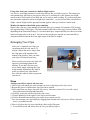
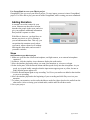
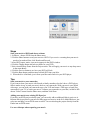
2. Click the Editing button and then click the Audio FX button.
3. Select the Pitch Change effect and adjust the slider. Click Preview to hear how your clip will
sound.
4. Click Apply. iMovie will split the audio from the video clip and place it on the audio track below.
A red bar will show while the audio effect is being applied.
5. When the effect is applied, play the clip to hear the new audio effect.
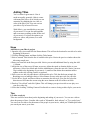
6. Switch to the clip viewer and rearrange where this clip is in your movie. Switch back to timeline
view to see how the audio moved with your video clip, despite being on a separate track. This is
because even though the audio was extracted from the video clip, they are still "pinned" to one
another. The yellow pushpins show this in timeline viewer.
Tips
Removing wind noise and camera hum
If you recorded outside on a windy day, or your camcorder records its own operating noise with the
built-in microphone, you might hear unwanted noise in your video. Use the Noise Reducer effect to
reduce any unwanted noise in your recording.
Obtaining clean audio
While iMovie 6 includes the Noise Reducer audio effect, the best way to end up with clean audio in
your movies is to record it clean to begin with. For important audio recordings, consider using an
external microphone closer to the subject, such as a lavaliere mic or a handheld mic. Also, always
monitor any important audio recording with headphones during the recording process. If you’ll be
recording in a noisy environment, such as a live music event where you’re surrounded by a noisy
audience, consider getting noise-reduction headphones, so you can still hear the audio coming from
the camera.
21
Apple Tutorial