1
Controls and Functions
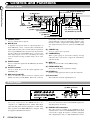
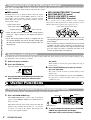
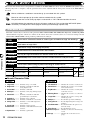
Front Panel
Controls and Functions
(1) POWER switch
(10) STORE key
(12) VALUE UP/DOWN keys
(11) Level meter
(13) BANK key
(2) MIC IN jack
(3) INPUT control
(4) OUTPUT control
(5) MIX control and LED
(6) CANCEL key
(7) COMPARE key
(8) MIDI key
(9) PARM CHECK key
(1) POWER switch
Serves to turn the unit on and off.
(2) MIC IN jack
A dynamic microphone with an output impedance of
about 600 ohms can be connected here. Normally the
input signal from this jack is mixed with the signal from
the rear-panel INPUT jacks and sent to the internal effect
circuitry. When the VOCODER effect is selected, the
mike input signal serves for controlling the sound
character and the envelope (volume change curve) of the
effect.
(3) INPUT control
Serves to adjust the signal from the INPUT jacks and the
MIC IN jack.
(4) OUTPUT control
Serves to adjust the level of the signal supplied at the
OUTPUT jacks.
(5) MIX control and LED
Serves to adjust the balance between original sound
(DRY) and effect sound (WET). When the control is
(14) Display
(15) TAP key and LED
(16) BYPASS key and LED
turned fully counterclockwise, only the original sound is
output. When the control is turned fully clockwise, only
the effect sound is output. If the mixing balance setting
was changed since the last store operation, the LED lights
up.
(6) CANCEL key
Serves to cancel a store operation.
(7) COMPARE key
When a patch (group of stored effect settings) is being
edited, this key can be used to compare the sound before
and after the edit.
(8) MIDI key
This key is used to make various MIDI settings.
(9) PARM CHECK key
Serves for checking effect parameter settings.
(10) STORE key
Used for storing patches in memory and other functions.
(11) Level meter
These indicators show the signal input level.
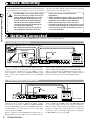
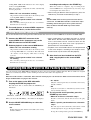
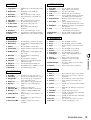
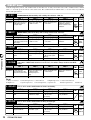
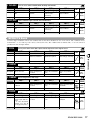
Rear Panel
(2) BYPASS jack
(1) MIDI connectors
(1) MIDI connectors
Serves for connection to the MIDI interface of a
computer or to a MIDI keyboard or similar. This allows
patch switching from external equipment or control of the
entire operation of the RFX-2000 from a computer, using
the supplied editor/librarian software.
2
ZOOM RFX-2000
(2) BYPASS jack
Serves for connection of the foot switch FS01 (option) for
switching effects on and off.
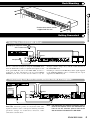
(3) DIGITAL OUT connectors
The same signal as available at the OUTPUT jacks is
carried by these connectors in S/PDIF digital format. This
can be used to supply the signal to consumer equipment
with a digital input, such as a digital multitrack recorder,