1
System setting
System setting
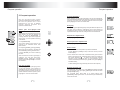
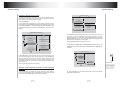
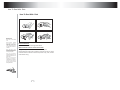
Example 4: Set age control grade
GENERAL PAGE
For original DVD disc, parents can prohibit the those content
inadvisable to children to be played, you can operate following
these procedures to set age control grade:
TV DISPLAY
1.Push [POWER]
ANGLE MARX
2.Push [SETUP] to enable TV screen display system setting
menu picture, push [DOWN] till the high lighting band move to the
item "PREFERENCE", push [ENTER], then push [DOWN] till the
high lighting band move to the item "PARENTAL", TV screen will
display:
OSD LANG
ENGLISH
CAPTIONS
FRENCH
SCR SAVER
GERMAN
PIC MODE
SPANSH
MAIN PAGE
SET OSD LANGUAGE
PREFERENCES PAGE
TV TYPE
AUDIO
SUBTITLE
DISC MENU
4 PG 13
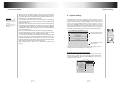
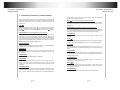
2. Push [RIGHT] to enter the sub-menu in the right of the screen. If
you want to set the language of operation indication or menu
display to English, you can push "UP" or "DOWN" to move the high
lighting band to "English", then push [ENTER], the language of the
menu in the screen will turn into English.
5
3.Push [MAIN PAGE] to exit system setting.
2
3 PG
PARENTAL
6 PG-R
PASSWORD
7 NC-17
DEFAUL TS
8 ADUL T
SMART NAV
NO PARENTAL
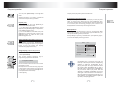
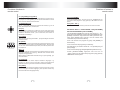
3. The submenu SMART NAV in PREFERENCES item is used to set
whether there is a menu when an MP3, MPEG file disc or JPEG file disc
is played.
PREFERENCES PAGE
SMT PARENTAL CONTROL
TV TYPE
3. Push [RIGHT] to enter the sub-menu in the right of the screen, if
you want to change the age control grade to 3, push [DOWN] till
the high lighting band move to the item "3PG", the player will
indicate you to enter password, if the ex-factory password has
never been modifiied, you can push number buttons "4408" in the
remote control.
4.Push [SETUP] to exit system setting.
DC IN
12V
12V 3A
+
DISC MENU
PARENTAL
PASSWORD
DEFAUL TS
NO MENU
SMART NAV
WITH MENU
12V REMOTE
OUT
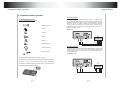
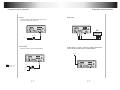
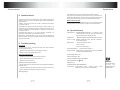
12V remote out
It provides the power
of DC 12V/0.5A when
power of the product
is on. If you turn off
power of the product,
it will have no output.
Example 5: Set Operation indication or menu display
language
18
_
SUBTITLE
SMART NAV TYPE
1.Push [SETUP] to enable TV screen display system setting
picture, push [ENTER], push [DOWN] till the high lighting band
move to the item "OSD LANG", TV screen will display:
12V REMOTE
OUT
AUDIO
For other description of this menu, please refer to the User Manual
provided at an earlier time.
19