1
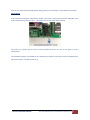
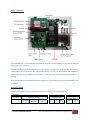
If you do not required to go through details setting, please process to STEP3 – Final Installation and Setup Factory Reset If you required to change the administrator number in the future, simply press the button “FACTORY” at the mother board until you hear the “du~” . This means the unit back to the factory default This means you already reset the unit to factory default. Now you can start to call again to set the administrator. This method of setting is only allowed to set 1 administrator number. If you wish to set more administrators, please go to Step 3 – Installation and set up WITURA TECHNOLOGY SDN BHD | WT‐1672C GSM Remote Control Switch User Manual V1.8 4