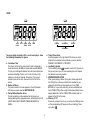
1
Player A thinks, makes a move and presses the top button in 10
seconds or more. Only 10 seconds is added to player A’s
countdown clock after the move has been made.
pointing to GAME appears on the LCD to show that you have
selected this option. By pressing GAME you have automatically
selected the first preset timer option. The amount of time you have
on the clock appears on the LCDs (in this case, 5 seconds per
move).
Preset Timer Method a)
To play a game using the first preset timer option, press one of
the Timing Activator buttons to start the one of the clocks. Each
player then has 5 minutes to complete all the moves and a
maximum free time of 3 seconds for each individual move.
Preset Timer Method a)
To play a game using the first Preset Timer option, press an
appropriate Timing Activator Button to start the one of the clocks.
Each player then has 5 seconds to complete each individual move.
Preset Timer Method b)
Under this general Bronstein option, you have another preset
timer method which can be accessed by pressing BRONSTEIN
again instead of Timing Activator buttons. Each player then has 20
minutes to complete all the moves and a maximum free time of 10
seconds for each individual move.
Preset Timer Method b), c)
Under this general Game option, you have another preset timer
method which can be accessed by pressing GAME again instead
of pressing a Timing Activator button when the display shows the
first Preset Timer option of Game timing. Each player then has 10
seconds or 1 minute to complete each individual move.
1.2.6 Game Timing
Note that in Game timing, unlike in other timing options, the
opponent’s countdown clock will be reactivated if you press your
Timing Activator button when your time is up.
Game timing is a simple, fast and fun way to time yourself
against your opponent, in which each player is simply given a
certain amount of time to complete each move. Your Game Clock
automatically resets the time for each move and displays a time’s
up symbol at the end of each move to remind you your time is up.
Timing Option
Game
Preset Timer Option
a)
b)
c)
1.2.7 User Timing
To concoct your own personalized timing method, select the
special “User” Option by following the steps below:
Time/Move (Time per move)
(i) Press one of the Timing Option keys (HOUR GLASS, BLITZ,
TOURNAMENT, BONUS TIMER, GAME, BRONSTEIN) after
the clocks have been reset (by pressing PAUSE for 3 seconds
or more). You will see the time allocated for this option together
with the number of moves (for Tournament only) on the LCDs.
A triangle appears on the LCD to show you which timing option
is currently displayed. Press NEXT/MOVE NO. to cycle through
the various Tournament stages. A triangle appears on the LCD
to show you which stage is on the display as you cycle through.
5 seconds/move
10 seconds/move
1 minute/move
To play a game using Game timing, press GAME before
pressing either of the Timing Activator buttons or after pressing
PAUSE for 3 seconds or more to reset the clocks. A triangle
9