1
4.0 GETTING STARTED
4.2
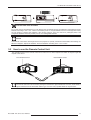
Connecting the Power Cord
•
Before plugging in the Power Cord, ensure that all devices have been connected
to their respective inputs to this unit.
•
Connect the power cord to the power input terminal of the projector.
CAUTION AGAINST FIRE AND ELECTRIC SHOCK
Since the power consumption of this unit is high, insert the power plug directly into a wall outlet.
When not using devices, remove the power plug from the wall outlet.
Do not use power cords for connection other than specified.
Do not use a power voltage different from that which is indicated.
Do not cut, tear or modify the power cords. Also, do not place a heavy object on, heat or stretch the power cords as
this may cause damage to the cords.
Do not insert or pull plugs with a wet hand.
R699800 - Inti Series User Manual
19