1
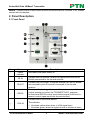
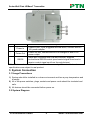
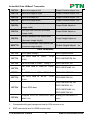
Scaler Wall Plate HDBaseT Transmitter ⑥ AUDIO IN ⑦ HDMI IN ⑧ LINK &HDCP ⑨ RESET source turn off when there is no VGA input signal Connect with the audio output socket of VGA source device, deliver synchronous audio source with VGA signal source when choosing VGA as source signal. Connect with HDMI source device. The indicator will illuminate yellow when there is VGA signal input and illuminate green when the signal source is chosen as input source. LINK: Twisted Pair Link status indicator, illuminate green when successfully connected. HDCP: HDCP compliance indicator, illuminate green when the source signals is with HDCP; blink when it is not with HDCP; and turn off when there is no source signal. Press the button to reboot TPHD405PT-WPI. USB port, used for firmware update ⑩ FIRMWARE Plug a flash disk or other storage device with update file (MERGE.bin), and send command 50698% to update firmware. 2.2 Side Panel ① HDBT OUT: RJ45 port, connect with receiver via a CAT5e/6 cable to deliver Audio/ Video signals, support PoC. Note: TPHD405PT-WPI support unidirectional PoC, i.e. it can be energized by far-end receiver but it can’t energize far-end receiver. 2.3 Rear Panel PTN Electronics Limited 3 www.PTN-electronics.com