1
Controls and Functions
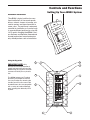
Positioning the dB500
Microphone Positioning - How to Reduce Feedback
Feedback is the annoying howling and squealing that is heard when the
microphone gets too close to the speaker and the volume is high. You get
feedback when the microphone picks up the amplified signal from the
speaker, and then amplifies through the speaker again, and then picks it
up again, and so on and so on. In general, it is always recommended that
any LIVE mic (a mic that’s on) is positioned behind the speaker enclosures. This will give you the best level from your system before feedback.
One possible exception is when you are adjusting the sounds of the
microphones, since you want to listen in front of the speaker to hear properly. To do this, lower the MAIN VOLUME while setting the EQ and effect
from in front of the speakers. Once you have the sound you like, move
the microphones to behind the speakers and raise the Main volume.
Active Monitor
Active Monitor
dB
dB
500a
500a
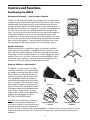
Speaker Placement
Whenever possible it is a good idea to raise the speakers above the
heads of the listening audience. The dB500 enclosure features a standard 1 3/8” pole mount receptacle, which are compatible with speaker
stands from a variety of manufacturers. In a smaller setting like a school
cafeteria, library, or a mall kiosk, you can also use the dB500 in one of
the tilt back monitor positions, which will improve the projection of the
speakers and may eliminate the need for speaker stands.
Using the dB500 as a Floor Monitor
The dB500 is an ideal solution for stage
monitoring and thanks to its unique design,
two wedge monitor positions are possible.
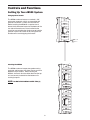
When placed on its side with the high frequency horn facing to the left of the enclosure, the dB500 is tilted at a 15 degree
angle optimizing performance when used
on a small stage. When placed on its side
with the high frequency horn facing to the
right of the enclosure, the dB500 is tilted at
a 30 degree angle optimizing performance
when used on larger stages. In a large
stage monitor system, several dB500’s can
be daisy-chained together using the
EXTENSION SPEAKER output.
FAR FIELD
Bottom
NEAR FIELD
Top
Note: Be sure to check the manufacturers
minimum recommended impedance for
STAGE MONITOR POSITION
STAGE MONITOR POSITION
15 DEGREES
30 DEGREES
your power amplifier to avoid overload and
possible damage to both the speaker and
amplifier. In many instances when using the dB500 as a monitor system, you may choose to use an
external equalizer like the Samson S Curve 131 to increase the volume and reduce the chance of
feedback.
6