1
165 mm+-2
Under Image Shooting Mode (
)
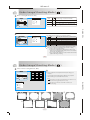
Self-timer Mode
OK
MENU
With the 10 sec. Self-timer ( ):
The image will be taken after an interval of 10 seconds
once the Shutter Button is released.
9
With the 2 sec. Self-timer ( ) :
The image will be taken after an interval of 2 seconds once
the Shutter Button is released.
2S
With the Double self-timer ( ) :
The image will be taken twice once the Shutter Button is
released.
OK
MENU
The first image will be taken after an interval of 10 seconds.
The second one will be taken after an interval of 2 seconds
continuously right after the first shooting .
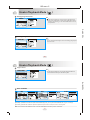
Voice Memo Mode
7
5M
122 mm+-2
7
5M
You can have two ways to put the voice memo onto the images.
OK
MENU
OK
MENU
At Image Shooting Mode:
1. When the Voice Memo Button is pressed down, the Voice Memo icon( ) will
show up on the LCD.
2. Press down the Shutter Button to take a picture.
3. Then you can record a voice memo up to 10 seconds after the image is taken.
The recording can be stopped at any time by pressing the Shutter Button.
At Playback Mode:
1.Press down the Voice Memo/Down Button and a recording bar will show.
2. Press down the Shutter Button half way down to record a voice memo.
3. Then you can record a voice memo up to 10 seconds after the image is taken.
The recording can be stopped at any time by pressing the Shutter Button.
After the voice memo is recorded, the ( ) will show on the TFT LCD Monitor.
14
Under Image Shooting Mode (
)
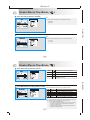
Exposure / Delete Button
14
6M
14
6M
Operation Steps
Operation Steps
100-0015
1.
Operation Steps
1.
DELETE
DELETE: OK
CANCEL:
F5.8
AUTO
OK
MENU
OK
MENU
OK
MENU
Shooting Mode
OK
MENU
Night Mode
OK
MENU
OK
MENU
Playback Mode
At Image Shooting Mode:
By pressing down the Delete / +/- Button, you can adjust the value of the exposure compensation, which is ranged from
-2.0EV to +2.0EV (at 0.5EV increment), and you can see the exposure compensation icon (
) showing on the right, bottom
on the TFT LCD. By press the Up & Down Button you can choose the ISO values and press OK Button to confirm.
At Night Scene Mode under Shooting Mode:
You can adjust the value of the long-time shutter, including 8, 6, 4, 3, 2, 1, 1/2, 1/4, 1/8sec, Auto by pressing Flash/Right &
Self-timer/Left Button. By pressing the Up & Down Button you can choose the aperture and press OK Button to confirm.
At Playback Mode:
Deleting the single image can be done by pressing down this button and OK Button.
If you would like to delete all images, please refer to page 24.
15
122 mm+-2
0.0EV