1
Appendix A. RPQs
Many RPQs are proprietary features that have been developed based upon particular customer
needs. Other RPQs are options that are not included on the standard configuration panels due
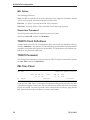
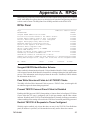
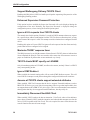
to their sensitive nature. The RPQ Panel lists all RPQs available to the SCON-3074.
RPQs Panel
RPQs
LINCS C8.2 Central Control
DESCRIPTION
STATUS
Sungard ESCON Identification Scheme
Pass Write Structured Fields to LU3 TN3287 Clients
Prevent TN3270 Connect Panel if Host is Disabled
Restrict TN3270 LU requests to those configured
Support Wollongong Pathway TN3270 Client
Enhanced Supervisor Password Protection
Ignore all LU requests from TN3270 clients
Maximize TN3287 response timer
TN3270 clients MUST specify an LUNAME
Ignore ICMP Redirect
Assume all TN3270 clients support extended attributes
Immediately Disconnect NonSNA Client
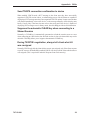
Send TN3270 connection confirmation to device
Suppress the automatic CLEAR key when connecting to a Shared Session
During TN3270E negotiation, always tell client what LU was assigned
Disable
Disable
Disable
Disable
Disable
Disable
Disable
Disable
Disable
Disable
Disable
Disable
Disable
Disable
Disable
PF: 1-Menu
7-Back
8-Forw
9-Default
10-Done
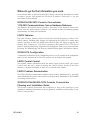
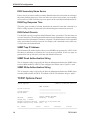
Sungard ESCON Identification Scheme
When enabled, information taken from the ‘Unique Machine Identifier’ field in configuration
will be inserted into the Node Identifier frame that is exchanged during the link initialization
process. This information can be displayed from the host side. If disabled, LINCS defaults
the information in this field.
Pass Write Structured Fields to LU3 TN3287 Clients
This RPQ will allow Write Structured Fields to pass to a TN3287 client, even though it did
not indicate support for them during negotiation.
Prevent TN3270 Connect Panel if Host is Disabled
Enabling this RPQ prevents LINCS from painting a Connect Panel of configured 3270 Host
Classes when the TCP port is configured with a valid port number and the Host column
indicates ‘Disabled’ on the TN3270 Client Definition Panel. Normally, defining a port number
without enabling a Host setting will result in the 3270 Host Connection panel being presented.
Restrict TN3270 LU Requests to Those Configured
With this option enabled, only clients that have an entry in the TN3270 Client Definition
panel (IP Address is specified), will be matched to an entry and be allowed to connect.
707112-001
37