1
Effects
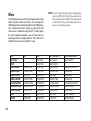
The DA5 provides eleven of the most popular effects (some
effects actually combine two effects). You can adjust the
SPEED parameter of modulation effects or the TIME parameter of delay/reverb effects simply by pressing the TAP
switch twice. In addition to using the EDIT 1 knob to adjust
the most important parameters, you can make more detailed adjustments by holding down the TAP button or BYPASS button while turning the EDIT 1 knob.
14
NOTE: In order to adjust the effect parameters, Effect Bypass
must be off (BYPASS LED dark). If you hold down the
TAP switch and turn the EDIT 1 knob when bypass is
on (BYPASS LED lit), you’ll be adjusting the noise reduction - not the effect parameter.
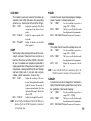
TYPE
TAP
EDIT 1
EDIT 2 [TAP+EDIT 1]
AUTO WAH
---
WAH SENS
WAH ATTACK
EDIT 3 [BYPASS+EDIT 1]
WAH POLARITY
COMP
---
COMP SENS
COMP ATTACK
---
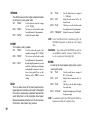
COMP+PHASER
PHASER SPEED
COMP SENS
PHASER SPEED
PHASER RESONANCE
COMP+CHORUS
CHORUS SPEED
COMP SENS
CHORUS SPEED
CHORUS MIX
CHORUS+DELAY
DELAY TIME
DELAY LEVEL
DELAY TIME
CHORUS MIX
CHORUS+REVERB
CHORUS SPEED
REVERB LEVEL
CHORUS SPEED
CHORUS MIX
FLANGER+REVERB
FLANGER SPEED
REVERB LEVEL
FLANGER SPEED
FLANGER RESONANCE
TREMOLO+REVERB
TREMOLO SPEED
REVERB LEVEL
TREMOLO SPEED
TREMOLO DEPTH
ROTARY+REVERB
ROTARY SPEED
REVERB LEVEL
ROTARY SPEED
ROTARY SENS
DELAY
DELAY TIME
DELAY LEVEL
DELAY TIME
DELAY FEEDBACK
REVERB
REVERB TIME
REVERB LEVEL
REVERB TIME
REVERB HIDAMP