1
AUTO WAH
PHASER
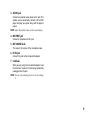
This models an auto-wah; a device that creates an
automatic “wah” effect that varies with your picking
dynamics (i.e., how hard or soft you hit the strings).
EDIT 1 “SENS”
EDIT 2 “ATTACK”
EDIT 3 “POLARITY”
Adjusts the sensitivity of the effect
in response to the volume of your
guitar.
Adjusts the response speed of the
auto wah.
Adjusts the direction in which the
effect operates.
COMP
EDIT 2 “ATTACK”
TAP
Sets the modulation speed in a
range of 0.1...10 [Hz].
EDIT 2 “SPEED”
This lets you use the knob to make
fine adjustments to the parameter.
EDIT 3 “RESONANCE” Adjusts the amount of resonance.
Adjusts the sensitivity of the compressor. Turning the knob toward the
right will increase the amount of
compression and sustain. If you turn
the knob all the way to the left, the
effect is OFF.
Adjusts the strength of the attack.
HINT: In the COMP+PHASER and COMP+CHORUS combination effects, the ATTACK parameter is already set
to the optimal value.
“SPEED”
CHORUS
This models the rich sound of an analog chorus unit.
TAP
Want to play a clean passage that needs to be nice,
smooth, and even? Need a bit more sustain on a
lead line? Then look no further; COMP is the effect
for you. It’s modeled on a compressor pedal that is
hugely popular due to the percussive clean sound it
can produce—making it perfect for ’80s and ’90s pop
and funk rhythm work. It can also add a singing,
mellow, sustain to lead lines - clean or dirty.
EDIT 1 “SENS”
A model of a much respected and popular analogue
phaser, housed in a banana yellow box!
“SPEED”
EDIT 2 “SPEED”
EDIT 3 “MIX”
Sets the modulation speed in a
range of 0.1...10 [Hz].
This lets you use the knob to make
fine adjustments to the parameter.
Adjusts the mix amount of the effect.
HINT: In the CHORUS+DELAY combination effect, the
SPEED parameter is already set to the optimal value.
FLANGER
A model of a truly classic flanger that “unchained” a
highly influential modern guitarist who many hail as
the “godfather of two-handed tapping.”
TAP
“SPEED”
Sets the modulation speed in a
range of 0.1...10 [Hz].
EDIT 2 “SPEED”
This lets you use the knob to make
fine adjustments to the parameter.
EDIT 3 “RESONANCE” Adjusts the amount of resonance.
15