1
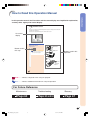
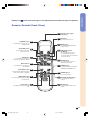
refer to the main pages in this operation manual where the topic is explained.
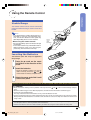
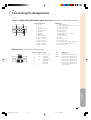
Remote Control (Front View)
15
Remote control signal
transmitters
26
ON button
For turning the power on.
STANDBY button
28
For putting the projector into the
standby mode.
36
MENU button
For displaying adjustment and
setting screens.
KEYSTONE button
29
For entering the Keystone
Correction mode.
UNDO button
For undoing an operation or
returning to the previous display.
INPUT buttons
Adjustment buttons
(' " \ |)
• For selecting menu items.
• For adjusting the Keystone
Correction when in the Keystone
Correction mode.
29
37
ENTER button
For setting items selected or
adjusted on the menu.
27
For switching to the respective
input modes.
AUTO SYNC button
29
34
RESIZE button
For switching the picture display
(STRETCH, SIDE BAR, etc.).
46
For automatically adjusting images
when connected to a computer.
33
FREEZE button
For freezing images.
RGB/COMP. button
44
For switching the signal type (RGB
or Component).
Volume buttons
For adjusting the speaker sound
level.
44
PICTURE SETTING button
For selecting the memory
location.
27
28
MUTE button
For temporarily turning off the
sound.
-13
XV_Z10E_E_p08_15.p65
13
03.11.7, 4:14 PM
Introduction
Numbers in