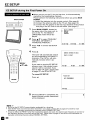
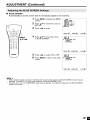
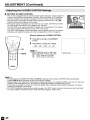
1
ADJUSTMENT
(Continued)
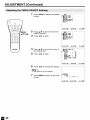
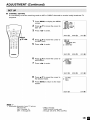
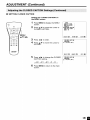
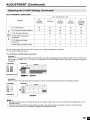
• SETTING V-CHIP
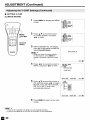
[1] MPAA RATING
1
Press MENU to display the MENU
screen.
MEOO TIMER
_[SLEEP
[]VIDEO ADJUST
[]PRESET
[]CLOSED CAPTIOU_
IT'D-CHIP 8LOCK
[]SET UP
ENU/
AI,I<II_
2
Press &/V to move the cursor
to V-CHIP BLOCK, and press
<1/_- to enter.
MENU TIMER
[]SLEEP
[]VIDEO ADJUST
[]PRESET
[]CLOSED CAPT]OH_
[_iI_Iv-cHIP BLOCK
[]SET UP
_
Select
Channel
3
INPUT SECRET NO. will display.
Input the 4-digit secret number by
using Channel Select.
IOPUT SECRET NO,
• When you inputthe secret number
for the first time, press MENU to
register. Otherwise, continue to step
4.
EXIT:@
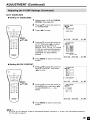
4
Press <1/_- to move the cursor to
MPAA, and press <1/_- to enter.
IV-CHiP BLOCK
ORETURU
[_ MPAA
TU GOIDELiNES_
STATOS{OFF]
SELECT:@
5
Press &/V to move the cursor to
PC, and then press <1/_- to select
BLOCK. If you set PG to BLOCK,
PC-13, R, NC-17 and X are
automatically blocked.
Press MENU to return to the main
screen.
• If you set G to BLOCK, all ratings are automatically blocked.
• If you set X to BLOCK, G, PG, PG-13, R and NC-17 are not blocked.
EXIT:@
WAA
ORETURN
G
{..... I
[_ PG
{BLOCK]
PG-13 {BLOCK]
R
{BLOCK]
NC-17 [BLOCK]
X
[SLOCK]
SELECT:@
6
ENTER:@
ADJUST:@
EXIT:@