1
FRONT AND REAR CONTROL OPTIONS
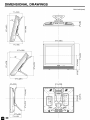
I Main unit (front view)
I
Upper control
panel
VOL (-)/(+)
OH (V)/(_)
MENU
TV/VIDEO
r_etca_nb_s
to an
angle between 12
degrees and 35 degrees.
The screen cannot be set
up straight. When
changing the angle, make
sure to hold the stand and
adjust the screen to the
best viewable angle.
Adjustable
range
Speaker
r
Remote
sensor
window
SLEEP indicator
The SLEEP indicator lights up red when
the SLEEP TIMER is set to on.
POWER indicator
A green indicator lights when the power is on and a red indicator lights
when in the standby mode the indicator will not light when the main
power is off).
• TV/VIDEO, CH (V)/(A), VOL (-)/(+), and MENU on the main unit have the same functions as the same buttons
on the remote control. Basically, this operation manual providesa description based on operation with the remote
control.
_
In