1
2
ALS
104
GB
PRODUCT DESCRIPTION
2.3 OPERATING MODES
2.3.4 Function descriptions
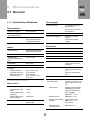
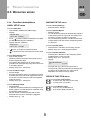
MACHINE SETUP menu
LABEL SETUP menu
Function Factory Settings
– Restores factory settings
Function Label Size
– Automatically calibrates the label length
– Display:
Function Speed Adaption
– Settings: On/Off
– On: The dispensing speed is automatically adjusted
to the speed of the conveyor belt; this setting only
functions if a rotary encoder is connected.
– Off: The dispensing speed is constant and is as set
in dispensing mode (see section “Dispensing mode”
on page 24.)
Current Size:
107.7 mm Detect?
– Press
in order to start the calibration; four labels
are dispensed during the calibration.
– Display after the calibration:
Size found:
107.7 mm Accept?
–
Function Encoder Resol.
– Determines the resolution of the rotary encoder.
– Setting range: [10…9999] pulse/revolutions
Press to accept the measured value,
to quit the function and retain the former value.
Function Encoder Diameter
– Determines the diameter of the measuring wheel
installed with the rotary encoder.
– Setting range: [3.2…318.3] mm
– Display:
Function Stop Sensor Pos.:
– Stop sensor position
– Distance between the label sensor (stop sensor)
and the dispensing edge
– This setting determines how far out the labels
protrude over the dispensing edge when the unit is
in its waiting position.
– Setting range: [0.0…999.9] mm
Encoder Diameter
x.x
yy.y var
– The right side (yy.y) shows the speed of the
conveyor belt currently measured. By changing the
measuring wheel diameter, this value can be
adjusted to the actual conveyor speed.
Function Product Length:
– Product length
– Prevents the product sensor from being incorrectly
activated. Once a product has triggered the sensor,
the sensor is locked until the product has passed
under the sensor.
– Setting range: [0.0…999.9] mm
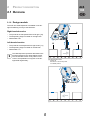
SERVICE FUNCTION menu
Function Run continuously
– A test function that turns on the motor
– To stop motor: Any button
Function Missing Labels:
– Missing labels
– In practice, sometimes labels are missing from the
backing paper. The fault tolerance is defined using
the Missing Labels function.
– Set the number of missing labels that must be
detected before an error message is triggered.
– Setting range: [1…10]
Function Machine Type
– ALS 104 LH: Left-handed unit
– ALS 104 RH: Right-handed unit
27