1
9.
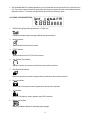
Power Save Display
Blinks when the power save is activated. The rate at which the icon blinks varies with the power saving ratio.
Fast indicates a lower power saving while slow indicates a higher power saving ratio.
10. Tx Indicator
Appears when a signal is being transmitted.
11. Rx Indicator
Appears when a signal is being received.
12. Large Segment Display
Indicates the channel number in use at the normal mode. When the Function Button is pressed, it displays
the function menu in sequence: CH / cTc / SC / dW / VO / Vdt / ALo / CAL / ton
13. Small Segment Display
Displays the CTCSS tone option at the normal mode. CTCSS option is displayed in “Hz”.
Displays the SUBMENU of each MENU in the function mode. (e.g. CH 1-8 / cTc: hz / SC: up, dn / dW: channel
number / VO : high, off, low / Vdt 5sec, 3sec, 2sec, 1sec / ALo off, auto / CAL number 1-7 / ton : no - freq )
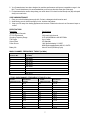
CONTROL BUTTON FUNCTIONS
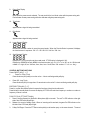
Power ON/OFF (#13) ( ↵ )
•
Power On - Short Touch
Press this button (#13) briefly to turn the unit on. A short confirming melody will play.
•
Power Off - Long Touch
Press this button (#13) for longer than 1.5 seconds to turn the unit off. A short confirming melody will play.
ENTER BUTTON (#13) ( ↵ )
Press it to confirm the required option for respective functions during function edit mode.
Press it briefly in standby mode to convert the display of CTCSS sub code from frequency to number or number to
frequency in about 1 second.
PUSH-TO-TALK (PTT) BUTTON (#4)
1. Press it firmly and speak into the Built-in Microphone (#9) to transmit. The red Tx LED Indicator at the right
side of the LCD Panel (#8) will light.
2. Release it to revert to standby mode. When an incoming call is received, the green Rx LED Indicator on the
left side of the LCD Panel (#8) will light.
3. 2-Way Call Ringer: Press the PTT Button twice quickly to call another party on the same channel. The word
3