1
Commissioning of
control unit
the room
Code input
Installer code
After entering the installer code all
parameters determined for the heating
specialist are released and can be edited
in accordance with the system version.
In order to enter the installer code, the
keys
and
must be pressed
simultaneously for approx. three seconds,
until the code input appears in the display.
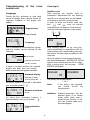
Language
During the first activation or with each
return of voltage after a power failure all
segments available in the display will
appear:
0
2
4
6
8
10
12
14
16
18
20
22
24
Segment test
ffff
°C
KWh
Min
%
°C
KWh
Min
%
+
The desired language can be selected.
Ff
CODE
Language
D
This is followed by the equipment version
and the current version number of the
software.
Each flashing digit is set by using the
rotary pushbutton in accordance with the
code number and is confirmed by pressing
the button. All other digits are edited in the
same way.
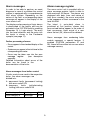
After the code has been entered correctly,
the acknowledgement INSTALLER OK will
appear upon confirmation of the last digit,
after a wrong entry, the message CODE
ERROR will appear.
Unit version
V3 .0
Interface version and
version number
If there is no alarm present, the standard
display with date, time and current
boiler temperature will appear thereafter.
0
2
4
6
8
10
12
14
16
18
20
22
INSTALLER
24
Standard display
40 5
°C
Wed. Aug. 25, 2004
16:32 hrs Temp. 40.5°
2
4
6
8
10
12
14
16
18
20
22
24
Summer shutdown
40 .5
°C
active
Attention: Enabled parameters will be
blocked again if no further
action takes place over a
period of ten minutes. In this
case the installer code must
be entered again.
An active frost protection function is
represented by a ice crystal symbol (
).
0
2
4
6
8
10
12
14
16
18
20
22
OK
CODE ERROR
The factory set installer code is :
1234
Note:
If the code is not accepted
you should consult the
manufacturer!
C
An active summer switch-off is identified
by a sunshade symbol ( ).
0
0 000
24
Frost protection
40 5
°C
active
8