1
Network Camera User’s Manual
Security
1
2
3
Protect Network Camera by passwords
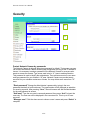
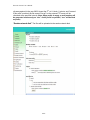
The Network Camera is shipped without any password by default. That means everyone
can access the Network Camera including the configuration as long as the IP address is
known. It is necessary to assign a password if the Network Camera for everyone who
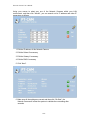
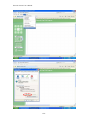
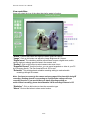
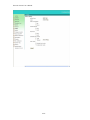
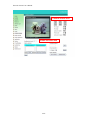
wants to access the camera. Type a new word twice in “1” area to enable protection.
This password is used to identify the administrator. Then add an accounts in user name
and type password for your friends in “2” area. Network Camera can provide twenty
accounts for your valuable customers or friends. You may delete some users from “3”
area.
“Root password” Change the Administrator’s password by typing in the new
password identically in both text boxes. The typed entries will be displayed as asterisks
for security purposes. After pressing “Save”, the web browser will ask the Administrator
for the new password to access.
“Add user” Type the new user's name and password, then press “Add” to insert the
new entry. The new user will be displayed in the user name list. This is up to 20 user
accounts.
“Manager user” Click the down arrow to choose a user’s name and press “Delete” to
complete.
27/53