1
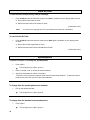
To drop the last party added to a conference call:
1.
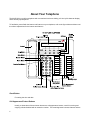
Press the Menu button and then the softkey below Drop (if available on your display).
or, Press <Drop> (if administered).
Hold
To put a call on hold:
1.
Press <Hold>.
The green light blinks.
The call is put on hold.
To return to the call on hold:
1.
Press the call appearance button of the call on hold.
To answer a new call while active on another:
1.
Press <Hold>.
The green light blinks.
The present call is put on hold.
2.
Press the call appearance button of the incoming call.
You are connected to the incoming call.
Last Number Dialed (Redial)
To automatically redial the last number dialed:
1.
Press <Redial>.
The last number that you dialed is automatically redialed.
Note:
8
The redialed number can be an outside number (up to 24 digits), an extension, or a trunk
or feature access code.