1
Over The Range Microwave
Model PMOR30
mMPORTANT iNFORMATiON
The life of the kitchen _
To aid in reporting this microwax e o\'e*a in case of loss or theft, please record below the model *mmber and serial number
located on the malt We also suggest you record all the in_k,rmation listed and retain for _/ture reference,
MDDEL
NHRDER
SERIAL
NUMBER
DATE
DEPURCHASE
DEALER
TELEPHDNE
SERVICER
TELEPHONE
TO
PHONE:
i (800)793=0093
TO WRITE:
DAGOR INCo
i440
Bridge
Diamond
Gate
Drive
Bar, CA 91765
Please pIovide the fi_llowing infi_rmation whe_l you write or call: model m_mber, serial mlrnber_ date of purchase, your
complete mailing ad&ess (including zip code), your daytime telephone mm_ber (i_lcludi_lg area code) and description
of
the problem,
T_{_
ACC;ES;S;
|NTERNET:
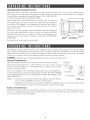
(a) Do not attempt to operate
result in harm_iH exposure
with the safety interlocks.
www, dacor, com
this oven with the door open since open-door operation can
to microwave energy. It is important not to defeat or tamper
(b) Do not place any object between the oven fiont face and the door or allow soil or cleaner
residue to accmmHate on sealing surfaces.
(c) Do not operate
the oven if it is damaged.
It is particularly
important
close properly and that there is no damage to the: (1) door (bent),
(broken or loosened), (3) door seals and sealing surfaces.
(d) The oven should not be adjusted
personnel.
or repaired
by anyone
that the oven door
(2) hinges and latches
except properly
qualified
service
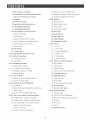
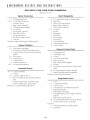
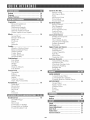
2 For (ustomer
2 Precautions
Assistance
23 Recipes ibr Low Calorie Entrees
to Avoid Possible Exposure
to Excessive Microwave
25 Recipes ibr Delicious Desserts
Energy
3 ( ontents
4 Product
24 Recipes for Supper Soups And Sauces
26-28
Defrost
26 Super Deiiost
Warranty
5 Important
Safety Instructions
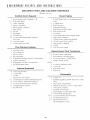
26 Super Deikost Chart
6 I npacking
Instructions
27 Auto Defiost
6 Grounding
Instructions
27 Auto Deliost Chart
7-9 Information
You Need to Know
28 Beverages
7 About Your Oven
28 Keep Warm
7 About Food
29 Fan Options
8 About Utensils
and Coverings
29 Light Options
8 About Children
and the Microwave
3{) Turntable On/Off
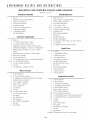
9 About Microwave
31-32
Cooking
9 About Safety
31 2. Auto Start
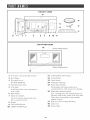
10 Part Names
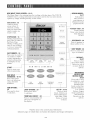
11 Control
Panel
32 3. Sound Adjustment
12-13
Introduction
13-14
BeNre Operating
32 4. Child Lock
to Touch Screen
32 5. Video Demo
32 6. Screen Contrast
13 To Set The Clock
32-34
14 Stop/Clear
14-16
Manual
Set lp
31 I. Clock
Other Convenient Features
32 Easy Minute
Operation
14 High Power Cooking
33 Time Select
15 Variable Power Cooking
33 Kitchen Timer
15 Multiple Sequence Cooking
34 More or Less Time Adjustment
16 Mamml Del_ost
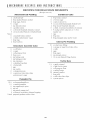
35 Cleaning and Care
16-17
Sensor Modes
36 Replacing Parts
17 Reheat / Popcorn / Baked Potatoes
36 Charcoal Filter
17 Sensor Cooking Chart
36 Oven Light
18-19
NEW WAVE COOKBOOK
36 Work Light and Night Light
37 Specifications
18 Vegetables
18 Meats-PoultlT°FishiSealbod-Frozen
Foods-
Pasta Grains
19 NEW WAVE COOKBOOK
20-25
Microwave
37 Service Call Check
38-39
Chart
Recipes and Instructions
Quick Reference
38 Sensor Modes
38 NEW WAVE COOKBOOK
20 Breakihst Bar / Lunch ()n The l_.tm
38 Microwave Recipes and Instructions
20 Breakt?ast Bar / Lunch Oa The Run Chart
38 Defrost
2I One Dish Dinners-Low
38 Beverages
Calorie Entrees
Supper Soups And Sauces-
38 Set Up
Delicious Desserts
39 Quick Reference
22 Recipes _br One Dish Dinners
WHAT
R$ COVERED
CERTIFICATE OF V_>\RRANTIES
DACOR MICROVk>\VE OVEN
WITHIN THE FIFT¥STATES OF THE U.S.A.,THE DISTRICTOF COLUMBIA AND CANADA*:
FULL ONE YEAR _&_\RRANTY
If your DACOR product fails to Amction within one year of the original date of prochase, due to a det}ct in
material or workmanship, DACOR will remedy the defect without charge to you or subsequent users. The
owner must provide proof of prochase upon request and have the appliance accessible for service.
* Warranty is null and void if nonoCSA approved product is transported from the I_LS.
OUTSIDE THE FIFTV STATESOF THE U.S.A., THE DISTRICT OF COLUMBIA AND
CANADA:
LIMITED FIRST YEAR WARRANTY
If your DACOR product fails to function within one year of the original date of purchase, due to a de/}ct in
materia! or workmanship, DACOR will fttrnish a new part, F.O.B. thctory, to replace the dei}ctive part. All
delively, insta!lation and labor costs are the responsibility of the puivhaser. The owner must provide proof of
purchase upon request and have the appliance accessible tbr service.
WHAT
R$ MOT
° Failme of the product
caused
° Selwice calls to educate
° Failme of the product
tial consumer use_
° Replacement
° Damage
COVERED
by limhy installation,
the customer
in the proper
when used for commercial,
improper
caused by accident,
of required
maintenance.
use and care of the producL
business,
of house _i_ses or fuse boxes, or resetting
to the product
usage, or neglect
rental or any application
other than tbr reside1>
of circuit breakers.
fire, flood or other acts of God.
° Breakage, discoloration
or damage to glass, metal sl.tr['aces, plastic components,
other cosmetic finish, caused by improper usage or care, abuse, or neglect.
trim, paint, porcelain
or
THE REMEDIES PROVIDED FOR IN THE ABOVE EXPRESS WARRANTIESARE THE SOLE AND EXCLUSIVE REMEDIES
THEREFORE NO OTHER EXPRESS\_ARRANTIES ARE MADE,AND OUTSIDE THE FIFTYSTATESOFTHE I._ITED STATES
AND THE DISTRICT OF COLUMBIA, ALL IMPLIED WARRANTIES INCLUDING BUT NOT LIMITED TO. ANY IMPLIED
\_>'kRRANTYOF MERCHANTABILITY OR FITNESS FOR A PUR(HASE IN NO EVENT SHALL DA(OR BE LIABLE FOR
IN(DENTAL EXPENSE OR ( ONSEQUENTIAL DAMAGESNO WARRANTIES,EXPRESS OR IMPLIED.ARE MADE TO ANY
BUYER FOR RESALE.
Some states do not allov_limitations on how long an implied xvarranty lasts or do not allow the exclusion or limitation of incidental or
consequential damages, so the above limitations or exclusions may not apply to you This warranty gives you specific legal rights, m_d
you may also have other rights that vaU from state to state.
When using electrical appliances, basic safety pr_canfions should be followed, including the _bllowing:
WARN|NG
- To reduce the risk of burns, electric shock, fire, injury to persons or exposure
excessive microwave energy:
1. Read all instructfuns
before using the
appliance.
2. Read and fol!ow the specific
"PRECA[TIONS
TO AVOID
POSSIBLE
EXPOS[RE
TO EXCESSIVE
MICROWAVE ENERGY" on page 2.
3. This appliance must be grounded. Connect
only to properly
grounded
outlet. See
"GROUNDING INSTRUCTIONS"
on page
6 and INSTALLATION INSTRUCTIONS.
4. Install or locate this appliance
only in
accordance with the provided installation in=
structions.
5. SOlUeproducts such as whole eggs and sealed
containers
for example, closed glass jars
are able to explode and should not be heated
in this oven.
6. Use this appliance only for its intended use as
described in this manual. Do not use corrosive
chemicals or vapors in this appliance. This type
of oven is specifically designed to heat, cook
or dry food. It is not designed for industrial
or laboratory use.
7. As with any appliance, close supervision is
necessary when used by children.
8. Do not operate this appliance if it has a damaged
cord or plug, if it is not working properly or
if it has been damaged or &opped.
9. This appliance should be serviced only by
qualified service personnel. Contact nearest
Dacor Authorized Servicer l\_r examination,
repair or adjustment.
10. Do not cover or block any openings on the
appliance.
11. Do not store or use this appliance outdoors.
Do not use this product near water
for
example, near a kitchen sink, in a wet basement
or near a swimming pool,or similar locations.
12. Do not immerse cord or plug in water.
13. Keep cord away from heated surfaces.
14. Do not let cord hang over edge of table or
counter.
15. See door surface cleaning instructions on
page 35.
16. To reduce the risk of fire in the oven cavity:
a. Do not overcook food. Carefully attend
THESE
to
appliance when paper, plastic or other corn=
bustible materials are placed inside the oven
to facilitate cooking.
b. Remove wire twist-ties from paper or plastic
bags before placing bag in oven.
c. If materials inside the oven should ignite,
keep oven door closed, turn oven off, and
disconnect the power cord or shut off
power at the fuse or circuit breaker panel.
d. Do not use the cavity for storage purposes.
Do not leave paper products,
cooking
utensils or food in the cavity when not
in use.
17. Liquids, such as water, coffee or tea are able to
be overheated beyond the boiling point without
appearing to be boiling. Visible bubbling or
boiling when the container is removed from
the microwave oven is not always present.
THIS COULD RESULT IN VERY HOT
LIQUIDS St DDENLY BOILING OVER
WHEN A SPOON OR OTHER UTENSIL
IS INSERTED INTO THE LIQUID.
To reduce the risk of injury to persons:
a. Do not overheat the liquid.
b. Stir the liquid both before and hall\vay
through heating it.
c. Do not use straight-sided
containers
with narrow necks. Use a wide=mouthed
container.
d.
After heating, allow the container to stand
in the microwave oven at least for 20
seconds before removing the container.
e. Use extreme care when inserting a spoon
or other utensil into the container.
17. Clean ventilation openings and grease filters
frequently
Grease should not be allowed to
accumulate on ventilation openings, hood
(louver) or grease filters.
18. Use care when cleaning the louver and the
grease filters. Corrosive cleaning agents, such
as lye=based oven cleaners, may damage the
louver and the grease filters.
19. When flaming foods under the hood, turn the
fan
on.
20. This appliance is suitable for use above both
gas and electric cooking equipment 30" wide
or less.
INSTRUCTIONS
Unpacking and Examining Your Oven
Open the bottoru of the carton, bend the carton flaps back and tilt the oven over to rest on styrofoam pads.
Lift carton off oven and remove all packing materials, Installation Instructions, Wall Template, Top Template
Charcoal Filten Tnrntable and Turntable Support. SAVE THE CARTON
AS IT MAY MAKE INSTALLATION EASIER.
DO NOT REMOVE THE WAVEGUIDE COVER_ which is located on
the ceiling in the oven cavity. Check to see that there are Installation
Instructions, Wall Template, Top Template and Charcoal Filter, which is
used when recirculating is chosen. Read enclosures and SAVE the
Operation Manuah
Check the oven for any damage, such as misaligned or bent door, damaged
door seals and sealing surfaces_ broken or !oose door hinges and latches
and dents inside the cavity or on the door. If there is any damage, do not
operate the oven and contact your dealer or DACOR AUTHORIZED
SERVICER.
Safety door
Door seals and
latches
sealing
cover
surfaces
See Installation Instructions for more details_
This appliance must be grounded. This oven is equipped with a cord having a grounding wire with a grounding
plug. It must be plugged into a wall receptacle that is properly installed and grounded in accordance with the
National Electrical Code and local codes and ordinances. In the event of an electrical short circuit, grounding
reduces risk of electric shock by providing an escape wire for the electric current.
WARNNG = hnproper use of the grounding plug can result in a risk of electric shock.
Electrical Requirements
Check Installation Instructions for proper location for the power supply.
3-prong
Plug
------_,
The electrical requirements are a 120 volt 60 Hz, AC only, 15 amp. or more _
protected electrical supply. It is recommended that a separate circuit serving
only the oven be provided.
The oxen is equipped with a 3oprong grounding plug. It must be plugged into
a wall receptacle that is properly installed and grounded. DO NOT UNDER
ANY CIRCUMSTANCES CUT OR REMOVE THE GROUNDING PIN
FROM THE PLUG.
Notes:
_'
omu_o_ng
Pin
_'_il
3-Prong
Receptacle
1. If you have any questions about the grounding or electrical instruc=
Ground
Receptacle Box
tions, consult a qualified electrician or service person.
2. Neither Dacor nor the dealer can accept any liability for damage to the oven or personal injury result=
ing I_om failure to observe the correct electrical connection procedures.
Radio or TV Interference
Should there be any interference caused by the microwave oven to your radio or TV, check that the microwave
oven is on a different electrical circuit, relocate the radio or TV as far away from the oven as feasible or check
position and signal of receiving antenna.
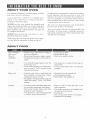
ABOUT
YOUR
OVEN
This Operation Manual is valuable: read it carefll!ly
and always save it for reference.
A good microwave cookhook is a valuable asset.
Check it for microwave
cooking principles,
techniques, hints and recipes.
NEVER use the oven without the turntable and
support nor mrn the turntable over so that a large dish
could be placed in the oven. The turntable will mrn
both clockwise and counterclockwise. See page 30
%r complete insmictions.
ALWAYS have %od in the oven when it is on to
absorb the microwave energy
Condensation is a nornta! part of microwave cooking.
Room humidity and the moisture in food will
influence the a-nount of moisture that condenses in
the oven. Generally, covered foods will not cause as
much condensation as uncovered ones. Vents on the
oven back must not be blocked.
The oven is for food preparation only. It should not
be used to dry clothes or newspapers.
Your oven is rated 1100 watts by using the IEC Test
Procedure. In using recipes or package directions,
check tbod a minute or two before the minimum time
and add time accordingly.
When using the oven at power levels below 100%,
you may hear the magnetron cycling on and off.
ABOUT
FOOD
Eggs, sausages,
nuts. seeds,
milts &
vegetables
o Puncture egg yolks before cooking to
prevent 'explosion".
o Pierce skins c f potatoes, apples, squash.
hot dog_,and sausages so that steam es°
cape:
• Cook eggs in shells
° Reheat whole eggs.
, Dry nuts or seeds m shells.
Popcorn
° Use specla!ly bagged popcorn for the
• Pop popcorn in regular brown bags or
glass bowls
• Exceed 1nax11ntlln
t11ne
on
popcorn
package.
microwave
oven,
° Listen while popping corn lbr the popping to slow to 1 or 2 seconds or use
special Popcorn pad.
Baby food
o Transfer baby iood to small dish and
heat carefully, stirring often. Check
temperature before Selwing
• Put topples on bottles alter heating rind
shake thoroughly. °°'v'VYlst'"test be/ore
_Seding.
- Heat baby food in original ars
o Heat disposable bottles.
° Heat bottles with nipples on.
General
o Cut baked goods with filling after hemmg to release steam and avoid burns.
- Stir hqmds briskly before and after
heming to avoid %ruptlon".
o Use deep bowl. when cooking liqmds
or cereals, to prevent boilovers.
, Heat or cook in close_ glass jars or air
tight containers.
• Can in the microwave as harmful bacteria may not be destroyed
o Deep iht frl>
o Dry wood, gourds, herb_, or wet papers.
• Operate the oven empty
[INm:ORMAIIOFIYOUNEEDTO KNOW
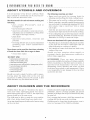
ABOUT
UTENSILS
AND
COVERINGS
It is not necessary to buy all new cookware. Many
pieces already in your kitchen can be used success=
fully in your new microwave oven.
Use these utensils for safe microwave cooking and
reheating:
• glass ceramic (Pyroceram_),
such as
Coruingware ®.
• heat=resistant glass (Pyrex _)
• microwave=safe plastics (some microwave=
sate plas_ticsare not suitable for cooking t'c_ods
with high fat and sugar content.)
• paper plates
• microwave=safe pottery, stoneware and
porcelain
• browning dish (Do not exceed recommended
preheating time. Fo!low manut;acturer's
directions.)
The following coverings are idea[:
, Paper towels are good for covering t\)ods for
reheating and absorbing fat while cooking bacon.
, Wax paper can be used for cooking and reheating.
, Plastic wrap that is specially marked for microwave
use can be used for cooking and reheating. DO NOT
allow plastic wrap to touch t\_od. Vent so steam
can escape.
° Lids that are microwave=safe are a good choice
because heat is kept near the t\_odto hasten cooking.
° Oven cooking bags are good for large meats or foods
that need tenderizing. DO NOT use metal twist ties.
Remember to slit bag so steam can escape.
These items can be used for short time reheating
of foods that have little fat or sugar in them:
, wood, stra_; wicker
How to use aluminum foil in your microwave oven:
* Sinai1 flat pieces of alurninurn t\_ilplaced smoothly
on the food can be used to shield areas that are
either det_osting or cooking too quickly.
" Foil should not come closer than one inch to any
surface of the oven.
DO ROT
Should you have questions about utensils or
coverings, check a good microwave cookbook or
follow recipe suggestions.
USE
• metal pans and bakeware
o dishes with metallic trim
o non-heat-resistant
glass
o non-lmcrowave-safe
plastics
o recycled paper produc_s
- brown paper bags
° rood storage bags
- metal twist-ties
(margarine
ACCESSORIES There are many microwave
accessories available for purchase. Evaluate carefully
bet\_re you purchase so that they meet your needs. A
microwave=safe thermometer will assist you in
determining correct doneness and assure you that
foods have been cooked to safe temperatures. Dacor
is not responsible t\_r any damage to the oven when
accessories are used.
mbs}
Should you wish to check ifa dish is sate %r micro=
waving, place the empty dish in the oven and
microwave on 100% power fur 30 seconds. A dish
which becomes very ho_tshould no_tbe used.
ABOUT
CHILDREN
AND
Children below the age of 7 should use the micro=
wave oven with a supervising person very near to
them. Between the ages of 7 and 12, the supervising
person should be in the same room.
The child must be able to reach the oven comt\)rt=
ahly; if not, he/she should stand on a sturdy stool.
At no time should anyone be allowed to lean or swing
on the oven door.
THE
MICROWAVE
Children should be taught all safety precautions: use
potholders, remove coverings caret'till> pay special
attention to packages that crisp food because they may
be extra hot.
Don't assume that because a child has mastered one
cooking skill he/she can cook everything.
Children need to learn that the microwave oven is
not a toy. See page 32 t\_r Child Lock t'eat__tre.
IINFORMAIION YOUNEED10 KNOW
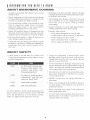
ABOUT
NRCROWAVE
COORRNG
* Arrange food careiqAly Place thickest areas toward
outside of disk
° Watch cooking time. Cook %r the shortest amount
of tirne indicated and add more as needed. Foods
severely overcooked can smoke or ignite.
• Cover foods while cooking. Check recipe or cook°
book for suggestions: paper towels, wax paper,
microwave plastic wrap or a lid. Covers prevent
spattering and help foods to cook evenly
* Rearrange foods like rneatballs halfway through
cooking both t]:orntop to bottom and from the center
of the dish to the outside.
" Add standing tirne. Remove %od t_oru oven and
stir, if possible. Cover for standing time which
allows the food to finish cooking without
overcooking.
. Check for doneness. Look %r signs indicating that
cooking temperatures have been reached.
• Shield with srnall flat pieces of aluminum foil any
thin areas of meats or poultry to prevent overcook=
ing before dense, thick areas are cooked thoroughly
• Stir foods t_om outside to center of dish once or
twice during cooking, if possible.
Doneness signs include:
o Food stearns throughout, not just at edge.
o Center bottom of dish is very hot to the touch.
o Poultry thigh joints move easily.
o Meats and poultry show no pinkness.
o Fish is opaque and flakes easily with a %rk.
• Turn %ods over once during rnicrowaving to speed
cooking of such %ods as chicken and hamburgers.
Large items like roasts must be turned over at
least once.
ABOUT
SAFETY
Always use potholders to prevent burns when
handling utensils that are in contact with hot food.
Enough heat t}om the food can transfer through
utensils to cause skin burns.
• Check %ods to see that they are cooked to the
United States Department of Agriculture's recon>
mended ternperaR_res:
160_F
165IF
... for fresh pork,
boneless white
seafood,
egg
frozen prepared
Avoid steam burns by directing steam away t_om
the face and hands. Slowly lift the farthest edge of
a dish's covering and carelqAly open popcorn and
oven cooking bags away t_om the face.
ground meat.
poultw, tish.
dishes and
food.
... for leftover, ready-to-reheal
refrigerated,
and deli and
carry-ore _l_esh' food.
170K
_. white mere ofpoukry.
180K
_. dm*kmeat ofpoultl 3
To test for doneness, insert a rneat thermometer in a
thick or dense area away t}om tat or bone. NEVER
leave the thermometer in food during cooking,
unless it is approved %r microwave oven use.
Stay near the oven while it's in use and check cook=
ing progress t}equently so that there is no chance
of overcooking food.
®
NEVER use the cavity for storing cookbooks or
other items.
®
Select, store and handle %od carefu!ly to preserve
its high quality and minirnize the spread of
foodborne bacteria.
Keep waveguide cover clean. Food residue can
cause arcing and/or fires.
Use care when rernoving items ftom the oven so
that the utensil, your clothes or accessories do not
touch the safety door latches.
15
16
17
7
1
5
7
9
10
11
VREW
BOTTOM
18
_J
/
(Front
of Microwave)
(Rear
of Microwave)
J
J
19
11 TURNTABLE ON/OFF pad.
12 Control Panel
13 Touch Screen
I Oven door with see-through window
2 Door hinges
3 Waveguide cover:
DO NOT REMOVE.
4 Turntable mo'tor shaft
14 Ventilation openings
15 Removable turntable
The tmntable will rotate clockwise or
counterclockwise. Only remove t\_r cleaning.
1G Removable turntable support
5 Oven light
It will light when oven is operating or
door is open.
6 Rack holders
First, carefa!ly place the turntable support in
the motor shaft in the center of the oven floor.
Then, place the turntable on the turntable
support securely.
7 Safetydoor latches
The oven will not operate unless the
door is securely closed.
8 Handle
17 Rack for 2=level cooking/reheating
18 Light cover
19 Grease filters
9 FAN OPTIONS pad
10 LIGHT OPTIONS pad
1o
NEW WAVE TOUCH SCREEN: 12=13
The Home Page is fDr entering time for cooking or kitchen timer, The TOUCH
SCREEN shox_ s cooking infom_ation and recipes and lets the user enter chosen
options by simply touching directly on the screen.
Time Select : 33
Touch to access
screen _xhere 12
common cooking
times are shown that
simply require one
touch to start.
REHEAT
STOP/CLEAR : 14
During programming,
press once to retm-n to
the Home Page
During cooking, press
once to stop cooking
or mice to cancel the
cooking program.
POPCORN
EASY MNNTE : 32
Press once to cook for
one minute at 100%
or press repeatedly to
extend cooking time
in multiples of one
minute.
BEVERAGES
BAKED
KEEP
WARM
.......................
CLEAR
START
.........I
......
DEFROST
START
Press to start oven
after programming
NEW
WAVE
COOKBOOK
MICROWAVE
RECIPES
&HNSTRUCqHONS
NEW WAVE
COOKBOOK : 10-19
Press each pad to
show six selections
on the TOUCH
SCREEN.
FAN
LIGHT
TURNTABLE
SET UP
ON/OFF
FAN OPTIONS:
29
Press pad to show
3 selections.
!
LIGNT 0PTION$ : 29 •
SET NP :31=32
Press to show
Clock, Child Lock,
Sound Adjustment,
Auto Start, Video
Demo or Screen
Contrast.
Press pad to shD_
3 selections.
TNRNTABLE ONOFF : 30
Pressto tm'nturntable
of£
The icon wil! appear on
the display.
SENSOR NODES :
10=17
Select pad to
bake potatoes,
pop popcorn or
reheaI previously
prepared foods.
Kitchen Timer : 33
Touch Kitchen
Timer, enter desired
time and press
START.
BEVERAGES : 28
Press to prepare or
reheat coffee or tea.
KEEP WARN : 28
Press to warm food
up to 30 minutes.
DEFROST :
20=27
Press to select
one of three Super
Def?ost or one of
six Auto Def_:ost
options.
NEROWAVE
RECIPES AND
NSTRNCT_ONS :
20=25
Press pad to show
six categories, each
with six fnods.
Breakfast Bar,
Lunch on the Run,
One Dish Dinners,
Loxx Calorie
Entrees, Supper
Soups and Sauces
and Delicious
Desserts are the
options.
Number next to the control panel illustration
indicates page on which there are feature descriptions and usage information.
11
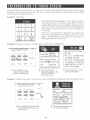
Your nex_ Micro_ave Oven features a large screen on the Control Panel x_hich, not only provides rnuch
information to make using the oven easy, but also, is used to input in%rmation directly about the food being
cooked, quantity or desired doneness.
Example 1: Home Page
The Home Page is the beginning. It shows the time of day, if
the clock has been set. It also shows Time Select, where by
touching the screen the next screen appears, making it easy to
select one of twelve commonly used times. Touching Kitchen
Timer tells the oven that the time set is only %r timing, not
%r cooking.
Note that if cooking time is touched on the screen, that
Time Select and Kitchen Timer disappear and Power Level
appears. Touching Power Level leads to the next screen %r
selecting the desired Power Level.
4
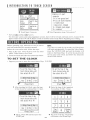
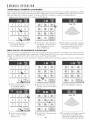
Example 2: Suppose you want to cook meat loaf in NEW WAVE COOKBOOK:
DEFROST
N_W
WAVE
COOKBOOK
LBGHT
O_TIONS
TU_NTASLE
ON/OFF
SETUp
I Press MEATS on the
Control Panel in NEW
WAVE COOKBOOK.
2 Note that six meat
selections appear on the
TOUCH SCREEN.
Touch Meat Loaf
3 Follox_ directions on the
TOUCH SCREEN.
Example 3: Suppose you want to cook Spicy Couscous in MICROWAVE RECIPES AND INSTRUCTIONS:
!i!_i!_!!_!!!iii!!!ii_iil
_!;i_!!i{{iiii!!ii!!iiiiiiiii!!!ii_ii_iiiil;i
i{i_i_iiiiiiiiiiiiiiiiiii_iiiill
i{i_i_i
_i
_i
_iii{_i_i!!!_!ii!il;i]iiii_iiiiiiiiiiiiiiiiiiii{{!!!!i_!i
_ii!;il;i_i_i!(i_il;!!i_!_{_iiiiiiiiiiiiiiiii!!i!i;;
KE_P
'_,_
EaSy
__'_',? STOP
'_,_
Sl_RT
_'_
as_aosT
_[w
_v_
coog_oo_
_STRUCT_ONS
L_HT
OI,_UONS
TU_TA_L_
O_/OF_¸,
S_T Uf'
Press MICROWAVE RECIPES
AND INSTRUCTIONS
on the
Control Panel.
2 Touch One Dish Dinners
the TOUCH SCREEN.
12
on
I INT IO[ IJ(;TIO
TO TOUCH
J
SCREEN
3 Touch Spicy Couscot_s.
4 Note Preparation steps. Note arrows*.
* Forward _)_i and Back_:! Arrows:
On all recipe screens and some preparation screen% there win be %rward and back arrows, located in the
upper corners of the TOUCH SCREEN. Touch to read the entire recipe before beginning any cooking.
Before operating your microwave oven, be sttre to
read and understand this operation manual.
Before the oven can be used, _\_llowthe steps:
1. Plug in the oven. Close the door. You can select
either: Video Demo or Set Clock.
2. Touch Set Clock and fo!low the ins_trucNonsbelow.
TO
SET
THE
NOTE:
If no choice is made _\_r30 seconds, the Video Demo
will begin at_tomadcally. To cancel the Video Demo,
press the STOP/CLEAR pad and the display will
return to the Home Page. To set the clock, press the
Set Up pad, touch Clock and fc_llow the directions
on the Touch Screen.
CLOC
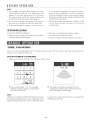
• Suppose you want to enter the correct time of day: 12:30 PM.
After touching Set Clock, enter the time
of day (hour) by touching Hour 11 times.
3 Select AM or PM and then press the
START pad.
2 Enter the time of day (minutes)
by touching 10 Min. 3 times.
4 The clock will start. The display
will return to the Home Page.
IBEFOREOPERATING
NoTE :
1. If you make a mistake while setting the clock,
touch STOP/CLEAR pad. The Horne Page will
appear. To set clock again, press Set Up pad on
the contro! panel and Clock. Keep touching the
screen until the desired time of day appears.
2. If you want to change the setting of the time of
day, press Set Up pad and t\fllow the directions.
3. If the electrical power supply to your microwave
oven should be interrupted, the screen will inter=
mittently show Video Demo or Set Clock after the
power is reinstated. If this occurs during cooking,
the program will be erased. Simply touch Set Clock
and t\fllow the directions.
4. If you touch continously the Hour, 10 Min or 1 Min
on the Touch Screen, the time wi!l coum up
automatically.
Touch the STOP/'CLEAR pad to:
1.Return the Home Page to the display, if you make
a mistake during programming.
TRNm;
2. Stop the oven temporarily during cooking.
3. Cancel Kitchen Tff-ner/Auto Start.
4. Cancel a program during cooking, touch twice.
COOKING
Your oven can be programmed for 99 minutes and 99 seconds (99.99). Always enter the seconds after the
minutes, even if they are both zeros.
H|GH
POWER
COOK|NG
, Suppose you want to cool< for five minutes at 100% power:
2 The display wi!l begin counting down the
cooking time. During the cooking, the power
level will appear in the display.
'1 Enter cooking time, 5, 0, 0 by touching
numbers. Note the top line of the display.
Press the START pad.
NOTE:
If the door is opened or STOP/CLEAR pad is pressed
once during cooking process, the cooking time in the
display mltomatically stops. The cooking time starts
to count dox_n again when the door is closed and the
START pad is presse&
14
IMANUAL OPERATION
VARIABLE
POWER
COOKING
There are eleven preset power levels. To change the power level, touch Power Level after entering the cooking
time. Using lower power levels increases the cooking time which is recornmended for foods such as cheese,
milk and long slow cooking of meats. Consult cookbook or recipes for specific recommendations.
, Suppose you want to cook for 5 minutes at 30% power:
I Enter cooking time, 5, 0, 0
by touching nurnhers,
Touch Power Level.
2 Touch 30%. The top line of
the display will show time
and chosen power level,
Press START pad.
3 The display will begin counting
down the cooking time. During
the cooking, the power level
will appear in the display
MULT|PL
_= S_=QU_=NC
_= COOK|NG
The oven can he programmed for up to four automatic cooking sequences, switching from one power level
setting to another automatically. Sonqetimes cooking directions tell you to start on one power level and then
change to a different power level. Your oven can do this m_toruatically.
° Suppose you want to cook roast beef for 5 minutes at 70% power and then continue to cook for 30 minutes at
50% power:
I Enter cooking time, 5, 0, 0
by touching nurnbers.
Touch Power Level.
2 Touch 70%. You can ornit
this step when you set 100%
power.
3 Touch Multiple Sequence.
1
4 Touch second cooking
time 3, O, O, 0. Touch
Power Level.
Touch 50%. Then press the
START pad.
The display will begin counting
down the total cooking time.
During the cooking, the power
level will appear in the displa>
IMANUAL OPERATION
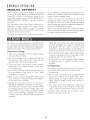
MANUAL,
DEFROST
If the food that you wish to defrost is not listed
on the AUTO DEFROST or SUPER DEFROST
CHARTS is above or below the limits in the
AMOUNT column on the AUTO DEFROST or
SUPER DEFROST CHARTS, you need to defrost
manually.
rule of thurnb is approximately I\mr minutes per
pound. For example, defrost four minutes t\_r one
pound of frozen spaghetti sauce.
Always stop the oven periodically to remove or
separate the portions that are defrosted. If food is
not defrosted a't the end of the estimated defrosting
time, program the oven in one minute incrernents on
30% power until totally defrosted.
You can defrost any frozen I\_od, either raw or
previously cooked, by using 30% power. Follow
the exact procedure found on page 15. Estimate
defrosting time, enter it. Then touch Power Level on
the Touch Screen and select 30%.
When using plastic containers from the freezer,
defrost only long enough to rernove from the plastic
in order to place in a microwave=safe dish.
For either raw or previously cooked frozen food the
The Sensor is a semi=conductor device that detects
the vapor (moisture and humidity) emitted l]:orn the
I\_odas it heats. The sensor adjusts the cooking times
and power level for various foods and quantities.
When the sensor detects the vapor emitted from
the food, rernainder of cooking or reheating time
will appear. The door may be opened when
remaining cooking time appears on the display. At
this time, you may stir or season food, as desired.
7. If the sensor does not detect vapor properly when
cooking or reheating foods, error messages will be
displayed, and the oven will mrn off
8. Check food for correct ternperamre after cooking.
If additional time is needed, continue to cook
manually
Using Sensor Settings
1. After oven is plugged in, wait two minutes before
using any Sensor setting.
2. Be sure the exterior of the cooking container and
the interior of the oven are dry. Wipe off any
moisture with a dry cloth or paper towel.
3. The oven works with foods at normal storage
temperature. For example, popcorn would be at
room
CoveringFoods
Sorne foods work best when covered. Use the cover
temperature.
recommended in the procedure for these foods.
1. Casserole lid.
4. Any Sensor Cooking or Reheating selection can
be programmed
with More or Less Time
Adjustment. See page 34.
2. Plastic wrap: Use plastic wrap recornmended for
microwave cooking. Cover dish loosely; allow
approximately 1/2 inch to remain uncovered to
allow steam to escape. Plastic wrap should not
touch food.
5. More or less lbod than the quantity listed in the
chart should be cooked l\_llowing the guidelines
in any microwave cookbook.
6. During the first part of Sensor Cooking or
Reheating, SENSING will appear on the display.
Do not open the oven door or press STOP/CLEAR
pad &1ring this part of the cooking cycle. The
measurernent of wlpor will be interrupted. If this
occurs, an error message will appear. To continue
cooking, touch the STOP/CLEAR pad and cook
manually.
3. Wax paper: Cover dish completely;
fold excess
wrap under dish to secure. If dish is wider than
paper, overlap two pieces at least one inch to cover.
Be careful when removing any covering to allow
steam to escape away frorn you.
16
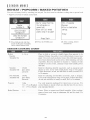
IS[NS0R MOD[S
REHEAT
/ PGPCGRN
/ BAKED
POTATGES
You can cook many foods !_y tcmching just one pad. Yotl don't need to calculate cooldng time or power level.
• Suppose yotl want to reheat canned chili.
<i:i
I Press Reheat pad and then
touch the Regular Turntable
On to reheat canned chili.
$_N$OR
COOR|NG
Rehea
Regular
Turntable On
2 Press the START pad.
CHART
4 -36 oz
Place i_ dish or casserole slightly larger than amotm_ to be
reheated. Flatten_ _fpossible. Cover w_th lid, plastic wrap or wax
paper. Use covers such as plastic wrap or lids with larger quanta
t_es of more dense tbods such as stews. A_br reheating° st_rwe!l.
if possible. Re-cover and allow _o s_and 2 to 3 minutes. Foods
should be very hot. if not. continue to heat with variable power
and
Stirrable
Turntable
! 3x9x2
Off
3 After cooking, follow
instructions.
glass utihty
casserole
[lnte
idea! _br reheating sti_Table casseroles° such as macarom and
cheese or stew. Cover with vented plamc wr_p or wax paper.
Follow d_rections. At end. stir and allow to stand, covered. _or 5
1o IC minu_es.
Non Stirrable
Turntable Off
13x9x2
glass utility
casserole
Ideal for reheating non-stirrable casseroles, such as lasagna.
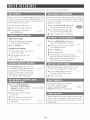
Cover with vented plastic vvTapor wax paper. Fol!ow direa_ons.
At end stlr and allow to s_and, covered, fix 5 to 10 ntinu_es
Popcorn
1 pkg
3]) - 3.5 oz (Regular)
1.5 - !.75 oz _Snack)
Use only popcorn packaged for lnicrowave oven use. Try
several brands to decide which you like the best. Do no! _ry _;
pop unpopped kernel;
Baked Potatoes
! -6
Pierce. Place on paper4owel-lined turntable. After cooking,
remove fiOln oven. wrap in aluminum foil and let stand 5 to
10 minutes.
17
to enter quantity. When cooking %ods with the sensor,
it is not neccessary to enter quantity or weight. The
fl_ods using the sensor are indicated with '' *" in the
chart on page 19.
Your oven has six %od pads and each pad has six
selections. Many sensor cooked %ods are included
in NEW WAVE COOKBOOK.
See the sensor
cooking information on page 16. For foods not using
the sensor, fl_!low the directions on the Touch Screen
VEGETABLES
The desired doneness can be selected for any vegetables choice.
*Suppose you want to cook broccoli (normal):
{
I Press the Vegetables pad
and then touch the desired
vegetable: Broccoli.
2 Touch the desired doneness, and
the oven will start automatically.
When the sensor detects the vapor
emitted from the food, remaining
cooking time will appear. The
oven door can be opened
whenever the count down time is
displayed on the Touch Screen.
3 After cooking, %!low
instructions.
NN[:
You can also start the cooking by pressing the START pad at step 2. At that time "normaF is selected automatically.
The doneness can be changed after pressing the START pad by touching the desired aloneness on the display
within seven seconds.
iVI 'ATS
FR:GZ N
- POULTRY
FOODS
- F SH/S :'AFGGD
- PASTA
GRAINS
* Suppose you want to cook 2.0 lb boneless pork loin:
_ii_,
Press Meats pad and then
touch the desired meat:
Boneless Pork Loin.
°%>
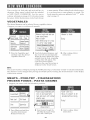
_ _,_....
2 Enter desired x_eight by
touching the screen. Then
press the START pad.
18
3 After cooking, follow
instructions.
INEW WAVECOOKBOOK
NEW
WAVE
COOKBOOK
COONRNG
VEGETABLES
BEANS / CARROTS*
MUSHROOMS / SPINACH*
CORN ON THE COB / PEAS*
CHART
FISH / SEAFOOD
:25 2 1.5 lb
12522 lb
FISH STEAKS_
.25 22.0 lb
SHRIMP_
25!210
ib
1252 1.5 lb
SCALLOPS*
25 22.01b
CLAMS & MUSSELS_
FISH KABOBS* weight Offish
up to 11/2dozen
1252 1.5 lb
ACORN SQUASH*
FROZEN FOOD
MEATS
GROUND BEEF_
BoNELESs
PORK
LoIN
MEAT
LOAF
VEGETABLES _
_
25- 1.251b
ENTREES*
25 ; 2.01b
2:0:31S
ib
MAiN DiSHES*
i10;20!b
sNAcKs*
24
40oZ
28oz°
POT RO_ST
STEW
210k 3.5 lb
1+02201b
SOFTEN ICE CREAM
Pint, Quart,
Half Gall0n
SPARERIBS
1.023.01b
THAW JUICE CONCENTRXPE
& 12, 16 oz
POULTRY
BONELESS CHICKEN
BONE,IN CHICKEN
PIECES*
GROUND POULTRY*
PASTA / GRAINS
5 22.0 ib
.5 - 3.0 lb
FRESH PASTA
DRY PASTA
8.9oz
COUSCOUS
.5 - 2.0 cups
i25 _2.01b
NOTE:
1. You can enter the amount on]y within the range of
the NEW WAVE COOKBOOK
COOKING
CHART.
2. NEW WAVE COOKBOOK can be programmed
with More or Less Time Adjustment. See page 34.
* It is not necessary to emer quamity with these foods
because they are cooked by the sensor.
19
MICROWAVE RECIPES AND INSTRUCTIONS
has six cooking categories to assist with meal
preparation. There are some %ods in the Breakfast
Bar and Lunch on the Run that use the senso_ See sensor
BREAKFAST
ON
BAR
cooking intbn-nation on page 16. For Ibc_ls not using the
sensor, Ibllow the directions on the screen to enter quantity
/ LUNCH
THE
RUN
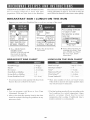
• Suppose you _aant to use Brealc_hst Bar to cook tv,o servings of hot cereal
2 Select the desired %od:
Hot Cereal.
I Press MICROWAVE
RECIPES AND
INSTRUCTIONS pad and
then touch the desired
category: Breakfast Bar.
BREAKFAST
Scrambled
Bacon*
BAN
Eggs
CHART
LUNCH
3 Enter desired quantity by
touching the screen. Then
press START pad. When
the oven stops, fc_!low
instructions.
ON
THE
RUN
CHART
i - 9 eggs
2 = 6 slices
Hot Cereal
Fresh Rolls or Muffins
Frozen Rolls or Muffins
I - 6 servings
I =8
I - 8
Pizza Reheat**
1= 6 slices
Frozen Breakfast
I (3 - 6 oz_
Frozen Sandwich*
1 (3 26 oz)
Food*
** Must enter number of slices on Touch Screen.
Other %ods in chart do not require quantity input.
See Touch Screen %r directions.
* It is not necessary to enter quantity with these foods
because they are cooked by the sensor.
NOTE:
1.You can program with More or Less Time
Adjustment. See page 34.
3. The final cooking result will vary according to the
%od condition (e.g. initial temperature, shape,
quality, covering).
Check food for correct
temperature after cooking. If additional time is
needed, continue to cook manually.
2. More or less than the quantity lis'ted in the chart
should be cooked fo!lowing the guidelines in any
microwave book.
20
(MICROWAVERECIPESAND INSTRUCTIONS
ONE
DiSH
DINNERS
SUPPER
SOUPS
AND
DELiCiOUS
DESSERTS
° LOW
CALORRE
SAUCES
-
ENTREES
°
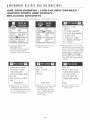
• Suppose you want to use ()lie Dish Dinners to cook Spicy C__)uscous.
¾e
I Press MICROWAVE
RECIPES AND
INSTRUCTIONS pad and
then touch the desired
category: One Dish Dinners.
2 Select the desired %od:
Spicy Couscous.
3 All ingredients for the recipe
and step=by step procedures are
shown. Touch the arrow marks
on the screen to read the recipe
through before cooking. The
steps BEFORE beginning any
cooking.
d
4 When ready to cook, press
START pad. The oven has
the cooking instructions in it
so it is not necessary for you
to make any decisions!
e_;a nf
When the oven stops, read
the instructions on the
Touch Screen, open the
door, complete the steps
and close door. Press
START pad.
21
After cooking, %!low
instructions.
JMICROWAV[RECIPESAND INSTRUCTIONS
RECIPES
FOR
ONE
D|NH
D|NNENN
(Recipes serve 6)
Spicy Couscous
Beef
11/4 lb lean ground beef
141k oz can diced tomatoes
1 c tomato sauce
11,/2
4
2
1
3
21/2
1 large onion, chopped
15 c chopped green pepper
3/4
C COtlSCOnS
i clove garlic, minced
Ilk fbsp chili powder
1 tsp ground cumin
1 tsp dried oregano leaves
i c raisins
1
1/2
1
2
1
1
2
2
Garnish: yogurt and chopped flesh parsley
Salsa Chicken
1[/4 oz dW taco seasoning
1 lb boneless chicken breast thin strips
6 oz pkg yellow rice mix with seasoning
packet
21k c hot water
21k c flozen peas
1 c canned corn
lk c apricot preselwes
141/2 oz can diced tomatoes
$eafoocl
Burgundy
lb 3/4=inch beef rump or chuck cubes
tbsp flour
slices of bacon, minced
large onion, chopped
cloves garlic, minced
c carrots
tsp salt
tsp pepper
tsp thyme
tsp rosemary
c red wine
c beef bouillon
c sliced mushrooms
c pearl onions
Sweet
& Sour Pork
1
2
1/2
1/4
2
1
1/4
11/4
c long grain rice
c pineapple juice
c water
c sweet & sour sauce
tbsp soy sauce
tbsp minced flesh ginger
c honey
lb boneless lean pork loin, cut into thin
strips
20 oz can pineapple chunks, drained
3
C flesh
or flozen
stir=fiT vegetables
Garnish: toasted sliced almonds
Pasta
8 = 9 oz flesh tortellini
2 c water
13/4 c creamy Alfledo sauce
1[/4 lb raw shellfish like shrimp, scallops,
Vegetarian
crab
1
3 c thinly sliced flesh vegetables like
carrots, mushrooms, green beans
Garnish: 1/3c gqated Parmesan cheese
31/2
1/4
lk
1
1
3
Oczo
C Ol"ZO
c vegetable bouillon
c pesto sauce
c small pieces of sundried tomatoes
tbsp minced garlic
tbsp italian seasoning
c chopped green, red, orange & yellow
peppers
1 large onion, thinly sliced
14 oz can artichoke hearts, drain & qnarter
3 oz pitted ripe olives, cut in half
Garnish:
1,/2 c Parmesan cheese, fleshly grated
1/4 c pinenuts
22
JMICROWAV[RECIPESAND INSTRUCTIONS
RECIPES
FOR
LOW
ENTREES
CALORIE
(Recipes serve 6)
Stuffed
3
11/4
1/2
2
1
1
1/2
l&
1/2
Acorn
Squash
$I÷aR
acorn squash each weighing 3/4lb
lb ground tt.trkey
onion, chopped
carols, shredded
greenpepper, chopped
tbsp catsup
tsp salt
tsp pepper
c instant rice
1 lb beef flank steak, cut in diagonal inch
strips
lk c orange juice
3 tbsp lime juice
2 tbsp minced garlic
i tbsp Worcestershire sauce
11& tbsp chili powder
1 tsp cumin
2 c red, green and yellow pepper strips
1 large onion, chopped
1 c black beans, rinsed and drained
6 10-inch warm flour tortillas
20 oz can crashed pineapple, drained
save juice
1/2 c teriyaki sauce
1/4 c sweet and sour sauce
Tha_ Ch_ck÷n
1 large tomato, chopped
lk c salsa
lk c fat free sore' cream
Kabobs
2 tbsp lime juice
1 tsp cooking oil
Itsp soy sauce
1/s tsp red pepper
11/4 lb boneless chicken, cut into l-inch cubes
4 onions, quartered
2 red peppers, cut into i-inch pieces
2 tsp light peanut butter
Salmon
Glaz÷d
Ilk
2
11/4
i
Glaze:
8
lk
2
3
Romanoll
12 oz dry egg noodles
2 c skim milk
1 c water
i
11/2
15
8
1/_
1
Faj_Ias
Roast
Pork T÷nd÷rlo_n
lb whole pork tenderloin
tsp rosemary, salt and pepper
lb sweet potatoes, 2qnch cubes
orange, thinly sliced
oz whole cranbelr T sauce
c red wine
fbsp steak sauce
tbsp flour
Natatou_ll÷
1/4 c olive oil
1 medium egg@ant, peeled and cut in l-inch
pint fat flee sour cream
oz package &Y ranch salad dressing mix
oz can salmon, drained and flaked
oz can sliced mushrooms, drained
c chopped green onions
tsp dill weed
cLlbes
1
4
1
1
1
2
large onion, sliced thinly
small new potatoes, cut in 3/4qnch cubes
clove garlic, minced
zucchini, sliced thinly
green pepper, cut into thin strips
c sliced flesh mushrooms
141) oz can seasoned, diced tomatoes
11k tsp dried basil leaves
11k tsp marioramleaves
salt and pepper to taste
23
IMICROWAV[ RECIPESAND INSTRUCTIONS
RECIPES
FOR
SUPPER
SOUPS
AND
SAUCES
(Recipes serve 6)
Ch_ck÷n
1
1
1
2
5
11/2
1
lk
Noodle
Bouillabaisse
tsp oil
medium onion, sliced thinly
c thin sliced celery
c thin sliced carrots
c chicken broth
lb bone=in chicken pieces
c fine egg noodles
c chopped parsley
salt and pepper
2 tbsp olive oi!
2 large onions, chopped finely
3 cloves garlic, minced
8 ozbottle clam juice
21k c dry white wine
141k oz can diced tomatoes
21k c finely chopped fennel
3/4 c instant rice
3 tbsp chopped parsley
1 bay leaf
1 tsp dried thyme
1,/2 tsp g_ound pepper
8 oz boneless white fish, cut into 6 pieces
8 oz scallops
8 oz shrimp, peeled and deveined
Curr_÷d V÷g÷tabl÷
2
2
2
1
1
1
1
2
1
15
141)
15
1
4
tbsp oil
c 1/2=inch sweet potato CL_es
c 1/2qnch white potato cubes
medium zucchini, cut into i-inch cubes
medium red pepper, cut into 1/>inch cubes
medium green pepper, cut into 1/2=inch
cttbes
medium onion, cut into 1/>inch cubes
tbsp curry powder
tsp ground cumin
oz can garbanzo beans, rinsed and drained
oz can diced tomatoes
oz can crushed tomatoes
tsp salt
c vegetable or chicken broth
Meat
SpRt Pea
3 c water
3 c vegetable bouillon
1 c dried split peas
1/2 c chopped onion
1 clove garlic, minced
1,/2 tsp dried majoram
1/2 tsp dried thyme leaves
1 bay leaf
1/8 tsp cayelme pepper
1 c sliced carrots
1 c diced potatoes
lk c sliced celery
Sauce
1 lb ground beef
lk lb sweet Italian sausage
8 oz chopped, canned mushrooms, drained
1 medium onion, minced
2 cloves garlic, minced
1 stalk celet7i, minced
1 carrot, minced
lk c red wine
lk c water
28 oz can tomato puree
6 oz can tomato paste
Itsp sugar
1 tsp dried basil
Itsp oregano
1/4 tsp crushed red pepper
1 tsp salt
_/4 tsp pepper
1 c sliced carrots
1 c sliced celery
lk c chopped red pepper
lk c chopped green pepper
lk c sliced green beans
1 large onion, minced
2 cloves garlic, minced
28 oz can crushed tomatoes
19 oz can kidney beans, rinsed and drained
19 oz can black beans, rinsed and drained
Ilk c water
1/2 c barley
2 fbsp chili powder
Itsp cumin
2 tsp Italian seasoning
1 tsp salt
1/4 tsp pepper
Garnish: Parnlesan cheese or sore cream
24
IMICROWAV[ RECIPESAND INSTRUCTIONS
RECIPES
FOR
DESSERTS
DELICIOUS
(Recipes serve 6)
Almond
Nread
Pudding
2 c half and half
2 tbsp unsalted butter, melted
2 large eggs, beaten
3/4 c sugar
1 tsp almond extract
1/2 c golden raisins
1/2 c slivered, blanched ahnonds, toasted
6 c 2=inch cubed French or Challah bread
_at_ce:
1/4
1/2
1
2
c unsalted butter, melted
c sifted cont_ctioners' sugar
large egg
fbsp bourbon
Choeolate
1/4
1/2
1
2
1/4
1
1/4
1
1/2
Zueeh_n_ Cake
c soft butter
c sugar
c a!!=pmpose flora
tbsp cocoa
tsp baking soda
tsp baking powder
tsp cinnamon
c shredded zucchini
c buttermilk
Cherry
P_e Pudding
21 oz cherry pie filling
4 c sponge or angel %od cake cubes
2 c milk
eggs
tbsp sugar
tsp almond extract
16 oz can drained, Bing cherries
Turtle
P_e
101k oz bag marshmallows
11/2 c canned pumpkin
1/2 tsp pumpkin pie spice
_/4 tsp salt
1 tsp grated orange rind
8 oz thawed, non=dairy whipped rapping
9-inch prepared graham cracker ci_.tst
Cake
2 tbsp butter, melted
1/4 c brown sugar
1/4 c apricot preserves
8 oz can crushed pineapple drained well
2 tbsp sliced, blanched aImonds
1,/_ c dried, sweetened cranberries (Craisins)
1 9 oz pkg yel!ow cake mix or 1/2box
regular size
1 egg
2 tbsp mm
6 tbsp pineapple juice and/or water
4
1
_/2
1
1 egg
1 tsp vanilla
1/2 c chopped pecans
1,/2 c semisweet chocolate chips
confectioners' sugar
Pumpkin
Caribbean
IL/2
lk
lk
lk
20
1
1/2
lk
Bars
c quick oatmeal
c light brown sugar
c all=purpose floLtr
c melted butter
caramel candies
tbsp milk
c milk chocolate chips
c pecanpieces
DEFROST
padhastv,'ospecial
de_i'osting
methods.
SUPER
DEFROST
Super Defrost rapidly defrosts specit_c t\_ods and weights found in the SUPER DEFROST chart.
* Suppose you want to defrost 1.0 pound boneless chicken.
'1 Press Defrost pad and
then touch desired %od:
1 pound boneless chicken.
The oven will start
atltomatica113z
2 When the oven stops, read
instructions on the screen,
open the door, complete the
instructions and close the
door. Press START pad.
NOTE:
1. To defrost foods above or below the weights
allowed on the SUPER DEFROST
Chart,
use Auto Defrost or Manual Defrost. See Auto
Det_:oston page 27 and Manual De_:ost on page 16.
SUPER
DEFROST
3 After the defrost cycle ends,
read the screen. Remove the
food from oven, cover and
let stand for the suggested
time to allow defrosting to
be completed.
2. Super Dei_:ost can be programmed with More or
Less Time Adjustment. See page 34.
CHART
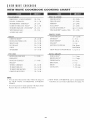
Ground meat
1.0 lb
At pause_ turn over, relnove any thawed pieces and break remainder
apart. At end, let stand, cc.vered, for 3 to 5 lnmutes.
Boneless
ChicKen
1.0 ib
At pause, turn over and separate m_( p_eces. At end_ let stand_ covered_
i_r 3 _o 5 mmu_es.
2.0 lb
At pause, turn over and separate m_o p_eces. At end. let stand, covered.
for 3 to 5 mmu_es.
Bone-ln
Chicken
Pieces
NOTE:
Super Dei}ost provides just enough defrosting that the %ods can be used in recipes or %r cooking. There will
be some ice crystals remaining.
26
I DEFROST
AUTO
DEFROST
Auto Det]:ost automatically defrosts all the t\_ods found in the AUTO DEFROST chart below.
* Suppose you want to defrost a 2.0 pound steak.
2 Touch the desired %od:
Steaks.
I Press Defrost pad and
then touch AUTO
DEFROST 6 Choices.
:;>_la
aa
d
4 When the oven stops, read
instructions on the screen,
open the door, complete the
instructions and close the
door. Press START pad.
AUTO
8 Enter desired weight by
touching the screen. Then
press START pad.
_ZFROST
¢
When the oven stops, read
instructions on the screen,
open the door. complete the
instructions and close the
door. Press START pad.
G After the det¥ost cycle ends,
read the screen. Remove the
t\_od from oven, cover and
let stand for the suggested
time to allow defrosting to
be completed.
CHART
Ground Men
Steaks, Chops / Fish
Chicken Pieces
Roasts
5 - 3.0
1_
5 - I0 rain.
.5 - 4.0
5 - 3.0
lb
lb
10 - 20 rnm.
l0 - 20 rain
2.0 - 4.0
lb
30
-
45 lnln.
Casserole
2 - 6
cups
5 - 15 rain.
Soup
l -6
cups
5- 15 l_nin.
_OTE:
1, You can input the amount only within
of the AUTO DEFROST CHART.
3. To defrost other foods or t\_ods above or below
the range
the weights allowed on AUTO DEFROST
CHART, use time and 30% power. See Manual
Det_:ost on page 16.
2, Auto Det}ost can be programmed
with More or
Less Time Adjustrnent, See page 34.
27
Beverages enables you to restore coffee or tea to a more suitable drinking temperature or to prepare instant
coffee or tea.
• Suppose you want to make two cups of coffee.
!_f _
_,_
_/¸
¸¸
_o
2 Touch desired number on
the screen. The oven wi!l
start automatically.
I Press BEVERAGES pad
and then touch Prepare.
3 When oven stops, %llow
instructions on the screen.
BEVERAGE$CHART
Reheat
!/2,2 cups
Keep Warm enables you to keep cooked %od at the ideal serving temperate]re
, Suppose you want to keep on cooked casserole
warm for 5 minutes.
Press Keep _hrm pad and
then enter the desired time.
Press START.
Keep Warm can be programmed
%r up to 30 m!nutes.
2 The display wil! begin counting
down. During the warm!ng time,
Keep Warm will appear in the
display.
as the final stage in Multiple
28
Sequence
cooking.
See page 15.
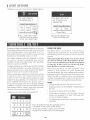
There are 3 choices in Fan Options.
, Suppose yotl want to mm the fan on at high speed.
Press Fan Options pad and then totlch
the desired option: High Speed.
To mm the fan off, press the Fan Options
again and touch Off on the display.
, Suppose you want to set the Auto Fan to stay on for a selected time.
_i
I Press Fan Options pad
and then touch the desired
option: Auto Yah.
2 Select the desired speed:
High Speed.
_!
ii_ • _
_i_,_
3 Select the desired time.
Press the START pad.
There are 3 choices on Light Options.
• Suppose you want to turn the night light on.
Press Light Options pad and then
touch the desired option: Night Light.
To turn the light off, press the Light Options
again and tot_ch Off on the display.
29
jLIGHT oPTioNS
• Suppose you want to turn the Aato Night Light on.
....
f@
[:;
.......
2 Select the desired time.
Press the START pad.
I Press Light Options pad
and then touch the desired
option: Aato Night Light.
LISIN(; THE RACK
For most cooking, the turntable should be on; however
the turntable can be turned offso that it does not rotate
The Rack allows several foods to be cooked or
reheated at one time. However, for the best cooking
and reheating, use the tm'mable o_ a*_dthe aH_omat,;c
when extra large dishes, such as the popular 13 x 9 x 2
glass utility casserole, are used. The casserole should
be placed on the turntable so that it is level.
,/_)0 [_/tVS,
The display indicates when the turntable is off.The
door can be opened for checking Ibod and the
turntable will stay in the offposition. After checking,
close door and touch START
When placing the Rack in the oven, be sure that it
sits down in all %ur of the Rack Holders. It may
be necessary to push down on the Rack to position
it correctly. It must NOT rest on the top of the
Rack Holders as arcing could occm:
When using the Rack, set time and power level
manually. Allow plenty of space around and
be_nveenthe dishes. Pay close attention to the cooking/
reheating progress. Reposition the I\_ods and reverse
them I_ol-Urack to mrmable at least once during any
cooking or reheating time. Using a lower power level
will assist in better cooking/reheating uniformity.
All special features can only be used with the turntable
on. When the turntable is set in the offposition, only
manual operation can be used except for the Reheat
function which can be used for both options.
When cooking large quantities of food which cannot
be stirred, it is best to use a lower power level such
as 40% or 50%. You may speed cooking for large
amounts by programming 5 to 10 minutes on 100%
power (HIGH) followed by the desired time on
lower power. See page 16 lbr how to program multiple
sequences. You may wish to reverse a large casserole
once during cooking; simply open door, reposition
casserole, close door and touch START.
AVORk
* Storing the Rack in the oven when not in use.
* Popping popcorn on the turntable with the Rack in
the oven.
* Using any browning dish on the Rack.
* Suppose you want to turn the turntable off
* Using special features with the Rack. Special
features are designed to be used with Ibods only
on the revolving tarntable.
* Cooking directly on the Rack use microwave-safe
cookware.
Press Tarntable On/Off. The turntable off icon
will appear on the top left of the display.
To turn the turntable on again, press Turntable
On/Off. The tm*ntable off icon will disappear.
3O
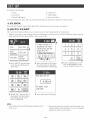
Set Up has six flmctions.
1. Clock
4. Child Lock
2. Auto Start
5. Video Demo
3. Sound Adjustment
6. Screen Contrast
To use any
function,
press Set Up, touch desired function and fc_llowdirections on the screen.
1 .CLOCK
Press the Set Up pad, touch Clock and fo!low the directions on the screen. See page 13.
2.AUTO
START
The Auto Start fi_mctionallows you to set your oven to start automatically at a later time.
• Suppose you want to start cooking a stew for 20 minutes on 50% power at 4:30 P.M. Before setting, check to
make sure the c!ock is showing the correct time of day.
I Press SET UP pad and then
touch the desired function:
Auto Start.
2 Enter start time (4:30) using
the screen choices and then
touch PM. Press START pad.
g Enter cooking time, 2, 0, 0,
0 by using numbers on the
screen. Touch Power Level.
FAuto
Start
setfor
[
4:E{0 PM[
_Toc,,ancel_
touch
Stop/Cle_r'
4 Touch 50%. The top line of
the display will show time
and chosen power level.
Press START pad_
5 Auto Start time will appear.
NOTE:
2. Be sure to choose %ods that can be left in the oven
i_AtltoStartcanhe used formanual cookingonly,if
clockisset_
safely unti] the Auto Start time. Acorn or butternut
squash are often a good choice.
31
I SET UP
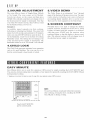
3°SOUND
ADJUSTMENT
S°VIDEO
The oven offers a choice of Simple Beep, Melody
or No Sound. The oven comes set t\_r Melody.
Touch your choice on the screen and then press
START. The selected sound does not change even if
the electrical power supply is interrupted. Note that
even when No Sound is chosen, there wi!l be a sound
t'c_rthe Kitchen Timer, if it was set.
Reminder:
The Video Demo is an automated "tour" through
many of the features of the microwave oven. You may
wish to observe it when the oven is new or when you
are teaching family members how to use the oven.
There are five short segments in the Video Demo.
6.SCREEN
CONTRAST
Normally there is no need to change the display
contrast; however, should you wish to do so, touch
Ligh_ter or Darker until the contras_t is as desired.
And then press START pad. Be cautious when
touching Lighter so that the display is always read=
able. The selected contrast will not change even if
the electrical power supply is interrupted.
An audible signal reminds you that cooking,
det_osting or reheating has finished. The sound will
repeat every 60 seconds and continue for 30 minutes
unless you touch STOP/CLEAR or open the door. To
set the Reminder, touch On on the End of Cooking
Reminder screen. The setting does no_tchange even
if the electrical power supply is interrupted. The
Reminder cannot be set if "No Sound" was selected.
4°CHILD
DEMO
LOCK
The Child Lock pre_ents umvanted o_en operation
such as by small children. The oven can be set so
that the control panel is deactivated or locked.
EASY
NRNUTE
Easy Minute allows you to cook t\_r a minute at 100% power by simply touching the EASY MINUTE pad.
You can also extend cooking time in multiples of one minute by repeatedly touching the EASY MINUTE pad
during manual cooking.
* Suppose you want to heat a cup of soup t\_r one minute using 100% power.
pOT,\7OES
BEVERAGES
K_EF'
WArM
NOTE:
To use Easy Minute, touch pad within three minutes
after cooking, closing the door, touching the STOP/
CLEAR pad or during cooking.
DE_O_T
Touch EASY MINUTE
pad on control panel
32
1OTHERCONVENIENTFEATURES
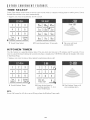
TRNE
SELECT
Totlch Time Select on the screen to access a new screen with 12 common cooking times at 1013%power. Touch
desired time and the oven starts atltomatically.
• Suppose you want to melt butter t'c)r30 seconds.
I Touch Time Select.
KRTCHm;N
2 Touch desired time: 30 seconds.
3 The oven will start
automatically.
TRNm;R
Use this feature as a general ptaT_ose timer. You can enter any time up to 99 minutes and 99 secnnds. If you
want to cancel the timer during the count down phase, simply press STOP/CLEAR and the display will return
to the Home Page.
" Suppose you want to time a three minute long distance phone call:
'1 Touch Kitchen Timer.
2 Enter desired time by
touching numbers : 3, 0, 0.
Press START pad.
N)TE:
Even if all sound is oft'. the oven will beep when the Kitchen Timer encts.
33
3 The Kitchen Timer x_ill
start counting down.
1OTHERCONVENIENTFEATURES
MORE
OR
LESS
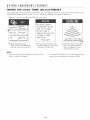
TRiWm; ADJUSTMENT
The programmed cooking times are tailored to the most popular tastes. To adjust the cooking time to your
individual preference use the _mord _or _less _ feature to either add or reduce cooking time.
Suppose you want to cook Ground Beef _r more time:
i
I Press Meats pad in the
NEW WAVE COOKBOOK
and then touch Ground Beefi
2 Prepare the food following
the information on the screen.
And press START pad.
NOTE:
1. Once you have selected either More Time or Less
Time, it cannot be changed.
3 After pressing the START
pad, Less Time and More
Time will appear. Touch
desired choice, if any.
2. Choosing More Time or Less Time must be done
within seven seconds after touching START.
34
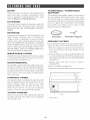
DOOR
Wipe the window on both sides with a damp cloth to
rernove any spills or spatters. Meta! parts wil! be
easier to maintain if wiped frequently with a damp
cloth. Avoid t]heuse of harsh abrasives.
EXTERIOR
The outskle surface is painted. Clean the outside with
mild soap and water; rinse and dry with a soft cloth.
Do not use any type of household or abrasive
eteanel;
/ TURNTABLE
TURNTABLE
SUPPORT
The turntable and turntable support can be rernoved
for easy cleaning. Wash thern in mild, sudsy water;
for stubborn stains use a mild cleanser and scouring
sponge as described above. They are also dishwasher=
proof! Use upper rack of dishwasher. The turntable
motor shaft is not sealed, so excess water or spills
should be wiped up immediatel>
|NTER|OR
Cleaning is easy because no heat is generated to the
interior surfaces; therefore, there is no baking and
setting of spills or spattering. To clean the interior
surfaces, wipe with a soft cloth and warm water. DO
NOT USE ABRASIVE OR HARSH CLEANERS
OR SCOURING PADS. For heavier soil, use baking
soda or a mild soap; rinse thoroughly with hot water.
NEVER SPRAY OVEN CLEANERS DIRECTLY
ONTO ANY PART OF THE OVEN.
WAV_=GU|
D_ =COV_=R
Carefully wash any %od particles from the waveguide
cover located on the right side in the oven cavity. Do
not remove the waveguide cover.
ODOR
REMOVAL
Occasionally, a cooking odor may rernain in the oven.
To remove, combine 1 cup water, grated peel and juice
of 1 lemon and several whole cloves in a 2 cup glass
measuring cup. Boil for several minutes using 100%
power. Allow to set in oven until coo!. Wipe interior
with a soft cloth.
CONTROL
Turntabl÷
GR_'A$_"
F|LTER$
Filters
shouldbecleaned
atleast
onceamonth.Never
operate the fan or oven without the filters in place.
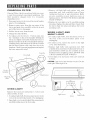
1. Pull down slightly on the tab toward the front of
the oven and remove the tilter. Repeat %r the
other filter.
2. Soak the filters in a sink or dish pan filled with
hot water and detergent. DO NOT use m-nmonia or
other alkali: they will react with the filter material
and darken it.
3.Agitate and scrub with a brush
ernbedded dirt.
4. Rinse thoroughly and shake dry.
5. Replace by fitting the filter back into the opening.
PANEL
Care should be taken in cleaning the comrol paneh If
the control panel becornes soiled, open the oven door
before cleaning. Wipe the panel with a cloth
dampened slightly with water only. Dry with a soft
cloth. Do not scrub or use any sort of chemical
cleaners. Close door and touch STOP/CLEAR.
TOUCH
to remove
J
$CR_'u:'N
Wipe the touch screen with a damp cloth and then
dry with a soft cloth. Do not allow soft to accumulate
on the touch screen.
Tab
Grease
filter
.............
CHARCOAL
FILTER
3.Remove old light bulb and replace only with
equivalent watt bulb available t¥om a Dacor
Authorized Servicer or parts distributor. Bulbs
are also available at most hardware stores or
lighting centers. DO NOT USE BULB LARGER
THAN 30 W_TTS.
CharcoaI Filter, which was enclosed with your oven,
is used for nonvented, recirculated installation. The
tilter should be changed every 6 to 12 months
depending on use.
1. Disconnect power to the oven at the circuit breaker
panel or by unplugging.
2. Remove center screw i_om the top center of the
louver and push down careflflly on the tab at each
end of the louver to disengage.
4. Replace the oven light cover by carefully pushing
into place. Replace the charcoal filter, if used. Push
the louver back into place and replace the louver
mounting screw.
3. Pull the louver away from the unit.
4. Change the charcoal filter.
WORK
NIGHT
5. To replace, put the louver's 3 bottom clips into
the 3 openings on the cavity faceplate holding the
louver at a slightly outward tilt. Rotate the louver so
that the 3 top tabs are in the cavity faceplate openings.
Carefully push in "thebottom of the lom_erto ensure
that the three boYton] clips snap into the cavity
filceplate. Check for proper engagement and replace
the screw removed in step 2.
LIGHT
LIGHT
AND
1. To replace light bulbs, first disconnect power to
the oven at the circuit breaker panel or by
unplugging.
2. To release cover, remove the screw on the light
cover. (See illustration.)
3. Replace light bulbs with equivalent watt bulb
avaih(ble from your Dacor Authorized Servicer or
parts distributor. Bulbs are also available at most
hardware stores or lighting centers. DO NOT USE
A BULB LARGER THAN 30 WATTS.
Top tabs
Oven light
4. Close light cover and secure with screw removed
in step 2.
Screw
CAUTION:
Light cover may become very hot. Do not
touch glass when light is on.
Cavity
faceplate
Hood louver
/
Charcoal
filter
Bottom
OVEN
clips
LIGHT
/,/
/
Remove the louver per instructions 1=3 above and
charcoal filter, if used.
Light cover
1. To replace light bulb, first disconnect power to the
oven at the circuit breaker panel or by unplugging.
Screw
2. Open light cover located behind filter mounting by
careflflly pulling up on the front edge.
36
Light bulbs
PMOR30S,
PMOR3OB, PMOR30R
AC Line Vbltage:
Single phase 120V. 60Hz. AC on1,
AC Power Required:
1600 watts° 14 amps.
Output Power:
1100 watts* (IEC Test Procedure,
Frequency:
2450 MHz
Outside Dimensions _not including handle/:
29 l-'/10"(W/x 16 Vs"(H/x 16 1-'/1_"(D_
Cavity Dimensions:
21"(W} x 8 7/8"(H} x 14 _/_' (D J
Oven Capacny:
! .6 Cu. Ft.
Cooking Uniformity:
turntable system
Weight:
Approx. (net) 55 lb, (gross) 60 ib
Work/Night Lighl:
2 bulbs 30w max. each lincandescent
* The Internationa! Electrotechnical Commission's
This test method is widely recognized.
standardized
light bulbs)
method %r measuring output wattage.
In compliance with standards set by:
Federal Communications Commission Authorized.
F((
DHHS
®
Complies with Department of Health and Human Services (DHHS) rule, CFR, Title 21, Chapter
I, Subchapter J.
This syrubo! on the nameplate means the product is lis_tedby TJnderwriters Laboratories, Inc.
Please check the %llowing be%re calling %r service:
Place one cup of water in a glass measuring cup in the oven and close the door securely.
Operate the oven I'c_rone minute at HIGH 100%.
A
Does the oven light come on?
B
Does the cooling fan work'?
(Put your hand over the rear ventilaing
YES
NO
YES
NO
openingsJ
C
Does the turntable rotate?
It is nomml %r the turntable to turn in either direction.
YES
NO
D
Is the water in the oven warm?
YES
NO
If"NO" is the answer to any of the above questions, please check electrical outlet, fuse and/or circuit breaker.
If they are functioning properly. CONTACT YOUR NEAREST DACOR AUTHORIZED SERVICER.
A microwave oven should never be serviced by a _do=it=yourselF' repair person.
NOTE: If count=down time is appearing on the screen and counting down very rapidly, %llow directions below
to cancel Hidden Demo.
Press STOP/CLEAR pad and hold for %ur seconds until an audible signal is heard_
Quickly press STOP/CLEAR key four times within the next two seconds.
37
Vegetables ........................................
Broccoli/Cauliflower
Beans/Carrots
Mushrooms/Spinach
Corn on _he Cob/Peas
Summer Squash/Zucchini
Winter Squash/Acorn Squash
Nears ..............................................
Ground Beet"
Boneless Pork Loin
Meat Loaf
Pot Roast
Stexx
Spareribs
PoNtry .............................................
Boneless Chicken Breast
Bone-in Chicken Pieces
Whole Chicken
Turkey Breast
Turkey Drumstick
Ground Poult W
FishNeaNod ......................................
Fish Fillets
Fish Steaks
Shrimp
Scallops
Clams & Mussels
Fish Kabobs
Frozen Food .......................................
Vegetables
Entrees
Main Dishes
Snacks
Sotien Ice Cream
Tha_ Juice Concentrate
PastaNrains ......................................
White Rice
Brown Rice
Fresh Pasta
Dry Pasta
Grits
18
18
18
18
Lunch On The Run ................................
Meal in a Cup
Hot Dogs in Buns
Soup
Microwave Pizza
Pizza Reheat
Frozen Sandwich
One Dish Dinners .................................
Spicy Couscous
Beef Burgundy
Salsa Chicken
Sweet and Sour Pork
Seafood Pasta
Vegetarian Orzo
Low CNorie Entrees .............................
Smft)d Acorn Squash
Steak Fajitas
Thai Chicken Kabobs
Glazed Pork Tenderloin
Salmon Romanoff
Ratatoui!le
19
Supper Soups and Sauces ......................
Chicken Noodle
Boui!labaisse
Curried Vegetable
Split Pea
Meat Sauce
Vegetarian Chili
Delicious Desserts ...............................
Almond Bread Pudding
Caribbean Cake
Chocolate Zucchini Cake
Cherry Pie Pudding
Pumpkin Pie
Turtle Bars
23
21
22
24
18
18
SUPER DEFROST ..................................
25
I pound Ground Meat
I pound Boneless Chicken
2 pounds Boneqn Chicken Pieces
AOTO DEFROST ....................................
26
Ground Meat
Steaks, Chops / Fish
Chicken Pieces
Roasts
Casserole
Soup
19
Prepare ............................................
Reheat .............................................
26
26
Clock ...............................................
enid LocR.........................................
Sound Adjustment ................................
Auto Start ..........................................
VideoDemo .......................................
Screen Contrast ..................................
30
30
31
31
31
31
Couscot._s
greakfast Bar .....................................
Scrambled Eggs
Bacon
Hot Cereal
Fresh Rolls or Muffins
Frozen Rolls or Muffins
Frozen Breakthst Food
38
For more complete in%rmation and safety precautions, refer to your Operation Manuah
If the oven has just been plugged in, touch Set
Clock on the screen and t'ollox_ the directions. To
reset the clock, press Set Up pad on the control panel.
Then touch Clock on screen.
I Enter the time of day (hour).
2 Enter the time of day (minutes).
3 Select AM or PM and then
press START pad.
For %ods not using the sensor, %llow the direc=
tions on the screen to enter quantity. When cooking
%ods with the sensor, it is not neccessary to enter
quantity or weight.
"1 Press the VEGETABLES pad and
then touch the desired vegetable.
:a Touch the desired aloneness and
.....................................
the oven will start atttomatically.
_:/_r_
3 After cooking, follow instructions.
High Power Cooking
1 Enter cooking time by touching
numbers on the home page.
'1 Press the DEFROST pad and then
touch AUTO DEFROST 6 Choices.
2 Press START pad.
2 Select the desired food and weight
by touching the screen.
Eli
Variable Power Cooking
3 Press START pad.
4 Follow instructions.
"1 After Step 1 above, touch Power
Level on the screen.
.............................
...............................
5 After the det_ost cycle ends, read the
screen. Remove the food t}om oven, cover
and let stand for the suggested time to
allow det>osting to be completed.
:a Touch desired Power Level
(Ex: 30%).
SL4RT
3 Press START pad.
Press REHEAT pad and touch de=
sired flmction. Follow the directions
on the TOUCH SCREEN and press
START. When sensor detects the
vapor emitted i_om the food, remain=
der of cooking time will appear.
RO_]T
The Auto Start flmction allox_s you to set the
oven to start automatically at a later time.
RE H EJ:k:Y
"1 Press the SET UP pad and then
touch Auto Start on the screen.
:,r
:a Follow insmctions.
Easy Minute allows you to cook %r
'1 Press the MICROWA'VE
RECIPES AND INSTREr( o v c:_<>waw_<::lf's
TIONS pad and then touch
,'__:;>_)cr_cN_;
the desired category.
2 Select the desired food t}om
the screen.
one minute at 100% pox_er by
simply touching the EASY
MINUTE pad on the control panel.
Touch Time Select on the screen to access a new
screen with 12 common cooking times at 100%
power. Touch desired time and the oven starts
automaticall3z
3 Follow directions on the screen.
4 When the oven stops, %11ow
instructions.
ri_t
......................
39
The life of the kitchen'
DACOR iNC. * 1440 Bridge Gate Drive, Diamond
1o800o793-0093,
www.dacor.aom
Bar, CA 91765
TINSEB247MRR1