1
Integration
14
Te c h n i c a l
Note
Programming the OneBox Pilot Number
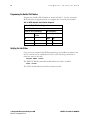
Program the OneBox Pilot Number as shown in Table 11. Use the Automatic
Route Selection Assignment forms to configure the voice mail pilot number.
Table 11. MITEL Automatic Route Selection Assignment
Automatic Route Selection Assignment
Leading Digits: 89
Second Dial Tone Yes/No/Alternate:
COR Group Number:
Digits Dialed
Number of Digits
to Follow
Termination Type Number
00
0
Route
61
65
0
Route
29
66
0
List
12
Verifying the Link Status
Once you have completed the PBX programming, the OneBox installation, and
the E1 connections are established you can use the following commands to
check the status of the link:
DTSTAT READ <PLID>
The DTSTAT READ command should indicate the Link is available.
STAT <PLID>
The STAT should indicate that all the channels are idle.
©June 2003 Ericsson Enterprise AB
EN/LZT 108 6654 R1A
MITEL SX-2000 E1 DPNSS