Download Citrix Systems MetaFrame MetaFrame Presentation Server Installation guide
Transcript
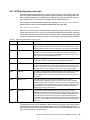
3.2.4 WTS testing tools and scripts For situations where you do not have a group of users to pilot your Citrix solution, Microsoft and Citrix provide automated tools to simulate a pilot environment. Microsoft provides such tools as Microsoft RoboServer, RoboClient, and SMClient to assist you with WTS capacity planning. Both tools are included in the Windows Server 2003 Resource kit. Citrix provides an equivalent tool for MetaFrame, called the Citrix Server Test Kit. You can download the kit from the Citrix Developer Network Web site under SDK: http://www.citrix.com/cdn Both tools use client drivers to send keystrokes, mouse movements, and clicks to a terminal server to simulate real users. You can use these tools to determine the maximum number of terminal server users that your environment will support. Many hardware vendors also supply performance information using one or more of the commonly used scripts listed in Table 3-3. Table 3-3 Windows Terminal Server capacity scripts Vendor Testing script Description Microsoft Knowledge worker Based on the Gartner Group specification, this script simulates a user that keeps a number of applications open all of the time, switching between them to perform a number of tasks. The user’s typing rate is 35 words per minute (WPM). Microsoft Structured task worker Based on the Gartner Group specification, the structured task worker script simulates a user who opens and closes applications while moving between different tasks. The user’s typing rate is 60 WPM. This script provides a more stressful test than the knowledge worker script. Citrix Normal user The normal user script simulates a user running one application at a time. For example, the script may write and save a letter using Microsoft Word. Citrix Power user This script simulates a user running two or more applications simultaneously. The power user typically uses more system resources than a normal user. For example, a power user script may open Microsoft Word and Microsoft Excel at the same time and merge an address book in Excel with a letter in Word. IBM Light user The light user script represents task-oriented users who normally use a single data entry type application. In most tests, light users are represented as Microsoft Outlook users who typically send and receive a text message every five minutes. IBM Medium user This script represents normal users who typically have two or three non-computational applications open in the same session space, with light switching among them. In most tests, medium users are represented as using Microsoft Word to create small documents, Microsoft Excel for simple data entry, Microsoft Outlook for sending and receiving e-mail, and Microsoft Internet Explorer for browsing an intranet site. IBM Heavy user The heavy user script simulates power users who typically use multiple applications that require large amounts of memory space and processing power. In most tests, heavy users are represented as using Microsoft Word to create several documents, Microsoft Excel for extensive data manipulation and to create graphs and charts, Microsoft Outlook for reading and sending significant amounts of e-mail, and Microsoft Internet Explorer for extensive browsing of an intranet site. The typing rate of your users, measured in WPM, affects the capacity of your server. As the average typing rate increases, the number of users that can be supported by your server decreases. Users who open and close applications, rather than switching between them, also place a greater load on a terminal server. Chapter 3. Running a Windows Terminal Server and MetaFrame pilot 23