1
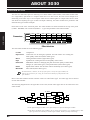
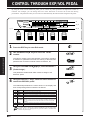
Storing Patches
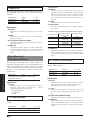
As long as you do not store to memory any patches edited in Edit mode, the original status will be returned
when you select another patch. The following paragraphs describe how to store patches.
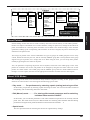
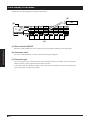
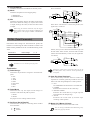
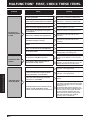
U.0
8 types analog Distortion
Harmonized Pitch Shifter
32 Individual effects
56 programs
GROUP
U :USER
P :PRESET
:BOTH
BANK
PARM 1
Sens
Type
Type
Presence
Type
Pedal Assign
PARM 2
Attack
Freq/Sens
Gain
Treble
Pitch/Depth/Key Depth/Time
Time
Pedal Mode
PARM 3
Tone
Gain/Mix
Tone
Mid
Fine/Rate/Time Rate/TmFine
PreDLY/FB
Serl/Para
1, 3
DIST
Mode
Q/Mode
Level
Bass
Shift/Peak
PARM 5
Patch Level
Position
ZNR
Level
Mix/Bal/Mode
Bal/Clip
Mix
B 2
EQ1/WAH
B 3
DIST
B 4
EQ2
B 1
EFF1/SFX
B 2
EFF2
B 3
REVERB
PEDAL
OFF
VOL
EXP
EQ2
VOL
EQ1/WAH
Type
PARM 4
.
COMP
Type
EFF1
EFF2
B 1
COMP
TUNER
Tone/Width/FB Tone/Mode
Amp Sim
Master Vol
TOTAL
♯
♭
(MODULE ON/OFF)
DIST
1:OD 1
2:OD 2
3:DIST 1
4:DIST 2
5:BLUES OD
6:FUZZ
7:LEAD
8:METAL
EFF1
1:PEDAL PITCH
2:PITCH SHIFT
3:FLANGER
4:PHASE
5:CHORUS
6:SLOW ATTACK
7:STEP
8:TREMOLO
9:METALLIC
EFF2
1:STEREO CHORUS
2:AUTO PAN
3:MONO DLY
4:PINGPONG DLY
SFX
1:SUPER BENDER
2:PITCH DLY
3:HPS
REVERB
1:HALL
2:ROOM
3:PINGPONG DLY
Pedal Assign
0:OFF
1:VOLUME
2:WAH
3:DIST
4:EFF1/SFX
6:EFF2
6:REVERB
TUNER CALIB
435-445Hz
REV
+
–
EFF1
EFF2
SFX
EQ1/WAH
1:EQ1
2:PEDAL WAH
3:AUTO WAH
STORE
GROUP
EDIT
MODULE
PARAMETER
VALUE
2
1
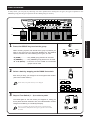
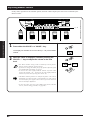
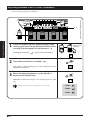
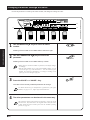
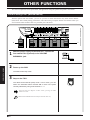
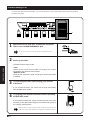
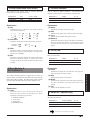
Press the STORE key.
STORE
This will invoke the store standby status, and the module cursor
LED's, and parameter cursor LED's, will flash. In this status, you
can specify the bank number and patch number of the storage
destination.
HINT
2
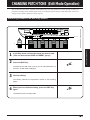
CHANGING PATCH TONE
NOTE
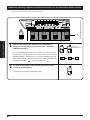
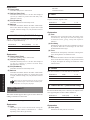
Even though you can change the parameters of the patches of the
PRESET group, you cannot write over them. Instead, when you have
changed a patch of the PRESET group, select the storage destination
forcibly with "U" (USER group).
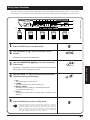
You can store in either Play mode or Edit mode.
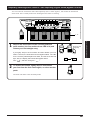
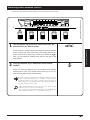
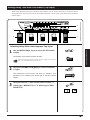
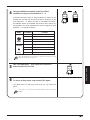
Using the BANK foot switch and Foot Switches 1 – 4,
specify the patch storage destination.
If you do not make any particular specification, the destination
will be the original patch of the USER group. When store has not
been specified by the PRESET group, the patch is stored in
Patch 1, Bank 0 of the USER group.
NOTE
3
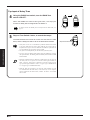
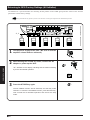
When you store parameters, the patch data already in the storage
destination will be erased. Check to make sure you do not need the
patch in the storage destination.
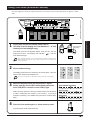
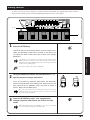
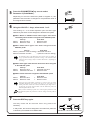
Press the STORE key again. This completes the
storage operation, and returns the 3030 to the Play
mode.
NOTE
STORE
Rather than finally pressing the STORE key, you can press the EDIT
key to cancel storage and return to the Play mode.
■19