1
Common Terms
The following are common terms used in intelligent light programming:
1. Blackout - is a state where by all lighting fixtures light output is set to '0' or 'off', usually on a
temporary basis.
2. DMX-512 - is an industry standard digital communication protocol, frequently used in
entertainment lighting equipment.
3. Fixture - refers to your lighting effect or other device such as a dimmer, which you can control.
4. Sliders - are also known as faders.
5. Scanner - refers to a lighting effect which has a pan and tilt mirror; However DMX controllers may
refer to this term when describing the control of a DMX512 compatible device.
6. MIDI - is a standard term for representing musical information in a digital format. A MIDI input
provides external triggering of scenes using MIDI devices such as a MIDI keyboard.
7. Stand Alone - refers to a fixtures ability to function independently of an external controller. This is
usually in sync to music due to a built in microphone.
8. Fader slider - is used to adjust the fade time between scenes within a chase.
9. Speed slider - affects the amount of time a scene will hold its state. It is also considered a wait
time.
10.Shutter - is a mechanical device in the lighting fixture that allows you to block the lights path. It is
often used to lessen the intensity of the light output or strobe.
11.Playbacks - can either be scenes or chases that are directly recalled by the user. A playback
may also be considered a program memory which can be used during a show.
12.Patching – refers to the process of assigning faders to a DMX channel fixture.
First Time Operation
1. Remove all packaging materials.
2. Connect a DMX cable from controller to your first light or pack. Connect a DMX cable from the first
light or pack to the second. Do this until all lights or packs are connected.
3. Plug any par can/theatre spots in to your dimmer packs if you are using dimmer packs.
4. Plug your controller into the mains with the supplied AC/DC power supply or with a PP3 battery
(not provided).
5. Plug your dimmer packs or lights in to the mains.
6. Set correct DMX addresses on your lights or dimmers. Some lights or packs have dip-switches.
Some have digital displays.
7. Once you have turned on your controller, move up the master slider.
8. You are now ready to use your controller. If you find the lights or dimmers are not functioning, try
switching the polarity switch at the rear.
Troubleshooting
If fixture is not responding to DMX
1.Check all connections are correct.
2.Check DMX addressing is correct.
3.Check master dimmer fader is up.
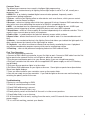
4.Check polarity switch at the back of the unit is in the correct position.
5.Check fade slider is up to the top.
6.If all the above fails to work, unplug from the mains, wait 30 seconds then reconnect to the
power supply.
7.If it is still not working, contact your dealer.
5