1
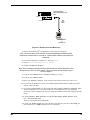
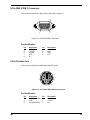
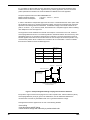
120 Connect RS-232C Serial Cable (female end) here SBC Backplane 6-Pin Circular Jack (To External Keyboard) COM 1 DB9 male 15-Pin Video Connector (to External Display Monitor) RS232C Cable Dumb Terminal or Auxiliary PC Figure 3-1: Serial port on the MiniArrayIII A3. Power up the MiniArrayIII. The RASExpress Server Screen will appear. Note: The server takes a few moments to load the RASExpress software and to initialize the modems after it is turned on. Observe RAS software processing and displaying . A4. Turn on the terminal (or auxiliary PC) and press Enter. A5. Select Quick Configuration of Server. A6. Enable IP Remote Access. Note: Error messages will appear and will indicate that the remote addresses of the WAN ports are not on the same subnet. This is normal for the initial setup. Ignore these messages. A7. Type the IP Address for the CommPlete RASExpress server. A8. Type the IP Subnet Mask. A9. In the IP Default Route field, enter the router address for the LANs file server. A10. If you want the RASExpress server to use IP Routing Information Protocol (RIP-2) for for IP routing, enable IP RIP. A11. If you have enabled IP-RIP, you may enable IP Auto Learn Default Gateway. When enabled, the RASExpress server will learn the correct default gateway if it was configured incorrectly or if the configured gateway goes down and a different router starts acting as a default router. A12. In the Primary Name Server field and the Secondary Name Server fields, type 000.000.000.000 unless you have made other arrangements. A13. In the IP Frame Type field, select the frame type that fits your LAN, either TYPE_II (the default value), or SNAP (Sub-Network Access Protocol). MA6 19