1
selected network type.
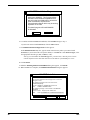
Connect Timer. The MCSI Connect Timer dialog box shows the default value of the connect
timer in the Enter Connect Timer Value box. This value sets the time in seconds, in the range 0
through 60, that the MCSI emulator waits for a MCSI device to become available. To change the
value of the connect timer, type a different value in the box. Click OK when finished.
Baud Change. A check mark appears next to the Baud Change command to indicate that an
application can change the baud rate or other port parameters. If Baud Change is unchecked,
then an application cannot change the baud rate or other port parameters. To change this setting,
click Baud Change.
Default Login. Use the Default Login Parameters dialog box to automatically log into a
specific server whenever Windows runs. Select a server from the Available Servers box, then
type a user name and optional password. Click OK when finished. ComMap saves these login
parameters in your COMMCSI.INI file.
Note: You can use a text editor to edit the COMMMCSI.INI file, however you cannot change
the password because the password field is encrypted. Editing the password will corrupt the
file.
If there are no servers listed in the Available Servers box, type a server name in the Server
Name box, then click the Search button to search for a match. You can use * and ? as wild card
characters.
Port Type. Use this command to designate your mapped ports as outbound (available only for
calling out) or inbound (available only for calling in A port cannot be both outbound and
inbound. In Windows 3.1x, all mapped ports have the same port type. In Windows 95/98/NT,
however, you can designate one port as outbound and another as inbound.
62
MA6