1
Installation and Operation Manual
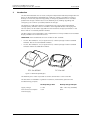
DC4 Desktop Charger for d81, d62, and d41
1.1
1.2
TD 92481GB
Abbreviations and Glossary
device
In this document, a device can be DC4 or a handset developed
to work together with DC4 and PDM/IMS2. See respective
manual for each device.
DHCP
Dynamic Host Configuration Protocol, protocol for automating
the configuration of computers that use TCP/IP
Easy replacement
A handset replacement procedure that is done via the handset
display and does not involve the PDM/IMS2.
PDM
Portable Device Manager
USB
Universal Serial Bus
IMS2
Integrated Wireless Messaging and Services:
Application that enables wireless services to and from the
devices.
Safety
The desktop charger adapter shall be connected to 100 - 240 V AC, 50 - 60 Hz. Therefore
extra caution shall be taken during operation. The Desktop Charger itself is supplied with 5 V
DC from the adapter.
IMPORTANT: Use only the power supply adapter delivered with the charger. Replacing with
other power supply units means risk of battery explosion caused by too high input voltage
or switched polarity. Supplying the charger with 5 V on opposite poles than intended is
strongly forbidden.
1.3
Technical Solution
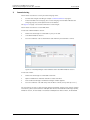
The following functionality is provided by the DC4:
•
•
•
Provide a means for software and parameter update of handsets and chargers.
Charging of the battery of the handset.
Easy replacement
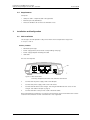
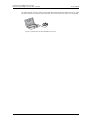
The DC4 has one USB connection and two Ethernet connections. When using Ethernet
connection it is possible to connect several DC4 desktop chargers serially to the LAN.
If the DC4 is connected towards PDM via both USB and Ethernet, the USB connection
overrides the Ethernet connection.
If the Ethernet connection is used, each DC4 needs an IP address.
See label for MAC address.
17 December 2010 / Ver. D
2